
When your Kidde smoke alarm starts blinking red, it’s easy to feel concerned, especially if you don’t know what it means. A blinking red light can signal everything from a low battery to an emergency. Understanding your smoke alarm’s signals is essential for your safety and peace of mind. In this guide, you’ll learn why your Kidde smoke alarm blinks red, how to troubleshoot it, and what actions to take to keep your home protected.
What Does A Blinking Red Light Mean On A Kidde Smoke Alarm?
A blinking red light on a Kidde smoke alarm is not just a random signal. It’s a form of communication, letting you know what’s happening inside the device. The meaning depends on the pattern and timing of the flashes.
Common Red Blinking Patterns
- Once every 30-60 seconds: Usually means the alarm is working correctly and in “standby” mode.
- Rapid flashing or constant blinking: Can indicate a recent alarm event or that the alarm is in “hush” or testing mode.
- Red light with beeping: Often signals a problem, such as low battery, sensor issue, or end-of-life warning.
The key is to notice both the blinking pattern and any accompanying sounds.
Types Of Kidde Smoke Alarms
Kidde manufactures several types of smoke alarms, each with its own behavior:
| Model Type | Red Light Pattern | Typical Meaning |
|---|---|---|
| Ionization | Blinks every 40-60 seconds | Normal operation |
| Photoelectric | Blinks every 60 seconds | Normal operation |
| Combination (Smoke + CO) | Blinks rapidly after test/alarm | Test mode or recent event |
| Hardwired | Constant red with beep | Error or end-of-life |
Knowing your model helps you understand what the blinking means.
Reasons For A Kidde Smoke Alarm Blinking Red
Understanding the cause of the blinking red light is the first step to fixing any issue. Let’s look at the main reasons:
1. Normal Operation
Many Kidde smoke alarms blink a red light every 30-60 seconds. This is a self-check indicator. It means the alarm is powered and functioning.
Example:
If you see a red blink every minute with no sound, your alarm is working as it should.
2. Alarm Memory
After detecting smoke or carbon monoxide, the alarm may blink rapidly to show a recent event. Some models continue this blinking for up to 24 hours after an incident.
3. Testing Mode
When you press the test button, the alarm will emit sounds and blink red. This checks the sensors and the alarm tone. The rapid red blinking during this test is normal and should stop after a short time.
4. Low Battery Warning
If the red light blinks and the alarm beeps at intervals, the battery may be low. For battery-operated models, replace the battery immediately.
5. End-of-life Warning
Smoke alarms don’t last forever. Most Kidde alarms have a lifespan of 7-10 years. A blinking red light with a chirping sound can mean the alarm needs to be replaced.
6. Error Or Malfunction
If you notice constant blinking, irregular flashes, or a red light with unpredictable sounds, the alarm may have a fault. This could be from dust, humidity, or a hardware issue.
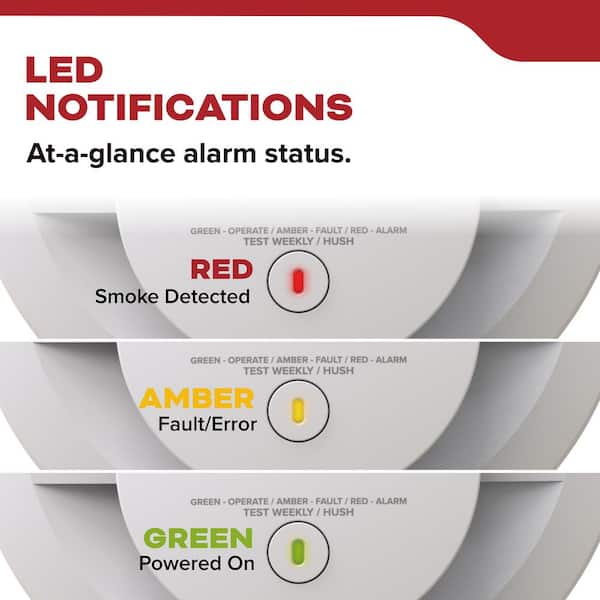
7. Interconnected Alarm System Event
In homes with hardwired interconnected alarms, a red blinking light can indicate that another alarm in the system was triggered. This feature helps you find the source alarm quickly.
Credit: www.homedepot.com
How To Troubleshoot A Kidde Smoke Alarm Blinking Red
If your smoke alarm is blinking red, follow these steps to figure out what’s wrong and fix it.
Step 1: Identify The Pattern
- Watch the red light and note the blinking frequency.
- Listen for any beeping or chirping.
Step 2: Check The User Manual
Every Kidde alarm comes with a manual that explains what the light patterns mean for your specific model. If you don’t have it, you can find manuals online on the Kidde website.
Step 3: Replace The Battery
If the alarm is battery-operated or has a backup battery, replace it with a new one. Use the battery type recommended in the manual.
Step 4: Test The Alarm
Press the test button and hold it for a few seconds. The alarm should sound, and the red light should blink rapidly. This confirms the alarm is getting power.
Step 5: Clean The Alarm
Dust and debris can cause false alarms or errors. Gently vacuum the outside of the alarm or use compressed air.
Step 6: Reset The Alarm
Some issues clear with a simple reset:
- Remove the alarm from its mounting bracket.
- Disconnect the power (remove batteries or unplug, if hardwired).
- Hold the test button for 15-20 seconds.
- Reconnect power and remount the alarm.
Step 7: Inspect For End-of-life
Check the manufacture date on the back of the alarm. If the alarm is older than 7-10 years, replace it.
Step 8: Replace The Alarm If Needed
If the light and sound patterns don’t stop after all steps above, the alarm may be faulty. It’s safer to replace the unit.
Understanding Beep And Blink Codes
Smoke alarms use both sound and light to communicate. Here’s a quick guide to Kidde’s common codes:
| Red Light Pattern | Beep Pattern | Meaning |
|---|---|---|
| Blinks every 60 sec | None | Normal operation |
| Rapid blink | Alarm sound | Smoke or CO detected |
| Constant blink | Chirp every 30-60 sec | Low battery |
| Blink with 3 beeps | Three short beeps, pause | Smoke detected |
| Blink with 4 beeps | Four short beeps, pause | CO detected (combo unit) |
This summary helps you match what you see and hear to the correct action.
Credit: www.kidde.com
When To Worry About A Blinking Red Light
Not every red blink is a sign of danger. But there are times you should act quickly:
- Continuous blinking with alarm sound: Possible fire or CO emergency. Get outside and call emergency services.
- Chirping with blinking: Low battery or end-of-life warning. Change battery or replace alarm.
- Blinking after cleaning and reset: If problems continue, the alarm may be faulty.
If you’re ever unsure, it’s safer to replace the alarm or contact Kidde support.
Kidde Smoke Alarm Maintenance Tips
Regular maintenance keeps your smoke alarm working well and reduces false alarms.
1. Test Monthly
Press the test button once a month. This ensures the alarm, light, and battery are working.
2. Change Batteries Yearly
Even if your alarm is not beeping, change the battery at least once a year. Daylight saving time changes are a good reminder.
3. Clean Regularly
Dust and cobwebs can affect sensors. Use a vacuum or soft brush to gently clean the alarm every 6 months.
4. Replace Every 7-10 Years
Check the date on the back of your alarm. Replace it when it reaches the end of its lifespan.
5. Avoid Paint And Stickers
Don’t paint over or put stickers on your alarm. This blocks vents and can stop it from working.
6. Install In The Right Places
Put alarms in every bedroom, hallway, and on each level of your home. Don’t install near kitchens or bathrooms where steam can cause false alarms.
7. Interconnect For Safety
If possible, use interconnected alarms. When one sounds, all alarms in the home will sound, giving you more time to react.
Advanced Troubleshooting: Less Obvious Issues
Sometimes, Kidde smoke alarms blink red for reasons that are not obvious to most users. Here are two insights that are often missed:
Power Surges Or Wiring Issues
For hardwired models, a power surge or loose wire can trigger a blinking red light or a false alarm. After a storm or electrical work, check your alarm’s wiring if you see unexpected blinking.
Humidity And Temperature Changes
Sudden changes in humidity (like after a shower) or extreme temperature swings can affect sensors. If your alarm blinks red after these events, move it further from kitchens or bathrooms.
Kidde Smoke Alarm Models And Their Differences
Kidde offers a range of smoke alarms. Here’s a comparison of popular types:
| Model | Power Source | Special Features | Blinking Red Light Pattern |
|---|---|---|---|
| i9010 | 10-year sealed battery | No battery changes, tamper-proof | Blinks every 60 seconds (standby) |
| KN-COSM-BA | Battery | CO and smoke combo, voice alerts | Rapid blink after event |
| PI2010 | Hardwired with battery backup | Dual sensor (ionization + photoelectric) | Blinks for alarm memory |
| P3010CU | 10-year sealed battery | Voice, hush, alarm memory | Blinks for alarm memory |
Always check your model’s manual for the exact meaning of blinking patterns.
Upgrading Your Kidde Smoke Alarm
If your alarm is old or has frequent false alarms, it might be time to upgrade.
Benefits Of Newer Models
- Long-life sealed batteries: No more annual battery changes.
- Voice alerts: Say “Fire!” or “Carbon Monoxide!” for clarity.
- Wireless interconnect: Link alarms without extra wiring.
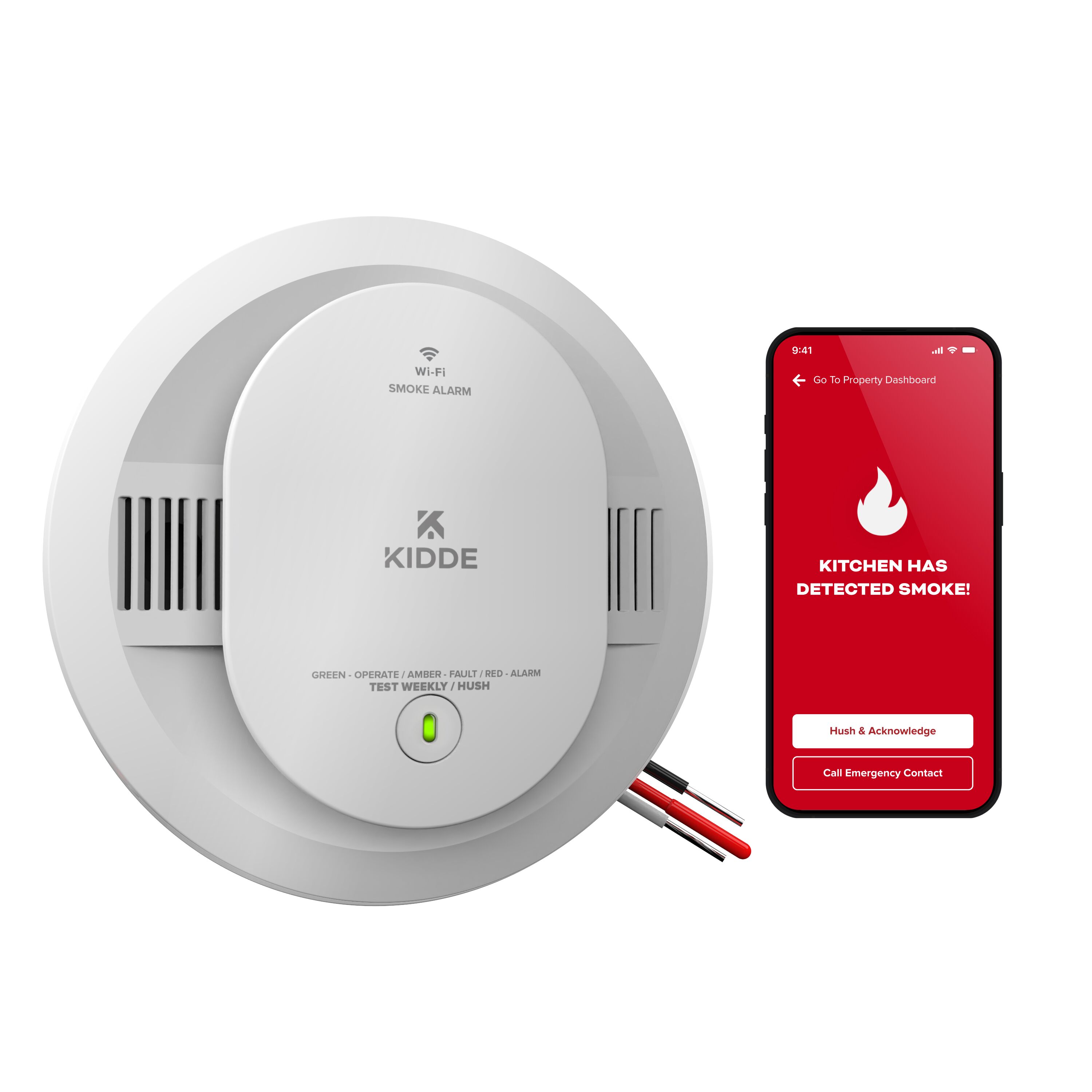
- Smart features: Some models connect to mobile apps for remote alerts.
How To Upgrade
- Check the date on your current alarm.
- Choose a model with the features you want.
- Replace all alarms if possible, so they age together.
- Install according to Kidde’s instructions.
Real-world Example: Resolving A Blinking Red Light
Let’s walk through a real scenario:
Situation: Maria noticed her Kidde smoke alarm blinking red every 30 seconds and chirping once every minute.
Actions:
- She checked the manual: This pattern meant a low battery.
- She changed the battery. The blinking and chirping stopped.
- Two weeks later, the blinking and chirping returned.
- She checked the manufacture date. The alarm was 10 years old.
- Maria replaced the alarm with a new Kidde model.
Lesson: Sometimes, a low battery warning can return if the alarm is at end-of-life, even with a new battery. Always check the age of your alarm.
Safety Tips For Dealing With Smoke Alarms
- Never ignore a blinking red light with sound.
- Test alarms monthly, even if the red light blinks normally.
- Keep spare batteries on hand.
- Teach everyone in the household what the signals mean.
- Make a fire escape plan and practice it.
Common Mistakes With Kidde Smoke Alarms
Many people make errors with smoke alarms that put their safety at risk. Avoid these:
- Ignoring end-of-life signals: A red blinking light with a chirp means it’s time to replace the alarm.
- Not cleaning alarms: Dust can cause false alarms or errors.
- Installing in wrong places: Avoid kitchens, bathrooms, and garages.
- Not replacing batteries: Even hardwired alarms need battery changes.
- Mixing old and new alarms: Replace all alarms at the same time for best performance.
When To Contact Kidde Support
If you’ve tried all troubleshooting steps and the blinking red light continues, contact Kidde’s customer support. Have your model number, manufacture date, and a description of the problem ready. Their team can give specific advice or arrange for a replacement if your alarm is under warranty.
For general smoke alarm information, you can also refer to resources like the National Fire Protection Association.
Frequently Asked Questions
Why Is My Kidde Smoke Alarm Blinking Red Every 30 Seconds With No Sound?
This pattern usually means the alarm is in standby mode and working correctly. If there’s no sound, your alarm is likely fine. Test it monthly to be sure.
What Should I Do If My Smoke Alarm Keeps Blinking Red And Chirping?
Replace the battery first. If the blinking and chirping continue, check the alarm’s age. If it’s older than 7-10 years, replace the unit. If the issue persists, contact Kidde support.
Can Humidity Cause My Kidde Smoke Alarm To Blink Red?
Yes, high humidity or steam can trigger the sensor, causing the alarm to blink red or even sound falsely. Move the alarm further from bathrooms or kitchens if this happens often.
How Do I Reset My Kidde Smoke Alarm After A False Alarm?
Remove the alarm from its bracket, disconnect power, and hold the test button for 15-20 seconds. Reconnect and remount the alarm. This clears most errors.
Is A Blinking Red Light A Sign Of Carbon Monoxide?
On combination smoke/CO alarms, a blinking red light and four quick beeps often mean carbon monoxide is detected. Leave your home and call emergency services if you suspect a CO leak.
Conclusion
A blinking red light on your Kidde smoke alarm may look alarming, but it’s usually just the device trying to tell you something. With the knowledge in this guide, you can read the signals, keep your alarm working, and protect your home and loved ones.
Always pay attention to both the light and the sound patterns, test your alarms regularly, and replace them when needed. Your safety is worth the small effort it takes to keep your smoke alarms in top condition.

Credit: www.wikihow.com