
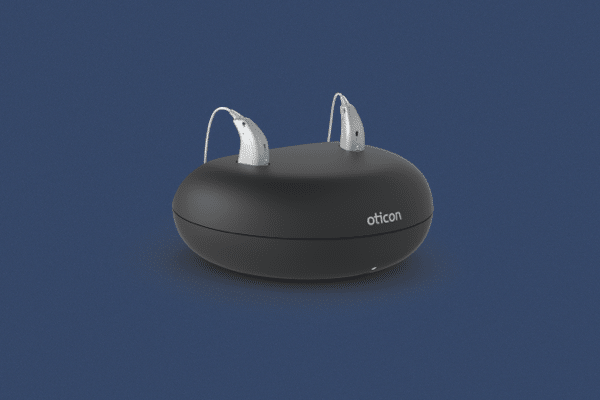
If you use an Oticon hearing aid and notice a blinking orange light while it’s sitting in the charger, you might feel confused or worried. Is it broken? Is it charging correctly? Or is there something you can do to fix it? Understanding what this orange blinking means can help you avoid stress and keep your hearing aids working their best. In this article, you’ll find clear answers, practical steps, and expert tips—everything you need to know about the Oticon hearing aid blinking orange in charger.
What Does The Blinking Orange Light Mean?
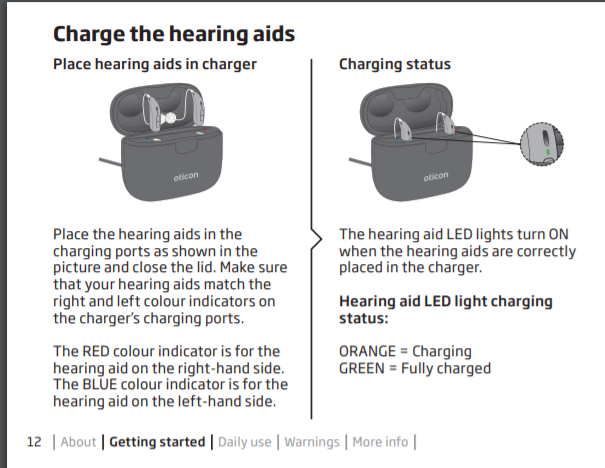
The blinking orange light on your Oticon hearing aid charger is not just a random signal; it’s a built-in warning. For most Oticon rechargeable models, a steady green light means charging is going smoothly. But when you see orange blinking, it almost always means there’s a problem with charging. This could be an issue with the hearing aid, the charger, or even the environment.
Main Causes For Blinking Orange
Some of the most common reasons include:
- Battery temperature too high or too low: Hearing aids are sensitive to heat and cold. If they’re too hot (from being worn or left in the sun) or too cold, the charger will not start charging and will blink orange.
- Dirty charging contacts: Dust, earwax, or skin oils can block the connection between the hearing aid and the charger.
- Incorrect placement: If the hearing aid is not sitting properly in the charger, it won’t charge.
- Charger malfunction: A problem with the charger itself, such as a faulty cable or power supply.
- Firmware/software issues: Rare, but sometimes the device needs a reset or update.
How To Troubleshoot The Blinking Orange Light
Seeing a blinking orange light isn’t the end of the world. Most of the time, you can fix the problem at home. Here’s what you can do, step by step.
1. Remove And Reinsert The Hearing Aids
First, gently lift the hearing aids out of the charger and reinsert them. Make sure they are sitting correctly, with the charging contacts lined up. Sometimes a small shift is all it takes to fix the issue.
2. Check For Dirt Or Debris
Examine both the hearing aid contacts and the charger’s slots. If you see any dust, earwax, or dirt, clean them carefully. Use a soft dry cloth or the cleaning tool provided by Oticon. Avoid wet cloths or any liquid cleaners.
3. Let The Hearing Aids Cool Down
If you just removed your hearing aids after hours of use, they may be warm. Let them sit outside the charger for 10–15 minutes to cool down. Then, try charging again.
4. Move The Charger
Make sure your charger is in a safe, dry place at room temperature. Avoid windowsills, bathrooms, or places where temperatures can swing quickly. Extreme temperatures can cause the orange light to blink.
5. Inspect The Charger And Power Source
Check that the charger’s power cable is connected securely. Try plugging the charger into a different outlet. If possible, check the charger with another pair of Oticon hearing aids to rule out a charger problem.
6. Restart Or Reset
Some Oticon models can be reset by holding down the push button for a few seconds. Check your user manual for the correct reset procedure.
7. Contact Your Hearing Care Professional
If none of these steps work, it’s time to contact your audiologist or hearing care provider. Don’t try to open the hearing aids or charger yourself.
Oticon Models And Their Charger Indicators
Not all Oticon models use exactly the same light signals. Here’s a comparison of how some popular models behave when charging:
| Model | Charging Light (Normal) | Charging Light (Problem) | Other Notable Features |
|---|---|---|---|
| Oticon More miniRITE R | Steady Green | Blinking Orange | Bluetooth, rechargeable, telecoil |
| Oticon Opn S miniRITE R | Steady Green | Blinking Orange | Rechargeable, direct streaming |
| Oticon Ruby miniRITE R | Steady Green | Blinking Orange | Budget-friendly, rechargeable |
This table shows that for most recent Oticon rechargeable models, a blinking orange light in the charger means a charging problem, regardless of the model.
How Temperature Affects Charging
One often-missed reason for the orange light is temperature sensitivity. Rechargeable batteries in hearing aids work best at room temperature (about 68–77°F or 20–25°C). If your hearing aids are exposed to:
- Sunlight
- Car dashboards
- Heaters or radiators
- Freezing weather
…the charger may refuse to start charging, and the orange light blinks. Always let your hearing aids return to normal room temperature before charging. This simple habit can prevent many charging headaches.
The Importance Of Clean Charging Contacts
Many users forget that earwax and skin oils can build up on the small metal contacts of the hearing aids and charger. Even a thin layer can block charging.
| Contact Condition | Charging Performance | Recommended Action |
|---|---|---|
| Clean, shiny | Normal, steady green light | No action needed |
| Slightly dull, light debris | May cause slow or interrupted charging | Clean with dry cloth or brush |
| Sticky, visible earwax | Likely to trigger blinking orange light | Clean carefully, repeat as needed |
Regular cleaning can prevent many charging errors. If you wear your aids daily, clean the contacts once per week.
When Should You Worry?
A blinking orange light is not always a sign of a serious problem. In most cases, it’s a warning you can fix yourself. However, there are situations when you should seek help quickly:
- The orange light keeps blinking even after cleaning and cooling the hearing aids.
- Your hearing aids do not work after charging.
- The charger itself shows no lights at all.
- You see signs of damage, corrosion, or water inside the charger or hearing aids.
If you see these issues, stop using the charger and contact your hearing care professional.
Credit: massachusettshearinggroup.com
Mistakes To Avoid
Many beginners make small mistakes that lead to the orange blinking light. Here are two important ones to watch out for:
- Forgetting to close the battery door: On some models, if you do not close the battery door properly, the hearing aid will not charge—even if it sits in the charger.
- Using the wrong charger or cable: Not all Oticon chargers are the same. If you use a charger from another model or brand, it may not fit or provide the correct voltage.
These simple errors are easy to avoid once you know what to look for.
How Long Should Charging Take?
A normal Oticon hearing aid needs about 3 hours for a full charge. A quick 30-minute charge can give you up to 6 hours of use. If your hearing aids are blinking orange and not charging, you may end up with a dead battery during the day.
Here’s a quick comparison of typical charging and usage times:
| Charging Time | Expected Usage |
|---|---|
| 3 hours (full) | ~24 hours |
| 30 minutes (quick) | ~6 hours |
| 1 hour | ~12 hours |
If you notice your hearing aids take much longer to charge or the battery life seems much shorter, this could signal a deeper issue—possibly a battery that needs replacing.

Credit: forum.hearingtracker.com
How To Prevent The Blinking Orange Light
Preventing problems is always easier than fixing them. Try these practical tips:
- Store your charger and hearing aids at room temperature. Avoid places with big temperature changes.
- Clean the contacts weekly using a soft cloth or cleaning brush.
- Use only the official Oticon charger and cable provided with your device.
- Avoid overcharging by unplugging the charger when not in use for long periods.
- Update your hearing aid firmware if advised by your audiologist.
These habits can save you time, money, and frustration.
When To Replace The Battery Or Charger
Rechargeable hearing aid batteries do not last forever. Most Oticon rechargeable batteries last about 3–5 years before they lose performance. If you notice:
- Your hearing aids take much longer to charge
- The battery runs out much faster than before
- The orange light keeps blinking even after trying all fixes
…it may be time for a new battery or charger. Always get battery replacements done by a professional to avoid damaging your hearing aids.
Real-world Example
Consider Anna, a 67-year-old Oticon More user. One morning, she noticed the orange blinking light. She was worried but remembered her audiologist’s advice. She took the hearing aids out, let them cool, cleaned the contacts, and plugged them back in.
The light turned green, and her aids charged normally. Anna’s story shows that with a calm approach, most orange light problems can be solved at home.
Where To Find More Help
If you’re still having trouble, the official Oticon Support website has troubleshooting guides, videos, and contact details for local support. Your hearing care professional is also a valuable resource for hands-on help.
Credit: forum.hearingtracker.com
Frequently Asked Questions
Why Is My Oticon Hearing Aid Blinking Orange In The Charger?
A blinking orange light usually means there’s a charging issue, such as dirty contacts, incorrect placement, battery temperature problems, or a charger malfunction.
Can I Charge My Oticon Hearing Aids If They Are Warm?
No, it’s best to let your hearing aids cool to room temperature before charging. Charging warm hearing aids can cause the orange light to blink and may reduce battery life.
How Often Should I Clean The Charging Contacts?
Clean the contacts at least once per week, or more often if you notice any dirt or earwax buildup. Clean contacts help prevent charging problems.
What Should I Do If My Charger Shows No Lights At All?
Check the power source and cable. Try another outlet. If there are still no lights, your charger may be faulty and should be checked or replaced by a professional.
Can I Use Any Charger With My Oticon Hearing Aids?
No, always use the official Oticon charger and cable. Using the wrong charger can damage your hearing aids or cause charging errors.
A blinking orange light can be annoying, but with some simple steps and careful habits, you can keep your Oticon hearing aids working smoothly for years. Stay patient, act quickly when you notice issues, and don’t hesitate to reach out for help when needed.
Your hearing is worth it!