
The Dyson Airwrap is a unique styling tool loved by many for its advanced technology and easy hair styling. But sometimes, owners see a white light blinking on their Airwrap and wonder what it means. Is it broken? Is it safe to use? This blinking light can be worrying, especially if you depend on your Airwrap every day. Understanding the reason behind the blinking light can save you time, money, and stress.
This article explains everything about the Dyson Airwrap white light blinking problem. You’ll learn why the light blinks, what it means, how to fix it, and when to seek help. By the end, you’ll feel confident handling this issue, and you’ll know how to keep your Airwrap working smoothly.
What Does The White Light Blinking Mean?
When you see a white light blinking on your Dyson Airwrap, it’s a signal from the device. Dyson uses lights on the Airwrap to tell you about its status. The white blinking light is not just a random flicker—it’s a coded message about something important.
Usually, the blinking white light means:
- There’s a blockage in the filter or airflow.
- The filter needs cleaning.
- The tool is overheating.
- There’s a fault inside the device.
It’s not always a sign of a serious problem. Sometimes, it’s just a reminder to clean the filter. Other times, it signals an internal issue that might need repair.
Dyson Airwrap Light Codes
The Airwrap uses different colored lights to show different problems. Here’s a quick comparison:
| Light Color | Blinking or Steady | Meaning |
|---|---|---|
| White | Blinking | Filter needs cleaning or blockage |
| Red | Blinking | Overheating or internal fault |
| Blue | Steady | Normal operation |
| Blue | Blinking | Cool shot active |
Knowing the meaning of each light helps you quickly identify what’s wrong. The white blinking light is the most common issue, and it’s usually easy to fix.
Common Causes Of The White Light Blinking
To solve the problem, you need to know why the white light blinks. There are a few main causes:
Filter Blockage
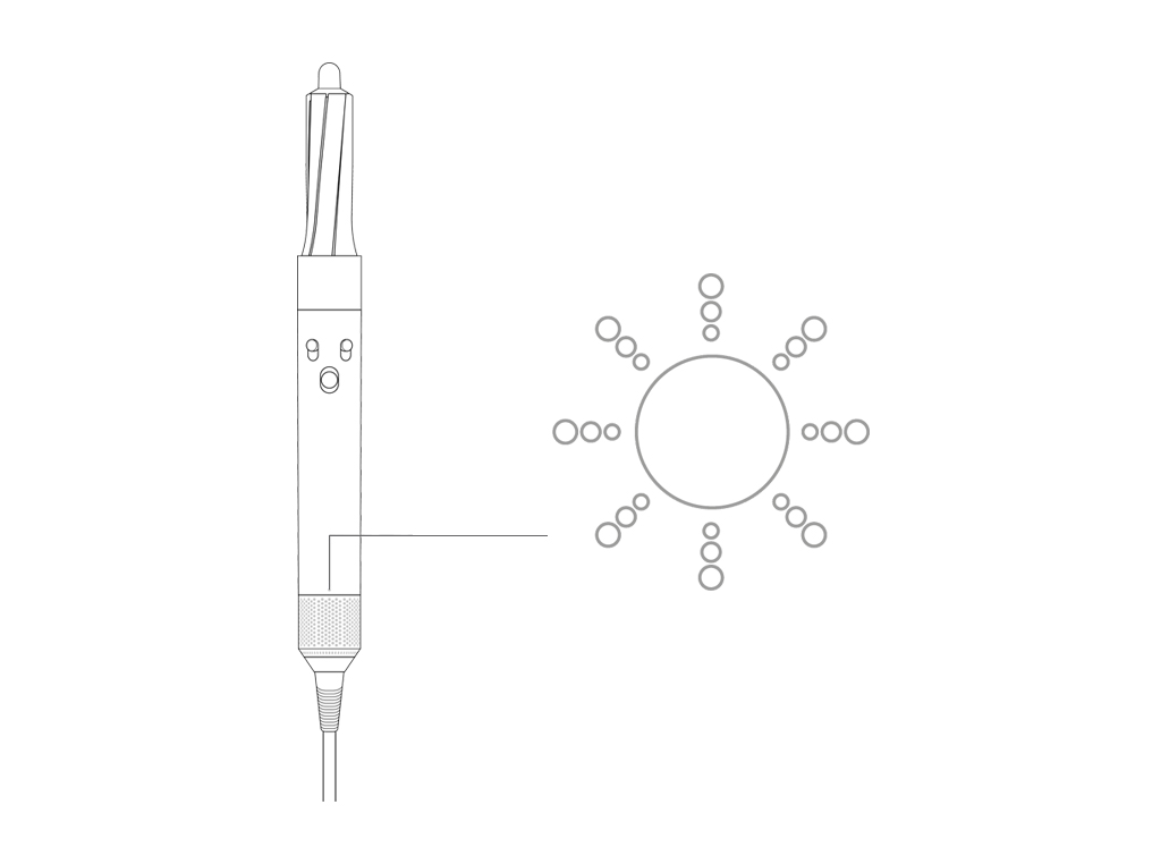
The Airwrap has a filter at its base. This filter stops dust and hair from getting inside the motor. If the filter gets blocked, the device can’t get enough air. The Airwrap then blinks the white light to warn you.
Dirty Filter
Even if the filter isn’t blocked, it can get dirty over time. Dust, styling products, and hair can stick to it. Dyson recommends cleaning the filter every month, or more often if you use the Airwrap daily.
Overheating
If the device gets too hot, it protects itself by flashing the white light. Overheating can happen if you use the Airwrap for a long time without breaks, or if it’s used in a hot room.
Internal Error
Rarely, the white blinking light can mean a technical fault inside the Airwrap. This could be a problem with the motor or electronics. If cleaning the filter doesn’t work, this might be the cause.
Accessories Not Attached Properly
Sometimes, the Airwrap blinks because an accessory (like the barrel or brush) isn’t attached correctly. Always check that your styling attachment clicks into place.
Credit: support.sa.dyson.com
Step-by-step Solutions For White Light Blinking
Fixing the white blinking light is usually simple. Here’s how to solve it:
1. Clean The Filter
Most of the time, cleaning the filter will stop the white light blinking.
Cleaning Steps:
- Unplug the Airwrap and let it cool down.
- Remove the filter cage from the base.
- Use the cleaning brush that came with your Airwrap, or a soft toothbrush.
- Gently brush the filter to remove dust and hair.
- Rinse the filter cage if needed (not the main unit).
- Let the filter dry fully before putting it back.
If you’ve lost the cleaning brush, any soft brush will work. Make sure not to use water on the main device—only the filter cage.
2. Check For Blockages
Look for blockages in the airflow or attachments. Remove all accessories and check for hair or debris. Clean them as needed.
3. Allow The Device To Cool Down
If the Airwrap feels hot, unplug it and let it rest for at least 10 minutes. Overheating can trigger the white light.
4. Reattach Accessories
Detach and reattach all accessories. Make sure they click firmly into place. Sometimes, a loose attachment can cause the light to blink.
5. Reset The Device
After cleaning and checking everything, plug the Airwrap back in. Turn it on and see if the light is gone.
6. Contact Dyson Support
If the white light keeps blinking after you’ve tried everything, it may be a deeper issue. Contact Dyson support for help. They can guide you or arrange repairs.
Real-life Examples And User Experiences
Many people have faced the white blinking light problem. Here are some real stories and what they learned:
Example 1: Busy Morning Blockage
Emma uses her Airwrap every morning. One day, she saw the white light blinking and panicked. She found dust in the filter. After cleaning, the light stopped. She learned to clean the filter every week.
Example 2: Overheating In Summer
Jason styled his hair in a hot bathroom. The white light started blinking, and the Airwrap was warm. He unplugged it, let it cool, and the light disappeared. Now, he styles his hair in a cooler room.
Example 3: Persistent Blinking
Sophie cleaned the filter and checked for blockages, but the light kept blinking. She contacted Dyson support. They found an internal fault and replaced her Airwrap under warranty.

Credit: www.youtube.com
How Often Should You Clean The Filter?
Regular filter cleaning is the best way to prevent the white light blinking issue. Dyson suggests cleaning the filter once a month, but you might need to do it more often depending on your usage.
Here’s a quick guide:
| Usage Frequency | Recommended Cleaning |
|---|---|
| Daily | Weekly |
| Few times a week | Bi-weekly |
| Occasional | Monthly |
If you use styling products, clean the filter more often. These products can clog the filter faster than normal dust.
Preventing White Light Blinking: Proactive Tips
You can avoid the white blinking light with simple habits:
- Clean the filter regularly.
- Store the Airwrap in a dust-free area.
- Avoid using the Airwrap with wet hands.
- Don’t cover the airflow openings.
- Use styling products away from the device.
- Let the Airwrap cool between uses if styling for long periods.
A common mistake is forgetting about the filter. Many people don’t realize how much dust, hair, and product can build up. Regular cleaning is easy and keeps your Airwrap healthy.
When To Worry: Signs Of Deeper Problems
Not every blinking light is a simple fix. If you notice these signs, it may be a bigger issue:
- The white light blinks even after cleaning.
- The Airwrap makes strange noises.
- It smells like burning plastic.
- The device turns off by itself.
- The airflow is weak, even after cleaning.
These signs may mean an internal fault. Don’t ignore them—contact Dyson support.
The Importance Of Proper Maintenance
Taking care of your Airwrap is more than just fixing blinking lights. Proper maintenance extends its life and keeps your hair safe.
Quick Maintenance Checklist
- Clean filter regularly
- Check for blockages weekly
- Store in a clean, dry place
- Avoid dropping or knocking the device
- Use only official Dyson accessories
Most Airwrap owners don’t realize how much maintenance matters. Even small amounts of dust can hurt performance. Regular cleaning prevents most problems, including the white blinking light.
Comparing Dyson Airwrap To Other Styling Tools
Is the Dyson Airwrap more prone to blinking light issues than other styling tools? Let’s compare:
| Device | Common Issues | Maintenance Needed |
|---|---|---|
| Dyson Airwrap | Filter blockage, blinking lights | Monthly cleaning |
| Traditional Hair Dryer | Overheating, burning smell | Yearly cleaning |
| Curling Iron | Overheating, coating wear | Wipe after use |
| Straightener | Plate buildup, wiring issues | Wipe after use |
The Airwrap needs more regular cleaning because of its advanced airflow system. But with proper care, it’s just as reliable as other tools—and often safer.
Non-obvious Insights For Dyson Airwrap Owners
Most guides focus only on filter cleaning. But some less obvious tips can help:
- Check the filter cage alignment: If the cage isn’t properly attached, the Airwrap may blink the white light even if the filter is clean.
- Humidity matters: Using the Airwrap in a humid bathroom increases the risk of overheating and blockages. Try styling in a dry room.
- Accessories can cause blockages: Hair and dust can get stuck in barrels and brushes, not just the filter. Clean all attachments regularly.
Many beginners miss these details. They focus only on the filter, but the whole device needs care.
Troubleshooting Steps: A Practical Guide
If you see the white blinking light, follow this checklist:
- Unplug the device.
- Let it cool down.
- Remove the filter cage and clean it.
- Check all accessories for blockages.
- Reattach everything firmly.
- Plug in and test.
- If the light still blinks, contact Dyson.
This step-by-step approach solves most problems. Don’t skip any steps—each one matters.
Dyson Warranty And Support
Dyson offers a two-year warranty for the Airwrap. If your device has a persistent blinking light, and you’ve tried all fixes, Dyson support will help. They can guide you through troubleshooting or arrange repairs.
You can reach Dyson support online or by phone. For more information, see Dyson Support.
The Risks Of Ignoring The White Blinking Light
Ignoring the white light can lead to bigger problems:
- Reduced styling performance
- Motor damage
- Shortened device lifespan
- Safety risks (overheating)
Some users keep styling even when the light blinks. This is risky. The Airwrap is telling you something important—don’t ignore it.
What If You Don’t Have The Cleaning Brush?
Lost your Airwrap’s cleaning brush? No problem. You can use:
- A soft toothbrush
- A small paintbrush
- A makeup brush
Just make sure it’s clean and dry. Never use a wet brush or water on the main unit.
How To Store Your Dyson Airwrap Safely
Proper storage prevents dust and keeps the device healthy.
- Store in the original case or a clean drawer.
- Don’t wrap the cord tightly—it can damage wiring.
- Keep attachments in their own spaces.
Some users leave their Airwrap on the counter. This increases dust risk. Always store it safely.
Upgrading And Replacing Parts
Dyson sells replacement filters, cages, and accessories. If your filter cage is damaged, order a new one from Dyson. Don’t use cheap third-party parts—they can cause more problems.
Environmental Impact Of Regular Maintenance
Keeping your Airwrap clean reduces the need for repairs and replacements. This helps the environment. Each year, thousands of broken styling tools are thrown away because of simple maintenance issues. Cleaning your filter saves money and reduces waste.
Frequently Asked Questions
What Does The Blinking White Light Mean On My Dyson Airwrap?
The blinking white light usually means the filter needs cleaning or there’s a blockage. It can also signal overheating or a loose accessory. Clean the filter and check for blockages first.
How Do I Clean The Dyson Airwrap Filter?
Unplug the device, remove the filter cage, and use a soft brush to remove dust and hair. You can rinse the cage, but not the main unit. Let the cage dry fully before reattaching.
Can I Use The Airwrap If The White Light Is Blinking?
It’s not recommended. The blinking light is a warning. Using the Airwrap while the light blinks can cause damage or overheating. Clean the filter and check for blockages before using again.
What Should I Do If The White Light Keeps Blinking After Cleaning?
If cleaning doesn’t solve the problem, check all accessories and let the device cool. If the light still blinks, contact Dyson support. There may be an internal fault.
Is The Dyson Airwrap Covered By Warranty For Blinking Light Issues?
Yes, Dyson offers a two-year warranty. If your Airwrap has a persistent blinking light and you’ve tried all fixes, Dyson can repair or replace it. Keep your receipt and contact support.
Taking care of your Dyson Airwrap is simple but important. The white light blinking is usually an easy fix—just clean the filter and check for blockages. With regular maintenance, your Airwrap will last longer and style better. And if you ever see the blinking light, you’ll know exactly what to do.

Credit: support.dyson.co.nz