
When you see a blinking blue light on your invisible fence, it can be confusing—and maybe a little worrying. Is it a warning? Is your system still working? Many pet owners notice this blinking light and aren’t sure what to do next. Understanding what that blue light means, and how your invisible fence system uses it, is key to keeping your pet safe and your fence working well.
Invisible fences use technology to create a hidden boundary for your dog or cat. These systems are popular because they keep pets safe without blocking your view or changing the look of your yard. But with technology comes signals, lights, and messages that can be hard to understand. The blinking blue light is one of the most common signals you’ll see, and knowing what it means can save you time, stress, and possibly even an escape.
In this article, you’ll learn exactly why the blinking blue light appears, what it means, and what steps to take. You’ll also see how this compares to other light signals, how to troubleshoot problems, and how to make sure your invisible fence keeps working its best. If you want to understand your system like a pro, this guide will help.
What Is An Invisible Fence?
Invisible fences are electronic systems that keep pets inside a set area without a physical wall or fence. Instead, they use a buried wire or a wireless signal to mark the boundary. Your pet wears a special collar that reacts when it comes near or crosses this line.
There are two main types:
- Wired invisible fences: A wire is buried around your yard. The transmitter sends a signal through this wire.
- Wireless invisible fences: The transmitter creates a circular boundary using radio signals, no wire needed.
When your pet approaches the boundary, the collar beeps or vibrates as a warning. If the pet keeps going, it feels a mild static correction. Most pets quickly learn to stay within the safe area.
Invisible fences are popular because they:
- Allow open views, no physical barrier
- Are often cheaper than building a real fence
- Let you create any shape or size boundary
However, like any technology, they have signals and lights to show the system status. The blinking blue light is one of the most important.
Understanding The Blinking Blue Light
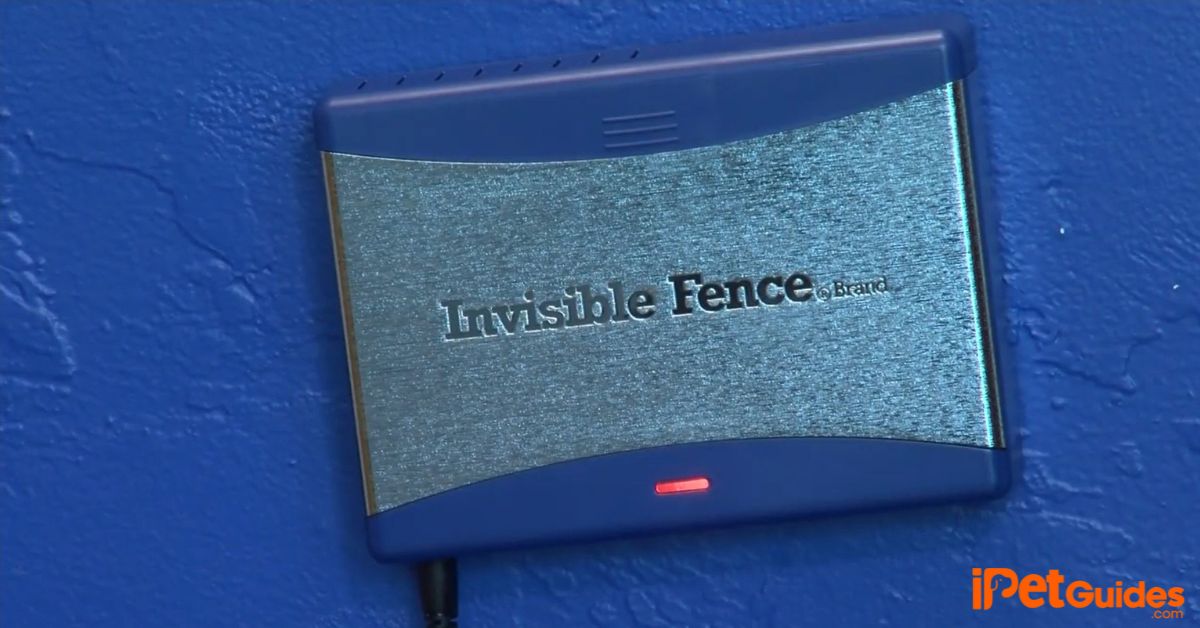
If you notice a blinking blue light on your invisible fence control panel, it’s sending you a message. But what message? The answer depends on your brand, model, and system setup, but there are common meanings.
For many systems, especially Invisible Fence® Brand, a blinking blue light usually means:
- The system is working, but the battery backup is active
- The unit is running on battery power, not main electricity
- There may be a power outage, or the plug is loose
But it can also have other meanings, like:
- The system has detected a fault or break in the wire
- The system is in a special mode (test, training, or troubleshooting)
It’s important to check your user manual for your exact model. Most brands use blue lights for battery status or communication. A steady blue light often means everything is fine, while a blinking blue light is usually a warning or alert.
Why Blue?
Manufacturers use different colors for different signals. Blue is often used because it stands out from standard red or green, which usually mean “stop” or “go. ” Blue is easy to see, even in daylight, and isn’t confused with other warning lights.
Common Causes Of A Blinking Blue Light
Knowing why the blue light is blinking can help you act quickly. Here are the most frequent causes:
- Power Outage or Unplugged Unit: The system has lost its main power and is now running on battery backup. This is the most common reason for a blinking blue light.
- Battery Backup Engaged: Some units have a backup battery. If the main power fails, the blue light blinks to show battery mode is active.
- Wire Break or Signal Loss: In some models, a blue light can mean the underground wire is broken, or there’s a problem with the signal.
- Test or Training Mode: If you’ve recently put the fence in a special mode, the blue light might blink to remind you.
- Low Backup Battery: The battery backup is low and needs to be charged or replaced.
Let’s compare these possible causes and what action you should take:
| Cause of Blinking Blue Light | What It Means | Action to Take |
|---|---|---|
| Power outage | System running on battery | Check power outlet, restore power |
| Unplugged unit | No main power detected | Plug unit back in |
| Wire break | Signal interrupted | Inspect and repair wire |
| Training/Test mode | Special system status | Return system to normal mode |
| Low backup battery | Battery needs replacement | Replace or recharge battery |
What To Do When You See The Blinking Blue Light
You don’t need to panic if you see the blinking blue light, but you should act quickly to keep your pet safe. Here’s a simple step-by-step approach:
- Check for Power: Make sure the main unit is plugged in and the outlet is working. Try plugging in another device to check the power.
- Inspect the Battery Backup: If your system has a battery backup, check if it’s working or needs to be replaced.
- Look for Wire Breaks: Walk the boundary and check for any visible damage, digging, or recent yard work that could have cut the wire.
- Review the Manual: Each brand and model can have unique signals. Look up what the blinking blue light means for your system.
- Test the System: Walk your pet’s collar near the boundary to see if it’s giving the warning beep or correction.
- Reset the System: Sometimes, unplugging the unit for a minute and plugging it back in can clear a false signal.
- Contact Support: If you can’t solve the problem, call the manufacturer or a local installer.
Example: How To Test Your System
Suppose your system is showing a blinking blue light, and you want to test if it’s working. Put the collar on a leash (not your pet). Walk slowly toward the boundary. Listen for the warning beep and watch for the correction.
If you don’t hear anything, the fence might not be working, and you should keep your pet inside until it’s fixed.
Comparing Blue Light To Other Indicator Lights
Most invisible fence systems use several different light colors. Here’s what the main ones usually mean:
- Green: Normal operation, everything is OK
- Red: Serious error, wire break, or system failure
- Yellow/Orange: Warning, battery low, or a non-critical issue
- Blue: Battery backup active, test mode, or special status
This quick comparison shows how blue fits in:
| Light Color | Typical Meaning | Immediate Action? |
|---|---|---|
| Green | System normal | No |
| Red | Error or break | Yes |
| Yellow/Orange | Warning/low battery | Maybe |
| Blue (blinking) | Battery backup or special mode | Check soon |
Pro Tip: Some models let you change the light colors or sounds in the settings. Always check your manual if you see a color you don’t recognize.
Troubleshooting Common Problems
If your blue light keeps blinking, there may be a deeper issue. Here’s how to approach common problems:
Power Problems
If your area recently had a storm or power surge, your system might have switched to battery backup. Always check the plug first. Some units have a reset button you can press after power is restored.
Wire Breaks
Mowers, landscaping, or digging can break the buried wire. Some signs include:
- The fence suddenly stops working
- The blue light blinks, and you hear a beeping alarm from the base unit
To find the break, use a wire break locator tool (available at most pet stores or online). You can also follow the wire above ground if you know where it’s buried.
Battery Issues
If your system uses a backup battery, it will only last so long. Most last 24–48 hours. If you see the blue light blinking for more than a day, the battery may be dead. Replace with the correct type for your unit.
Collar Problems
Sometimes the problem isn’t with the fence, but with the collar. Check if:
- The collar battery is charged
- The collar is making a beep near the boundary
- The contacts are clean and touching your pet’s skin
System Mode
If you recently changed settings or started training, check if the system is in test mode. This can cause the blue light to blink until you switch back to normal operation.
Non-Obvious Insight: Sometimes lightning can damage the transmitter or wire without leaving visible signs. If you’ve had a storm, and nothing else is wrong, this could be the cause.

Credit: www.youtube.com
How To Prevent Problems With Invisible Fence Lights
Prevention is often easier than repair. Here’s how to keep your system running smoothly:
- Check Power Regularly: Make sure the system is plugged in and connected to a surge protector.
- Test the System Monthly: Walk the boundary with the collar to check for warning beeps or corrections.
- Replace Backup Batteries: Most batteries need to be changed every 6–12 months. Write the date on the battery with a marker.
- Protect the Wire: Tell landscapers or anyone digging where the wire is buried.
- Read the Manual: Each model is different. A quick look at the manual can prevent confusion later.
Non-Obvious Insight: Some surge protectors do not protect against all types of electrical surges. Ask your installer for one made for pet fences.
When To Call A Professional
Most problems with a blinking blue light can be fixed at home. But some issues need expert help:
- The light keeps blinking, and you can’t find the cause
- The fence doesn’t work, and you can’t find the wire break
- Your system is out of warranty or uses special parts
Many companies offer invisible fence repair services. They have special tools to find breaks, replace batteries, or update your system. If your pet is a known escape artist, or you have a large property, calling a pro is a smart choice.
Credit: www.sat-congo.com
Real-world Example: A Week Without Main Power
Imagine a family whose area loses power after a big storm. Their invisible fence unit’s blue light starts blinking. At first, the battery backup keeps the fence working, but after two days, the battery runs out. The pets are now able to cross the boundary without correction.
The family learns:
- The importance of checking the fence after a storm
- Why it’s smart to keep pets inside during long power outages
- How a blinking blue light can warn you before the system fails
This is why understanding your fence’s signals—especially the blue light—matters so much.
How Long Does The Battery Backup Last?
Battery backups are designed to keep your fence working during short power outages. Most last 24 to 48 hours. Some higher-end systems can last up to 72 hours, but that’s rare.
Here’s a quick look at typical backup times:
| Brand/Model | Battery Backup Duration |
|---|---|
| Invisible Fence® Brand | 24-48 hours |
| PetSafe In-Ground Fence | 24 hours |
| SportDOG In-Ground Fence | Up to 48 hours |
| Extreme Dog Fence | Varies (optional) |
Remember, the backup battery is not meant for long-term use. If the blue light blinks for several days, act fast to restore power or replace the battery.
Safety Tips For Pet Owners
Your pet’s safety depends on a working fence. Here’s how to keep them safe when you see a blinking blue light:
- Keep Pets Inside if you’re not sure the system is working
- Use a Leash when walking near the boundary during repairs
- Supervise Outdoor Time until the fence is back to normal
- Teach Children what the lights mean and when to alert an adult
If you’re away from home often, ask a neighbor or pet sitter to check the fence and lights for you.
Are All Invisible Fence Systems The Same?
No. Different brands and models use different technology, signals, and light codes. For example, Invisible Fence® Brand is well-known, but brands like PetSafe, DogWatch, and SportDOG also make popular systems.
Some use blue for battery backup, others for wire breaks. Always check your manual. If you lost it, most brands have digital manuals online. For more information, you can check the official Invisible Fence Wikipedia page.
Pro Tip: Take a photo of your fence’s control panel with your phone. This can help if you need to call support or compare signals later.
Upgrading Your System For Better Monitoring
Modern invisible fence systems now offer features that make monitoring easier:
- Wi-Fi or App Integration: Some newer systems send alerts to your phone if the power goes out or the wire breaks.
- Longer Battery Backups: Upgraded units can last longer during outages.
- Multiple Light Codes: More detailed signals for different problems.
If your system is older, upgrading can mean less worry and better safety for your pet. Ask your installer about new options if you’re having frequent problems.
Frequently Asked Questions
What Does A Blinking Blue Light Mean On My Invisible Fence?
A blinking blue light usually means your system is running on battery backup, not main power. It can also signal special modes or a problem, depending on your model. Check your manual for your specific system.
How Long Will My Invisible Fence Work On Battery Backup?
Most battery backups last 24 to 48 hours. Some may last longer, but you should restore main power or replace the battery as soon as possible.
Can I Use My Invisible Fence During A Power Outage?
Yes, if your system has a battery backup and the blue light is blinking, your fence is still working—but only for a limited time. If the backup runs out, the fence will stop working.
What Should I Do If The Blue Light Keeps Blinking?
First, check that your fence is plugged in and the outlet works. If it is, check the battery backup and replace if needed. If the problem continues, contact customer support for help.
Does Every Invisible Fence Brand Use A Blue Blinking Light?
No, light codes vary by brand and model. Some use blue for backup, others use it for different problems. Always check your manual or the brand’s website for the right meaning.
A blinking blue light on your invisible fence is not something to ignore, but it’s rarely an emergency. By understanding what it means, how to fix it, and when to get help, you’ll keep your pet safe and your fence working smoothly.
Regular checks, knowing your system, and acting fast when you see new signals will make life easier for both you and your furry friend.

Credit: petplaygrounds.com