
If you own a Canon camera, you probably depend on your battery charger every day. But what happens when you see a blinking orange light? It’s a small signal, but it can mean many things—some normal, some serious. For new users, this blinking light can be confusing and even worrying. Understanding what it means, and how to fix problems, is important for keeping your camera ready and your batteries safe. This article will help you decode the blinking orange light, explain what causes it, and show you how to solve common issues.
What Does The Canon Battery Charger Blinking Orange Mean?
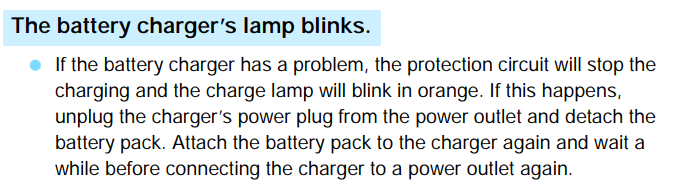
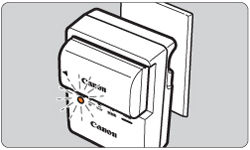
The orange light on a Canon battery charger is a status indicator. If it blinks, the charger is trying to tell you something. Usually, a steady orange light means the battery is charging, while a blinking orange light means there is an issue. The number of blinks often gives clues to the problem.
For most Canon battery chargers, the light can:
- Stay solid orange (charging)
- Blink orange (problem detected)
- Turn green (fully charged)
Canon chargers use a simple pattern to show faults. The blinking light can be:
- Single blink: Short-circuit or battery problem
- Double blink: Battery temperature issue
- Triple blink: Battery charge error
Not all Canon chargers use the same pattern, but these are the most common. Always check your charger’s manual for the exact meaning.
Canon Battery Charger Models And Their Indicator Lights
Canon has made many chargers over the years. Here is a simple comparison of three popular models and their indicator light meanings:
| Charger Model | Steady Orange | Blinking Orange | Green Light |
|---|---|---|---|
| LC-E6 | Charging | Error | Fully Charged |
| LC-E17 | Charging | Error | Fully Charged |
| LC-E12 | Charging | Error | Fully Charged |
Most Canon chargers use the same light system. If your charger is not listed, check the manual or Canon’s official website.
Common Reasons For Blinking Orange Light
When the orange light blinks, it usually means the charger has found a problem. Here are the main reasons:
1. Battery Temperature Is Too High Or Too Low
Canon chargers have safety features. If your battery is too hot or cold, charging will stop. The charger blinks orange to show this.
- Too hot: After heavy use or charging in hot weather
- Too cold: After storage in cold places
Example: After shooting outdoors in summer, your battery may get hot. When you start charging, the orange light blinks.
2. Battery Is Faulty Or Damaged
A damaged battery may cause the charger to blink orange. This happens if:
- The battery is old (more than 3 years)
- The battery was dropped or crushed
- The battery was exposed to water
Sometimes, batteries lose capacity with age. Even if they look normal, the charger may detect internal problems.
3. Battery Is Not Genuine Canon
Canon chargers sometimes blink orange when charging third-party batteries. These are batteries made by other companies. While some work well, others may trigger errors because their internal chips do not match Canon’s standards.
4. Battery Is Not Inserted Correctly
If the battery is not seated properly, the charger cannot connect. This can cause blinking orange. Always make sure the battery clicks into place.
5. Dirty Or Corroded Contacts
Dirt, dust, or corrosion on the battery or charger contacts can cause errors. The charger may blink orange because it cannot read the battery.
6. Charger Is Faulty
Sometimes, the charger itself is the problem. If the charger is old, damaged, or exposed to moisture, it may blink orange even with good batteries.
How To Fix A Blinking Orange Light
Seeing a blinking orange light does not mean your camera is broken. You can usually solve the problem with simple steps. Try these solutions:
1. Check Battery Temperature
- Remove the battery and let it cool or warm up
- Wait 20–30 minutes before trying again
- Do not charge batteries in extreme heat or cold
2. Inspect The Battery
- Check for cracks, swelling, or leaks
- Try another battery if you have one
- Replace old batteries (more than 3 years is risky)
3. Clean Battery And Charger Contacts
- Use a dry, soft cloth to wipe contacts
- Never use water or cleaning sprays
- If contacts are corroded, rub gently with a pencil eraser
4. Try A Genuine Canon Battery
If you use a third-party battery, switch to a genuine Canon battery. This often stops the blinking orange problem.
5. Insert Battery Carefully
Remove the battery and insert it again. Make sure it clicks into place.
6. Test The Charger
- Try charging another battery
- If the charger always blinks orange, it may be faulty
- Replace the charger if needed
7. Reset The Charger
Some chargers have a small reset button. If yours does, press it. If not, unplug the charger and wait 5 minutes before plugging it in again.
Credit: community.usa.canon.com
How Long Should Charging Take?
Understanding charging time is important. If your charger blinks orange, it may be because the battery is charging too fast or too slow.
Typical charging times for Canon batteries:
| Battery Model | Capacity (mAh) | Charging Time |
|---|---|---|
| LP-E6N | 1865 | 2 hours |
| LP-E17 | 1040 | 1.5 hours |
| LP-E12 | 875 | 1 hour |
If your battery takes much longer, or the charger blinks orange, check for problems.
Signs Of A Bad Battery
Sometimes, the blinking orange light is a warning about battery health. Here are signs your battery needs to be replaced:
- Battery heats up fast when charging
- Battery loses charge quickly (less than 1 hour use)
- Battery is swollen or deformed
- Charger blinks orange with every battery
Do not use damaged batteries. They can leak or even explode in rare cases.
Credit: support.usa.canon.com
The Importance Of Genuine Canon Batteries
Canon cameras are designed to work best with Canon batteries. Third-party batteries may be cheaper, but they can cause problems:
- Charger blinks orange or refuses to charge
- Shorter battery life
- Higher risk of overheating
Some third-party batteries work well, but always buy from trusted brands. If you have problems, switch to a genuine battery.
How To Tell If Your Battery Is Genuine
Genuine Canon batteries have:
- Canon logo and model number
- Serial number on the side
- High-quality printing and finish
- Hologram sticker (on newer batteries)
Fake batteries may have poor printing, missing stickers, or odd shapes. If unsure, compare with a known genuine battery.
Charger Errors And Their Meanings
Canon chargers use blink codes to show errors. Here is a summary of the most common blink patterns:
| Blink Pattern | Possible Cause | Action |
|---|---|---|
| 1 blink | Short circuit or battery error | Check battery, contacts |
| 2 blinks | Temperature error | Let battery cool/warm |
| 3 blinks | Charging error | Try another battery |
Not all chargers use these patterns, but most Canon chargers do.
Real Examples From Canon Users
Many Canon users have faced the blinking orange light. Here are some examples:
- Case 1: A photographer in Texas noticed the charger blinking orange after a long shoot in summer. The battery was too hot. Cooling it fixed the problem.
- Case 2: A traveler used a third-party battery. The charger blinked orange. Switching to a genuine Canon battery stopped the blinking.
- Case 3: A user found their battery swollen after months of storage. The charger blinked orange. Replacing the battery solved the issue.
These examples show that the blinking orange light is a useful warning. It protects your camera and battery.
How To Extend Battery And Charger Life
Proper care can prevent problems and keep your gear working longer. Here are some tips:
- Store batteries in cool, dry places
- Avoid charging in extreme temperatures
- Clean contacts regularly
- Do not overcharge batteries
- Use genuine Canon chargers and batteries
If you travel often, keep batteries in a case. Avoid leaving batteries in direct sun or freezing cold.
What To Do If Nothing Works
If you try all solutions and the charger still blinks orange:
- Test another charger and battery
- Contact Canon service center
- Do not try to fix chargers or batteries yourself
Canon service centers can test your battery and charger. They use professional tools to check for faults.
Canon Battery Charger Blinking Orange And Safety
The blinking orange light is not just a technical signal—it is a safety feature. Canon chargers are designed to:
- Stop charging unsafe batteries
- Prevent overheating
- Protect your camera from damage
If your charger blinks orange, never ignore it. Always check for problems before using your camera again.
Canon Charger Troubleshooting Checklist
If you see a blinking orange light, follow these steps:
- Remove the battery and wait 10 minutes
- Clean contacts with a dry cloth
- Check battery for swelling or damage
- Try charging another battery
- Try a different charger
- Use a genuine Canon battery
- Contact Canon support if needed
Following these steps can solve most problems.

Credit: www.youtube.com
Buying A Replacement Charger Or Battery
If your charger or battery is faulty, buy replacements from trusted sources. Avoid cheap knock-offs. Canon chargers and batteries are available from:
- Canon official website
- Authorized dealers
- Reputable camera stores
A quality replacement will last longer and protect your camera.
Environmental Impact Of Batteries
Used batteries should not be thrown in the trash. They contain chemicals that can harm the environment. Canon recommends:
- Recycling batteries at battery collection points
- Never burning or breaking batteries
In the US, battery recycling centers are common. Check local rules for safe disposal.
Canon Battery Charger Vs Third-party Charger
Many users ask if they should use Canon chargers or third-party models. Here is a comparison:
| Charger Type | Safety Features | Compatibility | Price |
|---|---|---|---|
| Canon Original | High | Perfect | Higher |
| Third-Party | Variable | Sometimes limited | Lower |
If you use third-party chargers, choose well-known brands. Always check reviews and user feedback.
Canon Battery Charger Maintenance Tips
Regular care keeps your charger working well. Here are tips:
- Unplug charger when not in use
- Keep charger clean and dry
- Avoid dropping or hitting the charger
- Store charger away from direct sunlight
These steps will reduce errors like blinking orange lights.
Understanding Canon Charger Manuals
Many users skip the manual. But Canon charger manuals explain blink codes and troubleshooting. If you lost your manual, you can download it from the Canon Support site.
Non-obvious Insights
- Humidity can cause charger errors. If you live in humid places, moisture can build up in the charger. Dry it out before use.
- Using power strips with many devices can cause charging problems. Plug the charger directly into the wall for best results.
These tips are often missed by new users.
Frequently Asked Questions
Why Does My Canon Battery Charger Blink Orange With Every Battery?
If your charger blinks orange with all batteries, the charger itself may be faulty. Try charging batteries in another charger. If the problem continues, your batteries may be damaged. If not, replace the charger.
Is It Safe To Use Third-party Batteries In Canon Cameras?
Many third-party batteries work well, but some can cause errors or safety issues. Always buy from trusted brands. If your charger blinks orange with third-party batteries, switch to genuine Canon batteries.
What Should I Do If My Battery Charger Gets Wet?
If your charger gets wet, unplug it immediately. Let it dry for at least 24 hours. Do not use it until it is completely dry. Water can cause short circuits and permanent damage.
How Can I Tell If My Canon Battery Is Too Old?
Batteries usually last 2–3 years. Signs of an old battery include fast heating, short run time, and swelling. If your charger blinks orange and your battery is old, replace it.
Where Can I Find The Blink Code Meanings For My Charger?
The blink code meanings are usually in the charger’s manual. If you lost your manual, visit the Canon Support site and search for your charger model.
Taking care of your battery and charger will keep your camera ready for every shot. The blinking orange light is a helpful warning—not something to fear. With the tips above, you can solve most problems and enjoy reliable charging for years.