
If you use vape cartridges, you may have heard of the Brass Knuckles battery. It’s a popular choice for many because it’s small, stylish, and works well with most 510-thread cartridges. But what happens when your Brass Knuckles battery starts blinking? Many users feel confused or worried when they see the light flashing. Is it broken? Is the cartridge empty? Or is there something wrong with the battery itself?
Understanding why your Brass Knuckles battery blinks can save you time, money, and frustration. In this article, we’ll explore the real reasons for battery blinking, how to fix common problems, and tips to keep your device running smoothly. Whether you’re a beginner or an experienced user, you’ll find clear solutions and expert advice here.
What Is A Brass Knuckles Battery?
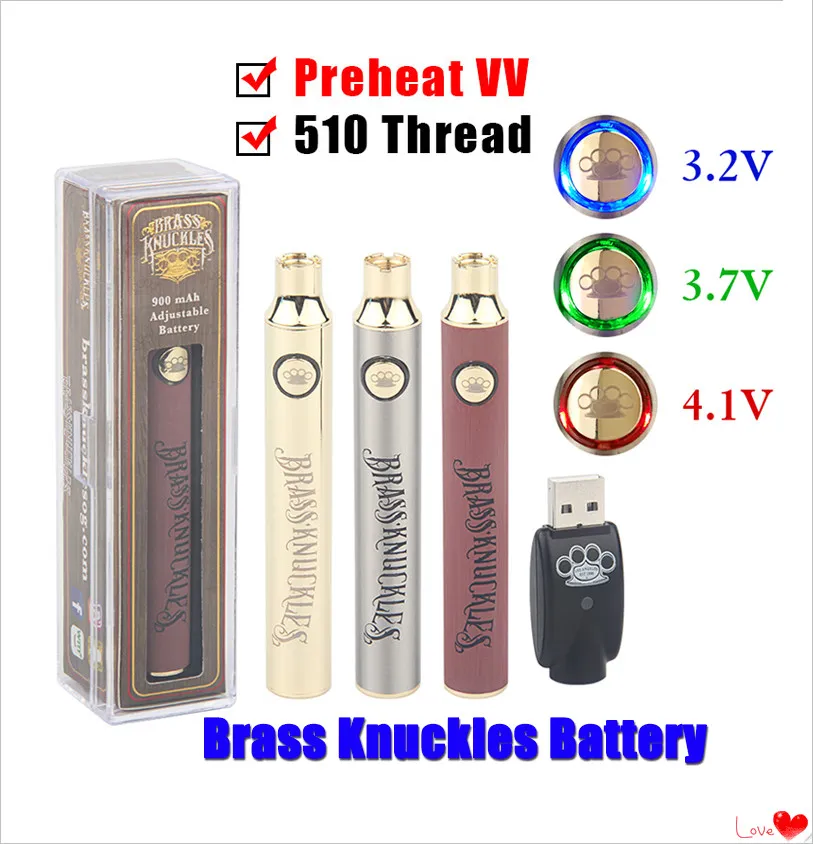
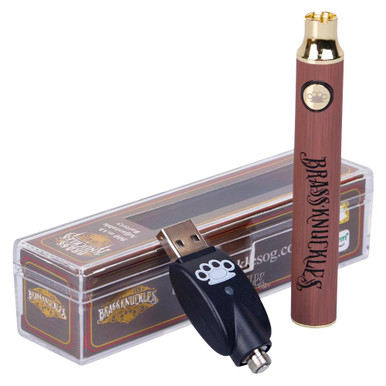
The Brass Knuckles battery is a rechargeable vape pen battery designed mainly for oil cartridges. It is famous for its sleek look and ease of use. Most versions use a standard 510-thread connection, which means they fit with many different cartridges on the market.
Some key features include:
- Variable voltage settings: You can adjust the power for different oils.
- Button or auto-draw options: Some models use a button to activate, while others work by inhaling.
- LED indicator light: Shows battery status and alerts you to problems.
The blinking light on a Brass Knuckles battery is not just for show. It’s a way for the device to communicate with you about its current state.
Why Does The Brass Knuckles Battery Blink?
When the LED light on your battery starts blinking, it’s trying to tell you something. The color and pattern of the blinking light can mean different things. Here are the most common reasons:
- Low Battery: A blinking light often means your battery is almost empty.
- Connection Issue: The battery might not be connecting well with the cartridge.
- Short Circuit: There may be a safety problem, like a short circuit.
- Overheating: The device is too hot and needs a break.
- Cartridge Problem: The cartridge might be defective or empty.
- Activation Error: The button is stuck, or the auto-draw sensor is confused.
Let’s break down these issues so you can spot and fix them quickly.
Decoding The Blinking Patterns
Different blink patterns signal different problems. Here’s a handy guide to what your Brass Knuckles battery is likely telling you:
| Blink Pattern | Color | Possible Meaning |
|---|---|---|
| 3 blinks | Red | Short circuit or connection issue |
| 5 blinks | White/Blue | Battery is low or dead |
| 10+ rapid blinks | Red/White | Overheating or extended draw |
| Continuous blinking | Any color | Button stuck or device error |
Note: Patterns may vary by model. Always check your specific device manual if you have one.
How To Fix Brass Knuckles Battery Blinking
Let’s dive into practical solutions for each issue. These steps work for most users and can quickly get you vaping again.
1. Charging The Battery
A common cause of blinking is a low or empty battery. Here’s what to do:
- Remove the cartridge.
- Plug the battery into the charger. Make sure the charger is working and the USB port is clean.
- Wait until the indicator light shows a full charge (often green or white).
- Reattach the cartridge and test.
Pro tip: Don’t overcharge. Unplug the battery once it’s full to help it last longer.
2. Checking Cartridge Connection
A dirty or loose connection can cause the battery to blink. Try these steps:
- Unscrew the cartridge.
- Use a cotton swab or soft cloth to clean the battery’s 510-thread connection.
- Check the cartridge’s bottom. If there’s oil or dirt, wipe it off gently.
- Reattach the cartridge firmly, but do not overtighten.
If the blinking stops, the problem was just a bad connection.
3. Fixing A Short Circuit
If the battery blinks red three times, you might have a short circuit. This is a safety feature. Here’s how to address it:
- Remove the cartridge and try a different one. If the blinking stops, the old cartridge is likely faulty.
- Check for damage to the battery. If you see burn marks or melting, stop using the device.
- Only use cartridges recommended for your battery.
4. Dealing With Overheating
If you take too many puffs in a row or use the battery at a high voltage, it can overheat. The device will blink to warn you.
- Let the battery rest for at least 10 minutes.
- Lower the voltage setting if your model allows.
- Avoid using the device in very hot environments.
5. Resolving Button Or Auto-draw Errors
Sometimes the activation button gets stuck, or the auto-draw sensor is confused.
- Rapidly press the button five times to reset most batteries.
- Make sure the button is not sticky or jammed. If it is, clean around it carefully.
- For auto-draw models, check that nothing is blocking the airflow holes.
If the problem continues, your battery may need repair or replacement.
How To Prevent Brass Knuckles Battery Problems
You can avoid most blinking issues with a few simple habits:
- Keep connections clean: Wipe the threads every few days.
- Charge carefully: Use only the charger that came with your device.
- Store safely: Keep the battery away from heat, water, and direct sunlight.
- Check cartridges before use: Don’t use damaged or leaking cartridges.
- Don’t overtighten: This can damage the threads and cause poor connection.
Common Mistakes Beginners Make
Many new users run into trouble because of small mistakes. Here are two non-obvious things to watch for:
- Using the wrong charger: Not all USB chargers are the same. Using a phone charger that gives too much power can damage your Brass Knuckles battery. Always use the charger made for your device.
- Ignoring cartridge resistance: Some cartridges are made for high-voltage batteries. If you use a low-resistance cartridge on a high setting, you can cause a short circuit and constant blinking.
Knowing these pitfalls can save you money and keep your device working longer.
Comparing Brass Knuckles Battery To Other Vape Batteries
How does the Brass Knuckles battery stack up against other popular options? Here’s a quick comparison:
| Feature | Brass Knuckles | CCELL | Ooze |
|---|---|---|---|
| Thread Type | 510 | 510 | 510 |
| Voltage Settings | Yes | Limited | Yes |
| Activation | Button/Auto-Draw | Auto-Draw | Button |
| Average Price | $$ | $$$ | $ |
| Durability | High | Very High | Medium |
Brass Knuckles is a good balance of price, features, and durability, which is why it’s popular.
Signs Your Battery Needs Replacement
Sometimes, blinking means the battery is at the end of its life. Here are warning signs:
- The battery loses charge quickly, even after full charging.
- The light blinks with every cartridge, not just one.
- The device feels hot or won’t turn on at all.
- Threads are stripped or the button is stuck permanently.
If you see these signs, it’s time for a new battery. Trying to fix a dying battery is usually not worth the effort.

Credit: www.mentor.at
Real-world Examples
Let’s look at some common user experiences:
Case 1: Red Blinking After Charging
Maria charged her Brass Knuckles battery overnight. In the morning, the light blinked red three times when she tried to vape. She cleaned the connection, but the problem continued. She tried a new cartridge, and it worked. The first cartridge was faulty.
Case 2: Continuous Blinking After Dropping
Alex dropped his battery on the ground. Now the light blinks every time he presses the button, even with different cartridges. The internal connection was damaged from the fall. He had to replace the battery.
Case 3: Overheating Warning
Sam likes to take long puffs. After a few strong draws, the light started blinking rapidly. He waited for 10 minutes, and the blinking stopped. Now, Sam takes shorter puffs and avoids this problem.
These examples show how small changes and checks can fix or prevent blinking issues.
Advanced Troubleshooting Tips
If you’ve tried the basic steps and your battery still blinks, try these advanced fixes:
- Test with a multimeter: If you have a multimeter, check that the battery voltage is correct (usually 3.3–4.2V).
- Update firmware: Some newer vape batteries can be updated via USB. Check the manufacturer’s website.
- Check for firmware lockout: If you pressed the button too many times in a row, the battery could lock. Try five quick presses to unlock.
Remember, not all problems are repairable. If your battery is old or damaged, replacement is the safest option.
Credit: sedadream.com
How To Choose The Right Replacement Battery
If you need a new battery, consider these factors:
- Thread compatibility: Make sure it fits 510-thread cartridges.
- Voltage range: More voltage options give you better control.
- Battery capacity: Measured in mAh (milliamp-hours); higher is better for longer use.
- Safety features: Look for overcharge, short-circuit, and overheat protection.
- Warranty: A good battery should come with at least a 6-month warranty.
Here’s a quick comparison of popular replacement options:
| Brand | Capacity (mAh) | Voltage Settings | Warranty |
|---|---|---|---|
| Brass Knuckles | 900 | Yes | 6 months |
| CCELL Palm | 550 | No | 12 months |
| Ooze Slim Twist | 320 | Yes | 6 months |
Pick a battery that matches your daily needs and usage style.
How To Extend The Life Of Your Brass Knuckles Battery
Want your battery to last longer? Follow these tips:
- Don’t leave it charging overnight: Overcharging wears out the battery.
- Store at half charge: If you won’t use it for a while, keep the battery at 40–60% charge.
- Avoid extreme temperatures: Both heat and cold can damage battery cells.
- Clean threads regularly: Dirty connections make the battery work harder.
With proper care, a Brass Knuckles battery can last over a year of regular use.
Safety Tips For Brass Knuckles Batteries
Vape batteries are generally safe, but misuse can cause problems like leaks, overheating, or even fire. Here’s how to stay safe:
- Use only the charger made for your battery.
- Never use a battery that is damaged or wet.
- Don’t carry loose batteries in your pocket with keys or coins.
- Stop using the battery if it feels very hot or smells strange.
If you want more safety information, check the official CDC vaping resource.
When To Seek Professional Help
If you’ve tried all troubleshooting steps and your battery still blinks, you may need professional help. Signs you should stop and ask an expert:
- The battery leaks or smells burnt.
- The light blinks in a strange pattern not in the manual.
- You see visible damage to the device.
Most vape shops can test your battery for free or a small fee. Sometimes, it’s safer and cheaper to replace it than to try risky repairs.
Credit: www.thecalmleaf.com
Frequently Asked Questions
Why Does My Brass Knuckles Battery Blink Red Three Times?
A red light blinking three times usually means a short circuit or connection problem. Try cleaning the connections and testing a new cartridge. If it keeps happening, your battery or cartridge may need replacing.
How Long Does It Take To Fully Charge A Brass Knuckles Battery?
Most Brass Knuckles batteries take about 1 to 2 hours to fully charge with the original charger. If charging takes much longer, the battery may be failing or the charger is weak.
Can I Use Any 510-thread Cartridge With My Brass Knuckles Battery?
You can use most 510-thread cartridges, but check the cartridge’s voltage requirements. Using a cartridge that needs higher voltage can cause blinking or poor performance.
Is It Safe To Use My Battery While Charging?
No, it’s not safe to vape while charging your battery. This can cause overheating and damage both the battery and charger.
How Do I Reset My Brass Knuckles Battery?
You can reset most batteries by pressing the activation button five times quickly. For auto-draw models, disconnect and reconnect the cartridge. Check your user manual for special steps.
Conclusion
Your Brass Knuckles battery blinking is not just an annoyance—it’s a message. With the right knowledge, you can decode what your device is telling you and keep it working safely. By following the tips and solutions above, you can avoid common mistakes, extend your battery’s life, and enjoy a better vaping experience.
If you ever feel unsure, don’t hesitate to seek expert advice. A little care goes a long way in keeping your device—and your sessions—smooth and worry-free.