
If you own a Philips Sonicare toothbrush, you may have noticed a blinking green light at some point. For many users, this small signal can be confusing or even worrying. Is it a sign of trouble? Is your toothbrush charging correctly? Should you do something? Understanding what the blinking green light means can help you use your device confidently and avoid common mistakes. In this guide, you’ll discover what causes the blinking green light, how to respond, and some practical tips for keeping your Sonicare in top shape.
What Does The Blinking Green Light Mean?
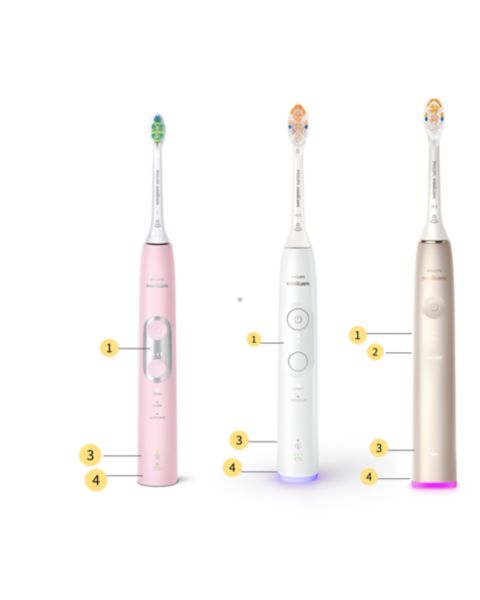
The blinking green light on a Philips Sonicare toothbrush is usually seen on the handle, near the bottom. Its main purpose is to indicate the charging status of your device. Here’s what you need to know:
- When you place the toothbrush on its charging base, a blinking green light means the battery is actively charging.
- Once the battery is fully charged, the green light may turn solid or disappear, depending on your model.
This simple feature helps you quickly check if your toothbrush is charging properly. However, not all Sonicare models behave the same way, and other lights may appear for different reasons.
Sonicare Model Differences
Philips Sonicare offers many toothbrush models, and the way their lights behave can vary. Below is a comparison of popular models and their indicator lights:
| Model | Blinking Green Light | Other Indicators |
|---|---|---|
| Sonicare ProtectiveClean | Yes (charging) | Battery indicator, amber for low battery |
| Sonicare DiamondClean | Yes (charging) | Solid green for fully charged, red for low battery |
| Sonicare EasyClean | No | Red light for low battery only |
| Sonicare FlexCare | Yes (charging) | Solid green for fully charged |
| Sonicare HealthyWhite | Yes (charging) | Amber for low battery, solid green for fully charged |
Always check your model’s user manual for specific light patterns. Some older models might not have a blinking green light at all, while newer models use it to show charging status.
Common Scenarios For Blinking Green Light
To help you understand when you’ll see the blinking green light, here are the main scenarios:
- Charging in Progress: This is the most common reason. When you place your toothbrush on the charger, the blinking green light shows the battery is charging.
- Initial Setup: After buying a new Sonicare, the first charge may cause the green light to blink for several hours.
- Battery Low and Charging: If the battery was low, the green light blinks until it’s fully charged.
- Software Updates (Rare): Some high-end models may blink during firmware updates, but this is rare.
If the green light blinks when the toothbrush is not on the charger, it could indicate a technical issue.
How Long Should The Light Blink?
Charging times vary by model and battery type. Here’s a simple breakdown:
| Model | Charging Time | Blinking Green Light Duration |
|---|---|---|
| Sonicare ProtectiveClean | Up to 24 hours | Until fully charged |
| DiamondClean | Up to 24 hours | Usually 6-8 hours |
| FlexCare | 16 hours | Until fully charged |
| HealthyWhite | 24 hours | Until fully charged |
If the green light blinks for longer than the standard charging time, or never turns solid, there might be a problem.
Troubleshooting The Blinking Green Light
Sometimes, the blinking green light can signal something is wrong. Here are practical steps to solve common issues:
1. Check The Charger Connection
Make sure your toothbrush is sitting correctly on the base. If the green light doesn’t blink when you expect, try:
- Repositioning the toothbrush
- Checking the power outlet
- Cleaning the charger contacts
2. Inspect The Battery
If your toothbrush doesn’t charge, the battery may be faulty or dead. Most Sonicare models use lithium-ion batteries that last about 3 years. Signs of battery trouble:
- Light blinks but toothbrush doesn’t charge
- Battery drains quickly
3. Look For Error Codes
Some models show error codes with light patterns. If the green light blinks rapidly or together with other lights, check your manual or visit the official Philips Sonicare support page.
4. Reset The Toothbrush
For software issues, try a simple reset:
- Remove the toothbrush from the charger
- Press and hold the power button for 5-10 seconds
- Place it back on the charger
5. Clean The Charging Base
Dust or toothpaste residue can block charging. Wipe the base with a dry cloth and make sure it’s dry before plugging in.
6. Contact Support
If none of these steps help, reach out to Philips customer support. They can offer advanced troubleshooting or repair options.
Non-obvious Insights For Users
Most guides cover basic steps, but here are two important insights many beginners miss:
- Charging Habits Matter: Keeping your Sonicare on the charger all the time can shorten battery life. Try to let the battery drain every few weeks before recharging fully. This helps the battery stay healthy longer.
- Travel Case Charging: Some models come with a USB travel case. If the green light blinks only when using the travel charger, check the cable and USB port. Many users mistakenly think the toothbrush is faulty when it’s just a poor connection.

Credit: www.reddit.com
Comparison With Other Electric Toothbrush Brands
Wondering how Sonicare’s blinking green light compares to other brands? Here’s a simple comparison:
| Brand | Charging Indicator | Light Behavior |
|---|---|---|
| Philips Sonicare | Blinking green light | Blinks while charging, solid for full |
| Oral-B | Solid green light | Stays solid during charging, turns off when full |
| Colgate Hum | Blue blinking light | Blinks during charging, solid for full |
| Fairywill | Blinking blue light | Blinks during charging, turns off when full |
Sonicare’s blinking green light is a clear signal that’s easy to spot. Other brands use different colors or patterns, so it’s important to read your device’s manual.
Battery Life And Charging Tips
To get the best from your Sonicare toothbrush, follow these tips:
- Avoid overcharging: Unplug or remove from base once fully charged.
- Charge fully before first use: This helps battery performance.
- Clean charging contacts regularly: Dust or toothpaste can block charging.
- Use original chargers: Third-party chargers may not work correctly.
- Store in a dry place: Moisture can damage electronics.
If you notice the blinking green light isn’t behaving as usual, check these basics first.
Credit: www.usa.philips.com
When To Replace Your Sonicare Toothbrush
A blinking green light doesn’t always mean it’s time for a new toothbrush. However, you should consider replacement if:
- Battery won’t hold a charge after full cycle
- Light patterns are abnormal even after troubleshooting
- Toothbrush stops working despite charging
Most Sonicare toothbrushes last 2-3 years with proper care. If your device is older and shows charging problems, replacing it may be the best solution.
Environmental Impact Of Battery Disposal
When replacing your toothbrush, don’t throw the old battery in the trash. Lithium-ion batteries can be harmful to the environment. Philips recommends recycling used batteries at special collection points. Learn more about safe disposal on the official Philips website or local recycling centers.

Credit: www.youtube.com
Where To Find Official Information
For detailed troubleshooting and user manuals, visit the official Philips Sonicare support website. You’ll find specific guides, warranty details, and FAQs. For extra technical details, check this Philips Sonicare Support page.
Frequently Asked Questions
What Does The Blinking Green Light Mean On My Philips Sonicare?
The blinking green light usually means your toothbrush is charging. It appears when the device is placed on the charger. Once fully charged, the light may turn solid or disappear, depending on your model.
How Long Should The Blinking Green Light Stay On?
Charging times depend on your model, but generally the green light blinks for 6-24 hours. If it stays on much longer, check for charging or battery issues.
Can The Blinking Green Light Signal A Problem?
Normally, it’s just showing charging status. But if it blinks rapidly, or appears when the toothbrush is not charging, it could mean a battery or software error. Try troubleshooting steps or contact support.
Is It Safe To Leave My Sonicare Charging All The Time?
It’s safe, but not ideal for battery life. Letting the battery drain fully every few weeks helps keep it healthy. Overcharging can reduce battery lifespan.
What Should I Do If The Blinking Green Light Won’t Stop?
First, check the charger and battery. Clean contacts, reset the toothbrush, and try a different outlet. If the light still won’t stop, contact Philips support for further help.
Conclusion
The blinking green light on your Philips Sonicare is a useful feature, but it can cause confusion if you don’t know what it means. By understanding its purpose and how it works, you can keep your toothbrush running smoothly and avoid unnecessary worry.
Always check your model’s manual for the most accurate guidance. If you notice any unusual behavior, follow the troubleshooting steps, and don’t hesitate to seek expert support. With proper care, your Sonicare will keep your smile bright for years to come.