
Many people enjoy the convenience of disposable vapes like the Lost Mary. They’re simple, portable, and easy to use—until something unexpected happens. If you’ve noticed your Lost Mary blinking while charging, you may feel confused or even worried that your device is broken. This blinking light isn’t just for show; it’s a signal from your device. Understanding what it means can help you avoid wasting money, prevent device damage, and stay safe.
In this article, you’ll find out exactly why your Lost Mary is blinking during charging, what the different blink patterns mean, and how to fix common problems. You’ll also learn practical tips for getting the most out of your device, ways to avoid mistakes, and answers to the most frequent questions about Lost Mary charging issues.
What Does The Blinking Light On Lost Mary Mean?
Before you jump to conclusions, it’s important to know that the blinking light on your Lost Mary is part of its normal design. The LED indicator gives you information about the device’s status—especially while charging or if there’s a problem.
The most common reasons for blinking include:
- Charging status: The device uses blinking to show it’s charging, fully charged, or has a charging error.
- Battery issues: Low battery, old battery, or battery not making contact can cause the light to blink.
- Connection problems: If the charging cable or port is loose or dirty, the device may blink.
- Device errors: Short circuits, overheating, or internal faults can trigger blinking.
Example: Different Blink Patterns
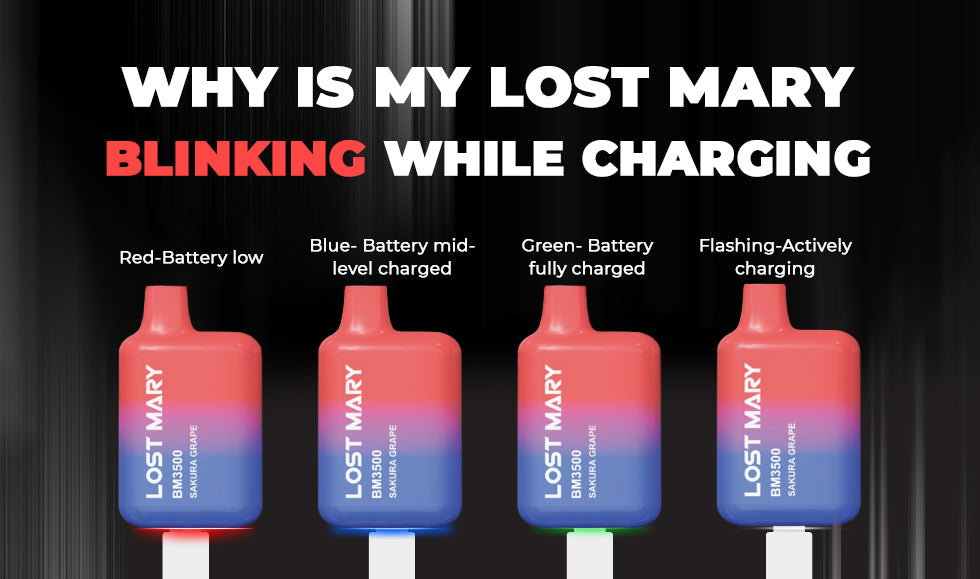
Most Lost Mary vapes use a single LED that can blink in different colors and speeds. For example:
- Slow blinking: Device is charging normally.
- Solid light: Charging is complete.
- Rapid blinking (3–10 times): Error detected, such as battery or connection problem.
Knowing these patterns helps you quickly judge if your device is working or needs attention.
Common Reasons Why Lost Mary Blinks While Charging
Let’s look at the specific reasons why your device might blink during charging.
1. Normal Charging Process
When you plug in your Lost Mary and the light blinks slowly or steadily, this usually means it’s charging as expected. The LED shows it is receiving power. Once charging finishes, the light may turn solid or turn off.
- Tip: Check the manual for your exact model, as light signals can vary.
2. Low Battery Warning
If you plug in a nearly empty device, the light may blink more noticeably at first. This is a low battery warning. The blinking should slow down or stop after a few minutes as the battery starts to fill.
3. Charging Cable Or Port Issues
A loose, damaged, or dirty cable can prevent proper charging. The device blinks rapidly to show it’s not getting a steady charge.
- Non-obvious insight: Using a cable that is too long or not rated for vaping devices can cause this issue even if the cable looks fine.
4. Battery Connection Problems
If the internal battery is not making good contact—maybe due to drops, dust, or wear—the device will blink to warn you. Sometimes, resetting the device (unplugging and replugging) can help.
5. Overheating
If the battery or circuit gets too hot, the device’s safety system will make the light blink quickly. Stop charging and let it cool down. Overheating can be dangerous.
6. Device Error Or Fault
A blinking light that doesn’t stop or changes color suddenly can mean a more serious problem, like a short circuit or broken part inside the device.
How Lost Mary Charging Works
Understanding how your Lost Mary charges can help you solve blinking problems more easily.
How Charging Circuits Work
When you connect your device, the internal circuit checks for safe voltage and current. If everything is normal, charging starts and the LED blinks to show this. If there’s an error, charging stops and the LED blinks faster.
Typical Charging Time
Most Lost Mary vapes take between 30 minutes and 1 hour to charge, depending on the model and battery size. Charging for much longer or shorter can signal a problem.
- Example: If your device blinks for two hours and never stops, this is not normal.
Charging Specifications
Here’s a comparison of popular Lost Mary models and their charging details:
| Model | Battery Capacity | Charging Port | Charge Time | LED Behavior |
|---|---|---|---|---|
| Lost Mary OS5000 | 650 mAh | USB-C | ~1 hour | Blinks while charging, solid when full |
| Lost Mary MO5000 | 500 mAh | USB-C | 40-60 min | Blinks during charge, off when done |
| Lost Mary BM600 | 360 mAh | Micro-USB | 30-50 min | Blinks while charging, off when full |
Troubleshooting: What To Do If Lost Mary Blinks While Charging
If your Lost Mary is blinking and you’re not sure why, follow these steps to find and fix the problem.
1. Check The Charging Cable And Adapter
- Make sure you’re using a quality cable that fits snugly.
- Avoid cheap or damaged cables.
- Try a different adapter or USB port—sometimes a wall charger works better than a laptop port.
2. Clean The Charging Port
- Dust or lint can block the connection.
- Use a wooden toothpick or small brush to gently clean the port.
Non-obvious tip: Never use metal objects to clean the port, as this can cause a short circuit.
3. Let The Device Cool Down
- If the device feels hot, unplug it and wait at least 10 minutes.
- Charging a hot vape can damage the battery and cause blinking errors.
4. Try A Different Power Source
- Some USB outlets (like those on TVs or cars) may not provide enough power.
- Use a direct wall charger for the best results.
5. Inspect The Device For Damage
- Look for cracks, dents, or signs of liquid damage.
- Internal damage can interrupt charging and make the LED blink.
6. Wait And Observe
Sometimes the blinking stops after a few minutes—especially if you plugged in with a low battery. Leave it for 10–20 minutes and check again.
7. Restart Or Reset
For some rechargeable models, unplugging and reconnecting the device can reset the charging circuit.
8. Replace The Device If Needed
If none of these steps work, the battery or internal electronics may be faulty. Disposable vapes are not designed for repair, so replacing the device is often the best option.
Blink Patterns And Their Meaning
Lost Mary devices use different blink patterns to communicate. Here’s a handy chart:
| Blink Pattern | Possible Meaning | Suggested Action |
|---|---|---|
| Slow, steady blinking | Charging normally | Wait until full charge |
| Solid light | Fully charged | Unplug and use |
| Rapid blinking (3–10 times) | Error or fault | Check cable/port, clean, or replace device |
| No light at all | Battery dead or device broken | Try different charger or replace device |
How To Extend The Life Of Your Lost Mary
A blinking light doesn’t always mean disaster. With the right habits, you can keep your device working longer and avoid many charging issues.
Use The Right Charger
Always use the cable and adapter that came with your device, or buy a replacement from a trusted brand. Using a charger with the wrong voltage can cause the battery to age faster or fail completely.
Don’t Overcharge
Unplug your device once it’s fully charged. Leaving it connected overnight can stress the battery over time. Most Lost Mary vapes have protection circuits, but it’s still a good habit.
Keep It Clean
Dust and pocket lint are common enemies of the USB port. Clean the port every few weeks with a non-metal tool.
Store At Room Temperature
Avoid charging or storing your device in very hot or cold places, like a car dashboard or near a heater. Extreme temperatures can trigger blinking and reduce battery life.
Avoid Dropping Or Crushing
Physical damage can break internal parts or loosen battery contacts, causing charging issues and blinking errors.
Differences Between Lost Mary And Other Disposable Vapes
Some users wonder if blinking while charging is unique to Lost Mary, or if other brands do the same. Here’s how Lost Mary compares to similar devices:
| Brand | Blinking While Charging | Common Charging Issues |
|---|---|---|
| Lost Mary | Yes—normal and error signals | Cable issues, battery faults |
| Elf Bar | Yes—similar patterns | Port damage, overheating |
| Juul | Yes—different light colors | Battery age, contact issues |
Non-obvious insight: While light signals are similar, each brand uses its own colors and blink speeds. Always check your device’s manual for the most accurate information.
When To Worry: Serious Issues Behind Blinking
While most blinking is harmless, certain situations mean you should stop using the device:
- Blinking does not stop after charging for over an hour.
- Device gets very hot while charging.
- You smell burning or see smoke.
- The device was dropped in water or on a hard surface and started blinking.
These are signs of a serious internal fault. In these cases, stop using the device and dispose of it safely. Never try to open or repair a disposable vape.
Safety Precautions When Charging
Disposable vapes are generally safe, but following these tips reduces risk:
- Use only official or high-quality charging cables and adapters.
- Charge on a fireproof surface, away from flammable materials.
- Never leave charging devices unattended for long periods.
- Do not charge near water or in very humid places.
- Keep away from children and pets.
If you ever see swelling, leaking, or smell chemicals, dispose of the device right away.
Can Lost Mary Devices Be Repaired?
Most Lost Mary vapes are designed as disposables. They are not meant to be opened or repaired. Trying to fix them can be dangerous and may void any warranty.
- If your device is under warranty, contact the seller or manufacturer for a replacement.
- If out of warranty, replace the device with a new one. The cost of repair is usually higher than buying a new disposable.
For more about battery safety and handling, see information from the U.S. Food and Drug Administration.
Myths And Misunderstandings About Blinking Lost Mary Vapes
Many users worry that a blinking light always means the device is ruined. In reality, most cases are easy to fix or not a problem at all.
- Myth: Blinking means the device is fake.
Fact: Even real Lost Mary vapes blink for normal reasons like charging.
- Myth: You can fix all errors by pressing the button repeatedly.
Fact: Most disposable vapes have no reset button. Unplugging and replugging is your only option.
- Myth: Using any USB cable is fine.
Fact: Low-quality cables cause many charging errors and blinking problems.
Understanding these myths helps you troubleshoot more confidently.
How To Choose A Reliable Lost Mary Vape
Not all Lost Mary vapes are equal. Buying from a trusted source helps you avoid defective or counterfeit products, which often have charging issues.
- Buy from licensed vape shops or official online stores.
- Check for an authenticity code on the package or device.
- Avoid deals that are too cheap—they may be fakes with poor quality control.
Counterfeit vapes often have LED issues, including blinking at the wrong times.

Credit: antitremor.org
What If My Lost Mary Won’t Stop Blinking?
If you’ve tried all troubleshooting steps and your device keeps blinking while charging, here’s what to do:
- Try a new cable and adapter to rule out power issues.
- Charge in a different location (different room, outlet, or building).
- Check for visible damage—if you see any, replace the device.
- Contact customer support if the device is new and still under warranty.
If none of these work, it’s time to safely dispose of the device.
Environmentally Responsible Disposal
Disposable vapes like Lost Mary contain lithium batteries. Never throw them in the regular trash—this can cause fires or environmental damage.
- Take used devices to an e-waste recycling center.
- Ask your vape shop if they accept old devices for proper disposal.
- Never try to break open or burn a used vape.
Proper disposal is good for the environment and local safety.
Credit: vapejuicedepot.com
Frequently Asked Questions
Why Is My Lost Mary Blinking 3 Times While Charging?
A 3-blink pattern usually means a charging error, often caused by a bad cable, poor contact, or a battery problem. Try using a different cable and clean the port before charging again. If the problem continues, the device may need replacing.
Can I Use My Lost Mary While It’s Charging?
It’s best not to use your Lost Mary while charging. Most disposables are not designed for “pass-through” vaping. Using the device while charging can overheat the battery or cause errors. Always wait until charging is finished.
Is Blinking During Charging A Sign Of A Fake Lost Mary?
Not always. Blinking lights are normal for both real and fake devices during charging or errors. However, counterfeit devices may blink at the wrong times or not charge properly. Always buy from trusted sources and check for authenticity codes.
What Should I Do If My Lost Mary Blinks But Doesn’t Charge?
First, check the cable and charging port for damage or dirt. Try a different cable and adapter. If the device still won’t charge, it may have an internal battery issue. In that case, replace the device—disposables are not repairable.
How Do I Know When My Lost Mary Is Fully Charged?
Most models show a solid light or turn off the LED when fully charged. Charging usually takes less than one hour. If the light keeps blinking for more than 90 minutes, unplug the device and check for problems.
Conclusion
A blinking Lost Mary during charging isn’t a reason to panic. In most cases, it’s a simple warning or just part of the normal charging process. By understanding what the light signals mean and following safe charging habits, you can keep your device working well and avoid most common problems.
If in doubt, replace the device and always dispose of used vapes responsibly.