
If you see a blinking flame icon on your thermostat, you may feel confused or even worried. What does this symbol mean? Is your heating system in trouble? Should you call a technician right away? Many homeowners see this blinking flame but don’t fully understand its purpose or what it’s telling you. If you want to feel confident and make smart decisions about your home’s comfort, this guide explains everything you need to know about the thermostat blinking flame—from basic meanings to troubleshooting, and when to seek professional help.
What Does The Blinking Flame Mean?
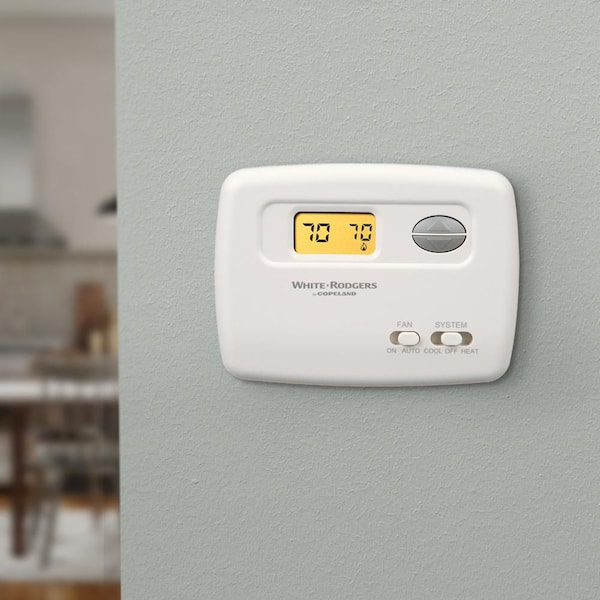
Most modern thermostats use simple icons to show the current status of your heating system. The blinking flame is one of the most common. Typically, this icon means your thermostat is sending a signal to your furnace or heat pump to turn on. But the blinking is not always a problem. Sometimes, it’s just a normal indicator.
Normal Vs. Warning
- Normal operation: If the flame blinks when you switch your thermostat to “heat,” it usually means the system is starting up. Many thermostats blink for a few minutes as the furnace warms up.
- Warning or error: If the flame keeps blinking for a long time, or appears when you haven’t turned on the heat, it could signal a problem. For example, the thermostat may not be getting a response from the furnace.
Examples
- When you set your thermostat to 70°F and the current room temperature is 65°F, the blinking flame shows the system is working to reach the set point.
- If your furnace is off and you see a blinking flame, this could mean the thermostat is calling for heat but the furnace isn’t responding.
Common Reasons For A Blinking Flame
Understanding why your thermostat displays a blinking flame helps you decide what to do next. There are several possible reasons:
- Startup Delay: Many systems have a built-in delay to protect the furnace. The flame blinks during this waiting period, often 1–5 minutes.
- Heating System Error: If your furnace has a fault, the thermostat may keep blinking to signal that heat is not coming on.
- Lost Communication: If the thermostat can’t connect with the furnace (for example, due to wiring problems), it may blink to indicate trouble.
- Low Battery: Some thermostats blink the flame icon when battery power is low.
- Dirty Filters: A clogged air filter can cause the system to delay or fail to start, sometimes triggering the blinking flame.
How Thermostats Communicate With Heating Systems
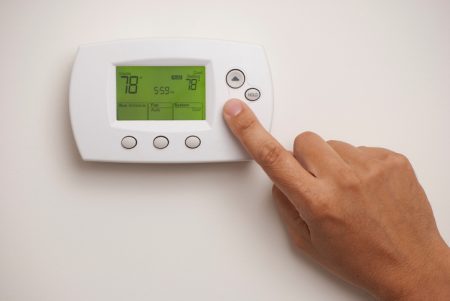
To understand the blinking flame better, it helps to know how thermostats and heating systems work together. Your thermostat acts as a control center, sending signals to your furnace or heat pump based on the room temperature and your settings.
Signal Path
- You set your preferred temperature.
- The thermostat senses the current temperature.
- If heating is needed, it sends a signal to the furnace.
- The furnace receives the signal and starts up.
- Once the furnace is running, the thermostat may stop blinking the flame and show a steady icon.
Electronic Vs. Smart Thermostats
Modern thermostats, like Nest or Ecobee, can show detailed icons and messages. Older thermostats might just blink a simple flame. Smart thermostats also connect to Wi-Fi, which means a blinking flame could indicate a lost internet connection or an update in progress.
Troubleshooting The Blinking Flame
If you see a blinking flame and aren’t sure if it’s normal or a warning, try these steps:
Step 1: Check The Settings
- Make sure your thermostat is set to “heat.”
- Check that the temperature is higher than the current room temperature.
Step 2: Wait A Few Minutes
- Most systems have a delay. Wait up to 5 minutes to see if the flame stops blinking.
Step 3: Inspect Furnace Status
- Go to your furnace and check if it’s running. You should hear a fan or see lights.
- If the furnace isn’t running, check for error codes or warning lights.
Step 4: Change The Air Filter
- A dirty filter can block airflow and cause the furnace to delay or fail.
- Replace the filter and see if the blinking stops.
Step 5: Check Battery And Power
- If your thermostat uses batteries, replace them.
- For wired thermostats, check if the display is clear and bright.
Step 6: Reset The Thermostat
- Most thermostats have a reset button or can be restarted by removing batteries and reinserting them.
- Wait for the system to reboot and observe the flame icon.
Step 7: Inspect Wiring
- Loose or damaged wires can cause communication issues.
- Only check wiring if you’re comfortable—otherwise, call a professional.
Step 8: Look For Manufacturer Codes
- Some thermostats display error codes alongside the blinking flame.
- Search online or in your manual for what the code means.
Credit: shachahchristianschool.com
When To Call A Professional
Not all blinking flame issues require expert help. But there are times when calling a licensed technician is the smart choice.
Signs You Need Help
- The blinking flame stays on for more than 10 minutes with no heat.
- You notice error codes or warning lights on the furnace.
- The thermostat display is blank or unresponsive.
- You smell gas or notice burning odors.
- After replacing the filter and batteries, the problem continues.
What A Technician Will Check
- Furnace operation, including burners and fans.
- Electrical connections and thermostat wiring.
- Error codes and manufacturer diagnostics.
- Safety switches and sensors.
Types Of Thermostat Blinking Flame Icons
Different thermostat brands use unique flame icons and blinking patterns. Here are some common examples:
Honeywell Thermostats
- A blinking flame means the system is in a heat delay mode, usually after turning on.
- If the flame blinks for more than 5–10 minutes, check for errors.
Nest Thermostat
- The blinking flame may appear during startup or when Wi-Fi is disconnected.
- Nest also shows messages like “Heating Starting Soon.”
Ecobee Thermostat
- The flame blinks if the thermostat is calling for heat but hasn’t detected the furnace running.
- Ecobee may also show “Aux Heat” or “Emergency Heat” if the main system fails.
Analog Thermostats
- Older models may simply blink a red or orange light instead of a flame icon.
Real-world Data: Typical Causes And Fixes
Let’s look at some real-world data to understand how often blinking flame issues occur and how they’re resolved.
| Cause | Percentage of Cases | Common Fix |
|---|---|---|
| Startup Delay | 45% | Wait 1–5 minutes |
| Dirty Filter | 20% | Replace filter |
| Low Battery | 10% | Replace batteries |
| Wiring Problem | 15% | Check connections |
| Heating System Error | 10% | Call technician |
This data shows that the most common cause is a simple startup delay. Only about 10% of cases need professional help.
Comparing Thermostat Brands: Blinking Flame Features
Some thermostats are better at communicating issues than others. Here’s a comparison of popular brands and their blinking flame features.
| Brand | Blinking Flame Icon | Error Messages | Extra Features |
|---|---|---|---|
| Honeywell | Yes | Basic codes | Delay timer |
| Nest | Yes | Detailed messages | Wi-Fi status |
| Ecobee | Yes | Advanced diagnostics | Aux/Emergency heat |
| Lux | Yes | Limited codes | Simple interface |
| Analog | No icon | Lights only | No digital features |
As you can see, smart thermostats like Nest and Ecobee offer more information, which helps you troubleshoot faster.
Credit: www.air-treatment.com
How To Prevent Blinking Flame Issues
Preventing problems is always easier than fixing them. Here’s how to keep your heating system and thermostat working smoothly.
- Change air filters regularly (every 1–3 months).
- Check thermostat batteries every season.
- Schedule yearly furnace maintenance with a professional.
- Keep thermostat software updated (for smart models).
- Clean thermostat contacts if you use an older analog model.
- Learn your thermostat’s icons and codes—read the manual.
- Keep vents clear so air flows easily.
Non-obvious Insights
- Many homeowners forget that thermostat location matters. If it’s near a draft or heat source, the readings can be wrong, causing unnecessary blinking.
- If you use programmable thermostats, sudden changes in schedule can cause the blinking flame to appear more often as the system adjusts.
The Role Of Furnace Safety Features
Modern furnaces have built-in safety features that can cause the thermostat to blink the flame icon. These features protect your home but can be confusing.
Examples
- High-limit switch: If the furnace overheats, it shuts off and the thermostat keeps blinking.
- Flame sensor: If the sensor is dirty or fails, the furnace won’t start and the blinking flame stays on.
- Pressure switch: If the venting is blocked, the furnace won’t run.
Practical Advice
If your furnace stops working and the blinking flame stays on, check for error codes on the furnace itself. Many models have a flashing light or display that tells you the problem.
How To Read Thermostat Error Codes
Some thermostats show error codes along with the blinking flame. These codes can help you pinpoint the issue.
Common Codes
- E1/E2: Communication error between thermostat and furnace.
- Low Battery: Replace batteries.
- Filter: Change air filter.
- Heat Delay: System is warming up.
How To Use Codes
- Look up the code in your thermostat’s manual or online.
- Follow the recommended steps.
- If the code repeats after fixing, call a technician.
How To Choose The Right Thermostat
If you’re considering upgrading your thermostat, choosing the right model can prevent blinking flame confusion.
Key Factors
- Compatibility: Make sure the thermostat works with your furnace type (gas, electric, heat pump).
- Ease of use: Choose models with clear icons and messages.
- Smart features: Wi-Fi, app control, and voice assistants can help.
- Reliability: Trusted brands have fewer issues.
Common Mistakes
- Buying a thermostat that’s not compatible with your system.
- Mounting the thermostat in the wrong location (too close to vents or windows).
- Ignoring the manual and missing key features.
Comparison Table: Thermostat Features
| Feature | Basic Thermostat | Smart Thermostat |
|---|---|---|
| Blinking Flame Icon | Yes | Yes |
| Error Messages | Limited | Detailed |
| Remote Control | No | Yes |
| Learning Schedule | No | Yes |
| Energy Reports | No | Yes |
Safety Tips When Handling Heating Problems
If you ever need to handle a blinking flame issue, safety comes first.
- Turn off power before checking wiring.
- Don’t ignore gas smells—leave the house and call emergency services.
- Never block furnace vents.
- Avoid opening furnace panels unless you know what you’re doing.
- Keep children away from thermostats and furnaces during troubleshooting.
Cost Of Fixing Blinking Flame Issues
You might wonder how much it costs to fix blinking flame problems. Costs vary depending on the cause.
- DIY fixes (filter change, battery replacement): $5–$20
- Professional troubleshooting: $75–$150 for a diagnostic visit
- Major repairs (wiring, furnace parts): $100–$500+
- Thermostat replacement: $50–$300, depending on features
Practical Insight
Most blinking flame issues are solved with simple fixes costing less than $20. Only rare cases need expensive repairs.
How To Avoid Common Blinking Flame Mistakes
Many homeowners make mistakes when dealing with the blinking flame icon.
- Ignoring the manual: Always check your thermostat’s manual first.
- Overreacting: Waiting a few minutes solves most blinking flame cases.
- Replacing parts unnecessarily: Check simple things (filter, batteries) before buying new parts.
- Skipping maintenance: Regular maintenance prevents most problems.
Using Online Resources
If you need more information, online resources from trusted sites can help. For example, the U.S. Department of Energy has guides on thermostat troubleshooting. Find helpful tips at Energy.gov.
Credit: www.homedepot.com
Frequently Asked Questions
What Does A Blinking Flame Mean On My Thermostat?
A blinking flame icon usually means your thermostat is calling for heat. It can also indicate a startup delay or an issue with your furnace. If the icon stays on for a long time without heating, check for simple fixes or call a technician.
How Long Should The Flame Blink Before Heat Starts?
Most systems have a startup delay of 1–5 minutes. If the flame blinks longer than 10 minutes without heat, it could signal a problem.
Should I Replace My Thermostat If The Blinking Flame Won’t Stop?
Not always. Try replacing batteries, changing the filter, and checking settings first. If the flame still blinks, call a professional to check for wiring or furnace issues. Only replace the thermostat if it’s faulty.
Can Dirty Filters Cause The Blinking Flame?
Yes, dirty air filters can block airflow and delay the furnace startup, making the flame icon blink. Changing filters regularly prevents this problem.
Are Blinking Flame Issues Dangerous?
Most blinking flame issues are not dangerous. But if you smell gas, see smoke, or the furnace won’t start, turn off the system and call for help. Safety is always the priority.
Conclusion
A blinking flame icon doesn’t have to be a mystery. With clear steps and basic knowledge, you can solve most issues yourself and keep your home comfortable. Learning to read your thermostat’s signals saves time, money, and worry. If you ever need more help, don’t hesitate to contact a professional or use trusted online resources.