
Many vape users have faced a situation where their Ooze battery starts blinking green. It can be confusing, especially if you’re not sure what it means or how to fix it. The blinking green light is a signal from your battery, trying to tell you something important. If you’ve found yourself wondering “Why is my Ooze battery blinking green?” you’re not alone. In this guide, you’ll discover the most common causes, how to troubleshoot, and what to do if nothing works.
What Does A Blinking Green Light Mean?
An Ooze battery blinking green is not random. It’s the battery’s way of communicating an issue. The green light can flash for several reasons:
- Connection problem between the battery and cartridge
- Low battery power
- Short circuit or internal error
- Charger or cable issue
Understanding the root cause is the first step to solving the problem. Each type of blink (fast, slow, number of flashes) can give you a clue.
Common Reasons For Ooze Battery Blinking Green
Let’s look at the main causes behind a green blinking light on your Ooze vape battery.
1. Poor Connection Between Battery And Cartridge
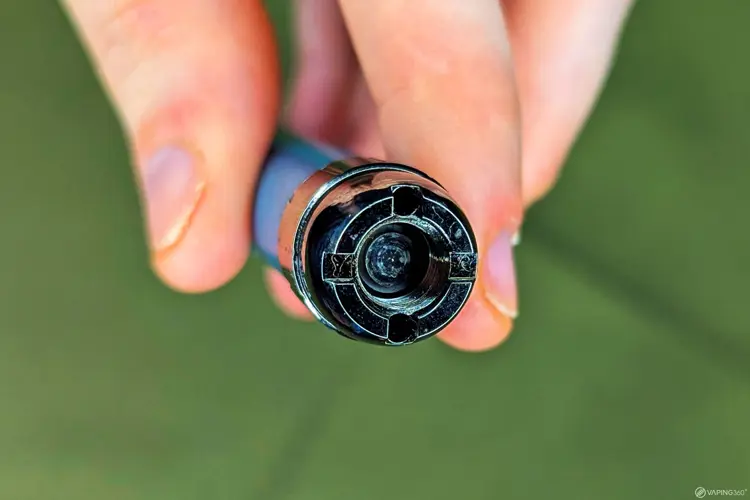
The most frequent reason for a blinking green light is a bad connection. This happens when the battery isn’t making solid contact with the cartridge.
- Dirt or oil on the connection points
- Cartridge not screwed in fully
- Threading issues (cross-threaded or stripped threads)
A dirty or loose connection prevents the battery from working correctly.
2. Low Battery Or Dead Battery
If your battery is almost empty or completely drained, it may blink green to warn you. In many models, a blinking green light (sometimes 10 times) signals that it’s time to charge.
3. Charger Or Charging Cable Problems
Sometimes, the issue isn’t with your vape, but with the charger or cable. A green blinking light can mean the battery recognizes the charger, but there’s a fault or interruption in the charging process.
4. Short Circuit Or Internal Error
If there’s a short circuit inside the battery or cartridge, or a more serious internal error, the battery will blink green to protect itself. This is a safety feature.
5. Cartridge Issues
A faulty or incompatible cartridge can cause blinking. Not all cartridges work with all batteries. Some have slightly different sizes or electrical properties.
How To Fix Ooze Battery Blinking Green
Once you know the possible reasons, troubleshooting becomes much easier. Follow these steps, one at a time, to find and fix the problem.
Step 1: Clean The Connection Points
- Remove the cartridge from the battery.
- Use a cotton swab or tissue with a little rubbing alcohol.
- Gently clean the metal contact points on both the battery and cartridge.
- Let them dry for a few seconds, then reattach.
A clean connection often solves the problem immediately.
Step 2: Check The Cartridge
- Make sure the cartridge is compatible with your Ooze battery.
- Inspect the bottom of the cartridge for any damage or debris.
- Screw it in gently but firmly—do not force it.
If you have a spare cartridge, try that one. If the blinking stops, your old cartridge is likely the issue.
Step 3: Charge The Battery
- Plug your battery into the charger that came with it.
- If possible, use a different charger or cable to rule out a charger problem.
- Allow it to charge fully before trying again.
Pro tip: Some users find that letting the battery rest for 30 minutes before charging can help.
Step 4: Test With A Different Charger Or Cartridge
If you have access to another charger or cartridge, try them. This can help you find out if your original charger or cartridge is the cause.
Step 5: Reset The Battery
Some Ooze batteries have a reset feature. To reset:
- Remove any attached cartridge.
- Tap the power button 5 times quickly.
- Wait a few seconds, then try again.
If your battery does not have a reset, simply turning it off and on may help.
Step 6: Inspect For Damage
Look for visible signs of damage:
- Cracks in the battery case
- Leaking fluid
- Burn marks near connection points
If you see any of these, stop using the battery immediately.
How To Tell Which Problem You Have
The number and speed of green flashes can help you diagnose the issue. Here’s a handy guide:
| Green Flash Pattern | Possible Cause |
|---|---|
| 10 quick blinks | Low battery or needs recharge |
| 3-5 slow blinks | Connection issue |
| Continuous blinking | Short circuit or serious error |
| 1 long blink | Cartridge not detected |
Always check your battery’s specific manual, as some models may have unique blink codes.
Credit: www.oozelife.com
Preventing Future Blinking Issues
Taking care of your Ooze battery can help you avoid green blinking problems in the future.
Keep It Clean
Regularly clean the connection points to prevent dirt buildup. Avoid touching them with your fingers.
Charge Properly
- Use only chargers designed for your battery.
- Don’t overcharge—unplug once full.
- Avoid using damaged cables.
Store Safely
Keep your battery in a dry, cool place. Avoid high heat, moisture, and direct sunlight.
Handle With Care
Do not drop or crush your battery. Even minor damage can cause issues later.
When To Replace Your Ooze Battery
Batteries don’t last forever. Here’s how to know it’s time for a replacement:
| Sign | What It Means |
|---|---|
| Frequent blinking even after cleaning | Battery may be worn out |
| Does not hold charge | Cell is at end of life |
| Visible damage or swelling | Unsafe to use |
| Unusual heat during use | Possible internal failure |
If you notice any of these, it’s safer and often cheaper to buy a new battery.
Non-obvious Insights For Beginners
Many new users miss these important points:
- Not all chargers are safe: Even if a cable fits, it may deliver the wrong voltage or current. Use the charger that came with your battery or one from the manufacturer.
- Cartridge resistance matters: Some Ooze batteries are only compatible with cartridges in a certain resistance range (measured in ohms). Using the wrong type can cause blinking and even damage the battery.
- Oil leaks can cause hidden issues: If your cartridge leaks, oil can seep into the battery’s connection and cause short circuits. Wipe off leaks immediately and let the battery dry before use.
Ooze Battery Vs. Other Vape Batteries
How does the Ooze battery compare to other common vape batteries in terms of blinking warnings?
| Brand | Green Blink Meaning | Common Fix |
|---|---|---|
| Ooze | Connection or low battery | Clean connection, charge |
| Vape Pen (generic) | Low battery or error | Charge battery, reset |
| 510 Thread | Short circuit, incompatible cart | Change cartridge, check charger |
| Yocan | Cartridge error or dead battery | Replace cartridge, charge |
This comparison shows most vape batteries use blinking lights to warn about similar issues, but the exact cause and solution can vary.

Credit: www.oozelife.com
What To Do If Nothing Works
If you’ve tried all the fixes and your Ooze battery still blinks green:
- Try your cartridge on another battery, if possible.
- Try a different cartridge on your Ooze battery.
- Contact Ooze support—sometimes, the battery is still under warranty.
- Consider recycling and replacing the battery if it’s old or damaged.
For more information about lithium battery safety, you can visit the FDA battery safety page.
Frequently Asked Questions
Why Does My Ooze Battery Blink Green 10 Times?
This usually means your battery is low and needs to be charged. Plug it in with the correct charger and let it reach full power before using again.
Can I Use Any Charger With My Ooze Battery?
No. Using the wrong charger can damage the battery or cause errors. Always use the original charger or one recommended by the manufacturer.
What Should I Do If Cleaning Doesn’t Fix The Green Blinking?
If cleaning the connection points does not work, try a different cartridge and charger. If it still blinks, the battery may be faulty and need replacing.
Is A Blinking Green Light Dangerous?
A blinking green light is not dangerous by itself, but it is a warning. If your battery gets hot, smells odd, or shows damage, stop using it right away.
How Long Do Ooze Batteries Usually Last?
With normal use and proper care, an Ooze battery can last 6-12 months. Heavy use or poor charging habits can shorten its life.
Conclusion
Taking a little time to understand what your battery is telling you can save you money, frustration, and maybe even keep you safer. A blinking green light is simply a call for attention—answer it with the right steps, and you’ll be back to vaping smoothly in no time.
Credit: vaping360.com