
When you see your Samsung fridge blinking temperature on its display, it’s easy to feel confused or even worried. Refrigerators are one of the most important appliances in any home, and any sign of a problem can make you fear for your food and your wallet. But a blinking temperature is usually your fridge’s way of communicating with you. Understanding why it happens, what it means, and how to respond can save you stress, money, and spoiled groceries.
Let’s dive into the common causes, troubleshooting steps, and practical solutions for a Samsung refrigerator with a blinking temperature display. This guide will help you handle the issue confidently, even if you’re not a technical expert.
Why Does The Temperature Blink On Samsung Fridges?
The blinking temperature on a Samsung fridge display is a warning sign. It means the appliance has detected an issue with the temperature inside the refrigerator or freezer. Samsung designed this feature to help users quickly notice and respond to temperature problems before they get worse.
Some key reasons for a blinking temperature include:
- Temperature is too high inside the fridge or freezer
- Door is left open or not sealed properly
- Power outage or recent unplugging and reconnecting
- Malfunctioning sensors or components
Understanding the message behind the blinking temperature can help you take the right action quickly and avoid larger problems.
What Does The Blinking Temperature Indicate?
When the temperature display blinks, it’s trying to tell you something specific. Here’s what it can mean in most Samsung fridges:
- High Temperature Warning: If the fridge or freezer gets warmer than the safe range, the number will blink.
- Door Open Alert: Leaving the door open for too long or not closing it fully will trigger the blinking.
- Power Interruption: After a power cut, the fridge may blink to warn that the temperature was unstable.
- Sensor or Component Error: Some models use blinking to show a sensor or part failure.
Newer Samsung models often have different patterns or codes, so check your user manual for model-specific meanings.
Example: Blinking Patterns
- All digits blink: Suggests a general temperature issue.
- Specific compartment blinks (fridge or freezer only): Points to a problem in that section.
- Alternating codes: Some models display error codes like “88 88” or “OF OF”.

Credit: www.youtube.com
Common Causes Of Blinking Temperature
Let’s look at the main reasons you might see a blinking temperature on your Samsung refrigerator.
1. Door Left Open
If the fridge or freezer door is left open, cool air escapes quickly. The appliance senses a rise in temperature and starts blinking to alert you. Sometimes, items inside block the door from closing fully, or the gasket (rubber seal) is dirty or damaged.
2. High Internal Temperature
Samsung fridges have sensors that measure the inside temperature. If it goes above the safe level (usually above 46°F/8°C for fridges, or 5°F/-15°C for freezers), the display blinks. This can happen if:
- You add a large amount of warm food at once
- The room is very hot
- There’s poor air circulation inside the fridge
3. Power Outage
When the fridge loses power, the inside warms up. After power returns, the blinking temperature tells you the appliance is working to cool down again. It may take several hours for temperatures to stabilize.
4. Faulty Temperature Sensor
A broken or disconnected temperature sensor can cause the display to blink, even if the inside is cold. This is less common but possible, especially in older units.
5. Cooling System Problems
If the compressor, fan, or evaporator is not working correctly, the fridge won’t stay cool. The display will blink to warn you of the problem.
6. Error Codes
Some Samsung fridges show blinking temperature along with error codes (like “5E”, “22E”, or “88 88”). These codes point to specific parts or problems. Always check your manual for exact meanings.
Immediate Steps To Take When You See A Blinking Temperature
Reacting quickly can prevent food spoilage and avoid bigger repairs. Here’s what you should do:
- Check the Doors: Make sure both fridge and freezer doors are fully closed. Look for items blocking the seal.
- Listen for Sounds: The fridge should be humming or making gentle cooling noises. If it’s silent, check the power.
- Wait After Power Outage: If you recently lost power, give the fridge 4-24 hours to stabilize. The blinking should stop when the right temperature is reached.
- Avoid Overloading: Don’t pack the fridge or freezer too tightly. Cool air needs to move freely.
- Check Error Codes: If you see letters or numbers blinking, write them down and look up their meaning in your manual or on Samsung’s support site.
Troubleshooting Guide For Samsung Fridge Blinking Temperature
If the blinking doesn’t stop after basic checks, try these steps:
Step 1: Power Cycle The Fridge
Unplug the fridge from the wall, wait 1-2 minutes, then plug it back in. This can reset the control board and fix minor glitches.
Step 2: Check The Door Gasket
Look at the rubber seal around the doors. Clean it with warm soapy water and make sure it’s not cracked or loose. A bad seal lets warm air in and causes blinking.
Step 3: Adjust Temperature Settings
Set the fridge to 37°F (3°C) and the freezer to 0°F (-18°C). If your settings are higher, the fridge may not cool properly.
Step 4: Clear Air Vents
Make sure nothing blocks the vents inside your fridge and freezer. Blocked vents stop cold air from circulating.
Step 5: Inspect For Ice Buildup
Sometimes, ice forms around the evaporator fan and blocks airflow. Defrosting the fridge (by unplugging for several hours) can help.
Step 6: Call For Service
If you’ve tried all the steps above and the blinking continues, it may be a faulty sensor or hardware issue. Contact Samsung’s customer service or a certified technician.
How Long Should The Temperature Blink?
In most cases, the blinking temperature will stop within a few hours after the issue is fixed. For example, after a power outage or when the door is closed properly, the fridge needs time to cool down. If the blinking continues for more than 24 hours, something else may be wrong, and you should investigate further.
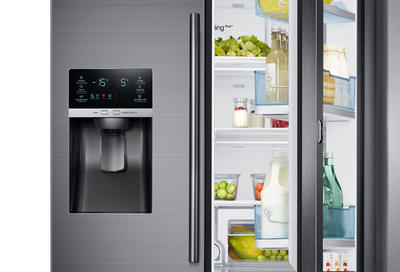
Credit: www.samsung.com
Error Codes And Their Meanings
Samsung fridges sometimes display error codes along with blinking temperatures. Here’s a quick guide to some common codes:
| Error Code | Meaning | What to Do |
|---|---|---|
| 5E | Freezer Sensor Error | Check for ice buildup, call service if needed |
| 22E | Fridge Fan Error | Unplug and defrost, then restart |
| 88 88 | Power/Communication Error | Power cycle the fridge |
| OF OF | Demo Mode | Deactivate demo mode (see manual) |
If you see a code not listed here, refer to your user manual or the official Samsung support page.
How To Prevent Blinking Temperature Issues
You can avoid most blinking temperature problems with good habits and routine maintenance.
Keep Doors Closed
Try not to leave the fridge or freezer open for long periods. Remind family members, especially children, to close the door gently and fully.
Don’t Overload The Fridge
Too much food blocks airflow, making it hard to keep cool. Arrange items so that cold air can move freely around shelves and drawers.
Clean The Gasket Regularly
A dirty or sticky gasket won’t seal properly. Clean it every few months with mild soap and water.
Monitor Temperature Settings
Check your temperature settings from time to time. If you notice food spoiling or freezing, adjust as needed.
Defrost When Needed
If you see thick ice buildup, especially in the freezer, defrost the fridge. Ice can block fans and sensors.
Comparing Samsung Fridge Models: Blinking Temperature Features
Samsung has released many refrigerator models over the years, and not all use blinking temperature displays in the same way. Here’s a simple comparison of common model types and their blinking temperature alerts:
| Model Type | Blinking Alert | Error Codes |
|---|---|---|
| Side-by-Side | Yes, for door/temperature issues | Yes, shows codes |
| French Door | Yes, similar alerts | Yes, with more advanced codes |
| Top Freezer | Sometimes, basic alerts | Few or no codes |
| Smart Fridge (Wi-Fi) | Yes, plus app notifications | Detailed error codes |
If you’re buying a new Samsung fridge and want easy troubleshooting, models with clear error codes can save you time.
Real-world Example: How A Blinking Temperature Was Fixed
Let’s look at a practical case. Maria noticed her Samsung French door fridge started blinking “42” on the fridge display. She checked and realized her child had left the door slightly open after grabbing a snack. Inside, she found some ice cream starting to melt.
Maria quickly closed the door and waited. After about three hours, the blinking stopped, and everything felt cold again.
She learned two things:
- The blinking temperature is a helpful early warning.
- Checking the door seal and teaching her child about proper closing prevented future issues.
Two Non-obvious Insights For Owners
- Blowing Warm Air After Power Loss: After a power outage, many Samsung fridges run fans to blow out warm air before starting to cool. During this time, the temperature blinks, and you may even feel warm air for a short while. This is normal and helps the fridge recover faster.
- Demo Mode Trap: Sometimes, new or recently moved fridges get stuck in “Demo Mode” (shows as “OF OF” or blinking numbers). In this mode, the fridge lights up, but the cooling system is off. Many users think the appliance is broken, but it just needs a few button presses to deactivate. Always check for this if you see blinking but the fridge is not cold at all.
When To Call A Professional
You can handle most blinking temperature causes yourself, but sometimes expert help is needed. Call a technician if:
- The blinking continues for over 24 hours with no clear reason.
- You hear loud noises or notice odd smells.
- The fridge does not cool even after resets.
- You see uncommon error codes or water leaks.
A professional can check for deeper issues, like compressor failure or electronic board problems, that you can’t fix at home.
Energy Use And Food Safety
A Samsung fridge with a blinking temperature may run more often to restore cold air, using more electricity. If you notice the blinking right after a power cut, check your food for signs of spoilage. The USDA recommends keeping the fridge at or below 40°F (4°C) and the freezer at 0°F (-18°C).
If food smells, looks, or feels off, it’s safer to throw it away.
For more details on safe food storage, visit the USDA’s official food safety page.
Replacement Parts And Warranties
If you need to replace a temperature sensor, door gasket, or main control board, check if your fridge is still under warranty. Samsung offers standard warranties, and some retailers provide extended coverage. Using official parts and certified service helps keep your warranty valid.
Here’s a quick look at common replacement needs and their average costs:
| Part | Average Cost (USD) | DIY Friendly? |
|---|---|---|
| Door Gasket | $30 – $80 | Yes |
| Temperature Sensor | $25 – $60 | Sometimes |
| Main Control Board | $120 – $250 | No |
DIY repairs are possible for simple parts, but complex fixes are best left to professionals.
Final Thoughts
A Samsung fridge blinking temperature may seem alarming, but it’s usually an early warning system that gives you a chance to act before things get worse. Whether it’s a simple door left open, a short power cut, or a more serious error, understanding the cause and responding quickly can protect your food and your appliance. Most problems have simple fixes, and with good habits and regular checks, you can keep your fridge running smoothly for years. If you’re ever unsure, don’t hesitate to call a professional or check Samsung’s official support channels.
Frequently Asked Questions
Why Does My Samsung Fridge Temperature Keep Blinking Even After I Closed The Door?
If the blinking continues after closing the door, the fridge may need more time to cool down. Give it a few hours. If the issue persists, check for blocked vents, overloading, or a faulty gasket.
How Long Does It Take For The Blinking Temperature To Stop?
Usually, it takes 2 to 24 hours for the blinking to stop once the temperature returns to normal. If it lasts longer, there may be another problem that needs attention.
Can A Blinking Temperature Mean A Serious Problem?
Sometimes. If the fridge is not cooling, makes loud noises, or shows error codes, it could be a sign of a hardware fault. In that case, contact a technician.
Will A Blinking Temperature Cause Food To Spoil?
If the temperature stays above safe levels for several hours, food can spoil, especially dairy and meat. Use a thermometer to check and follow USDA guidelines for food safety.
How Do I Reset My Samsung Fridge To Fix Blinking Temperature?
Unplug the fridge for 1-2 minutes, then plug it back in. This resets the control board and can clear minor errors. If the blinking continues, follow other troubleshooting steps or contact support.

Credit: www.spinchill.com