
If you own a Litter-Robot, you know how convenient it can be for keeping your cat’s litter box clean. But when you see a blinking yellow light on your Litter-Robot, it’s easy to feel confused or worried. What does it mean? Is there a simple fix, or does your robot need repair? This guide breaks down everything you need to know about the Litter-Robot blinking yellow issue, with practical steps to troubleshoot, maintain, and prevent problems. Whether you’re a new user or a long-time owner, you’ll find answers to keep your automatic litter box working smoothly.
What Does The Blinking Yellow Light Mean?
The blinking yellow light on a Litter-Robot is not just a random signal. It’s a way for your unit to tell you something needs attention. Most often, this light means:
- The bonnet is not seated properly
- The globe is jammed or stuck
- There’s an issue with the cat sensor
- The cycle was interrupted
- There’s a pinch detect fault (Litter-Robot 3)
The yellow light can blink in different patterns. For example, slow or fast blinking may signal different problems. Understanding the cause is the first step to solving it.
Common Causes Of Litter-robot Blinking Yellow
Many users experience the blinking yellow light, so you’re not alone. Let’s look at the most common reasons:
1. Bonnet Not Seated Properly
If the bonnet (the top cover) is even slightly out of place, the Litter-Robot cannot run a cleaning cycle. The sensors detect this and trigger the blinking yellow light. This is a safety feature to prevent accidents.
2. Globe Jam Or Stuck
The rotating globe can jam if large clumps of litter or foreign objects get stuck. When this happens, the motor cannot turn smoothly, and the yellow light blinks to alert you.
3. Cat Sensor Issue
The cat sensor detects when your cat enters and leaves. If something is pressing on the sensor (like too much litter or an uneven floor), the robot thinks a cat is present and will not start a cycle.
4. Cycle Interrupted
If you pause or stop the cleaning cycle manually, or if the power is interrupted, the Litter-Robot may show a blinking yellow light until you reset or resume the cycle.
5. Pinch Detect Fault
On the Litter-Robot 3, pinch sensors at the base detect if something is caught between the globe and base. If triggered, the robot stops and the yellow light blinks rapidly.
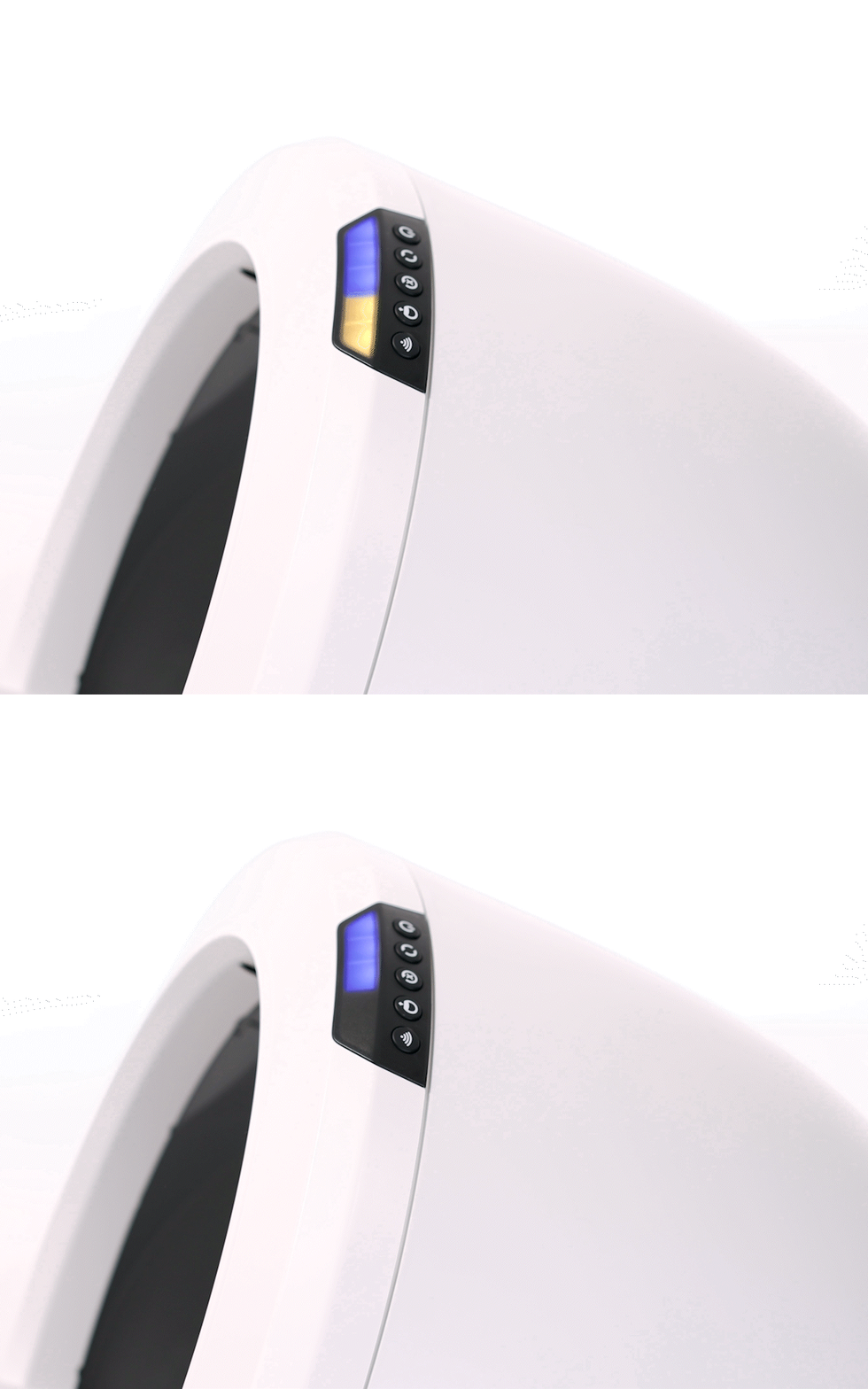
Credit: www.litter-robot.com
Troubleshooting Steps
You don’t need to be a technician to fix most blinking yellow issues. Here’s a step-by-step guide:
Step 1: Check The Bonnet
Remove the bonnet and reattach it, making sure all tabs are securely in place. Even a small misalignment can trigger the yellow light.
Step 2: Clear The Globe
Lift the globe and check for:
- Large clumps of litter
- Toys or foreign objects
- Sticky litter buildup
Remove any blockages, clean the globe, and reassemble.
Step 3: Test The Cat Sensor
Make sure the Litter-Robot is on a flat, solid surface. Too much litter can also cause problems—keep it below the fill line. Gently press on the step to see if the sensor is moving freely.
Step 4: Reset Or Resume Cycle
Press the reset button or cycle button (depending on your model) to resume normal operation. If the light stops blinking, you’ve fixed the problem.
Step 5: Check Pinch Sensors
For Litter-Robot 3, clean around the base where the globe meets the platform. Dust, litter, or debris can trigger a false pinch detect fault. Use a dry cloth or compressed air for best results.
Understanding Yellow Light Patterns
Different blinking patterns provide clues. Here’s a quick reference:
| Blink Pattern | Possible Cause | Quick Fix |
|---|---|---|
| Slow blink | Bonnet not seated | Reattach bonnet |
| Fast blink | Pinch detect fault | Clean pinch sensors |
| Solid yellow | Paused cycle | Resume or reset |
| Flashing every few seconds | Cat sensor triggered | Check for weight or litter level |
Paying attention to these patterns can save you time when troubleshooting.
How To Prevent The Blinking Yellow Light
Prevention is often easier than repair. Here are practical tips to keep your Litter-Robot running smoothly:
- Clean the unit regularly. Wipe the globe and base every week to stop litter buildup.
- Don’t overfill. Keep litter below the fill line to avoid sensor errors.
- Use the right litter. Clumping, unscented, clay-based litters work best. Avoid lightweight, crystal, or pellet types.
- Check the placement. Put your Litter-Robot on a hard, flat floor. Soft or uneven surfaces confuse the sensors.
- Inspect after each cleaning. When you empty the waste drawer, look for stuck objects or damage.
Differences Between Litter-robot Models
Not all Litter-Robot units are the same. The blinking yellow light can mean slightly different things depending on your model. Here’s a side-by-side comparison:
| Model | Yellow Light Issue | Special Features |
|---|---|---|
| Litter-Robot 2 | Bonnet or globe misaligned | Simple sensor, no pinch detection |
| Litter-Robot 3 | Pinch detect, sensor, or bonnet issue | Pinch sensors, quieter motor |
| Litter-Robot 4 | More advanced sensors, app alerts | Weight and waste level tracking |
Knowing your model helps you find the right fix faster.
When To Contact Customer Support
Sometimes, even after trying all the steps, the yellow light keeps blinking. If you notice:
- The yellow light returns right after reset
- The motor makes loud noises or stops moving
- You see error messages in the app (for connected models)
- There is physical damage to parts
It’s time to contact customer support. Litter-Robot has a helpful team and warranty coverage. Prepare your serial number and describe the problem clearly. Many users find that support can guide them through advanced troubleshooting or arrange for repair if needed.
Real-world Examples
Let’s look at a few situations that Litter-Robot owners have faced:
Case 1: A user noticed a blinking yellow light after adding new litter. After checking, they found the litter was above the fill line. Removing some litter fixed the problem instantly.
Case 2: Another owner found the globe wouldn’t rotate, and the yellow light blinked quickly. They discovered a small toy wedged in the gear, removed it, and the robot worked again.
Case 3: One person cleaned the unit but didn’t seat the bonnet fully. The yellow light kept flashing until they pressed down on all tabs and heard a click.
These stories show that most blinking yellow issues are easy to fix at home.
Common Mistakes When Troubleshooting
It’s easy to miss small details. Here are mistakes beginners often make:
- Forgetting to unplug before cleaning: Always unplug your unit before removing parts to avoid electric shock or sensor errors.
- Ignoring the fill line: Even a small amount above the line can block sensors.
- Overlooking debris under the globe: Small clumps or dust can trigger pinch sensors.
- Not checking the surface: Carpets or rugs may compress, causing sensor issues.
- Skipping regular maintenance: Waiting too long between cleanings can lead to bigger problems.
Paying attention to these details can save you time and frustration.
Maintenance Tips For Long-term Reliability
A well-maintained Litter-Robot will serve you for years. Here’s how to keep yours in top shape:
- Deep clean monthly. Disassemble the globe, bonnet, and base. Wash with mild soap and dry before reassembling.
- Inspect moving parts. Check gears and sensors for dust or buildup.
- Replace carbon filters. These help control odor and should be changed every 1-2 months.
- Update firmware. For Wi-Fi enabled models, keep software up to date for improved reliability.
- Keep spare parts. Having an extra bonnet, globe, or pinch sensor can reduce downtime.
Many problems are caused by missed maintenance, not hardware failure.
Are There Risks Of Ignoring The Blinking Yellow Light?
Some users ignore the blinking yellow light, hoping the robot will fix itself. But this can lead to:
- Waste overflow: The unit won’t clean if a fault is detected, causing odor and mess.
- Motor damage: Forcing the unit to run with a jam can burn out the motor.
- Sensor failure: Ignored issues can cause sensors to fail, leading to expensive repairs.
It’s always better to fix the problem early.
Other Indicator Lights And Their Meanings
While the yellow light is common, you may see other lights too:
- Blue light: Waste drawer is full or needs attention.
- Red light: Cat detected during cycle, or critical error.
- Green light: Ready for use, no errors.
Here’s a quick comparison:
| Light Color | What It Means | User Action |
|---|---|---|
| Yellow (blinking) | Error/attention needed | Troubleshoot as above |
| Blue | Waste drawer full | Empty drawer |
| Red | Cat detected/critical fault | Wait or reset |
| Green | Ready for use | None |
Understanding all lights helps you respond quickly.

Credit: www.youtube.com
When It Might Be Time For A Replacement
If your Litter-Robot is old or has repeated faults, you may wonder if it’s time to replace it. Consider a new unit if:
- Your robot is more than 5 years old and out of warranty
- Repairs cost more than half the price of a new unit
- Parts are no longer available
- The unit has had several major faults
Modern models have improved sensors and quieter motors, making them more reliable. For a guide on newer features and models, check out the official Litter-Robot support page.
Frequently Asked Questions
Why Does My Litter-robot’s Yellow Light Keep Blinking Even After I Reset It?
If the yellow light continues after a reset, check for hidden blockages, make sure the bonnet is seated, and inspect the pinch sensors. If nothing helps, a sensor may be faulty.
Can The Blinking Yellow Light Mean My Cat Is Too Light For The Sensor?
Yes. If your cat is under 5 pounds, the sensor may not detect them properly. Try adding more litter or adjusting the sensor sensitivity (if your model allows).
What Litter Types Cause The Most Problems With The Litter-robot?
Lightweight, crystal, or pellet litters often confuse the sensors and cause jams. Stick to standard clumping clay for best results.
How Often Should I Deep Clean My Litter-robot To Avoid The Yellow Light?
Deep cleaning once a month is a good rule. Wipe the bonnet and globe weekly, and check sensors regularly for dust or debris.
Is There A Risk To My Cat If I Ignore The Blinking Yellow Light?
Yes. Ignoring the warning can lead to waste overflow, odors, and even motor damage. Always fix the issue before letting your cat use the box again.
Final Thoughts
The Litter-Robot blinking yellow light is a useful alert, not a reason to panic. Most issues are minor and can be fixed at home in minutes. Regular cleaning, correct setup, and quick troubleshooting keep your automatic litter box reliable and convenient. When in doubt, reach out to customer support—they’re there to help. Your cat deserves a clean, stress-free space, and with a little care, your Litter-Robot will provide it for years.