
When your Roku TV won’t turn on and you see a red light blinking, it can be confusing and stressful. You might worry that your TV is broken or that you’ll need to spend a lot of money on repairs. But this issue is very common, and there are practical steps you can take to figure out what’s wrong and possibly fix it yourself. This guide will explain why this happens, what the blinking red light means, how to troubleshoot the problem, and how to avoid similar issues in the future. If you want to save time and avoid frustration, keep reading—you’ll find out what really matters and what steps are worth your effort.
Understanding The Blinking Red Light On Roku Tv
The blinking red light on a Roku TV is not just a random signal. It’s a way for the TV to communicate a problem. Usually, this blinking means there’s a power issue. Sometimes, it’s a sign of a hardware fault or a problem with the TV’s mainboard. The pattern of the blinking can also give you clues. For example, steady blinking often means the TV isn’t getting enough power, while rapid blinking could point to a different hardware issue.
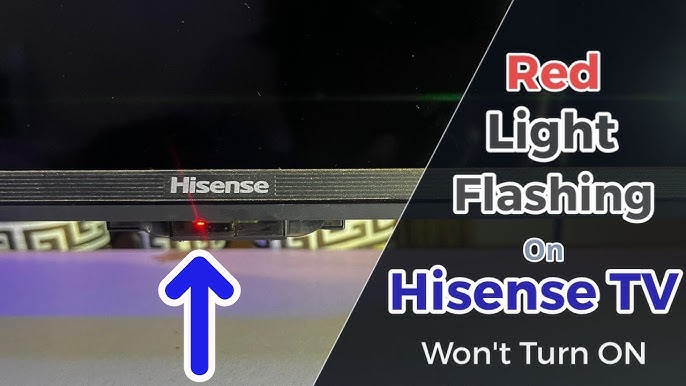
Many people confuse the red light with the white or blue standby lights seen on other TV brands. On Roku TVs, the red light is usually found near the bottom edge, close to the power button. If you see this light flashing and your TV screen stays black, it’s time to take a closer look at possible causes.
Common Reasons For A Roku Tv Red Light Blinking
To fix the issue, you first need to understand why it’s happening. Here are the most common causes:
- Power Supply Problems: The TV may not be getting enough power. This can be due to a faulty wall outlet, a damaged power cord, or a loose connection.
- Internal Hardware Failure: Sometimes, a part inside the TV—like the power board—can fail.
- Overheating: If the TV has overheated, it might refuse to turn on until it cools down.
- Remote Control Issues: The TV might not be getting the correct signal from the remote, especially if there’s an IR (infrared) sensor problem.
- Firmware Glitches: Rarely, software issues can cause the TV to get stuck in a boot loop, leading to the blinking red light.
It’s important to go step by step. Rushing can lead to missed details or even more damage.

Credit: www.reddit.com
First Steps: Quick Checks And Easy Fixes
Before you open anything or call support, try these simple actions. Many users fix their Roku TV in minutes with these steps:
- Unplug and Wait: Disconnect the TV from the wall. Wait at least 60 seconds. Plug it back in. This resets the system and clears minor glitches.
- Check the Power Outlet: Plug another device (like a lamp) into the same outlet. If the device doesn’t work, the outlet could be the problem.
- Inspect the Power Cord: Make sure the cord is tightly connected at both ends. Look for visible damage—cuts or fraying.
- Try Another Power Source: Move the TV to a different room or outlet. Sometimes, circuit breakers or bad wiring cause issues in one area of the house.
- Remove Extra Devices: Unplug all HDMI cables, USB drives, or external speakers. Sometimes, a faulty device connected to the TV can cause problems.
If the red light stops blinking after any of these steps, you’ve found the cause. If not, it’s time to dig deeper.
Diagnosing The Power Supply
When the quick fixes don’t solve the problem, the next step is to check the power supply system more carefully. Here’s a useful comparison of symptoms and likely causes:
| Symptom | Possible Cause | Action to Take |
|---|---|---|
| Red light blinks, no sound/screen | Power board failure | Consider professional repair |
| Red light steady, screen flickers | Loose cable connection | Check all cables inside and outside |
| Red light blinks after power surge | Damaged power adapter | Replace power adapter |
Most power-related problems are caused by faulty adapters or damaged internal power boards. If you notice a burning smell or see sparks, unplug the TV immediately for safety.

Credit: www.wikihow.com
Advanced Troubleshooting Steps
If your TV still won’t turn on and the red light is blinking, try these more advanced steps. Only do these if you are comfortable working with electronics. If not, contact a professional.
Perform A Hard Reset
A hard reset clears deeper system errors.
- Unplug the TV from the wall.
- Hold the power button on the TV (not the remote) for 30 seconds.
- Plug the TV back in and try turning it on.
Examine The Mainboard
Sometimes, a mainboard or power board failure can cause the blinking red light. If your TV is out of warranty and you’re comfortable, you can open the back panel. Look for:
- Bulging or leaking capacitors (small cylinder-shaped parts)
- Burn marks on the board
- Loose connectors
If you spot any of these, replacing the board might fix the issue. The cost of replacement boards varies, but usually ranges from $30 to $100. If this sounds too technical, it’s best to get help from a repair center.
Test With A Universal Remote
If you think the problem is with the remote, try turning on the TV with the physical power button on the unit. If the TV turns on, your remote may need new batteries or a replacement.
When To Call A Professional
There are times when DIY troubleshooting won’t work. Call a professional or your TV’s customer support if:
- You see visible damage inside the TV
- The red light blinks in a complex pattern (like 5 short blinks, then 2 long ones)
- You hear unusual sounds (clicking, buzzing)
- Your TV is under warranty
A qualified technician will have the tools to test the power supply, check for short circuits, and make safe repairs. Trying to fix complex issues yourself could void your warranty or make the problem worse.
Repair Vs Replacement: Which Is Better?
Many people wonder if fixing a Roku TV that won’t turn on is worth the cost. Here’s a quick comparison to help you decide:
| Situation | Repair Cost | Replacement Cost | Advice |
|---|---|---|---|
| Power board failure | $60–$120 | $250–$500 (new TV) | Repair if TV is less than 5 years old |
| Mainboard failure | $80–$200 | $250–$500 | Repair if under warranty or high-end model |
| Screen damage | $200–$400 | $250–$500 | Replace TV |
Most power-related repairs are affordable compared to buying a new TV, especially if your TV is only a few years old. But if the screen is damaged or you have an older, budget model, replacement often makes more sense.
Preventing The Red Light Issue In The Future
You can avoid many Roku TV power problems by following some simple tips:
- Use a surge protector: Power surges from storms or faulty wiring are a leading cause of TV failure.
- Keep vents clear: Make sure there’s enough space around your TV for air to flow. Overheating can damage internal parts.
- Update firmware regularly: Sometimes, a software update will fix bugs that cause startup problems.
- Unplug during long absences: If you go on vacation, unplug the TV to prevent damage from power spikes.
- Don’t overload outlets: Plugging too many devices into one outlet increases risk of power issues.
A surprising fact: Over 20% of TV failures in the US are caused by power surges, according to industry surveys. A $10 surge protector can save you hundreds in repair bills.
Two Non-obvious Insights Most Beginners Miss
- The blinking pattern matters. Many people ignore the rhythm of the blinking red light. But counting the blinks can help you or a technician diagnose the problem. Some Roku models use different blink codes to signal specific failures.
- External devices can cause the issue. A connected game console or streaming stick with a short circuit can prevent the TV from turning on. Always unplug all accessories during troubleshooting—even if they seem unrelated.
Useful Example: A Real-life Fix
Imagine your Roku TV won’t turn on, and the red light blinks steadily. You unplug everything, but nothing works. Then, you remember your child plugged in an old game console last week. You disconnect the console, unplug the TV, wait 60 seconds, and plug it back in.
The TV starts working again. In this case, the extra device was causing a power issue—something many people overlook.
Credit: www.youtube.com
When Warranty And Support Matter
Don’t forget to check your warranty status. Most Roku TVs come with a one-year limited warranty. If your TV is under warranty, contact the manufacturer before opening the TV or paying for repairs. Some brands also offer extended support or recall programs for known issues.
You can find warranty information on the official Roku or TV brand website, or check your purchase receipt.
If you want more technical details about TV power issues, the Wikipedia page on power supplies offers a helpful overview.
Frequently Asked Questions
Why Is My Roku Tv’s Red Light Blinking But Nothing Happens On The Screen?
The blinking red light usually means a power supply issue. The TV is not getting the right amount of power, or there’s an internal hardware problem. Try unplugging the TV for 60 seconds and check the power connections.
Can A Bad Remote Cause The Red Light Blinking Problem?
Usually, no. A bad remote will not cause the blinking red light. However, if the TV’s IR sensor is faulty, the TV might not respond even if the power is working. Test the TV with the physical power button to be sure.
Is It Safe To Open My Roku Tv To Check The Inside?
If your TV is under warranty, you should not open it—it may void the warranty. If it’s out of warranty and you are comfortable with electronics, you can check for obvious issues like burnt parts, but always unplug the TV first.
If in doubt, call a professional.
How Do I Know If The Power Board Is The Problem?
Signs of a faulty power board include a blinking red light, no sound or picture, and sometimes a burnt smell. If replacing the power cord and trying different outlets does not help, the power board may need repair or replacement.
Should I Repair Or Replace My Roku Tv If It Won’t Turn On?
If the repair cost is less than half the price of a new TV, and your TV is less than five years old, repair is usually a good idea. For older TVs or if the screen is damaged, replacement makes more sense.
Final Thoughts
A blinking red light on your Roku TV can be worrying, but with the right steps, you can often find the cause and fix it yourself. Take your time, use the guidance above, and don’t hesitate to contact support if you need help.
With a little patience, you’ll get your TV back up and running.