
A blinking orange light on your Roku Soundbar can be worrying, especially if your home entertainment setup depends on it. Many users have seen this issue and wondered what it means or how to fix it. The good news: most causes are easy to diagnose, and many solutions don’t need technical skills. In this guide, you’ll learn what the blinking orange light means, the most common reasons for it, and step-by-step ways to solve the problem. You’ll also find tips to avoid mistakes and keep your soundbar working well.
What The Blinking Orange Light Means
A blinking orange light on a Roku Soundbar usually points to a problem with the device’s connection or setup. Unlike other colors (like red for overheating or white for power), the orange blink often means there’s trouble with pairing or network. Roku designed this warning to catch your attention early, so you can fix small problems before they become bigger.
Some common situations that cause the orange blinking light are:
- Pairing problems with the remote or subwoofer
- Issues with the Wi-Fi connection
- Problems with power or startup
- Firmware or software errors
Understanding what triggers the orange light is the first step to solving it.
Main Causes Of The Roku Soundbar Blinking Orange
1. Remote Or Subwoofer Pairing Issue
Many Roku soundbars come with a wireless remote and, sometimes, a Roku Wireless Subwoofer. If the soundbar cannot connect to either, it may start blinking orange. This usually happens after a power cut, moving the soundbar, or changing batteries in the remote.
2. Network Or Wi-fi Problems
If your soundbar is not able to connect to your home Wi-Fi network, it may show the blinking orange light. This is especially true for models that need Wi-Fi to stream or work with smart assistants.
3. Power Problems
A loose power cable, a faulty outlet, or a damaged adapter can interrupt the power supply. When the soundbar gets unstable power, it may blink orange as a warning.
4. Software Or Firmware Errors
Sometimes, a failed update or a corrupted firmware file causes the orange light. If your device tried to update and something went wrong (maybe your internet dropped), the soundbar may get stuck in this state.
5. Hardware Failure
Though rare, a problem inside the soundbar—like a faulty board or broken component—can cause persistent orange blinking. If you’ve tried all other solutions, hardware failure is a last possibility.

Credit: www.youtube.com
How To Fix The Roku Soundbar Blinking Orange
You don’t need to be an expert to solve most soundbar problems. Follow these steps in order, and you’ll likely get your device working again.
1. Check Power And Connections
Start with the basics:
- Make sure the power cable is securely plugged into both the soundbar and the wall outlet.
- Try another outlet to rule out power supply problems.
- Inspect the power cable for any cuts, bends, or frays.
- Unplug the soundbar for 60 seconds, then plug it back in.
Pro tip: Some users forget to push the power cable all the way in after moving the soundbar. Firmly press it to ensure a good connection.
2. Re-pair The Remote Or Subwoofer
If your soundbar came with a wireless subwoofer or remote, follow these steps:
- Remove the batteries from the remote.
- Unplug both the soundbar and subwoofer.
- Wait 30 seconds.
- Plug in the soundbar and subwoofer. Wait for the blinking to slow or stop.
- Put the batteries back in the remote.
- Press and hold the pairing button (usually inside the battery compartment) for 5 seconds.
The devices should pair within a minute. If the orange light remains, try again or replace the batteries.
3. Reset Network Settings
If the issue is network-related, resetting your Wi-Fi connection can help:
- On the Roku remote, press Home.
- Go to Settings > Network > Set up connection.
- Choose your Wi-Fi and enter the password.
- Wait for the soundbar to confirm the connection.
If you cannot access the menu because of the blinking light, unplug your router for 60 seconds and restart it. Then restart the soundbar.
4. Update The Firmware
Outdated or corrupted software can trigger the orange blink. To update:
- Open the Roku menu with your remote.
- Go to Settings > System > System update.
- Choose Check now.
Let the soundbar finish any updates. The orange light should disappear if this was the cause.
5. Factory Reset The Soundbar
If nothing works, a factory reset is your last option:
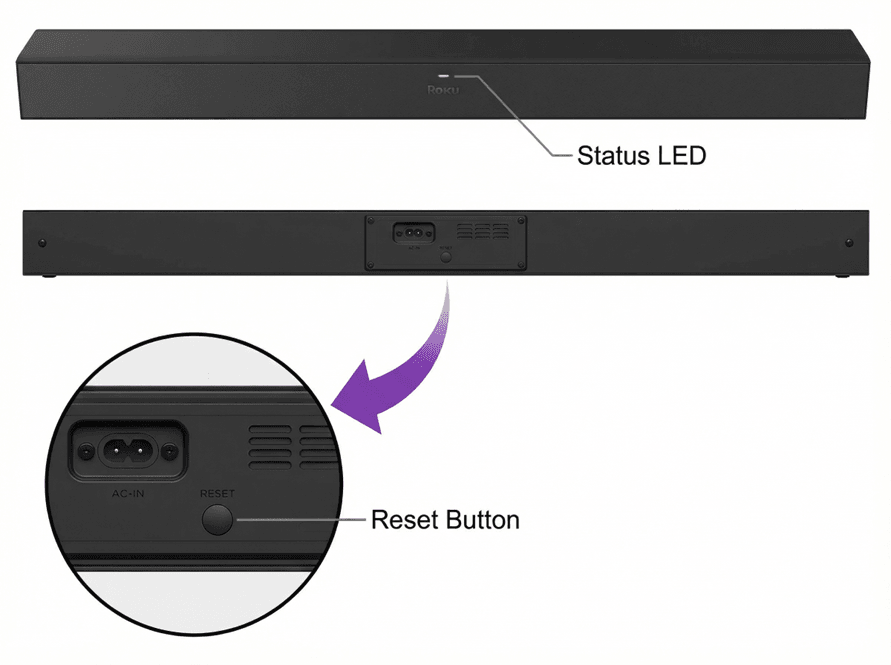
- Locate the reset button (usually a small pinhole on the back).
- Use a paperclip to press and hold the button for at least 10 seconds.
- Release the button when the soundbar LED blinks.
This erases all settings, so you’ll need to set up your device again.
6. Check For Hardware Issues
If you’ve tried all these steps and the orange light is still blinking, the problem might be hardware. Contact Roku support for repair or replacement.
Common Mistakes To Avoid
Many people make simple mistakes when trying to fix their soundbar. Here are things to watch out for:
- Skipping power checks: Even experienced users sometimes forget to check the basics like cables and outlets.
- Using old batteries: Weak batteries in the remote can cause pairing problems.
- Rushing the reset: Not holding the reset button long enough can prevent a true factory reset.
- Ignoring updates: Delaying software updates can lead to more issues over time.
- Not checking for interference: Other wireless devices can interfere with pairing. Move nearby wireless devices away during setup.
Comparing Roku Soundbar Models And Their Warning Lights
Different Roku soundbar models may use lights in slightly different ways. The table below shows how various models signal problems with their LED lights.
| Model | Orange Blinking Light Meaning | Other Warning Lights |
|---|---|---|
| Roku Smart Soundbar | Pairing or network issue | Red (overheating), White (power) |
| Roku Streambar | Remote/subwoofer pairing issue | White (power), Red (critical error) |
| Roku Streambar Pro | Firmware or Wi-Fi error | White (startup), Red (hardware) |
Knowing your model helps you understand what the blinking orange light means and which steps to follow first.
Troubleshooting Steps: What Works Best?
Based on user feedback and official guidance, some solutions are more effective than others. Here’s a quick summary:
| Solution | Success Rate | Time Needed | Skill Level |
|---|---|---|---|
| Check Power & Connections | High | 2 minutes | Beginner |
| Re-Pair Remote/Subwoofer | Medium | 5 minutes | Beginner |
| Network Reset | Medium | 5 minutes | Beginner |
| Firmware Update | Medium | 10 minutes | Intermediate |
| Factory Reset | High | 10 minutes | Intermediate |
| Hardware Repair | Low | Days | Advanced |
Most users find their soundbar works again after checking power or doing a quick re-pair.
Credit: support.roku.com
How To Prevent The Orange Blinking Light
Keeping your soundbar in good condition is easier than fixing problems later. Here are some tips:
- Update software regularly: Enable automatic updates so your device always has the latest fixes.
- Use quality power sources: Avoid cheap extension cords or adapters.
- Keep Wi-Fi strong: Place your router near the soundbar, or use a Wi-Fi extender if needed.
- Replace batteries often: Don’t wait for the remote to die before changing batteries.
- Avoid moving the soundbar: Unplug everything before moving to prevent loose connections.
- Check for wireless interference: Keep other wireless devices (like baby monitors) away from the soundbar during setup.
Many people don’t realize that regular updates and good Wi-Fi can prevent most orange blinking light issues. Also, unplugging the soundbar during electrical storms helps avoid power surges.
When To Contact Roku Support
If you’ve tried all basic fixes and the blinking orange light remains, it’s time to get help. Before you contact Roku support, gather these details:
- Model number and serial number (on the back or bottom of the soundbar)
- A list of troubleshooting steps you’ve already tried
- Purchase date and location (for warranty claims)
Roku’s official support page (Roku Support) has live chat and phone options. If your device is under warranty, they may offer free repair or replacement.
Credit: support.roku.com
Frequently Asked Questions
Why Is My Roku Soundbar Blinking Orange After A Power Outage?
A power outage can interrupt pairing with the remote or subwoofer. The orange light means the connection was lost. Try unplugging the soundbar for a minute, then plug it back in. If the blinking continues, re-pair the remote or subwoofer.
Can A Bad Hdmi Cable Cause The Orange Light To Blink?
No, the HDMI cable connects your soundbar to your TV and does not affect the orange blinking light. The issue is usually with power, pairing, or Wi-Fi, not HDMI.
How Do I Know If The Problem Is Hardware-related?
If you’ve checked all connections, reset everything, and updated the software but still see the orange blinking light, the soundbar may have a hardware fault. Contact Roku support for guidance or replacement.
Will A Factory Reset Delete My Apps And Settings?
Yes. A factory reset wipes all your installed apps, Wi-Fi settings, and account details. You’ll need to set up the soundbar again from scratch after resetting.
Is There A Risk Of Damaging My Soundbar By Pressing The Reset Button Too Long?
Holding the reset button for more than 10 seconds won’t damage your soundbar, but it will trigger a factory reset. Just make sure to release it as soon as the LED starts blinking quickly.
A blinking orange light on your Roku Soundbar can be annoying, but it’s almost always fixable with simple steps. By understanding the meaning of the light, following the right troubleshooting process, and avoiding common mistakes, you’ll have your soundbar back to normal quickly. Keep your software updated, check connections regularly, and don’t ignore warning lights—these habits will help you enjoy better sound and fewer problems in the future.