
A Nest Thermostat is a smart device that controls your home’s heating and cooling. Many people choose it for its learning features and energy-saving abilities. But sometimes, you may see the Nest Thermostat blinking red. This can be worrying, especially if you are not sure what the blinking red light means or how to fix it.
This article explains the reasons behind a Nest Thermostat blinking red, what you should do when it happens, and how to prevent it in the future. If you want to keep your home comfortable and your thermostat running smoothly, you’ll find practical guidance here.
Let’s dive in and take away the mystery of that blinking red light.
What Does The Blinking Red Light Mean?
The blinking red light on a Nest Thermostat is a status signal. It is not just a random warning; it tells you something important about the device’s current state. Usually, this red light means that the thermostat’s internal battery is charging, or that there’s a problem with the power supply.
To understand why this happens, it helps to know a bit about how the Nest Thermostat gets its power. Most of the time, it draws energy from your HVAC system’s wires. But if there isn’t enough power, the internal battery takes over.
When the battery level drops too low, the red light will start blinking.
Common Causes Of A Blinking Red Light
- Low Battery: The most frequent cause. The thermostat’s battery is too low and needs to recharge.
- Power Loss: Your HVAC system is not sending enough power to the thermostat.
- Wiring Issues: Loose, damaged, or incorrectly installed wires can interrupt power flow.
- System Overload: When the system is working hard (extreme weather), it may not deliver enough power for both HVAC and charging.
- Firmware Update: Sometimes, the red light blinks during a software update, but this is less common.
Understanding these causes helps you find the right solution quickly.
How To Respond When Your Nest Thermostat Blinks Red
Seeing the red light can be stressful, but the good news is that most fixes are simple. Here’s what you should do:
1. Wait And Observe
If you see the red light, don’t panic. The first step is to wait for about one hour. The Nest Thermostat often needs time to recharge its battery. If the blinking stops and the screen turns on, your problem may be solved.
2. Check The Power Connection
If waiting does not work, check if your HVAC system is turned on and working. Make sure your thermostat is firmly attached to its base.
- If your system uses a C-wire (common wire), it should provide constant power. Without a C-wire, the battery may drain faster.
- If your thermostat is loose, remove it and reattach it until you hear a click.
3. Manually Charge The Thermostat
If the red light keeps blinking and the screen stays off, you might need to charge the device manually.
- Remove the thermostat from the wall.
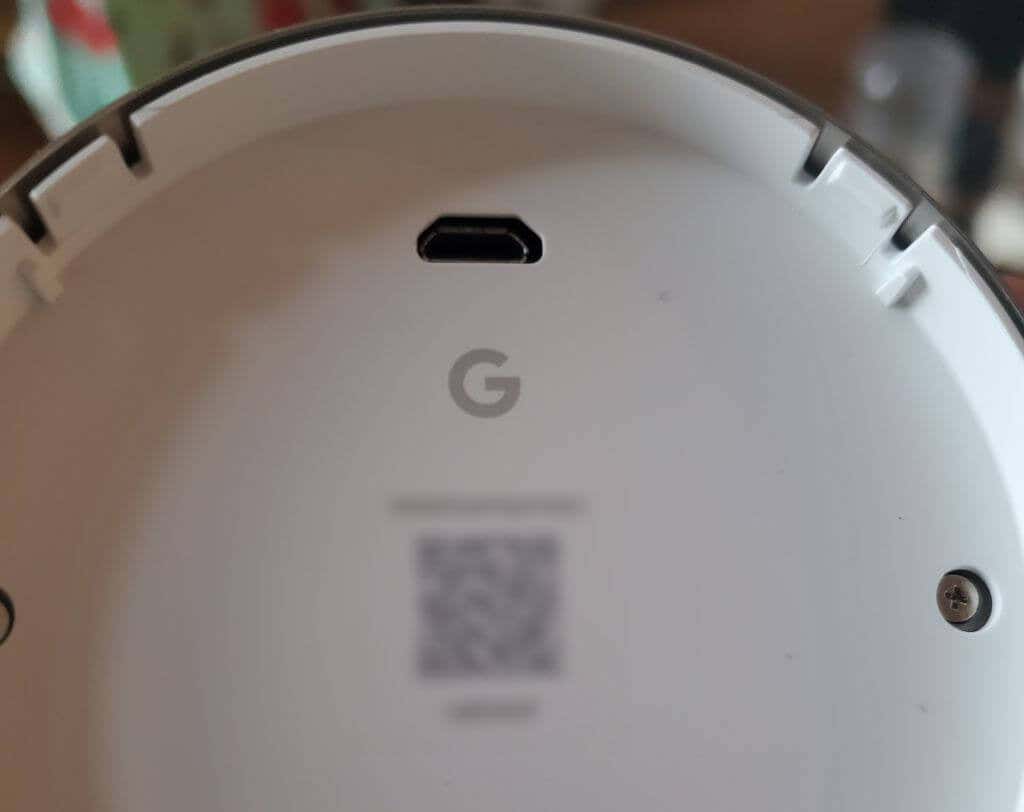
- Use a USB cable (Micro-USB or USB-C, depending on the model) and plug it into a wall charger.
- Let it charge for at least 1 hour. The screen should turn on and the red light should stop blinking.
4. Inspect The Wiring
Carefully pull the thermostat off the base and check the wires.
- Make sure no wires are loose or corroded.
- Each wire should be firmly inserted into its port.
- If you see damage or rust, you might need to replace the wire or contact a professional.
5. Restart The Thermostat
Sometimes, a simple restart helps.
- Hold down the thermostat ring for 10 seconds.
- Release when the screen turns off.
- Wait for it to restart and see if the red light disappears.
6. Check For Software Updates
A rare cause is a stuck firmware update. If the thermostat turns on, go to Settings > Software and check for updates. If one is available, install it.
When To Call A Professional
Most users can fix a blinking red light by following the steps above. However, there are times when you need help:
- The red light stays on after manual charging and resets.
- Wires are damaged or corroded.
- The HVAC system is not working at all.
- You are unsure or uncomfortable working with wiring.
A licensed HVAC technician or electrician can check your system safely.
Comparing Nest Thermostat Battery Problems
Sometimes, users confuse a blinking red light with other battery problems. Here is a simple comparison:
| Signal | Meaning | Action Needed |
|---|---|---|
| Blinking Red Light | Battery charging or low power | Wait or charge manually |
| Completely Off | Battery drained or no power | Manual charging or check wiring |
| Blinking Green Light | Software update in progress | Wait for update to finish |
This table helps you quickly identify what your Nest Thermostat is telling you.
Credit: helpdeskgeek.com
Preventing Future Red Light Issues
No one wants to keep fixing the same problem. Here’s how to avoid a blinking red light in the future:
Install A C-wire
A C-wire provides steady power to your thermostat. Many older homes do not have one. If your system only uses two wires, consider having a C-wire installed. This can prevent battery drain and blinking red lights.
Regularly Check Connections
Loose or corroded wires are a common cause of power problems. Every few months, gently pull off the thermostat and check the wiring. Make sure all wires are secure.
Keep Your Hvac System Maintained
A weak or failing HVAC system can cause power drops, especially in extreme weather. Regular maintenance ensures the system sends enough power to the thermostat.
Update Firmware
New updates often fix bugs or improve power management. Go to Settings and check for updates every few months.
Avoid Overloading The System
If you have many smart devices on one circuit, it can strain your power supply. Spread out devices to different circuits if possible.
Nest Thermostat Model Differences
Not all Nest Thermostats handle power the same way. Here’s a quick comparison of the main models:
| Model | Charging Method | Common for Blinking Red? |
|---|---|---|
| Nest Thermostat E | HVAC wires & USB | Yes, if no C-wire |
| Nest Learning Thermostat (3rd Gen) | HVAC wires & USB | Less common with C-wire |
| Nest Thermostat (2020) | HVAC wires & USB-C | Yes, if HVAC power is unstable |
The Nest Learning Thermostat (3rd Gen) is better at managing power, but all models can show a blinking red light if there is not enough power.

Credit: www.youtube.com
Real-world Example
Imagine you come home during a cold winter evening and find your Nest Thermostat blinking red. The temperature is dropping, and you worry about the heat. You wait an hour, but nothing changes. You pull off the thermostat, see the wires are secure, and decide to charge the device using a phone charger.
After an hour, the screen lights up, and the blinking stops. This simple fix gets your heat running again.
But maybe this happens a few more times each winter. You realize your system does not have a C-wire. Calling a professional to install one solves the problem for good. This shows how a small change can prevent future hassles.
Mistakes To Avoid
It’s easy to make mistakes when fixing a blinking red light. Here are a few common ones:
- Ignoring the red light: Waiting too long can drain the battery completely.
- Forcing wires: Yanking or pushing wires too hard can cause damage.
- Using the wrong charger: Always use a charger that matches the thermostat’s USB port and voltage.
- Skipping professional help: If you’re unsure, it’s safer to ask an expert.
Data On Nest Thermostat Power Issues
According to a 2022 survey by a leading home automation site, about 17% of Nest Thermostat users reported seeing a blinking red light at least once in their first year. Of those, 70% solved the problem with manual charging or checking wires. Less than 10% needed professional help.
This shows that most users can handle the issue themselves, but knowing when to call for help is important.
Useful Resources
If you want more details about the technical side or troubleshooting, the official Google Nest Help Center is a trusted source.

Credit: www.reddit.com
Frequently Asked Questions
What Does The Blinking Red Light On My Nest Thermostat Mean?
A blinking red light means the thermostat’s battery is low and charging. It can also signal a power supply issue from your HVAC system. If it keeps blinking for a long time, you may need to manually charge the device or check the wiring.
How Long Does It Take For The Red Light To Stop Blinking?
It usually takes up to one hour for the battery to charge enough for the thermostat to turn on. If it keeps blinking for more than an hour, try charging it with a USB cable or check for wiring problems.
Can I Use Any Usb Charger To Charge My Nest Thermostat?
You should use a standard USB wall charger with the correct cable (Micro-USB or USB-C, depending on your model). Avoid using computer USB ports or low-power chargers, as they may not provide enough current.
Do I Need A C-wire For My Nest Thermostat?
A C-wire is not always required, but it helps provide steady power and prevents battery drain. If your home does not have a C-wire and you have frequent red blinking issues, installing one can solve the problem.
Is The Blinking Red Light Dangerous?
No, the blinking red light itself is not dangerous. It is a warning signal about the battery or power. However, if you ignore it, your thermostat may stop working, which can affect your home’s heating or cooling.
Conclusion
A blinking red light on your Nest Thermostat can be frustrating, but now you know what it means and how to fix it. By understanding the causes, following the steps above, and taking preventive actions, you can keep your thermostat running smoothly all year.
With a bit of regular care, you’ll enjoy comfort and peace of mind, no matter what the lights are doing on your wall.