
Many people buy the Lookah Seahorse Pro for its easy use and smooth vaping experience. But sometimes, users see a blinking yellow light and wonder what it means. This problem can be confusing, especially for new users. If you’re facing the Lookah Seahorse Pro blinking yellow issue, don’t worry—you’re not alone. Understanding this warning, what causes it, and how to fix it can save you time, money, and frustration. Let’s look at the reasons behind this blinking light and how you can get your device working again quickly.
What Is The Lookah Seahorse Pro?
The Lookah Seahorse Pro is an electronic nectar collector, also known as a dab pen. It’s popular because it lets you vape wax concentrates easily. The device is shaped like a pen, making it portable and discreet. Users love its glass mouthpiece, variable voltage settings, and long battery life. The Seahorse Pro is designed for both beginners and experienced vapers.
Most users choose this device because it’s simple to use and clean. You only need to charge it, connect the coil, and you’re ready to vape. But like any electronic device, it sometimes shows error signals, such as the blinking yellow light.
Why Does The Seahorse Pro Blink Yellow?
A blinking yellow light on the Seahorse Pro is usually a warning signal. The most common reasons are:
- Connection issue between the battery and coil
- Low battery
- Short circuit
- Overheating
- Faulty or dirty coil
When the device shows this signal, it’s telling you something is wrong. The yellow light can blink a few times or keep flashing, depending on the problem.
Common Causes Explained
1. Connection Problems
The battery and coil must connect well. If the coil is not screwed in properly, or if there’s residue on the threads, the device may blink yellow. Even a small piece of dirt can block the connection.
2. Low Battery
If your battery is almost empty, the device may flash yellow to tell you it needs charging. Many users forget to check the battery level before use.
3. Short Circuit
A short circuit happens when the electric flow is not following the correct path. This can happen if the coil is damaged or if liquid gets inside the device.
4. Overheating
The device may heat up if you use it too much in a short time. To protect itself, the Seahorse Pro will blink yellow and stop working until it cools down.
5. Faulty Or Dirty Coil
If your coil is old, broken, or very dirty, the device may not work right. The yellow light is a sign to check the coil.
How To Fix The Blinking Yellow Light
Solving the Lookah Seahorse Pro blinking yellow issue is possible at home. Here are practical steps you can follow:
Step 1: Check The Coil Connection
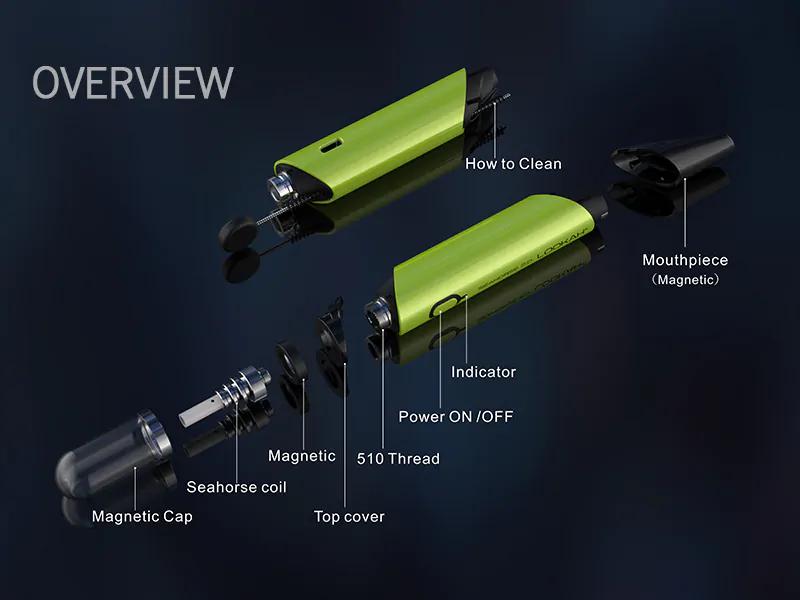
Remove the coil and check the threads. Clean both the coil and device connection with a cotton swab and a little rubbing alcohol. Make sure both parts are dry before screwing the coil back in—be gentle, but make sure it’s snug.
Step 2: Charge The Battery
Plug your device into a USB charger. Use the charger that came with your Seahorse Pro. Wait until the light turns green, which means the battery is full. Do not use the device while charging.
Step 3: Inspect For Short Circuit
Check if the coil is damaged or leaking. If you see burnt spots, a broken wire, or liquid inside, replace the coil. Never use a broken coil, as it can damage the device.
Step 4: Let The Device Cool Down
If you have been using the Seahorse Pro for a long session, let it rest for at least 10 minutes. The yellow light should stop blinking after the device cools.
Step 5: Replace The Coil
If cleaning doesn’t help, try a new coil. Always buy original Lookah coils to ensure proper fit and function. Cheap, off-brand coils often cause connection problems.
Step 6: Reset The Device
Some users have success by pressing the main button 5 times quickly to turn the device off and then on. This can reset the internal chip and clear minor errors.
Credit: www.lookah.com
When To Seek Professional Help
If you’ve tried all the above steps and your Seahorse Pro still blinks yellow, it may be time for expert help. Contact Lookah customer service or take your device to an authorized dealer. Do not open the device or try to fix the inside unless you are trained, as this can void the warranty or make the problem worse.
Preventing The Blinking Yellow Issue
It’s better to avoid problems than to fix them. Here’s how you can prevent the blinking yellow error:
- Always keep the coil and battery connection clean.
- Use only original Lookah parts.
- Charge the device fully before use.
- Do not overuse the device in one session.
- Store the Seahorse Pro in a cool, dry place.
Comparing The Seahorse Pro To Other Dab Pens
Is the Seahorse Pro unique in showing a blinking yellow light? Many dab pens use colored lights to show errors, but the Seahorse Pro’s signals are easy to understand if you know what to look for.
Here’s a comparison of error signals across popular dab pens:
| Device | Yellow Light Meaning | Other Warning Lights |
|---|---|---|
| Lookah Seahorse Pro | Connection/coil/battery issue | Red (overheat), Green (fully charged) |
| Yocan Evolve Plus | Low battery/coil error | Red (charging), White (ready) |
| Pulsar APX Wax | Coil short circuit | Blue (normal), Red (error) |
From this, you can see that most devices use colored lights, but the Seahorse Pro is clear about the yellow light meaning a problem with the coil or connection.
Signs It’s Time To Replace The Coil
The coil is a key part of the Seahorse Pro. If it’s not working well, you’ll see errors, poor vapor, or burnt taste. Here are signs you need a new coil:
- Blinking yellow light after cleaning
- Burnt or strange taste during vaping
- Coil looks dark or damaged
- No vapor even when the device is on
Using a coil for too long can damage the device. Most users replace the coil every 2–4 weeks, depending on use.
Proper Cleaning And Maintenance
Keeping your device clean prevents most problems. Here’s how to do it:
- Remove the coil and mouthpiece.
- Use a cotton swab with alcohol to clean the threads and contacts.
- Rinse the glass mouthpiece with warm water.
- Let all parts dry completely before reassembling.
- Do not soak the battery or main body in water.
Clean your device once a week for best results. A clean device lasts longer and works better.
Battery Care Tips
The battery is the heart of your Seahorse Pro. Take care of it with these tips:
- Do not let the battery fully die before charging.
- Use the original charging cable.
- Avoid charging overnight.
- Store the device at room temperature.
- If you won’t use it for weeks, charge the battery to about 50%.
These steps help your battery last longer and prevent charging issues.

Credit: www.ifixit.com
Most Overlooked Solutions
Many beginners miss these two points:
- Check for stuck buttons: Sometimes the main button gets stuck or sticky from concentrate leaks. If the button doesn’t feel “clicky,” clean around it with a dry cloth.
- Firmware updates: Some Lookah devices can get firmware updates. Check the official Lookah website to see if this applies to your model. An update can fix blinking light errors.
These solutions are not obvious, but they can solve stubborn problems.
When To Upgrade Or Replace Your Device
If your Seahorse Pro is old or damaged, repairs may not fix the blinking yellow light. Upgrading to a new model can save time and offer better features. Newer versions often have better battery life, stronger coils, and smarter chips that avoid common errors.
Here’s a comparison of Seahorse Pro and Seahorse Pro Plus:
| Feature | Seahorse Pro | Seahorse Pro Plus |
|---|---|---|
| Battery Life | 650 mAh | 950 mAh |
| Coil Options | Quartz, Ceramic | Quartz, Ceramic, See-through |
| Charging Port | Micro USB | USB-C |
| Smart Chip | No | Yes |
Upgrading can prevent many common issues, including the blinking yellow warning.
Credit: www.lookah.com
Where To Find Support And More Information
If you still have trouble, check the official Lookah website or ask for help at a trusted vape store. Online forums and product reviews can also help, but always verify advice with the official source. For more details, visit the Lookah Support Page.
Frequently Asked Questions
Why Is My Lookah Seahorse Pro Blinking Yellow Even With A New Coil?
A new coil should fix most problems, but sometimes the coil is not installed properly or the connection is dirty. Try cleaning both the coil and device contacts. If that doesn’t help, the coil could be faulty, or there may be a deeper electrical issue.
Can I Use Third-party Coils With The Seahorse Pro?
It’s best to use only official Lookah coils. Third-party coils may not fit well and can cause the blinking yellow light due to poor connection or wrong resistance.
How Long Should I Charge My Seahorse Pro?
Most devices need about 1–2 hours to fully charge. The light will turn green when done. Avoid overcharging, as this can damage the battery and cause errors.
Does The Blinking Yellow Light Mean My Device Is Broken?
Not always. It usually means there’s a small issue, like a connection or coil problem. Most users can fix it at home. Only seek professional help if none of the basic fixes work.
How Often Should I Clean My Seahorse Pro?
Clean the coil and mouthpiece weekly, and wipe the main body as needed. Regular cleaning prevents many errors, including the blinking yellow warning.
Conclusion
A blinking yellow light on your Lookah Seahorse Pro is common and rarely means the device is ruined. With simple checks and regular care, you can solve this problem and keep enjoying your device. If you still have issues, don’t hesitate to ask for help or consider an upgrade for a better vaping experience.