
A blinking light on your Chamberlain garage door opener can feel confusing. Is it a warning? A simple reminder? Or does it mean something serious? Many homeowners face this blinking issue and wonder how to fix it. The truth is, blinking lights can signal different problems—some are easy to solve, others need more attention.
In this guide, you’ll learn what each blinking pattern means, how to troubleshoot, and avoid common mistakes. Whether you’re new to garage door openers or have years of experience, you’ll find clear steps and practical advice to get your Chamberlain opener working smoothly again.
Understanding Chamberlain Garage Door Opener Blinking Patterns
Chamberlain garage door openers use blinking lights to communicate issues. These lights can be on the motor unit, safety sensors, or the wall control panel. The number and speed of blinks carry specific messages. Knowing what each pattern means is the first step toward a fix.
Motor Unit Blinking Codes
The motor unit often has a small LED light. Here are the most common blinking codes:
- 1 blink per second: Safety sensor issue.
- 2 blinks: Wiring or connection problem.
- 3 blinks: Control board failure.
- 4 blinks: Limit switch error.
- 5+ blinks: More advanced malfunction (consult manual).
Each pattern points to a different area. For example, a steady blink usually means something is blocking the sensors. Multiple blinks often signal an electrical issue. The Chamberlain user manual includes a full list of codes, but many people skip reading it, missing easy solutions.
Safety Sensor Blinking
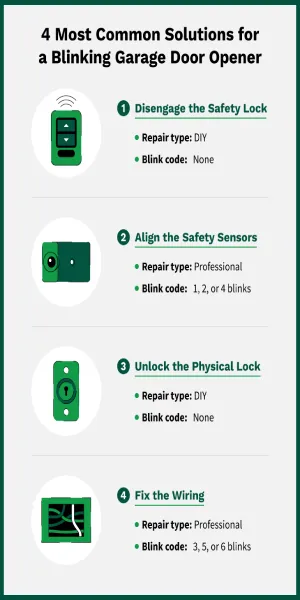
Safety sensors sit near the base of the garage door tracks. Their LEDs should glow solid green and amber when working. If you see:
- Flashing green or amber: Sensor misalignment or dirty lens.
- No light: Power or wiring problem.
The sensors are crucial for safety. They stop the door if something blocks its path. That’s why their blinking should never be ignored.
Wall Control Panel Blinking
Some Chamberlain wall controls also blink, especially if there’s a lock or battery warning:
- Slow blinking: Wall control locked or battery low.
- Fast blinking: Wiring error.
If you notice blinking here, check both the panel and the opener motor. Sometimes, the issue is as simple as pressing the unlock button.
Common Causes Of Chamberlain Garage Door Opener Blinking
Once you know what the blinking means, you can start narrowing down the cause. Here are the most frequent reasons Chamberlain garage door openers blink:
- Safety sensor misalignment: If the sensors aren’t facing each other perfectly, their lights blink. Even a small bump can cause this.
- Dirty sensor lens: Dust or spider webs block the sensor’s beam, causing blinking.
- Obstruction: Something is in the door’s path—boxes, bikes, even leaves.
- Loose wiring: Wires connecting sensors or the motor unit may vibrate loose over time.
- Damaged wiring: Rodents or weather can damage wires, causing intermittent blinking.
- Control board failure: If the main circuit board fails, multiple blinks may appear.
- Limit switch error: The opener can’t sense the door’s open or close position.
- Wall control lock: Accidentally pressing the lock button triggers blinking.
- Low battery: Some models blink when backup batteries are low.
- Power surge: Electrical spikes confuse the opener, causing blinking.
Non-obvious insight: Many people clean the sensor lens but forget to check alignment. Both are equally important. Also, loose wiring can cause blinking only when the door moves, making the issue hard to spot.
Troubleshooting Steps For Chamberlain Garage Door Opener Blinking
Fixing a blinking Chamberlain opener doesn’t always require a professional. Here’s a step-by-step approach:
1. Identify The Blinking Pattern
First, note which light is blinking and how many times. Is it steady, fast, or a specific number? Write it down, as this helps you match the code to the cause.
2. Inspect Safety Sensors
Check both sensors at the bottom of the door tracks.
- Clean the lens with a soft cloth.
- Make sure both lights are solid.
- Adjust the sensors until they face each other directly.
Tip: A small mirror can help you see if the beams align.
3. Check For Obstructions
Look around the garage door’s path.
- Remove objects blocking the sensors.
- Clear away leaves, cobwebs, and debris.
Even tiny items can cause blinking.
4. Examine Wiring Connections
Check wires at the motor unit, sensors, and wall control.
- Look for loose or unplugged wires.
- Inspect for damaged insulation.
- Gently tug each wire to see if it’s secure.
Non-obvious insight: Some Chamberlain openers use push-in connectors that feel tight but are actually loose. Re-seat all connectors.
5. Reset The Opener
Unplug the opener for 30 seconds, then plug it back in. This resets the electronics and clears minor errors.
6. Test Wall Control Panel
If the wall control is blinking:
- Press the unlock button.
- Replace batteries if needed.
If blinking continues, check the wiring.
7. Consult The Manual
If you’re stuck, check your Chamberlain manual or find your model’s code chart online. Each model has specific codes.
8. Call For Professional Help
If you’ve tried all steps and blinking persists, contact Chamberlain support or a qualified technician. Some issues, like control board failures, need expert repair.
Chamberlain Garage Door Opener Models And Their Blinking Codes
Chamberlain has many opener models. Each uses blinking codes, but patterns differ slightly. Here’s a comparison of key models:
| Model | Blinking Codes | Common Issues |
|---|---|---|
| Chamberlain B970 | 1-4 blinks | Sensor, wiring, limit switch, board |
| Chamberlain C450 | 1-3 blinks | Sensor, wiring, wall control |
| Chamberlain RJO20 | 1-5 blinks | Sensor, wiring, lock, power |
| Chamberlain MyQ Smart | 1-4 blinks | Sensor, Wi-Fi, control board |
Note: Always check your specific model’s manual for accurate codes.
How To Fix Chamberlain Safety Sensor Blinking
Safety sensor blinking is the most common issue. Here’s how to solve it step-by-step:
Cleaning And Aligning Sensors
- Use a soft, dry cloth to clean both sensor lenses.
- Check if both LEDs glow solid (green and amber).
- Gently adjust each sensor until the lights stop blinking.
Example: If the green light blinks, slowly tilt the sensor left or right. Stop as soon as the light turns solid.
Checking Sensor Wiring
- Trace the wires from each sensor to the opener.
- Look for pinched, broken, or chewed cables.
- Repair or replace damaged wires.
Removing Obstructions
- Clear anything blocking the sensors—boxes, tools, even pets.
- Test the door after clearing the path.
Replacing Sensors
If cleaning and alignment don’t work, the sensor may be faulty. Chamberlain sensors cost around $30–$50. Replacing is simple:
- Disconnect old sensor.
- Attach new sensor using the same wires.
- Align and test.
Tip: Always match sensor model numbers to avoid compatibility issues.
Chamberlain Garage Door Opener Wiring Problems And Blinking
Wiring issues cause many blinking errors. Here’s how to troubleshoot:
Checking Connections
- Open the motor unit cover (unplug first).
- Inspect wire terminals—look for corrosion or loose screws.
- Re-seat wires and tighten terminals.
Testing Continuity
If you have a multimeter, check wire continuity:
- Set meter to continuity mode.
- Touch probes to each end of the sensor wire.
- If no beep, wire is broken.
Replacing Damaged Wires
- Buy replacement wire (usually 18–22 gauge).
- Run new wire from sensors to motor unit.
- Secure wires along door tracks.
Data: Most Chamberlain openers use low-voltage wiring. This means repairs are safe for most DIYers, but always unplug before touching wires.
Credit: www.precisiondoor.net
Limit Switch And Control Board Errors
Some blinking codes mean the opener can’t detect the door’s position or the main board is failing.
Adjusting Limit Switches
Limit switches tell the opener where the door stops. If they’re set wrong:
- Find the adjustment screws (usually on the motor unit).
- Turn screws gently to change door position.
- Test door after each adjustment.
Identifying Control Board Failure
Multiple blinks (usually 3+) often mean the board is faulty.
- Check for burnt smell or visible damage.
- If the board is bad, replacement costs $80–$150.
- Only attempt this if you’re comfortable with electronics.
Example: If your opener blinks three times and nothing else works, suspect the board.
Wall Control Panel Blinking Issues
Wall controls blink for several reasons:
Unlocking Wall Control
If the panel blinks slowly, it’s locked.
- Press and hold the unlock button for 5 seconds.
- Blinking should stop.
Changing Batteries
Some Chamberlain panels use batteries. Replace with fresh batteries if blinking continues.
Checking Wall Control Wiring
- Remove panel cover.
- Inspect wires for damage or looseness.
- Re-seat and tighten wires.
Tip: If your opener works with remote but wall control blinks, wiring is likely the issue.
Chamberlain Garage Door Opener Power And Battery Blinking
Power problems can cause blinking:
Resetting After Power Surge
- Unplug opener for 30 seconds.
- Plug back in and test.
Checking Backup Battery
Some models have a backup battery. If blinking:
- Open battery compartment.
- Replace with a Chamberlain-approved battery.
Data: Backup batteries last 1–3 years. Low battery is signaled by blinking on many models.
Preventing Chamberlain Garage Door Opener Blinking Issues
Prevention saves time and money. Here’s how to avoid blinking problems:
- Clean sensors monthly: Prevent dust buildup.
- Check alignment after storms: Wind can knock sensors out of place.
- Secure wires: Use clips to keep wires tight.
- Test door path regularly: Make sure nothing blocks sensors.
- Replace batteries yearly: Don’t wait for blinking to signal low power.
- Surge protect your opener: Use a surge protector to avoid electrical damage.
Non-obvious insight: Many people only check sensors when the opener fails. Checking monthly prevents most blinking issues.
Data On Chamberlain Garage Door Opener Failure Rates
Let’s look at some statistics to help you understand how often blinking issues occur:
| Issue Type | Percent of Cases | Average Fix Time |
|---|---|---|
| Sensor misalignment | 35% | 10 minutes |
| Dirty lens | 20% | 5 minutes |
| Wiring problems | 15% | 30 minutes |
| Control board failure | 10% | 2 hours |
| Limit switch error | 5% | 20 minutes |
| Other causes | 15% | Varies |
Most blinking issues are quick fixes, especially sensor-related problems.
Chamberlain Garage Door Opener Blinking: When To Call A Professional
Some problems are easy to fix. Others need expert help. Here’s when to call a pro:
- Control board replacement: Risky without experience.
- Severe wiring damage: If wires are inside walls or ceiling.
- Repeated blinking after troubleshooting: Could signal hidden issues.
- Strange noises, burning smell, or sparks: Turn off power and call immediately.
Tip: If you’re not comfortable with electrical repairs, always call a technician.
Chamberlain Garage Door Opener Blinking And Smart Features
Chamberlain’s MyQ Smart Garage Hub brings Wi-Fi features. Blinking can signal network issues:
- Blinking blue light: Wi-Fi setup needed.
- Blinking red light: Lost connection.
To fix:
- Reconnect to Wi-Fi using the MyQ app.
- Reset the hub if blinking persists.
Example: If your opener works manually but not through MyQ, network blinking is likely the cause.
Chamberlain Garage Door Opener Blinking: Quick Reference Guide
Here’s a simple summary for fast troubleshooting:
- 1 blink: Check sensors.
- 2 blinks: Inspect wiring.
- 3 blinks: Suspect control board.
- 4 blinks: Adjust limit switches.
- Blinking wall control: Unlock or change battery.
- Blinking sensors: Clean and align.
Keep this guide near your opener for quick reference.

Credit: www.reddit.com
Real-world Example: Solving Chamberlain Blinking
Let’s look at a practical example:
Sarah’s Chamberlain B970 started blinking one day. The motor unit showed 1 blink per second. She cleaned the sensors, but blinking continued. Next, she checked alignment and found one sensor was knocked out of place. After adjusting, the blinking stopped, and the door worked again.
Lesson: Always check both cleaning and alignment. Many issues need more than one fix.
Chamberlain Garage Door Opener Blinking Vs. Other Brands
How Does Chamberlain Compare To Other Brands?
| Brand | Blinking Codes | Ease of Troubleshooting | Average Repair Cost |
|---|---|---|---|
| Chamberlain | 1-5 blinks | Easy (sensor/wiring) | $20–$150 |
| LiftMaster | 1-8 blinks | Moderate (more codes) | $30–$200 |
| Genie | Flashing/solid | Easy (less codes) | $25–$120 |
Chamberlain makes troubleshooting easier with clear codes. Most repairs are affordable.

Credit: support.chamberlaingroup.com
Useful Resources For Chamberlain Garage Door Opener Blinking
If you need more help, Chamberlain offers guides and videos. You can also find expert advice at Chamberlain Official Site.
Frequently Asked Questions
Why Is My Chamberlain Garage Door Opener Blinking Continuously?
Continuous blinking usually means safety sensor misalignment or obstruction. Clean the sensors, check alignment, and remove anything blocking the path.
What Does 3 Blinks On My Chamberlain Opener Mean?
Three blinks often signal a control board failure. If simple fixes don’t work, you may need a new board or professional repair.
Can I Fix Blinking Issues Myself?
Most blinking problems—sensor cleaning, alignment, and wiring—can be fixed by homeowners. If the issue is with the control board or severe wiring damage, call a professional.
How Much Does It Cost To Fix Chamberlain Blinking Issues?
Sensor fixes cost $0–$50. Wiring repairs are $10–$50. Control board replacements cost $80–$150. Professional service averages $100–$200.
Does Chamberlain Myq Blinking Mean Wi-fi Trouble?
Yes. Blinking blue or red lights on MyQ units usually mean Wi-Fi setup or connection problems. Reconnect using the MyQ app or reset the hub.
Conclusion
A blinking Chamberlain garage door opener doesn’t need to be a headache. With clear codes and practical steps, you can solve most issues in minutes. Always check sensor alignment and wiring first, and keep your opener clean and well-maintained. If you face advanced problems, don’t hesitate to call a professional.
By understanding blinking patterns and following the right steps, your garage door opener will keep working safely and reliably for years.