
If you see your Calix router blinking red, you might feel worried. Many people think a red light means something is broken. But that’s not always true. Routers have many lights, and each color or blinking pattern tells you something about your internet connection or device health. Understanding what a blinking red light really means can help you fix the problem faster—and avoid unnecessary stress.
This guide explains why your Calix router blinks red, what each light means, and step-by-step solutions to common issues. You’ll also learn how to check your internet speed, when to call your provider, and how to prevent problems in the future. Even if you’re not tech-savvy, you can use this article to solve most blinking red light issues yourself.
What Does A Blinking Red Light Mean On A Calix Router?
A blinking red light on your Calix router is usually a warning. It means the device has detected a problem. The most common causes are:
- No internet connection
- Hardware or firmware error
- Cable or power issue
- Overheating
- Service outage
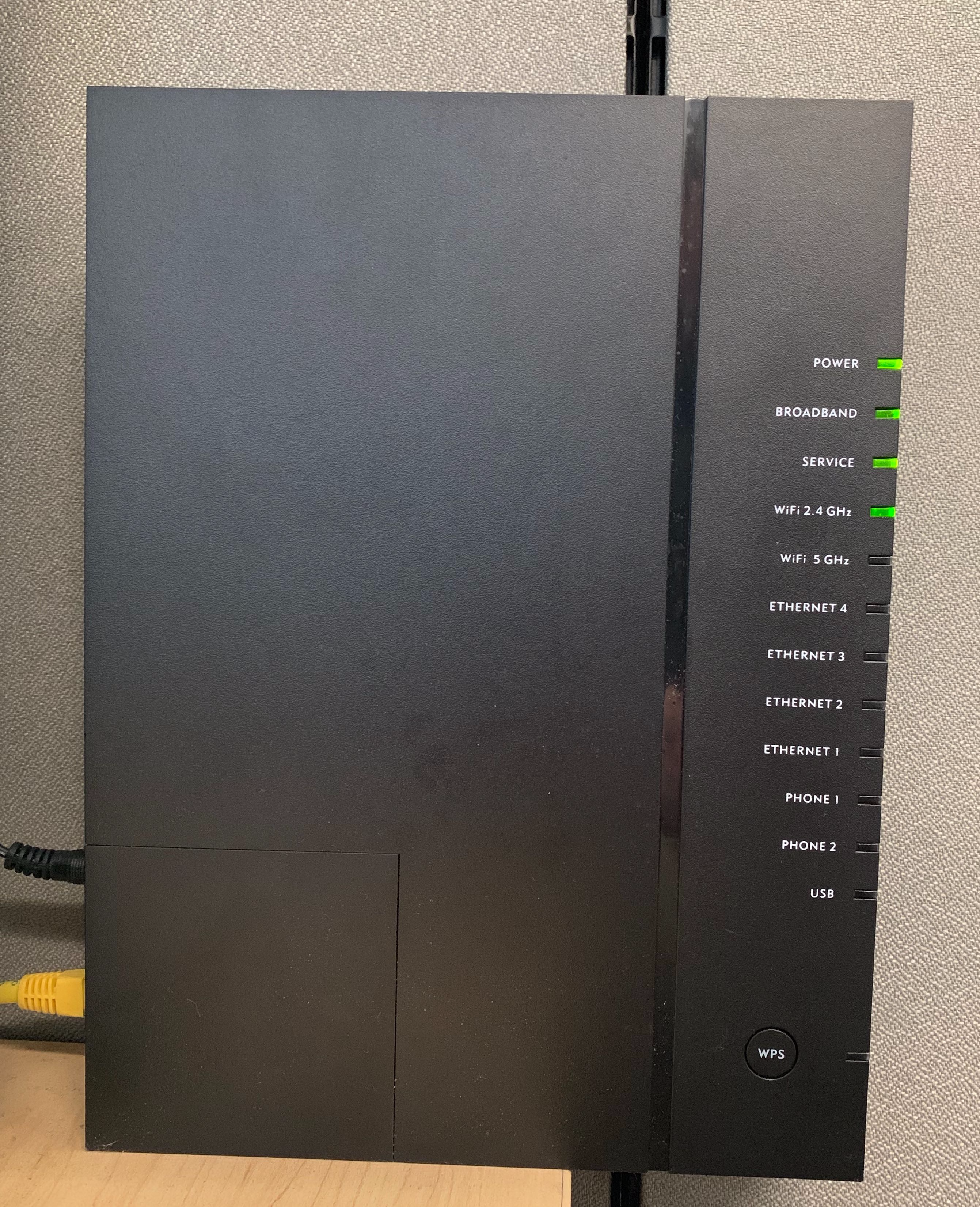
The red light usually appears on the front panel. Sometimes, you may see a steady red light, other times it blinks. The blinking pattern can help you identify the problem.
Different Light Patterns And Their Meaning
Routers use colors and blinking patterns to show status. Here’s what the main lights on a Calix router mean:
| Light Color | Blinking Pattern | Meaning |
|---|---|---|
| Green | Solid | Normal operation |
| Green | Blinking | Data is being transmitted |
| Red | Solid | Critical error or hardware failure |
| Red | Blinking | No internet or connection problem |
| Amber/Yellow | Solid/Blinking | Firmware update or limited connectivity |
If your Calix router is blinking red, it often means it can’t connect to your internet provider. But sometimes, it signals a hardware issue or a service outage.
Common Causes For Calix Router Blinking Red
Understanding the cause is key to fixing your router. Here are the most frequent reasons:
- Internet Outage: If your internet provider is down, your router can’t connect. This is the most common cause.
- Loose or Damaged Cables: If cables are not plugged in properly, or damaged, the router will blink red.
- Power Issue: Low power or unstable power supply can trigger a blinking red light.
- Firmware Corruption: If the router’s software is damaged or interrupted during an update.
- Hardware Failure: Internal components may fail over time, especially if the router is old.
- Overheating: Routers get hot. If they reach unsafe temperatures, they blink red to warn you.
- Configuration Error: Wrong settings can block the router from connecting.
Many beginners overlook the cable issue. Even if cables look fine, tiny bends or loose connectors can cause trouble. Another missed insight is overheating—placing your router in a tight spot or near electronics can make it blink red.
How To Fix A Calix Router Blinking Red
Solving the blinking red issue is usually simple. Follow these steps, in order, to troubleshoot:
1. Check For Internet Outage
Before you touch your router, check if your internet provider is down.
- Use your phone’s data to visit your provider’s website.
- Search for outage maps or alerts.
- Ask neighbors if they have internet.
If there’s an outage, wait until your provider fixes it.
2. Inspect Cables And Connections
Unplug and replug all cables. Look for damage or loose connections.
- Power cable: Should fit snugly.
- Ethernet cable: No cuts or bent pins.
- Fiber cable (if you use fiber): Handle gently, it’s fragile.
Replace any damaged cables.
3. Power Cycle The Router
Turn off your router completely. Wait 30 seconds. Turn it on again.
This simple step solves many issues. It clears errors and resets connections.
4. Check Router Placement
Routers need air. Move yours to an open spot, away from heat sources.
- Avoid placing near TVs, computers, or direct sunlight.
- Make sure it’s not covered by books or papers.
If the router feels hot, let it cool for a while before restarting.
5. Update Firmware
Routers need regular updates. If your Calix router allows manual firmware updates:
- Log into your router’s web interface (usually 192.168.1.1).
- Find the update section.
- Click “Check for updates”.
- Follow instructions.
If you’re not sure how, ask your provider for help.
6. Reset To Factory Settings
If nothing works, reset your router. Use the reset button (usually on the back):
- Press with a paperclip for 10 seconds.
- Wait until lights change.
- The router will restart and clear all settings.
Warning: You’ll lose custom settings (Wi-Fi name, password, etc.).
7. Contact Your Provider
If you still see a blinking red light, call your provider. They can check your line, send a technician, or replace the router.
Calix Router Models And Light Behavior
Different Calix router models may use slightly different light patterns. Here’s a comparison of common models:
| Model | Red Light Location | Blinking Pattern Meaning |
|---|---|---|
| Calix GigaCenter | Front panel | No internet, hardware error |
| Calix 804Mesh | Top ring | Lost connection to main router |
| Calix 803G | LED strip | Firmware error or power issue |
| Calix GigaPoint | Front LED | Fiber cable not detected |
Always check your model’s manual for exact light codes. Some routers blink red when updating firmware, others only for errors.
Internet Speed And Router Health
If your router blinks red often, it may affect your internet speed. Here’s how to check:
- Use Speed Test Tools: Websites like Speedtest.net show your upload/download speed.
- Compare with Your Plan: Is your speed lower than what you pay for?
- Test Different Devices: Try computers, phones, tablets.
Slow speeds or frequent disconnects can signal a deeper problem.
Router Vs. Internet Provider
Sometimes, the router is fine but your provider is slow. Other times, a faulty router makes your internet unreliable. Here’s a quick comparison:
| Issue | Router Problem | Provider Problem |
|---|---|---|
| Blinking Red Light | Yes | Yes |
| Slow Speed | Yes | Yes |
| Frequent Disconnects | Yes | Sometimes |
| No Wi-Fi Signal | Yes | No |
| Outage Announced | No | Yes |
If your router blinks red but your provider says everything is fine, the problem is likely with your device.
Preventing Calix Router Blinking Red Issues
You can avoid many problems by following these tips:
- Keep router firmware updated: Outdated software can cause errors.
- Check cables regularly: Replace old or worn cables.
- Place router in open space: Prevent overheating.
- Avoid power surges: Use a surge protector.
- Restart router once a month: Clears temporary errors.
A non-obvious insight: routers last longer if you dust them regularly. Dust blocks air vents and can cause overheating.
Credit: connectctc.zendesk.com
When To Replace Your Calix Router
Routers usually last 3-5 years. If you see a blinking red light often, even after fixes, your device may be old or faulty.
Signs you need a new router:
- Frequent errors that won’t go away
- Slow speeds on all devices
- Wi-Fi signal drops often
- Physical damage (cracks, burnt smell)
Upgrading to a new router can improve speed, reliability, and security.
Router Placement And Environment
Many people don’t realize that where you put your router matters. Placement affects speed and error rates.
Best practices:
- Place router at the center of your home.
- Keep away from thick walls and metal objects.
- Raise router off the floor.
- Keep at least 1 foot from other electronics.
Poor placement increases risk of blinking red lights, especially due to overheating.

Credit: www.youtube.com
Advanced Troubleshooting
If you’ve tried basic steps but still see a blinking red light, try these advanced methods:
Check Router Logs
Most Calix routers let you view logs.
- Log in to your router’s web interface.
- Look for “System Logs” or “Event Logs”.
- Check for error codes (like E01, E23).
These codes can help technicians diagnose problems.
Firmware Recovery
If your router fails during an update, it may blink red. Some models support recovery mode:
- Unplug router.
- Hold reset button.
- Plug in power while holding reset.
- Release after 10 seconds.
Follow any on-screen instructions.
Replace Power Adapter
Sometimes, the adapter fails—not the router. Try another adapter with same voltage.
Use A Ups (uninterruptible Power Supply)
Power interruptions can cause blinking red lights. A UPS keeps your router running during brief outages.
How Calix Routers Compare To Other Brands
Calix routers are known for reliability, but blinking red lights are not unique to them. Here’s a quick comparison:
| Brand | Blinking Red Light Issue | Typical Fix |
|---|---|---|
| Calix | Connection, hardware, overheating | Restart, cable check, firmware update |
| Netgear | Connection, firmware, power | Factory reset, firmware update |
| Linksys | Cable, configuration | Reconfigure, cable check |
| TP-Link | Firmware, overheating | Firmware update, placement fix |
Calix routers rarely blink red for minor issues—so if yours does, it’s worth checking carefully.

Credit: www.hbci.com
What To Tell Your Internet Provider
If you need to call your provider, give clear information:
- Router model and serial number
- Blinking pattern and color
- Steps you’ve tried
- Any error codes
This helps support staff solve your problem faster.
Security And Safety
A blinking red light usually isn’t a security risk. But if your router is hacked, it may behave strangely.
Signs of hacking:
- New devices on your network
- Changed settings
- Unusual blinking patterns
If you suspect hacking, reset your router and change passwords.
Real-world Examples
Many users have solved blinking red light issues by following simple steps:
- Jane in Michigan unplugged her router and found a loose fiber cable. Fixing it restored her connection.
- Omar in Texas discovered his router overheated after being placed near a heater. Moving it fixed the red blinking.
- A student in California reset his router after a failed firmware update. The blinking stopped, and internet returned.
Most blinking red light issues are fixable at home.
Frequently Asked Questions
Why Is My Calix Router Blinking Red After A Storm?
Storms can cause power surges or outages. These affect router performance and may damage cables. Check your power supply and cables first. If the problem continues, your router may need repair.
Can I Use My Calix Router While The Red Light Blinks?
Usually, a blinking red light means the internet connection is down. You may still connect to Wi-Fi, but you won’t have access to the internet. Fix the issue before using your router for online activities.
How Do I Know If My Calix Router Needs Replacement?
If you’ve tried all troubleshooting steps and still see a blinking red light, your router may be faulty or outdated. Signs include frequent errors, slow speeds, or physical damage. Routers older than 5 years should be replaced.
Will A Factory Reset Erase My Wi-fi Password And Settings?
Yes, a factory reset returns your router to default settings. You’ll lose custom Wi-Fi names, passwords, and configurations. Write down your settings before resetting.
Are Calix Routers Better Than Other Brands?
Calix routers are reliable and used by many internet providers. They have clear light codes and good support. However, blinking red lights can happen with any brand. The best router depends on your needs and internet plan. For more information, visit the official Calix website.
Your Calix router blinking red is not always a disaster. Most issues are simple to fix—check cables, power cycle, update firmware, and make sure your router is in a cool, open space. If problems continue, your provider can help or offer a replacement.
With these tips, you can solve most blinking red light issues yourself—and keep your internet running smoothly.