
Many people use vape pens for convenience and ease. The Brass Knuckles vape pen is a popular choice, known for its strong performance and sleek design. But sometimes, users see their vape pen blinking red and don’t know what it means. If you’re facing this issue, you’re not alone. The blinking red light can be confusing, but it’s actually your pen’s way of telling you something is wrong. Understanding the blinking red light is important for your safety and vaping experience.
In this article, you’ll learn what causes the Brass Knuckles vape pen to blink red, how to fix it, and how to prevent it from happening again. You’ll also see comparisons with other pens, troubleshooting steps, and helpful tips. Whether you’re new to vaping or experienced, this guide will give you clear answers, practical advice, and useful solutions.
What Does The Blinking Red Light Mean?
When your Brass Knuckles vape pen blinks red, it’s a warning signal. Vape pens use colored lights to communicate with users. The red light usually means something is wrong, but the exact reason can vary. Here are the main causes:
- Low battery: The battery power is almost gone.
- Connection issues: The cartridge and battery are not making proper contact.
- Short circuit: There’s a problem with the electrical flow.
- Overheating: The device is too hot and needs to cool down.
- Charging errors: The pen is not charging properly or is plugged into the wrong charger.
Each situation is different, so it’s important to check your vape pen carefully. The blinking red light is not a random feature—it’s built to protect both you and your device.
Common Reasons For Brass Knuckles Vape Pen Blinking Red
The blinking red light can mean several things. Let’s break down the most frequent reasons and how they affect your vaping.
Low Battery
Most vape pens blink red when the battery is almost empty. Brass Knuckles pens are no different. If you’ve been using your pen for a while and the red light starts blinking, it’s a sign you need to recharge. Sometimes, the blinking happens even when the pen is not in use, reminding you to charge it before your next session.
Connection Issues
Inside your pen, the cartridge connects to the battery. If the connection is loose or dirty, the pen may blink red. A simple twist or cleaning can solve the problem. Many beginners miss this step and think their pen is broken when it just needs a quick fix.
Short Circuit
A short circuit is an electrical issue. It can happen if there’s damage inside the pen or the cartridge. The red light blinks to warn you that the pen cannot work safely. Using a damaged pen can be dangerous, so stop using it until you fix the issue.
Overheating
Sometimes, vaping for a long time can make the pen hot. The Brass Knuckles pen blinks red to tell you to pause and let it cool down. This protects both the battery and the internal parts from damage.
Charging Errors
If you use the wrong charger or there’s a problem with the charging cable, the pen may blink red. Always use the charger that comes with your pen or a compatible one. Charging errors can reduce battery life or even cause safety risks.
Cartridge Problems
Not all cartridges fit perfectly. If you use a cartridge that’s too tight or too loose, the pen might blink red. This is a common mistake, especially with third-party cartridges. Make sure your cartridge is Brass Knuckles branded or fully compatible.
How To Troubleshoot A Blinking Red Brass Knuckles Vape Pen
Fixing your vape pen is easier than you think. Follow these steps to diagnose and solve the blinking red light.
Step 1: Check The Battery Level
Start by charging your pen. Plug it into the charger and wait for the light to change. If the red light stops blinking and turns green, your battery was simply low. If it keeps blinking, move to the next step.
Step 2: Inspect The Cartridge Connection
Unscrew the cartridge and check for dust, oil, or debris. Use a cotton swab or tissue to clean both the cartridge and battery connectors. Screw the cartridge back in gently—don’t force it. A clean, tight connection often solves the blinking problem.
Step 3: Try A Different Cartridge
If cleaning doesn’t help, try a different cartridge. Sometimes, the cartridge itself is damaged or incompatible. If the pen works with a new cartridge, the old one needs to be replaced.
Step 4: Examine For Short Circuits
Look for signs of damage: cracks, leaks, or burnt smells. If you suspect a short circuit, don’t use the pen. Contact Brass Knuckles support or a vape shop for help.
Step 5: Let The Device Cool Down
If you’ve been vaping continuously, stop and let the pen rest for at least 15 minutes. Overheating can cause the red light to blink. Once cool, try using the pen again.
Step 6: Test The Charger And Cable
Use the original charger if possible. If the pen doesn’t charge, try a new cable or adapter. Avoid using phone chargers or cheap replacements. Faulty chargers can cause blinking or damage.
Step 7: Reset The Pen
Some Brass Knuckles pens have a reset feature. Turn off the pen, wait a few seconds, and turn it back on. This can fix simple glitches.
Comparing Brass Knuckles Vape Pen To Other Vape Pens
Let’s see how the Brass Knuckles pen stacks up against other brands. Here’s a comparison table:
| Feature | Brass Knuckles | Vaporizer X | Vaporizer Y |
|---|---|---|---|
| Battery Life | Long (up to 250 puffs) | Medium (up to 180 puffs) | Short (up to 120 puffs) |
| Blinking Red Issue | Common with low battery | Common with overheating | Rare, usually cartridge related |
| Charging Speed | Fast (1 hour) | Medium (1.5 hours) | Slow (2 hours) |
| Compatible Cartridges | Wide range | Limited | Wide range |
Brass Knuckles is known for long battery life and fast charging. The blinking red light is most common when the battery is low or the cartridge is loose. Other pens may blink red for different reasons.
Preventing The Blinking Red Light
Avoiding the blinking red light is possible if you follow some simple steps. Here’s how to keep your Brass Knuckles vape pen working smoothly:
- Charge Regularly: Don’t wait until the battery is empty. Charge your pen after every few sessions.
- Clean Connections: Wipe the connectors weekly. Dirt and oil build up fast.
- Use Compatible Cartridges: Always check if your cartridge fits well.
- Avoid Overuse: Give your pen breaks to prevent overheating.
- Store Safely: Keep your pen away from extreme heat or cold.
These habits help you avoid common problems. Beginners often forget to clean their pen or use random chargers, leading to blinking issues. A little care goes a long way.
Brass Knuckles Vape Pen Technical Details
Understanding the technical side helps you fix problems faster. Here’s a technical overview:
| Specification | Brass Knuckles Vape Pen | Industry Average |
|---|---|---|
| Battery Capacity | 350 mAh | 350 mAh |
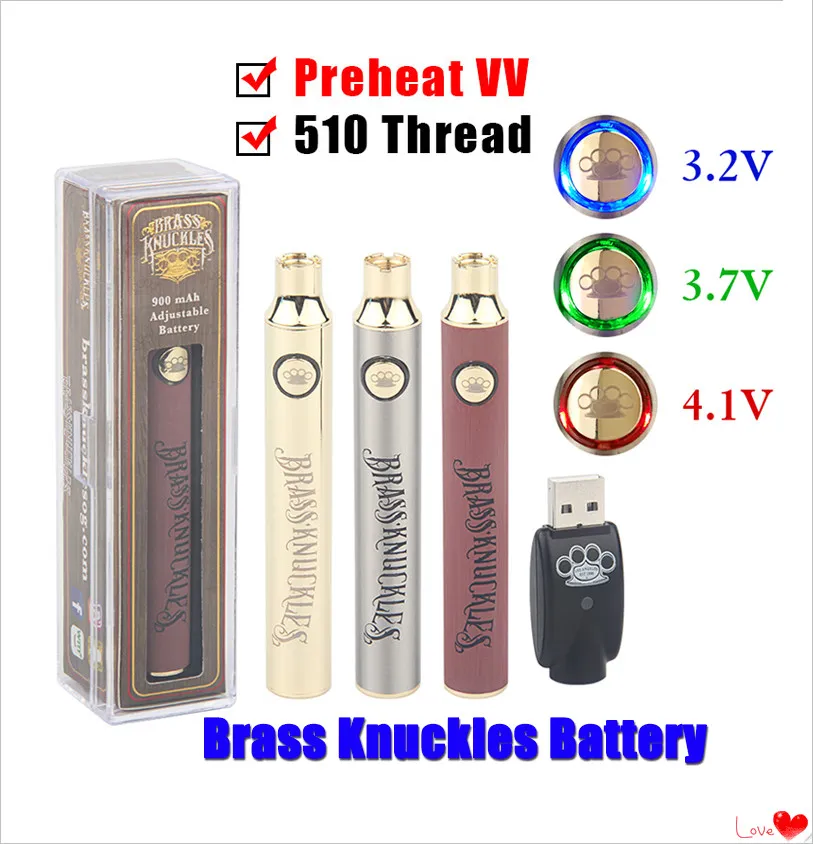
| Voltage Settings | 3.2V, 3.7V, 4.1V | 3.5V, 4.0V |
| Charging Port | USB | USB |
| Blinking Red Light Causes | Low battery, connection, overheating | Low battery, cartridge |
| Reset Feature | Yes | No |
Brass Knuckles pens have three voltage settings, allowing you to choose how strong your vape is. The battery matches industry standards, but the reset feature is unique.
Signs Of Deeper Problems
Sometimes, blinking red is just the start. Watch for these signs that your pen needs professional help:
- Blinking with burning smell
- Blinking after charging
- Blinking with no vapor
- Blinking and overheating quickly
- Blinking with visible damage
If you see any of these, stop using the pen. Continuing can be unsafe.
Real-life Examples: User Stories
Many users share their experiences online. Here are two stories that show common issues and solutions:
Mark’s Story: Mark noticed his Brass Knuckles pen blinking red after each puff. He cleaned the connector, but the problem continued. After switching to a new cartridge, the blinking stopped. Mark learned that cartridge compatibility matters.
Sara’s Story: Sara’s pen started blinking red during charging. She tried different cables, but only the original charger worked. Sara avoided further issues by sticking with official accessories.
These stories highlight the importance of cleaning, compatibility, and using proper chargers.
Battery Life And Charging Tips
The Brass Knuckles pen has a strong battery, but good habits can make it last even longer.
- Charge before it’s empty: Don’t wait for the red light.
- Don’t overcharge: Unplug once fully charged.
- Avoid cheap chargers: Use the original or high-quality replacements.
- Store at room temperature: Batteries degrade in extreme weather.
Data shows that proper charging can increase battery life by up to 30%. Many users ignore this and face frequent blinking issues.
Cartridge Compatibility And Common Mistakes
Choosing the right cartridge is key. Here’s a simple guide:
| Cartridge Type | Compatible? | Common Mistakes |
|---|---|---|
| Brass Knuckles Original | Yes | None |
| Universal 510 Thread | Yes | Loose fit, leaking |
| Non-Standard Brands | No | Short circuit, blinking red |
| Oversized Cartridges | No | Cannot connect, blinking red |
Most problems happen when users pick random cartridges. Always check the thread and size.
Credit: sedadream.com
Cleaning And Maintenance Steps
Maintaining your vape pen is simple but often forgotten. Here’s a step-by-step cleaning guide:
- Turn off the pen: Prevent accidental firing.
- Remove the cartridge: Unscrew gently.
- Clean the connectors: Use a cotton swab with rubbing alcohol.
- Dry completely: Moisture can cause blinking.
- Check for leaks: Replace damaged parts.
- Reassemble: Screw in the cartridge gently.
- Test the pen: See if the blinking stops.
Cleaning once a week keeps your pen healthy and reduces blinking issues.
Safety Precautions
Vaping is safe if you follow basic rules:
- Never use damaged parts
- Don’t charge unattended
- Avoid water or moisture
- Keep away from children
- Use only compatible cartridges and chargers
Data from vape safety studies shows that most accidents happen when users ignore blinking warnings or use cheap accessories.
Credit: digboimahilamahavidyalaya.org
When To Seek Professional Help
If your pen keeps blinking red after trying all fixes, it’s time to get help. Contact Brass Knuckles customer service or a local vape shop. Don’t risk using a faulty device—it could be unsafe.
Benefits Of Brass Knuckles Vape Pen
Despite some issues, the Brass Knuckles pen has many strengths:
- Strong battery
- Three voltage settings
- Wide compatibility
- Fast charging
- Easy maintenance
These features make it a favorite among vape users.
Non-obvious Insights Beginners Miss
- Voltage setting affects blinking: Using a high voltage can drain the battery faster, causing blinking red sooner. Beginners often use the highest setting, not realizing it shortens battery life.
- Humidity matters: Storing your pen in a humid place can cause connector issues and blinking. Always keep your pen dry.
Final Thoughts
A blinking red Brass Knuckles vape pen is not the end of your vaping experience. It’s just a warning to check your device, fix small problems, and keep vaping safely. Most issues can be fixed with careful cleaning, proper charging, and using compatible cartridges.
Smart habits and regular maintenance prevent blinking and keep your pen working well. Remember, the blinking red light is your friend—it helps you avoid bigger problems.
If you ever feel lost, don’t hesitate to ask for help or check reliable sources like Wikipedia. With a little attention, your Brass Knuckles vape pen can deliver smooth, safe vaping for a long time.

Credit: www.youtube.com
Frequently Asked Questions
Why Does My Brass Knuckles Vape Pen Blink Red Even After Charging?
This usually means a connection issue or a damaged cartridge. Clean the connectors and try a new cartridge. If the problem persists, check for signs of damage or contact support.
Can I Use Any Charger With My Brass Knuckles Pen?
No. Always use the original charger or a high-quality USB charger. Cheap or incompatible chargers can cause blinking and reduce battery life.
Is It Safe To Use The Pen When It’s Blinking Red?
No. The blinking red light is a warning. Stop using the pen and fix the problem before continuing. Ignoring the warning can lead to safety risks.
How Often Should I Clean My Vape Pen?
Clean your pen at least once a week. Regular cleaning prevents blinking issues and keeps your pen working smoothly.
What Should I Do If Blinking Red Happens After Installing A New Cartridge?
Remove the cartridge, clean the connectors, and reinstall it. If the blinking continues, try a different cartridge. Not all cartridges are compatible, even if the thread fits.