
Many pet owners love their furry friends but struggle with hair everywhere—on sofas, rugs, and even clothes. That’s why tools like the Bissell Pet Hair Eraser are lifesavers. However, what happens when your trusted vacuum shows a blinking red light while charging? Suddenly, cleaning feels uncertain. Is this a minor issue, or is your vacuum in trouble?
This article explains what the blinking red light means, why it happens, and most importantly, what you should do. We’ll look at common causes, solutions, and ways to prevent future problems. Whether you’re a first-time Bissell user or have owned several, you’ll find practical steps and insights here. By the end, you’ll know how to keep your vacuum working and your home hair-free.
Understanding The Bissell Pet Hair Eraser Series
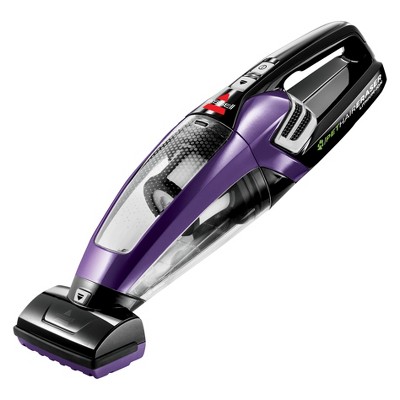
Before tackling the blinking red light, it helps to understand your device. The Bissell Pet Hair Eraser comes in several models—handheld, cordless, upright, and canister. Most users with a blinking red light problem own the cordless handheld version, which is popular for quick cleanups and portability.
Key features of the Pet Hair Eraser handheld models include:
- Lithium-ion battery for cordless use
- Specialized pet tools for furniture and tight spaces
- Easy-to-empty dirt bin
- LED indicator lights to show charging status
Knowing how your vacuum is designed helps identify where problems might start. The battery and charging system are crucial, as issues here often trigger warning lights.
What Does The Blinking Red Light Mean?
The blinking red light is not just a random signal. It’s a built-in alert system, telling you something isn’t right with charging. On most Bissell Pet Hair Eraser handhelds, the LED indicator shows:
- Solid blue light: Fully charged or running normally
- Blinking blue light: Charging in progress
- Blinking red light: Problem detected during charging
But what kind of problem? In almost all cases, the blinking red light signals that the vacuum is not charging correctly. This can result from battery issues, charger faults, or even temperature problems. Ignoring the blinking red light can lead to a vacuum that won’t hold a charge, leaving you with pet hair piling up.
Common Causes Of A Blinking Red Light
Understanding why the red light blinks is the first step toward a fix. Let’s look at the main reasons:
- Charger or Cable Issues
- Sometimes, the charger or cable is loose, damaged, or not the right model for your vacuum. If the charger can’t deliver power, the vacuum warns you with a blinking red light.
- Battery Problems
- All lithium-ion batteries lose strength over time. If the battery is old, faulty, or deeply discharged, charging may fail.
- Dirty or Blocked Charging Contacts
- Dust, pet hair, or grime on the metal contacts between the charger and vacuum can prevent energy transfer.
- Overheating
- If the vacuum or battery is too hot, the system won’t charge to protect itself. The red light blinks until it cools down.
- Internal Fault or Circuit Error
- Sometimes, a fault inside the vacuum, like a broken circuit, triggers the light.
- Environmental Issues
- Charging in very hot, cold, or humid places can cause safety circuits to stop charging.
Each cause has its own solution, but knowing these helps you troubleshoot quickly.
How To Fix Bissell Pet Hair Eraser Blinking Red Light
Now, let’s get practical. Here are steps you can try, from simplest to more advanced. You don’t need special skills—just patience and the right order.
1. Check Power Source And Charger
- Make sure the charger is plugged into a working outlet. Try another device (like your phone) in the same outlet to confirm it works.
- Inspect the charger and cable for cuts, bends, or exposed wires. Use only the original Bissell charger, as other chargers may not give the correct voltage.
2. Clean Charging Contacts
- Turn off and unplug the vacuum.
- Find the metal contacts where the charger meets the vacuum.
- Use a dry cloth or cotton swab to remove dust, pet hair, or dirt.
- Avoid using water or chemicals.
3. Reset The Vacuum
- Sometimes, an internal error can be cleared with a reset.
- Remove the vacuum from the charger.
- Turn it off.
- Wait 30 seconds, then turn it on and try charging again.
4. Let The Vacuum Cool Down
- If you’ve used the vacuum for a long time, the battery may be hot.
- Unplug it and let it rest for at least 30 minutes before trying again.
- Avoid charging it near heaters or in direct sunlight.
5. Try A Different Charger (if Available)
- If you have access to another Bissell Pet Hair Eraser charger, swap it. If the red light disappears, your old charger is likely faulty.
6. Inspect The Battery
- If the vacuum is old (2+ years) or has been used heavily, the battery may be worn out.
- In most Bissell models, the battery is built-in. If under warranty, contact Bissell for support.
- For out-of-warranty vacuums, battery replacement may be possible but often requires a technician.
7. Avoid Extreme Temperatures
- Charge the vacuum indoors, at room temperature (ideally 60–80°F / 16–27°C).
- Avoid garages, sheds, or unheated rooms.
8. Contact Bissell Support
- If none of the above work, it could be an internal defect.
- Have your model number and purchase date ready.
- Bissell can guide you through advanced steps or warranty service.
Example Troubleshooting Flow
Here is a simple flow you can follow if your Pet Hair Eraser blinks red:
- Unplug and replug the charger.
- Try a different outlet.
- Clean charging contacts.
- Let vacuum cool.
- Try charging again.
- Swap charger (if available).
- Contact Bissell support.
If you reach step 7 without success, you’ve ruled out common problems and need expert help.
Comparing Common Issues And Fixes
Understanding which problem is most likely can save time. Here is a comparison of typical causes, symptoms, and solutions:
| Cause | How to Recognize | Solution |
|---|---|---|
| Charger Fault | No charging, red light blinks immediately | Try another charger |
| Dirty Contacts | Vacuum sits loosely, red light, visible grime | Clean contacts carefully |
| Overheated Battery | Recently used for a long time, warm to touch | Let it cool before charging |
| Battery Worn Out | Old vacuum, short run time, red light after charging | Contact Bissell for service |
| Environmental Issues | Charging in hot, cold, or damp area | Move to room temperature area |

Credit: support.bissell.com
When Is It Time To Replace The Battery?
Batteries don’t last forever. Here’s how you know it’s time for a new one:
- The vacuum runs much shorter than before, even after charging fully.
- The red light blinks even after trying all fixes.
- The battery is more than two years old (for frequent users).
- The vacuum feels weak or does not start.
Most handheld vacuums have batteries rated for 300–500 charge cycles. For a weekly user, that’s about 3–5 years. If you suspect battery failure and your device is out of warranty, replacing it can be done by a technician. On some Bissell models, the battery is not user-replaceable—check your manual or contact support.
Tips To Prevent Blinking Red Light Issues
You can avoid most charging issues by following these tips:
- Use only the original charger. Third-party chargers may damage the battery or cause errors.
- Clean the charging contacts every few months, especially if you have a lot of pet hair.
- Store and charge in a dry, room-temperature place.
- Avoid fully draining the battery. Recharge when you notice the power getting low.
- Don’t leave the vacuum on the charger for weeks. Once fully charged, unplug it.
- If you won’t use the vacuum for a while, charge it halfway before storing.
These simple habits can extend battery life and keep your vacuum trouble-free.
Real-world Example: Troubleshooting Success
Let’s look at a real situation. Jane owns a Bissell Pet Hair Eraser handheld for her two cats. One day, she notices the red light blinking while charging. She tries these steps:
- Unplugs and re-plugs the charger, but the red light stays.
- Cleans the charging contacts with a dry cloth—finds some cat hair stuck.
- Waits 20 minutes to let the vacuum cool, then tries again.
- The vacuum now shows a blue charging light and charges normally.
Jane’s case shows that simple cleaning can solve most problems. Many owners panic at the blinking red light, but often it’s just dust or pet hair blocking the contacts.
Common Myths About Blinking Red Lights
Some users believe:
- “The vacuum is broken forever.” (Usually not true.)
- “A blinking red light means the battery exploded.” (This is extremely rare.)
- “It’s unsafe to try charging again.” (Not if you follow safety steps.)
In reality, the blinking red light is a protective feature. It prevents unsafe charging and warns you to check something. Most issues are minor and easy to fix at home.
Credit: www.target.com
How Bissell’s Charging System Works
The Bissell Pet Hair Eraser uses a smart charging circuit:
- The LED indicator light tells you if charging is normal, complete, or has a problem.
- The charger and vacuum communicate. If voltage or temperature is wrong, charging stops.
- The system also checks for deep discharge (battery very low) and may need more time to start charging.
Here’s a quick look at how the indicator lights work for most models:
| Light Color | Meaning | What to Do |
|---|---|---|
| Solid Blue | Fully charged / working | Unplug and use as needed |
| Blinking Blue | Charging in progress | Leave plugged in |
| Blinking Red | Error / not charging | Troubleshoot as above |
When To Seek Professional Help
If you’ve tried every home fix and the blinking red light remains, it’s time for expert support. Here are signs you need help:
- Burning smell or smoke from the vacuum or charger
- Charger gets extremely hot
- Vacuum does not turn on at all, even after charging
- Physical damage (cracks, dents) to the battery area
Contact Bissell customer service directly. Most new models have a one- or two-year warranty. Keep your receipt or order confirmation. Support may send a replacement charger, battery, or even a new vacuum if the fault is covered.
For more details on product support, you can visit the official Bissell support page.
How To Extend The Life Of Your Bissell Pet Hair Eraser
A few smart habits can keep your vacuum working for years:
- Charge after each use, but unplug when finished.
- Store indoors—avoid garages or basements where temperature swings happen.
- Clean filters and dirt bins regularly. A clogged vacuum works harder, heating up the battery.
- Don’t let the battery sit empty for months. Recharge at least every two months if not used.
Small actions make a big difference in battery and vacuum health.
Comparing Bissell Pet Hair Eraser With Similar Vacuums
How does the Bissell Pet Hair Eraser stand up to other popular handheld vacuums when it comes to charging issues?
| Brand / Model | Charging Indicator | Common Charging Issue | User-Replaceable Battery |
|---|---|---|---|
| Bissell Pet Hair Eraser | LED (Blue/Red) | Blinking red light | No (most models) |
| Shark Wandvac | LED bar | No charge, solid red light | No |
| Black+Decker Dustbuster | LED (Green/Red) | No charge, solid red light | Some models yes |
| Dyson V7 Trigger | LED (Blue/Amber/Red) | Flashing red light | No |
As you can see, many handheld vacuums use similar warning lights. The main difference: some brands let users replace the battery more easily. Bissell usually requires professional service for battery replacement.

Credit: www.amazon.sg
Important Safety Tips
Never ignore safety when dealing with electronics and batteries:
- Never use a damaged charger or cable.
- Keep away from water and wet surfaces.
- Don’t try to open the vacuum or battery unless you’re qualified.
- If you notice swelling or leaking, stop using the vacuum and contact Bissell.
Modern batteries are safe, but only if handled correctly.
Frequently Asked Questions
Why Is My Bissell Pet Hair Eraser Blinking Red While Charging?
A blinking red light means there is a charging problem—often a bad connection, faulty charger, battery issue, or temperature error. Try the troubleshooting steps above to find the cause.
Can I Use My Bissell Vacuum If The Red Light Blinks During Charging?
No, it’s best not to use the vacuum until the problem is fixed. The battery may not have enough power, or there could be a safety issue.
How Long Do Bissell Pet Hair Eraser Batteries Last?
Most last about 3–5 years with regular use (300–500 charge cycles). If you notice reduced runtime or charging problems, the battery may need service.
Is It Safe To Leave The Vacuum Plugged In Overnight?
It’s generally safe, as the charger stops when full. However, unplugging after a full charge extends battery life and avoids overheating.
Where Can I Find More Help If I Can’t Fix The Blinking Red Light?
Visit the official Bissell support page or call their customer service for expert guidance and warranty support.
The Bissell Pet Hair Eraser is a powerful tool for pet owners, but a blinking red light can be alarming. With the right information, most issues are quick to fix—saving you money and hassle. By understanding the warning signals, maintaining your vacuum well, and knowing when to seek help, you’ll keep your home clean and your vacuum running reliably for years.