
When your Altice remote starts blinking, it can be frustrating—especially if you just want to sit down and watch TV. Many people don’t realize that a blinking light on the Altice remote is not just an annoyance; it’s actually the device’s way of telling you something is wrong or needs attention.
By understanding the causes and solutions, you can quickly get back to enjoying your favorite shows without unnecessary stress.
This guide covers everything you need to know about Altice remote blinking: what the blinking means, common problems, simple fixes, when to reset, and how to prevent future issues. Whether you’re new to Altice remotes or have used them for years, you’ll find clear instructions and practical tips here. We’ll also discuss some less obvious troubleshooting steps and explain what to do if nothing seems to work.
Why Is My Altice Remote Blinking?
A blinking Altice remote is usually a sign that it’s trying to communicate with you. The light blinks for different reasons, and the color or pattern often gives a clue about the problem. Understanding the meaning behind the blinks can save you time and help you fix the issue faster.
Common Reasons For Blinking
- Low batteries – The most frequent cause. The remote flashes to let you know the batteries are almost dead.
- Pairing issues – If the remote can’t connect to the cable box, it might blink continuously or in a set pattern.
- Signal interference – Other electronic devices or obstacles can block the remote’s signal.
- Stuck or damaged buttons – If a button is pressed down or stuck, the remote may keep blinking.
- Firmware updates – Sometimes the remote blinks during or after a software update.
- Hardware problems – Internal issues, like a faulty circuit, could be the cause.
- Lost connection – After a power outage or box reset, the remote may need to re-pair.
Types Of Blinking Patterns
The Altice remote uses different blinking patterns to indicate specific problems. Recognizing these patterns helps identify the solution.
- Slow, steady blinking: Usually means the remote is in pairing mode.
- Fast, short blinks: Often signals a battery issue.
- Blinking after every button press: This can mean the remote is not paired or the signal isn’t reaching the box.
- No light at all: The remote might be completely dead, or the batteries are fully drained.
How To Troubleshoot Altice Remote Blinking
Before you call customer support or replace your remote, there are several steps you can take to fix the blinking issue yourself. Most problems can be solved with simple actions.
Step 1: Check And Replace The Batteries
This is the first thing to try whenever your remote starts blinking.
- Open the battery compartment on the back of the remote.
- Remove the old batteries.
- Insert new, high-quality AA or AAA batteries (check your remote type).
- Make sure the batteries are inserted in the correct direction.
Pro tip: Even if you replaced the batteries recently, try a fresh set. Sometimes new batteries can be defective or lose charge quickly in storage.
Step 2: Re-pair The Remote To The Box
If new batteries don’t solve the problem, the remote might have lost its connection to the cable box.
To re-pair your Altice remote:
- Make sure your TV and cable box are turned on.
- Hold the Home button on your remote for about 3-5 seconds.
- The remote should start blinking slowly, indicating pairing mode.
- Follow the on-screen instructions to complete pairing.
- Test the remote by pressing different buttons.
If pairing fails, repeat the process. Stand close to the box and remove any obstacles that could block the signal.
Step 3: Remove Interference And Obstacles
Electronics, metal objects, or even thick walls can block the infrared (IR) or radio frequency (RF) signal from your remote.
- Move closer to the cable box.
- Remove any objects in front of the box’s sensor.
- Turn off or move other electronics that could cause interference (such as routers or Bluetooth speakers).
Step 4: Check For Stuck Buttons
Sometimes a button can get stuck or pressed down without you noticing.
- Run your fingers over each button to check for any that feel different or do not pop back up.
- Gently tap or shake the remote to see if the blinking stops.
If you find a stuck button, try to gently unstick it. If it’s physically damaged, you may need a replacement.
Step 5: Power Cycle The Remote And Box
Turning devices off and on can clear minor glitches.
- Remove the remote’s batteries.
- Unplug the cable box from power.
- Wait at least 30 seconds.
- Re-insert the batteries and plug the box back in.
- Wait for the box to fully power up, then test the remote.
Step 6: Reset The Remote
If none of the above steps work, a full reset may help. This returns the remote to its factory settings.
To reset most Altice remotes:
- Press and hold the 7 and 9 buttons together for about 5 seconds.
- The light should blink, then stop.
- Follow the pairing steps again.
Important: A reset erases all custom settings and pairings.
Step 7: Update Remote Firmware
Some Altice remotes receive firmware updates. If your remote is blinking after a recent update, try the following:
- Restart both the cable box and remote.
- Check for any on-screen messages about updates.
- If the blinking continues, contact your service provider for further instructions.
Step 8: Replace The Remote
If you’ve tried everything and the blinking continues, the remote may be faulty. Contact your cable provider or visit their store for a replacement.

Credit: www.youtube.com
Altice Remote Blinking: Color And Pattern Guide
To make troubleshooting easier, here’s a quick reference for the most common Altice remote light patterns and what they mean.
| Blinking Pattern | Color | What It Means | Suggested Action |
|---|---|---|---|
| Steady blinking | Blue | Pairing mode | Pair remote with box |
| Fast blinking | Red | Low batteries | Replace batteries |
| Blinks after every press | Any | Signal not reaching box | Check obstacles/interference |
| No blinking | None | Dead remote | Change batteries or replace remote |
Preventing Altice Remote Blinking Problems
Many remote issues can be prevented with a few easy habits. Taking care of your remote reduces the chance of blinking problems and extends its lifespan.
Use Fresh Batteries
Old or cheap batteries can leak or cause inconsistent power, leading to blinking issues. Always use quality batteries and replace them every 6-12 months, even if they seem to work.
Avoid Physical Damage
Remotes can get damaged from drops or spills. Keep your remote away from liquids and handle it gently. If you have children or pets, consider using a protective case.
Keep The Remote Clean
Dust, dirt, or food particles can get inside the buttons, causing them to stick and create blinking problems. Use a soft cloth to wipe the remote regularly, and gently tap it upside-down to remove debris.
Store Remotes Properly
Don’t leave your remote in direct sunlight, on top of hot electronics, or in humid areas. Heat and moisture can damage internal components.
Update Software Regularly
If your Altice box offers software or firmware updates, install them. Updates often fix bugs and improve how the remote works with the box.
Common Myths And Misunderstandings
Many users believe that a blinking Altice remote always means the device is broken. In reality, blinking is more often a warning or a request for action. Here are some common misunderstandings:
- Myth: A blinking remote means it’s broken for good.
- Truth: Most blinking issues are minor and easy to fix.
- Myth: Only battery issues cause blinking.
- Truth: Pairing, interference, or stuck buttons are also common causes.
- Myth: You need to buy a new remote right away.
- Truth: Try troubleshooting steps first—most problems can be solved at home.
Altice Remote Blinking Vs. Not Responding
It’s important to know the difference between a blinking remote and one that’s simply not working.
| Issue | Remote Light | Likely Cause | Solution |
|---|---|---|---|
| Blinking | Visible | Batteries, pairing, interference | Troubleshoot as above |
| No response | None | Dead batteries, hardware failure | Replace batteries/remote |
A blinking light means the remote is at least trying to work. If there’s no light at all, focus on battery or hardware issues first.
Credit: www.optimum.net
Advanced Troubleshooting Tips
Sometimes, the problem is not obvious. Here are two insights that many beginners miss:
1. Check For Firmware Conflicts
If you recently added new devices (like a soundbar or smart TV), they might interfere with your Altice remote. Try turning off or unplugging these devices to see if the blinking stops.
2. Test The Remote With Another Box
If possible, pair your remote with a different Altice box. If it works there, the problem may be with your original cable box, not the remote.
Also, remember that remote sensors can sometimes get “confused” by strong light sources, like direct sunlight or very bright LED bulbs. Try changing your room lighting if troubleshooting stalls.
When To Contact Customer Support
If you have tried all the fixes and your Altice remote continues to blink, it may be time to reach out for help. Customer support can assist with:
- Remote replacement requests
- Checking your account for service or hardware issues
- Sending a technician if the problem is with the cable box
You can find contact details on the Altice USA website or your bill. If your remote is under warranty, a replacement may be free.
Credit: www.optimum.net
Altice Remote Models And Their Differences
Not all Altice remotes are the same. Knowing your model can help with troubleshooting and finding the right instructions.
| Remote Model | Main Features | Blinking Patterns | Pairing Method |
|---|---|---|---|
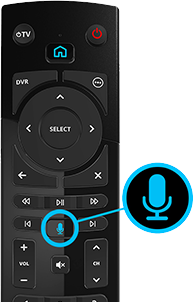
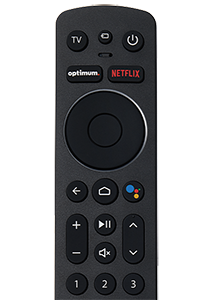
| Altice One Voice Remote | Voice control, RF/IR, backlit keys | Blue/Red LED | Hold Home button |
| Standard Altice Remote | Basic IR, no voice | Red LED only | Manual code entry |
| Mini Box Remote | Compact, limited functions | Single-color LED | Pair via box menu |
If you’re unsure which remote you have, check the model number on the back or inside the battery compartment.
Tips For Long-term Remote Health
A well-maintained remote can last for years. Here are some habits that help:
- Change batteries before they run out—don’t wait for the light to blink.
- Clean your remote monthly to remove dust and grime.
- Store it in a safe, dry place when not in use.
- Avoid pressing multiple buttons at once, which can confuse the remote.
- Update your cable box regularly to ensure compatibility.
Sustainability And Recycling Old Remotes
When replacing your Altice remote, don’t just throw it in the trash. Remotes contain batteries and electronic parts that can harm the environment.
- Remove batteries before disposing of the remote.
- Check if your cable provider offers a recycling program.
- Many electronics stores accept old remotes for recycling.
For more details on proper electronic waste disposal, visit the EPA’s recycling guide.
Frequently Asked Questions
Why Does My Altice Remote Blink But Not Work?
A blinking remote usually signals a problem with batteries, pairing, or interference. Try replacing the batteries and re-pairing the remote with your cable box. If the issue continues, check for stuck buttons or signal blockage.
How Do I Reset My Altice Remote If It Keeps Blinking?
Hold the 7 and 9 buttons together for 5 seconds. After the light blinks, re-pair the remote with your cable box by pressing the Home button. This reset clears all custom settings.
What Should I Do If New Batteries Don’t Stop The Blinking?
If fresh batteries don’t help, try re-pairing the remote, removing obstacles, and checking for stuck buttons. If nothing works, a hardware problem may be to blame, and you may need a replacement.
Can Sunlight Or Room Lighting Cause My Altice Remote To Blink?
Yes, very strong light can interfere with the infrared signal. Try using the remote away from direct sunlight or move bright lamps that point at the cable box.
Where Can I Get A Replacement Altice Remote?
You can order a replacement from your cable provider, visit a local service center, or buy one online. Always check the remote’s compatibility with your specific box model.
When your Altice remote starts blinking, it’s easy to worry that something big is wrong. But most blinking issues have simple solutions—changing batteries, re-pairing, or removing obstacles. By following the steps here, you can solve most problems on your own.
Remember to take care of your remote, watch for warning signs, and use troubleshooting tips before you buy a new device. With a little attention, your Altice remote will keep working well for years to come.