
A flashing red light on your Hart battery charger can be confusing, especially if you need your tools to work right away. Many people see the blinking red and are not sure if the battery is charging, if there’s a problem, or if the charger itself is faulty. This article will help you understand exactly what a blinking red light means, what you should do about it, and how to keep your Hart charger and batteries working their best.
You’ll learn why the red light blinks, how to fix common issues, and how to avoid mistakes that can damage your batteries. We’ll also cover the situations where you must stop and get professional help. By the end, you’ll be able to handle most Hart battery charger blinking red issues confidently, and you’ll know when it’s time to replace parts or call for service.
What The Blinking Red Light Means
The blinking red light on a Hart battery charger is not random. It’s a built-in signal from the charger to tell you something important. Usually, the light means there is a problem with charging the battery, not just a normal charging process.
Common Signals From The Charger
Different chargers use different light signals, but for most Hart chargers:
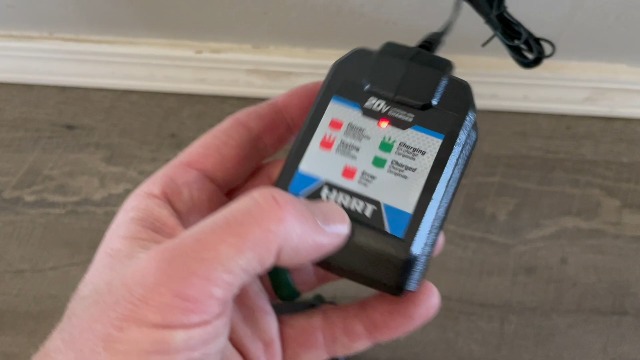
- Solid red light: Battery is charging normally
- Solid green light: Battery is fully charged
- Blinking red light: Problem detected—charging stopped or interrupted
The blinking red light is a warning, not a normal charging signal. If you see it, your charger is trying to protect itself or your battery.
Why Is This Signal Used?
Lithium-ion batteries, like those used in Hart tools, can be dangerous if charged incorrectly. The charger uses the blinking red light to make sure you notice and fix problems before anything gets worse. This helps prevent battery damage, fire, or other safety issues.
The Most Common Causes Of Blinking Red
If you see a blinking red light, it can mean a few different things. Below are the main causes:
- Battery too hot or too cold
- Battery not making good contact
- Damaged or faulty battery
- Charger problem or malfunction
- Dirty or corroded terminals
- Wrong battery type or size
- Power supply issues
Let’s look at each cause in more detail.
1. Battery Temperature Issues
Lithium batteries should not be charged if they are too hot or too cold. Hart chargers have sensors that check battery temperature. If the temperature is outside the safe range (often 41°F–113°F / 5°C–45°C), the charger will not start charging and will show a blinking red light.
2. Poor Battery Contact
If the battery is not fully seated in the charger or the contacts are dirty or bent, the charger cannot connect properly. It will show a blinking red light to alert you.
3. Battery Faults
A damaged battery (due to age, drops, or water) can show a blinking red light. If one of the cells inside the battery is shorted or open, the charger will refuse to charge for safety.
4. Charger Problems
Sometimes the charger itself is faulty. Internal electronics can fail due to age, power surges, or manufacturing defects. A blinking red light may mean the charger cannot work safely.
5. Dirty Or Corroded Terminals
Dust, grease, or corrosion on either the battery or charger contacts will stop the flow of electricity. The charger’s safety system will trigger the blinking red light.
6. Wrong Battery Type
Hart chargers are designed for specific battery types. Trying to charge a battery with a different voltage or chemistry will cause the red light to blink.
7. Power Supply Issues
If your wall outlet is not giving a stable voltage, or if you use an extension cord that is too long or thin, the charger may not work correctly. This can trigger a blinking red light.
Step-by-step Troubleshooting Guide
Before you panic or buy a new charger, try these steps. Many blinking red light problems are simple to fix.
1. Remove The Battery
Take the battery out of the charger. Wait a few seconds, then reinsert it. Sometimes, a poor connection is the only problem.
2. Check The Battery’s Temperature
Feel the battery with your hand. If it is hot, let it cool to room temperature. If it is cold, warm it gently (not with direct heat, just in a warmer room). Try charging again.
3. Inspect Contacts
Look at the metal contacts on the battery and the charger. If you see dirt or corrosion, clean them gently with a dry cloth or a cotton swab dipped in rubbing alcohol. Make sure everything is dry before reinserting.
4. Try A Different Outlet
Plug the charger into a different wall socket. Avoid using power strips or extension cords when troubleshooting, as they can cause voltage drops.
5. Test With Another Battery
If you have a second Hart battery, try charging it in the same charger. If the new battery charges normally (solid red light), your original battery may be faulty. If the second battery also triggers a blinking red, the charger or power supply is likely the problem.
6. Try A Different Charger
If possible, test your battery in another Hart charger. If the battery charges fine elsewhere, your original charger is probably faulty.
7. Look For Error Codes
Some newer Hart chargers have more than just a blinking red light—they may show error codes or patterns (like red-green-red blinking). Check your charger’s manual for details. If you lost your manual, you can often find it on the Hart website.
What To Do If Troubleshooting Fails
After basic troubleshooting, you may still have a blinking red light. At this point, you need to decide whether to:
- Replace the battery
- Replace the charger
- Seek professional repair or warranty service
Here’s how to decide:
When To Replace The Battery
- Battery is physically damaged, swollen, or leaking
- Battery is more than 3–5 years old and has been heavily used
- Battery triggers blinking red in multiple chargers
When To Replace The Charger
- Charger triggers blinking red with all batteries
- Charger feels unusually hot or makes buzzing noises
- Charger is more than 5 years old
When To Seek Professional Help
- You are not sure whether the battery or charger is faulty
- The charger or battery is still under warranty
- You see smoke, sparks, or smell burning plastic
Credit: www.amazon.com
Understanding Hart Battery Charger Models
Not all Hart chargers are identical. Some have advanced features, and others are more basic. It helps to know which model you own.
Here’s a comparison of popular Hart charger models:
| Model | Battery Types Supported | Charging Time (2.0Ah Battery) | Status Lights |
|---|---|---|---|
| Hart 20V Standard Charger | 20V Lithium-Ion | ~1 Hour | Red (charging), Green (charged), Blinking Red (fault) |
| Hart 20V Fast Charger | 20V Lithium-Ion | ~30 Minutes | Red, Green, Blinking Red, Error Patterns |
| Hart 40V Charger | 40V Lithium-Ion | ~1.5 Hours | Red, Green, Blinking Red, Error Codes |
If you have a fast charger, it may show more detailed error signals than basic models. Always check your manual for exact meanings.
Battery Health And Lifespan
A blinking red light can sometimes be a sign that your battery is nearing the end of its life. Most Hart lithium-ion batteries last between 300 and 500 full charge cycles, or about 3–5 years for typical users. If your battery is old, the blinking red may be telling you it’s time for a replacement.
Here’s how battery age affects performance:
| Battery Age | Typical Capacity | Chance of Charger Fault Signal |
|---|---|---|
| New (0-1 year) | 100% | Low |
| Moderate (1-3 years) | 80-90% | Medium |
| Old (3+ years) | 50-70% | High |
If your battery’s run time is much shorter than when new, and you see the blinking red often, consider buying a replacement.
Real-world Examples And Mistakes To Avoid
Many users make simple mistakes that lead to a blinking red light. Here are a few examples and lessons:
- Leaving batteries in extreme heat: A contractor left Hart batteries in his truck on a hot day. The charger blinked red until the batteries cooled down. Lesson: Store batteries at room temperature.
- Dirty workshop: A DIYer used the charger in a dusty garage. Fine sawdust blocked the contacts. Cleaning fixed the problem. Lesson: Keep contacts clean and dry.
- Wrong charger: Someone tried charging a 40V battery in a 20V charger. The red light blinked. Always match battery and charger voltage.
- Ignoring blinking red: One user kept trying to force the charger to work, and the battery eventually failed completely. Lesson: Never ignore warning signals—find the cause.
How To Prevent Future Blinking Red Issues
Most blinking red problems are preventable. Follow these tips:
- Store batteries and chargers indoors at stable temperatures (50–80°F is best)
- Keep contacts clean—wipe them with a dry cloth every few months
- Use the correct charger for your battery type and voltage
- Avoid dropping or hitting batteries—internal damage can cause faults
- Unplug chargers during lightning storms or power surges
- Charge batteries before they are fully empty—deep discharges shorten life
- Replace batteries when run time drops below 50% of original
One non-obvious tip: If you use your tools rarely, charge batteries every few months even if not used. Lithium batteries can become over-discharged in storage, which can also trigger a blinking red light when you try to recharge them.
When To Contact Hart Support
If you have tried all the troubleshooting steps and still see a blinking red light, contact Hart customer support. They can guide you through advanced checks or help you with warranty claims.
Hart offers a 3-year warranty on most batteries and chargers. Keep your receipt and check your product’s warranty status. If you bought your charger from a major retailer, like Walmart, the store may also offer exchange or repair options.
You can find more details and contact information on the official Hart Tools website.
Advanced Troubleshooting (for Experienced Users)
If you have electrical experience and your charger is out of warranty, you might try deeper troubleshooting:
- Test charger output with a voltmeter: If the charger shows no voltage at the contacts, it may have a blown fuse or failed internal part.
- Check battery voltage: A battery reading much below its rated voltage (like 10V for a 20V battery) may have failed internally.
- Open charger case: Only if you understand electronics and safety. Look for burnt or damaged components.
Warning: Opening chargers or batteries can void your warranty and is risky. If unsure, seek professional help.
Hart Charger Vs. Other Brands
How does Hart compare with other common tool brands when it comes to charger signals? Here’s a quick overview:
| Brand | Blinking Red Meaning | Extra Features |
|---|---|---|
| Hart | Fault, error, or unsafe condition | Simple error codes on advanced models |
| Ryobi | Battery too hot/cold, error | Detailed LED patterns |
| DeWalt | Battery issue or charger problem | Audio alerts on some models |
| Makita | Battery not recognized, error | Digital display on some chargers |
If you switch between brands, always check the manual. Charger lights and codes are not standardized.
Common Myths About Blinking Red Lights
Many people believe things about battery charger signals that aren’t true. Here are some myths:
- Myth: “A blinking red light means the battery will explode.”
Truth: It’s a warning, not an emergency. The charger shuts down before danger.
- Myth: “You can fix any blinking red light by resetting the charger.”
Truth: Sometimes, the problem is a dead battery or damaged charger.
- Myth: “All chargers use the same signals.”
Truth: Every brand uses its own patterns.

Credit: www.youtube.com
Environmental And Safety Tips
Batteries and chargers can be dangerous if misused. Here’s how to stay safe:
- Recycle old batteries at an approved center—never throw them in the trash
- Avoid water exposure—never charge a wet battery
- Supervise charging—don’t leave batteries charging overnight in case of problems
For more on battery recycling, see the EPA’s battery recycling guide.
Frequently Asked Questions
Why Does My Hart Charger Blink Red With A New Battery?
A new battery can trigger a blinking red if it is too hot, too cold, or not fully inserted. It can also happen if the battery was stored too long and is deeply discharged. Try warming or cooling the battery, cleaning the contacts, and making sure it is fully seated.
If the battery still will not charge, it may be faulty.
Can I Use My Battery If The Charger Blinks Red But It Seems To Work?
If your battery still works in your tools, it may not be fully dead yet, but it is likely close to the end of its life. A blinking red charger means the charger detected a problem. Using the battery could be unsafe if it is damaged or faulty.
Replace it as soon as possible.
How Long Should A Hart Battery Charger Last?
Most Hart chargers last 3–5 years with normal use. Lifespan depends on usage, environment, and power quality. If your charger often blinks red with good batteries, or fails to charge, it may be time for a replacement.
Is It Safe To Keep Batteries In The Charger?
It is best to remove batteries after charging. Keeping them in the charger will not overcharge them, but it can slowly drain the battery or lead to contact corrosion over time. Unplug chargers when not in use for safety.
Will A Blinking Red Light Damage My Battery?
No, the blinking red light is a safety feature. It means the charger will not charge the battery until the problem is fixed. This helps protect the battery from damage. Fix the cause before trying again.
A blinking red light on your Hart battery charger is not just a small annoyance—it’s a smart warning designed to protect your tools, batteries, and safety. With the steps and tips in this article, you can solve most problems quickly and avoid common mistakes.
Remember, proper care and attention to your batteries and charger will give you longer life, better performance, and safer operation for years to come.
Credit: apacheelectricvehicles.com