
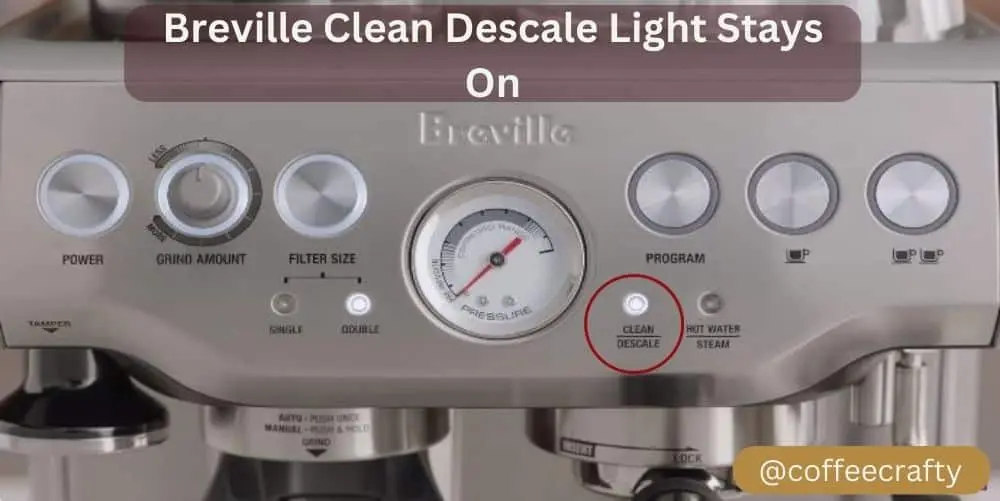
When your Breville appliance’s clean light starts blinking, it can be confusing and even frustrating. Whether you own a Breville espresso machine, coffee maker, or another kitchen device, that blinking clean light is trying to tell you something important about maintenance.
Ignoring it can lead to poor performance, odd tastes, or even machine damage. In this guide, you’ll learn exactly what the Breville blinking clean light means, why it happens, how to fix it, and how to prevent it in the future.
You’ll also discover troubleshooting tips, real user insights, and answers to the most common questions.
What Does The Breville Blinking Clean Light Mean?
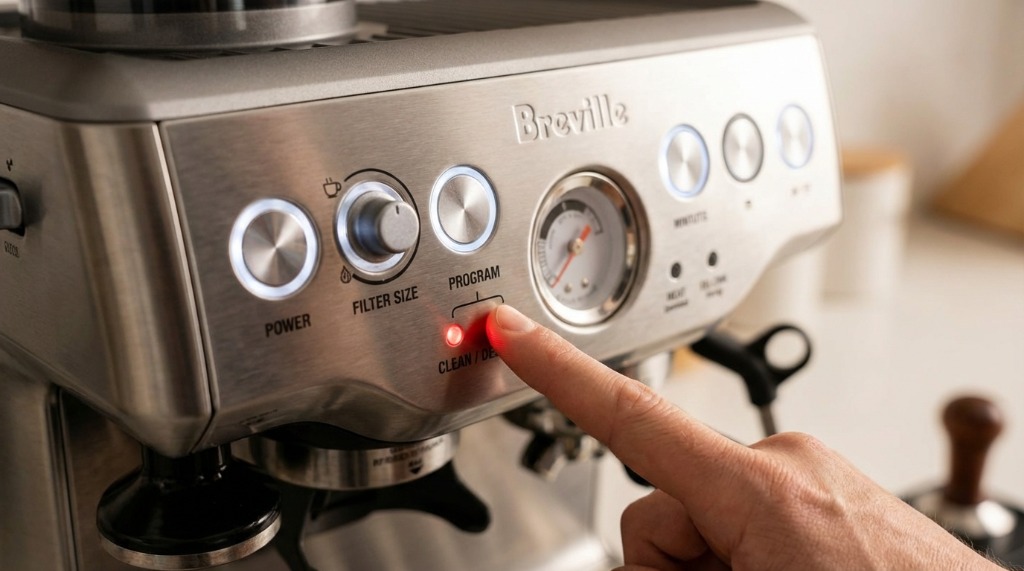
A blinking clean light on a Breville machine is a clear signal: your appliance needs a thorough cleaning or descaling. Breville includes this feature to help owners remember to maintain their machines regularly. If you see the light, it’s not just a suggestion—it’s a warning that minerals, coffee oils, or other residues are building up inside.
Why Breville Uses A Blinking Light System
Breville designs its products for busy people. The blinking clean light is a simple, visual reminder that you can’t miss. It reduces the risk of forgetting maintenance, which can otherwise lead to expensive repairs or replacements. The light usually blinks when sensors inside the machine detect too much scale (mineral buildup) or blockages.
In some models, the clean light can also indicate a missed cleaning cycle.
Common Breville Machines With Blinking Clean Lights
While many Breville products use a clean light, it’s most common with their espresso machines and coffee makers. Here are some popular models where you’ll see this feature:
- Breville Barista Express (BES870XL)
- Breville Barista Pro (BES878)
- Breville Precision Brewer (BDC450/BDC400)
- Breville Oracle (BES980XL)
- Breville Bambino Plus
Some Breville blenders and juicers also have cleaning indicators, but the blinking clean light is most closely associated with coffee and espresso machines.
Main Reasons Why The Clean Light Starts Blinking
The blinking clean light does not turn on randomly. Here’s what typically causes it:
- Scale Buildup: Hard water leaves minerals inside the machine. Over time, this can block the pipes and affect taste.
- Coffee Oil Residue: Espresso and coffee oils can collect inside the group head, steam wand, or other parts.
- Missed Cleaning Cycle: If you skip the required cleaning or descaling cycle, the light will remind you.
- Sensor Error or Fault: Rarely, the light may blink if there’s a problem with the sensor itself.
How To Respond When The Clean Light Blinks
If you see the blinking clean light, don’t panic. It’s a routine part of owning a Breville machine. Here’s what you should do:
- Check the User Manual: Each Breville model is a bit different. The manual will tell you the exact cleaning steps for your model.
- Run the Cleaning Cycle: Most machines have a button or setting for a cleaning cycle. This process flushes out oils and debris.
- Descale the Machine: Use a descaling solution to remove mineral buildup. Never use plain vinegar, as it can damage some Breville components.
- Reset the Light: After cleaning, the light should stop blinking. If it doesn’t, follow the reset instructions in your manual.
Step-by-step Guide: Cleaning And Descaling A Breville Espresso Machine
Let’s walk through the process using the popular Breville Barista Express as an example. These steps will be similar for other models, but always check your manual first.
What You’ll Need
- Breville cleaning tablets (or approved alternative)
- Breville descaling solution
- Water
- A container (to catch water)
- Cleaning disc (usually included with the machine)
Cleaning Cycle
- Insert the Cleaning Tablet: Place the cleaning disc in the portafilter and put a tablet on top.
- Lock the Portafilter: Insert it into the group head as if making espresso.
- Prepare the Machine: Place a container under the portafilter to catch water.
- Start the Cleaning Cycle: Press and hold the single and double shot buttons, then press the power button. Hold all three for about 10 seconds.
- Wait for the Cycle to Finish: The machine will run water through the system and stop automatically.
- Remove and Rinse: Take out the portafilter, rinse all parts, and wipe the group head.
Descaling Cycle
- Mix the Descaling Solution: Follow the instructions on your descaler. Pour the solution into the water tank.
- Remove the Portafilter: You won’t need it for descaling.
- Run Water Through the System: Use the manual button or descale setting, depending on your model.
- Rinse Thoroughly: After descaling, fill the tank with clean water and run another cycle to flush out chemicals.
- Wipe Down the Machine: Clean any spills or residue.
How Long Does Cleaning Take?
- Cleaning cycle: 5–10 minutes
- Descaling cycle: 30–45 minutes (including rinsing)
Many users underestimate the time needed for a full descale. Set aside at least half an hour.
Signs Your Breville Machine Needs Cleaning (even Before The Light)
Sometimes, the blinking clean light appears late. Watch for these early signs to avoid waiting too long:
- Sour or bitter taste in coffee
- Reduced steam pressure
- Slower espresso pour
- Odd noises or sputtering
- Visible mineral deposits in the water reservoir
Cleaning before the light blinks can help keep your coffee tasting great and your machine running longer.
Credit: www.jumpusapark.com
What Happens If You Ignore The Blinking Clean Light?
Many beginners think a blinking light is just a suggestion. In reality, ignoring it can cause:
- Clogged pipes: Minerals and coffee oils block water flow.
- Damaged heating elements: Scale acts as insulation, making the machine work harder and overheat.
- Bad tasting coffee: Old residue changes the taste.
- Shortened machine life: Neglecting maintenance can cut the lifespan in half.
A common mistake is waiting until the machine stops working. By then, repairs may be costly or impossible.
Comparing Cleaning Vs Descaling
Users often confuse the two. Here’s a simple comparison:
| Process | Removes | How Often? | Tools Needed |
|---|---|---|---|
| Cleaning Cycle | Coffee oils, residue | Every 1–2 weeks | Cleaning tablet, disc |
| Descaling Cycle | Mineral buildup (scale) | Every 2–3 months | Descaling solution |
Key insight: Skipping one process won’t replace the other. Both are essential for good performance.
Credit: tradicao.pt
Why The Clean Light Might Stay Blinking After Cleaning
Sometimes, users perform the cleaning cycle, but the light keeps blinking. Here’s why:
- Cycle Not Completed Properly: If you skip a step or interrupt the cycle, the sensor may not reset.
- Sensor Needs Manual Reset: Some Breville models require a special reset process.
- Residual Buildup Remains: If there’s still scale or oil, the machine will detect it.
- Faulty Sensor: In rare cases, the clean light can blink due to a malfunction.
How To Reset The Clean Light
Check your model’s instructions. For the Barista Express, you usually:
- Turn off the machine.
- Hold the 1 CUP and 2 CUP buttons.
- Press the POWER button while holding the other two.
- Release all buttons after 5–10 seconds.
If the light stays on, repeat the cleaning or descale cycle, and ensure all steps are followed.
Real User Experiences And Common Mistakes
Many first-time Breville owners make these errors:
- Using tap water for descaling: Hard water adds more minerals. Use filtered or distilled water.
- Skipping regular cleaning cycles: Waiting until the light blinks can cause buildup.
- Using vinegar instead of descaler: Vinegar can damage internal parts and void the warranty.
- Not rinsing after descaling: Leftover chemicals can affect taste and health.
One user shared: “My clean light stayed on until I realized I missed the final rinse cycle. Once I ran clean water through again, the light went off.”

Credit: www.youtube.com
Maintenance Frequency: How Often Should You Clean And Descale?
Breville recommends different schedules depending on your water and usage.
| Frequency | Cleaning | Descaling |
|---|---|---|
| Daily | Wipe steam wand, rinse portafilter | — |
| Weekly | Run cleaning cycle | — |
| Monthly | Deep clean removable parts | — |
| Every 2–3 months | — | Run descaling cycle |
Your schedule may change if you have very hard water or use your machine often.
Preventing The Blinking Clean Light: Proactive Tips
You can delay the blinking clean light—and keep your machine in top shape—by following these tips:
- Use filtered water to reduce mineral buildup.
- Clean the steam wand after every use to prevent milk residue.
- Wipe down the group head and visible parts daily.
- Replace water filters as recommended by Breville.
- Don’t skip scheduled cycles even if the light hasn’t blinked yet.
A key insight: Prevention is easier than fixing a clogged machine. Regular small cleanings save time and stress later.
What To Do If Cleaning And Resetting Don’t Work
If you’ve done everything and the light still blinks, try these troubleshooting steps:
- Double-check all steps: Make sure you didn’t miss part of the cleaning or descale process.
- Inspect sensors for debris: Sometimes a small blockage can fool the machine.
- Power cycle the machine: Turn it off, unplug for a minute, then restart.
- Contact Breville support: If under warranty, they may offer a free fix or advice.
- Check for firmware updates: Some newer machines can update software, which may help.
Don’t try to open the machine or bypass sensors yourself. This can void your warranty and cause more damage.
When To Replace Parts
Sometimes the clean light blinks because a part is worn out, not just dirty. Watch for:
- Worn water filters
- Damaged gaskets or seals
- Clogged steam wand tips
- Old cleaning discs
Replacing these parts can often fix persistent cleaning issues. Breville sells genuine replacements, or you can find them at trusted retailers.
Comparing Breville Machines: Which Models Are Easiest To Clean?
If you’re shopping for a Breville machine, consider how easy it is to clean. Here’s a quick comparison of three popular models:
| Model | Clean Light Feature | Cleaning Ease | Descaling Required? |
|---|---|---|---|
| Barista Express | Blinks when needed | Easy (clear steps) | Yes |
| Bambino Plus | Blinks when needed | Very easy (simpler parts) | Yes |
| Oracle | Blinks and displays text | Moderate (more complex) | Yes |
Non-obvious tip: Simpler models like the Bambino Plus are faster to clean but may lack advanced features. More complex machines (like the Oracle) offer more control but need more care.
Myths And Misunderstandings About The Blinking Clean Light
There’s a lot of misinformation online. Here are some common myths:
- “You can ignore the light if your coffee tastes fine.” (False—damage can happen before taste changes.)
- “Vinegar is always safe for descaling.” (False—some Breville models can be damaged.)
- “The clean light means the machine is broken.” (False—it’s just a maintenance reminder.)
Key insight: The blinking light is your friend. It helps avoid costly repairs if you pay attention.
The Role Of Water Quality In Clean Light Frequency
Many users don’t realize how much water quality affects cleaning needs. Hard water leads to more frequent descaling. If you live in a region with hard water, you’ll see the clean light blink more often. Using a water filter can reduce this problem.
For more about water hardness and its effect on coffee machines, check Wikipedia’s page on descaling.
Sustainable Cleaning Choices
Caring for your Breville machine doesn’t mean using harsh chemicals. Look for:
- Biodegradable descaling solutions
- Eco-friendly cleaning tablets
- Reusable cleaning tools (like brushes and cloths)
Never dump used descaling solution down the drain without diluting, as it can harm pipes and water systems.
Frequently Asked Questions
Why Does My Breville Clean Light Blink Even After Cleaning?
Sometimes, the clean light keeps blinking if the cleaning or descaling cycle wasn’t completed correctly. Double-check the steps in your user manual. If the light still blinks, try running the cycle again or resetting the machine.
Can I Use Vinegar Instead Of Breville’s Descaling Solution?
It’s not recommended. Vinegar can harm internal parts and void your warranty. Breville suggests using their official descaling solution or a safe, third-party product made for espresso machines.
How Often Should I Clean And Descale My Breville Machine?
Clean every 1–2 weeks and descale every 2–3 months for average use. If you have hard water or use the machine more often, increase the frequency.
What Happens If I Ignore The Blinking Clean Light?
Ignoring the light leads to mineral and oil buildup, poor performance, bad-tasting coffee, and can shorten your machine’s lifespan. Regular maintenance is much cheaper and easier than repairs.
How Do I Reset The Clean Light On My Breville?
Turn off the machine, then press and hold the 1 CUP and 2 CUP buttons while pressing the POWER button. Release after 5–10 seconds. If the light doesn’t reset, run the cleaning cycle again or consult your manual.
Taking care of your Breville machine may seem like a hassle, but it pays off in better coffee and a longer machine life. The blinking clean light is your reminder to keep things running smoothly. With a little routine care, you’ll enjoy great coffee every day—without the stress of sudden breakdowns or confusing warning lights.