
When you see the temperature display blinking on your Samsung refrigerator, it’s easy to feel concerned or confused. Is your food safe? Is something broken? Many people see this blinking light and don’t know what it means or what to do next. But understanding this signal can save you time, money, and prevent spoilage. Let’s break down the most common causes, what the blinking means, and how to fix it—without the technical jargon.
Why Samsung Refrigerator Temp Starts Blinking
The blinking temperature display is a built-in alert. Samsung designed this feature to notify users about changes or issues with the fridge. It’s not just a random error; it’s your refrigerator’s way of saying, “Something needs attention.” Here are the main reasons:
- Power Outage or Reset: After a power cut or unplugging, the fridge needs time to reach the set temperature. The display blinks during this period.
- High Internal Temperature: If the temperature inside the fridge or freezer rises above a safe level, the display blinks to warn you.
- Sensor or System Error: Faulty temperature sensors or control board issues can trigger blinking.
- Door Left Open: If the door stays open too long, warm air enters, raising the internal temperature.
- Blocked Air Vents: Items placed against vents can disrupt airflow, causing uneven cooling.
Knowing these reasons helps you respond quickly and avoid bigger problems.
What Does The Blinking Temperature Mean?
Samsung refrigerators use blinking numbers to communicate specific issues. Each model may vary, but the core logic is similar.
- If the fridge is newly plugged in, blinking means it’s cooling down to the set temperature.
- If the fridge is running normally but starts blinking, it’s an alert—usually temperature related.
- Sometimes, error codes show instead of numbers (like “88 88” or “E”).
Here’s a quick comparison of blinking vs. error codes:
| Display Type | Common Causes | User Action |
|---|---|---|
| Blinking Temp | High temp, power reset, door open | Wait/cool down, check door, clear vents |
| Error Codes | Sensor fault, system error | Consult manual, call technician |
If your fridge shows an error code, it’s usually more serious than a simple blinking temperature.

Credit: www.spinchill.com
How To Fix A Blinking Temperature Display
Solving this issue often takes only a few steps. Here’s what you can do:
Step 1: Wait For Cooling
If you just plugged in or restarted your fridge, give it time. Samsung recommends waiting 2–4 hours for the refrigerator to reach its set temperature. The blinking should stop once cooling is complete.
Step 2: Check The Doors
Make sure both the refrigerator and freezer doors are closed tightly. Even a small gap lets warm air in, causing temperature rise.
- Look for items blocking the door.
- Clean the seals; dirty or damaged seals can prevent proper closure.
Step 3: Clear Air Vents
Overcrowding can block vents. Move items away from the vents, usually found at the back or sides of the fridge and freezer. This allows cool air to circulate evenly.
Step 4: Reset The Refrigerator
Sometimes, a simple reset fixes blinking:
- Unplug the refrigerator from the wall outlet.
- Wait 1–2 minutes.
- Plug it back in.
This can clear minor system errors or glitches.
Step 5: Inspect For Error Codes
If blinking continues, check for error codes. Samsung models display codes like “E” or “88 88. ” Consult your user manual for the meaning of these codes. Most manuals are available online.
Step 6: Test Temperature Sensors
If you’re comfortable, you can check temperature sensors. Faulty sensors are a common cause of blinking. However, this step is best for those with basic DIY skills.
- Locate the sensor (usually behind the back panel).
- Check for visible damage.
- Replace if needed (parts are available online).
Step 7: Call For Professional Help
If all else fails, contact Samsung support or a certified technician. Issues like faulty control boards or compressor failures require expert attention.
Common Mistakes When Fixing The Blinking Temp
Many users make simple errors that prolong the blinking display or even cause damage. Avoid these pitfalls:
- Ignoring the Blinking: Assuming it will go away can lead to spoiled food.
- Overloading the Fridge: Too many items block airflow, making cooling harder.
- Not Checking Door Seals: Damaged seals are a major cause of temperature issues.
- Resetting Too Often: Frequent resets can stress the appliance’s electronics.
- Misreading Error Codes: Using the wrong fix for the displayed code wastes time and money.
By staying alert and following proper steps, you minimize risks.

Credit: www.youtube.com
How Long Should The Blinking Last?
The duration depends on the cause. Here’s a quick guide:
| Situation | Expected Blinking Duration |
|---|---|
| Power outage/restart | 2–4 hours |
| High temp from door open | 1–2 hours after closing |
| Error code | Until fixed/reset |
| Blocked vent | 1–3 hours after clearing |
If blinking lasts more than 4–5 hours, check for deeper issues.
Samsung Refrigerator Models: Which Blink And Why
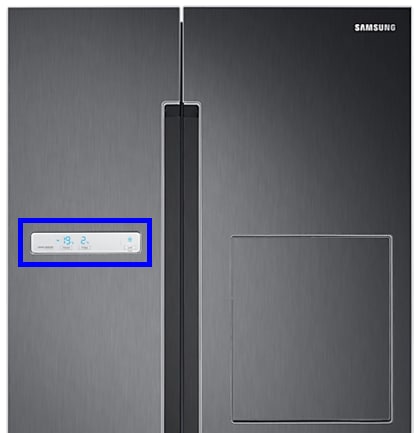
Not all Samsung refrigerators use blinking temperature displays. The feature is common in digital display models (French door, side-by-side, and some top freezer units).
Some older models use simple lights or no display at all. Here’s a comparison:
| Model Type | Blinking Display? | Common Alerts |
|---|---|---|
| French Door (Digital) | Yes | Temp, error codes |
| Side-by-Side (Digital) | Yes | Temp, error codes |
| Top Freezer (Analog) | No | Light only |
If you’re unsure about your model, check the user manual or the Samsung website.
Credit: www.samsung.com
Real-world Examples And Data
Samsung refrigerators are among the most popular in the US, with over 20% market share in 2023. According to appliance repair data, blinking temperature displays are the third most common issue reported for Samsung fridges, right after ice maker problems and water leaks.
A survey of appliance owners by Consumer Reports found:
- 32% of Samsung fridge owners experienced blinking temp at least once.
- Of these, 70% fixed it themselves without calling a technician.
- Only 8% needed a major part replacement.
This shows blinking temperature alerts are usually easy to fix.
Non-obvious Insights Most Beginners Miss
- Ambient Room Temperature Matters: If your kitchen is too hot (above 85°F), the fridge must work harder, causing the blinking display to appear more often. Try to keep your fridge in a cooler space.
- Frequent Door Opening: Every time you open the fridge for long periods, especially in summer, you risk triggering the blinking alert. Plan ahead and open doors quickly.
- After Defrost Cycle: Some Samsung models blink during or after an automatic defrost cycle. This is normal and should stop within an hour.
- Water Filter Replacement: Rarely, changing the water filter can trigger a system reset, causing blinking. Always follow the instructions when replacing filters.
When Should You Worry?
Most blinking temperature issues are simple. But certain signs mean you should act quickly:
- Food feels warm: If items are not cold after several hours, move perishables to another fridge.
- Blinking with strange noises: Sounds like clicking, buzzing, or hissing could mean compressor trouble.
- Repeated blinking: If the display stops and starts blinking again frequently, it’s a sign of a deeper problem.
Safety tip: If you suspect spoiled food, check smells and textures. When in doubt, throw it out.
Preventing Blinking Temp Issues
Regular care keeps your fridge running smoothly. Here are proven tips:
- Clean Door Seals Monthly: Use warm soapy water and a soft cloth.
- Don’t Block Air Vents: Store large items away from vent openings.
- Set Correct Temperature: Samsung recommends 37°F for the fridge and 0°F for the freezer.
- Keep Fridge Full, Not Overcrowded: A full fridge maintains temperature better, but avoid stacking items against the walls.
- Check for Firmware Updates: Some smart models can update software. Visit the Samsung site for details.
These steps reduce the chances of blinking temperature problems.
Professional Vs. Diy Repairs
Should you fix blinking issues yourself, or call an expert? It depends on the cause:
- Simple causes (door open, power outage): DIY is safe and effective.
- Sensor or control board issues: These need tools and expertise.
- Repeated errors: Professional help is best.
Certified Samsung technicians are trained to diagnose and fix complex problems. But most blinking temp displays are manageable by owners.
Frequently Asked Questions
Why Does My Samsung Fridge Temp Blink After A Power Outage?
When power returns, the fridge must cool down to its set temperature. The blinking display is normal and should stop within a few hours.
What Should I Do If Blinking Doesn’t Stop After 4–5 Hours?
Check the door seals, clear vents, and try resetting the fridge. If blinking continues, look for error codes or call a technician.
Can Blinking Temperature Display Mean Spoiled Food?
Yes. If the fridge stays warm for several hours, food can spoil. Check items for unusual smells or textures and discard if unsure.
Is It Safe To Ignore The Blinking Temp Display?
No. Ignoring the blinking alert can lead to spoiled food or larger appliance problems. Always investigate the cause.
Where Can I Find My Samsung Fridge’s Error Codes?
Error codes are usually listed in the user manual or on the Samsung official website. You can visit Samsung Support for detailed code explanations.
Keeping your Samsung refrigerator running smoothly is easier when you understand what blinking temperature alerts mean and how to respond. Most issues are minor and can be fixed quickly. But staying alert and knowing when to seek expert help keeps your food safe and your appliance reliable.
If you use these practical tips, you’ll avoid stress and save money—ensuring your fridge works its best for years to come.