
A Braeburn thermostat is a popular choice in many homes and offices for its reliability and user-friendly design. But what does it mean when your Braeburn thermostat is blinking “Cool”? For some, this flashing word can be confusing or even worrying—especially on a hot day when you need your air conditioner most. If you’ve noticed this blinking indicator, you’re not alone. Many people want to know if it signals a problem, a normal process, or a need for action.
Let’s take a clear and careful look at what the blinking “Cool” means, the reasons behind it, and how you can respond. We’ll go step by step, so even if you don’t have much experience with thermostats or air conditioners, you’ll leave with a solid understanding.
Along the way, we’ll highlight a few practical tips and less obvious details that can save you time and money.
What Does “blinking Cool” Mean On A Braeburn Thermostat?
The blinking “Cool” message on a Braeburn thermostat is a built-in signal. It typically means the thermostat is asking your air conditioner to start cooling, but there’s a short delay before the system actually turns on. This delay is intentional and helps protect your HVAC equipment.
This feature is called a compressor protection delay or “time delay.” If the thermostat just finished a cooling cycle or the power was interrupted, it waits a few minutes (often 3–5 minutes) before starting the air conditioner again. This pause allows the compressor to settle and reduces wear on the system.
But the blinking “Cool” can also point to other things:
- The system is waiting for the right moment to start cooling (normal behavior)
- There’s a problem with your AC or wiring (less common)
- The thermostat is in “test” or “setup” mode (rare)
Understanding which situation you’re facing is the first step.
Common Reasons For Blinking “cool”
If your Braeburn thermostat is blinking “Cool,” here are the most likely causes:
1. Compressor Protection Delay
This is the most common reason. After turning on, off, or changing modes, the thermostat waits a few minutes before sending power to the AC compressor. This protects your system from damage.
2. Recent Power Loss Or Brownout
If you recently lost power, even briefly, the thermostat automatically activates the delay. This helps avoid starting the compressor while internal pressures are still high, which can harm the unit.
3. Thermostat Just Installed Or Reset
New installations or a reset also trigger the delay. It’s normal for “Cool” to blink for a few minutes before the system starts.
4. Wrong Mode Or Settings
If your thermostat is set to “Heat,” “Off,” or “Fan Only,” and you expect cooling, the system won’t start even if “Cool” blinks. Make sure you’re in the right mode.
5. System Malfunction
In rare cases, blinking “Cool” continues for more than 10 minutes, with no cool air. This can signal a wiring problem, a broken compressor, or an issue with the thermostat itself.
6. Low Battery Or Power Issues
If your Braeburn thermostat uses batteries, low power can affect its operation. A blinking “Cool” combined with a low battery icon means you should replace the batteries soon.
How The Compressor Delay Works
HVAC compressors are expensive and sensitive parts. If they restart too quickly after shutting off, pressure inside the unit can be too high. This “short cycling” can damage the compressor and lead to expensive repairs or early failure.
To prevent this, most modern thermostats—including Braeburn models—have a built-in delay timer. Here’s what happens:
- You set the thermostat to “Cool” and lower the temperature.
- The thermostat sends a signal, but instead of starting the AC right away, it waits.
- During the wait, “Cool” blinks on the display.
- After the delay (usually 3–5 minutes), the AC starts, and the blinking stops.
This delay is smart protection, not a malfunction. In fact, skipping it can void your AC warranty.
Quick Comparison: Normal Vs. Problematic Blinking
To help you understand if your blinking “Cool” is normal or a sign of trouble, see the quick comparison below:
| Situation | Blinking “Cool” Duration | Action Needed |
|---|---|---|
| Compressor delay after turning on | 3–5 minutes | Wait, normal behavior |
| After power outage/reset | 3–5 minutes | Wait, normal behavior |
| Continuous blinking, no AC | 10+ minutes | Check settings, call for service |
| Blinking with low battery warning | Varies | Replace batteries |
How To Troubleshoot A Blinking “cool” Signal
If you see a blinking “Cool” on your Braeburn thermostat, follow these steps to diagnose and fix the issue:
1. Wait 3–5 Minutes
Most of the time, patience is the answer. If you just changed a setting, installed the thermostat, or had a power interruption, let the system wait out the delay. The AC should start after the blinking stops.
2. Check The Thermostat Settings
Make sure:
- The thermostat is set to “Cool”
- The temperature is set below the current room temperature
- The fan is set to “Auto” or “On,” as desired
Mistaken settings are a common cause of confusion. If you set the thermostat to “Off” or “Heat,” cooling will not start.
3. Check For Low Batteries
If your Braeburn thermostat uses batteries, a low battery can cause display problems or prevent signals from reaching the AC. Replace batteries if you see a warning.
4. Inspect The Air Conditioner
Listen for sounds from your AC unit. If you hear a click but no fan or compressor noise after the delay ends, there might be a problem with the AC itself.
Check for:
- Tripped breakers in your electrical panel
- The outside AC unit being unplugged or switched off
- Ice buildup on the AC coils (wait for it to melt before restarting)
5. Look For Error Codes Or Messages
Some Braeburn models display error codes if there’s a wiring or sensor problem. Check your thermostat’s manual for what these codes mean.
6. Reset The Thermostat
Try resetting your thermostat by removing batteries (if used) or turning off power at the breaker for a minute, then restoring it. This can clear minor glitches.
7. Call A Professional
If blinking “Cool” continues for more than 10–15 minutes and no cold air comes out, it’s time to call an HVAC technician. Possible issues include:
- Broken compressor or capacitor
- Faulty thermostat wiring
- Control board problems
- Blown fuses or relays in the air handler
Real-world Example: What Homeowners Experience
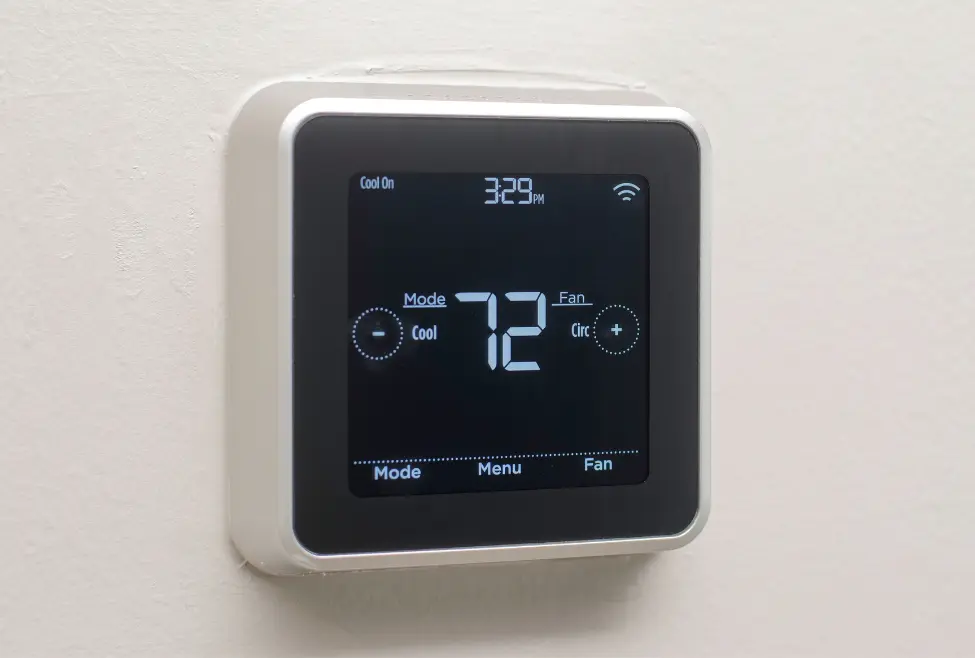
Consider this scenario: You come home on a hot day, lower your thermostat to 72°F, and see “Cool” blinking. You wait five minutes, and the air kicks on—problem solved. This is normal.
But if you return from vacation, power up your system, and “Cool” blinks for 15 minutes or more with no AC, something is wrong. This situation is rare but serious. Continuous blinking often means the system isn’t getting the signal it needs, or a safety device is stopping it from running.
Credit: www.lochardplumbingheatingandcooling.com
Hidden Details Beginners Miss
Many first-time users overlook two important facts about Braeburn thermostats:
- Delay is often adjustable: Some Braeburn models allow you to set the length of the compressor delay in the advanced settings. If you find the delay too long or too short, you may be able to adjust it. Always check your manual before changing this.
- Location of the thermostat matters: If your thermostat is in direct sunlight or near heat sources, it might read a higher temperature than the rest of the house. This can cause it to cycle on and off more often, triggering more frequent delays and blinking. Placing the thermostat in a shaded, central spot gives more accurate readings.
Table: Braeburn Thermostat Delay Settings By Model
Here’s a look at delay times on some popular Braeburn models:
| Model | Default Delay (Minutes) | Adjustable? |
|---|---|---|
| Braeburn 1020NC | 5 | No |
| Braeburn 2020 | 4 | Yes |
| Braeburn 2220 | 5 | Yes |
| Braeburn BlueLink 7320 | 5 | Yes |
Check your user manual for specific instructions on adjusting the delay.
Credit: www.air-treatment.com
When To Worry About A Blinking “cool”
A blinking “Cool” is usually not a reason to panic. In most cases, it’s just a normal wait. But you should take action if:
- Blinking lasts longer than 10 minutes
- No cold air starts after the delay
- You hear clicking, but nothing happens
- The thermostat display is blank or shows an error
- There are other signs of trouble (ice, strange noises, burning smell)
In these cases, it’s safest to shut off your system and call for professional help. Running a faulty air conditioner can cause more damage.
Tips To Prevent Future Issues
A little care can keep your Braeburn thermostat and AC working smoothly. Here are some tips:
1. Replace Batteries Regularly
If your thermostat uses batteries, change them every 6–12 months—even if there’s no warning yet.
2. Keep Thermostat Clean And Dry
Dust and moisture can cause problems. Wipe the thermostat gently with a dry cloth.
3. Schedule Annual Hvac Maintenance
A technician can check wiring, refrigerant, and other parts that may cause blinking issues.
4. Avoid Rapid Mode Changes
Switching quickly between “Cool,” “Heat,” and “Off” can confuse the system. Wait a few minutes between changes.
5. Check Wiring If Diy Installed
If you installed the thermostat yourself, double-check wiring connections, especially the Y (cooling) and C (common) wires.
Table: Common Thermostat Display Messages
Understanding other messages on your Braeburn thermostat can help you spot issues early:
| Display Message | Meaning | What to Do |
|---|---|---|
| Blinking “Cool” | Compressor delay or issue | Wait, then troubleshoot if needed |
| Blinking “Heat” | Heat delay (similar to cool) | Wait, then check furnace |
| Low battery icon | Batteries are weak | Replace batteries |
| Blank screen | No power or major fault | Check breaker, wiring, batteries |
| Error code (e.g., E1, E2) | Wiring or sensor fault | Consult manual or technician |
How To Manually Override The Delay (if Needed)
Sometimes, you may want to override the delay—such as during system testing. On most Braeburn thermostats, the delay cannot be bypassed for safety. However, in certain advanced models, a technician can enter a service mode to temporarily skip the delay for diagnostics.
For normal users, it’s best not to attempt this, as it can risk damaging your compressor.
If you absolutely must override the delay for troubleshooting, contact an HVAC professional. They have tools and knowledge to do it safely.

Credit: www.youtube.com
Why Compressor Protection Matters
It’s easy to get frustrated with a blinking “Cool” when you want instant relief from heat. But remember, the compressor protection delay is there for a reason. Without it, your air conditioner could suffer costly damage—sometimes in just one or two hard restarts. A few minutes of waiting can prevent a bill of $1,500 or more for a new compressor.
According to the U.S. Department of Energy, short cycling and frequent restarts are a top cause of premature AC failures. The delay feature in your Braeburn thermostat is an investment in your comfort and your wallet.
When To Replace Your Thermostat
While Braeburn thermostats are built to last, they do wear out over time. If you notice frequent glitches, unresponsive buttons, or issues that don’t resolve with new batteries or resets, it might be time for a replacement.
Consider replacing your thermostat if:
- It’s more than 10 years old
- The display is faint or unreadable
- You want new features, like programmable schedules or Wi-Fi control
Modern Braeburn models are compatible with most HVAC systems and offer better energy savings. For more information, check the Braeburn official website.
Frequently Asked Questions
What Should I Do If My Braeburn Thermostat Keeps Blinking “cool” And Never Turns On The Ac?
If the blinking lasts more than 10 minutes with no cold air, double-check your settings, replace batteries, and look for error codes. If nothing works, call a professional to check the wiring or your AC system.
Can I Turn Off The Compressor Delay Feature?
No, most Braeburn thermostats do not allow users to turn off the compressor delay. This is a safety feature to protect your air conditioner.
How Long Does The Delay Usually Last?
The delay is typically 3–5 minutes, but can be up to 5 minutes on some models. Check your user manual for your thermostat’s exact delay time.
Is Blinking “cool” Dangerous For My Ac Or House?
No, the blinking “Cool” is not dangerous. It’s a normal part of protecting your compressor. However, if it blinks without starting for a long time, it could signal a problem that needs attention.
Why Does My Thermostat Sometimes Blink And Sometimes Not?
The blinking “Cool” only appears after certain actions: changing modes, power loss, or ending a cooling cycle. If you don’t see it every time, that’s normal—it only activates when needed.
A blinking “Cool” on your Braeburn thermostat is almost always a sign that your system is waiting to protect itself before starting. Most of the time, this is normal and safe. By understanding the reasons behind the blinking, knowing when to wait and when to act, and keeping up with simple maintenance, you can enjoy cool comfort with confidence.
If problems continue, don’t hesitate to call a professional—quick action can prevent bigger issues and keep your AC running strong for years.