
Many Nintendo Wii owners have seen it: the Wii Remote starts blinking with its blue LEDs. Maybe you just powered it on, or perhaps you’re in the middle of a game and the lights begin to flash. This blinking can be confusing if you don’t know what it means. Sometimes, it’s normal. Other times, it signals a problem that needs fixing.
In this guide, you’ll learn what causes a Wii Remote blinking issue, what each blinking pattern means, and how to solve common problems. We’ll cover everything from basic troubleshooting to in-depth fixes, so you can get back to playing with minimal frustration. Even if you’re not a tech expert, you’ll find clear steps, useful tips, and practical solutions. Let’s take the mystery out of those blinking blue lights.
What Do The Wii Remote Blinking Lights Mean?
The blue LEDs on a Wii Remote give important feedback about its status. Here’s a quick overview:
- One light blinking: The remote is searching for a console to connect with.
- All four lights blinking rapidly: The remote is trying to sync or is not connected.
- Solid lights (one to four): The remote is synced and shows player number.
- Lights blink then turn off: The remote failed to connect or lost sync.
Understanding these patterns is the first step in solving Wii Remote blinking issues. Let’s look at each scenario in detail.
Normal Blinking Patterns
When you press any button, all four blue LEDs may blink for a moment. This is normal—the remote is waking up and searching for the Wii console. Once it connects, one LED will stay on, showing which player you are (1, 2, 3, or 4).
If you sync a new remote, the lights may blink for several seconds before one becomes solid.
Warning Signs
If the lights keep blinking and never stop, or if none of the LEDs stay on, this usually means the remote cannot connect. Sometimes, all lights blink quickly if batteries are low or the remote is malfunctioning.
Common Causes Of Wii Remote Blinking
Why does your Wii Remote blink instead of working? Here are the most frequent reasons:
- Syncing issues: The remote is not paired with the console.
- Low batteries: Weak power can cause connection problems.
- Wireless interference: Other electronics can disrupt the Bluetooth signal.
- Faulty remote or console: Hardware problems can prevent a stable connection.
- Software glitches: System errors or game-specific bugs.
Let’s break these down and see how each one affects the blinking lights.
Syncing Issues
If your Wii Remote isn’t synced, it will blink and not connect. This is common after changing batteries, using the remote with another console, or after a system reset.
Low Batteries
When battery power drops, the remote may blink but fail to connect. Sometimes, it will connect but then disconnect suddenly, causing more blinking.
Wireless Interference
Devices like cordless phones, wireless routers, or even microwaves can interfere with the Wii Remote’s Bluetooth signal, making connection unstable.
Hardware Problems
Physical damage, worn-out buttons, or internal failures can cause blinking that won’t stop. This is less common but possible, especially with older remotes.
Software Glitches
Sometimes, the Wii system or a specific game can bug out, causing the remote to blink and not respond. Restarting the console or updating software often helps.
How To Fix A Blinking Wii Remote
Solving Wii Remote blinking problems is mostly straightforward. Here’s a step-by-step plan:
- Replace the batteries with fresh ones.
- Resync the remote to the Wii console.
- Reduce interference from nearby devices.
- Restart the console and try again.
- Check for hardware damage.
- Try another remote (if available).
Let’s go through each step in detail.
1. Replace The Batteries
Always start here. Even if the batteries seem fine, they may not have enough power for wireless communication.
- Open the battery cover on the back of the remote.
- Insert two new, high-quality AA batteries.
- Make sure they are placed in the correct direction.
Weak batteries are the most common cause of blinking and connection issues. If possible, use alkaline batteries rather than rechargeables, as they provide a steadier voltage.
2. Resync The Remote
If the remote still blinks, try resyncing it with the Wii console.
- Turn on your Wii console.
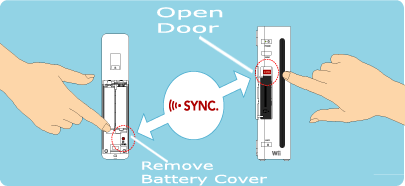
- Open the SD Card slot cover (front of the console).
- Press the small red SYNC button inside the slot.
- Immediately press the red SYNC button inside the battery compartment of your remote.
The LEDs should blink, then one will stay solid. This means the remote is now synced.
Tip: Only sync one remote at a time for best results.
3. Reduce Interference
Move away or turn off other wireless devices near your Wii. Common sources of interference:
- Wireless routers
- Bluetooth headphones
- Cordless phones
- Microwave ovens
Try to keep your console and remote in a clear line of sight, without obstacles between them.
4. Restart The Console
A simple restart can clear up temporary glitches.
- Power off the Wii by holding the Power button.
- Unplug it from the wall for 1 minute.
- Plug back in and turn on.
Try syncing the remote again.
5. Check For Hardware Damage
Inspect your remote:
- Are the buttons sticky or unresponsive?
- Is there corrosion in the battery compartment?
- Has it been dropped or exposed to liquid?
If you suspect hardware damage, try using a different Wii Remote. If the new remote works, the original is likely faulty.
6. Try Another Remote
If you have a second Wii Remote, see if it has the same problem. This helps you know if the issue is with the remote or the console.
If both remotes blink and won’t connect, the problem is likely with the Wii console.
How To Properly Sync A Wii Remote
Syncing is the process of pairing the remote with your Wii console. There are two ways to do this:
Standard Sync
This method is for long-term pairing.
- Power on the Wii console.
- Open the SD Card slot cover.
- Press the red SYNC button on the console.
- Within 20 seconds, press the SYNC button on the remote (inside the battery cover).
- Wait for the lights to stop blinking—one will stay lit.
Quick Sync (temporary)
For a quick, one-time connection (useful for friends’ remotes):
- On the Wii Menu, press any button on the remote.
- Wait for the lights to blink and see if it connects.
- If not, use the standard sync method.
Note: Temporary syncs are lost when the console is turned off.
Syncing Multiple Remotes
You can sync up to four remotes. Each one will light up a different LED (1, 2, 3, or 4) showing player order.
If you need to remove all synced remotes:
- Hold the SYNC button on the console for 15 seconds (clears all pairings).

Credit: www.reddit.com
Wii Remote Blinking Patterns: What They Mean
Here’s a table for quick reference on what different blinking patterns usually mean:
| LED Pattern | Meaning | What to Do |
|---|---|---|
| All 4 LEDs blink, then 1 stays solid | Normal connection and player number | Ready to play |
| All 4 LEDs keep blinking | Remote not synced or can’t find console | Resync remote, check batteries |
| 1 LED blinks, others off | Remote searching for console | Turn on Wii, resync if needed |
| All 4 LEDs blink, then turn off | Failed to connect | Check batteries, try again |
| No LEDs light up | Dead batteries or hardware issue | Replace batteries, check remote |
Advanced Troubleshooting: When Blinking Won’t Stop
If you’ve tried the basics and the Wii Remote keeps blinking, try these advanced steps.
Remove All Synced Remotes
Sometimes, old pairings cause problems. Remove all remotes and start fresh.
- Hold the SYNC button on the console for 15 seconds (with power on).
- Re-sync remotes as needed.
Test With A Different Console
If possible, try syncing your remote to another Wii console. This helps identify if the issue is with the remote or your console.
Update Wii System Software
Outdated system software can sometimes cause connectivity issues. Go to Wii System Settings and check for updates. A newer version may improve remote compatibility.
Clean The Remote’s Contacts
If you see corrosion or dirt in the battery compartment, clean it gently with a cotton swab and a small amount of rubbing alcohol. Dry thoroughly before using.
Reset The Remote
Remove the batteries, press any button for 15 seconds, then reinsert batteries. This can reset the remote’s internal memory.
Credit: www.nintendo.com
The Role Of Battery Quality And Type
Not all batteries work equally well in Wii Remotes. Here’s a comparison of common battery types:
| Battery Type | Pros | Cons | Recommended? |
|---|---|---|---|
| Alkaline | Long life, reliable voltage | Disposable, not eco-friendly | Yes |
| NiMH Rechargeable | Reusable, eco-friendly | Lower voltage, may cause issues | Sometimes |
| Cheap generic | Low cost | Unreliable, short life | No |
Tip: If you use rechargeable batteries, buy high-quality brands. Some low-end rechargeables drop voltage quickly and cause more blinking issues.
When To Replace A Wii Remote
Sometimes, no fix works. If your remote:
- Does not turn on, even with new batteries
- Blinks but never connects, even after resyncing
- Has physical damage (cracked case, broken buttons)
- Is over 10 years old and fails with multiple consoles
…it may be time to buy a new or refurbished remote.
Non-obvious insight: Many Wii Remotes on the secondhand market are counterfeit. Look for official Nintendo branding and buy from trusted stores or the Nintendo website when possible.
Wii Remote Plus Vs. Original: Is Blinking Different?
The Wii Remote Plus (with built-in MotionPlus) works almost the same as the original remote. However, some games and consoles require the newer model for compatibility.
Here’s a quick comparison:
| Feature | Original Wii Remote | Wii Remote Plus |
|---|---|---|
| MotionPlus built-in | No | Yes |
| Blinking patterns | Same | Same |
| Compatibility | All Wii games (with MotionPlus accessory for some) | All Wii games |
Practical tip: If you have frequent blinking issues with a MotionPlus accessory, try a Wii Remote Plus, as it has fewer connection problems.
Preventing Future Blinking Problems
Some problems can be avoided with regular care:
- Use quality batteries and replace them before they’re fully dead.
- Store remotes in a dry place, away from moisture or dust.
- Keep your Wii system software up to date.
- Don’t drop or bang the remote—this can damage internal circuits.
Non-obvious tip: If you don’t use your Wii for months, remove the batteries from the remote. This prevents leakage and corrosion that often causes blinking issues.
Credit: www.reddit.com
When To Seek Professional Help
If you’ve tried all troubleshooting and your Wii Remote still blinks without connecting, it may be time for expert repair. Signs you need professional help:
- Remote gets very hot during use
- Strange smells from the battery compartment
- Liquid damage inside the remote
- Console will not recognize any remote at all
Contact Nintendo support or a reputable game console repair shop. Trying to fix a badly damaged remote yourself may cause more harm.
For more information, the official Nintendo support page is a reliable resource: Nintendo Support.
Frequently Asked Questions
Why Does My Wii Remote Keep Blinking And Not Connecting?
Usually, this means the remote is not properly synced with the console or the batteries are weak. Try resyncing and using fresh batteries. If the problem continues, check for wireless interference or hardware issues.
How Can I Tell If My Wii Remote Is Fake?
Official remotes have the Nintendo branding on the battery cover and inside the battery compartment. Counterfeit remotes often have spelling mistakes, lower build quality, or missing logos. Fake remotes tend to have more blinking and connection problems.
Can I Use Rechargeable Batteries In My Wii Remote?
Yes, but use good-quality NiMH rechargeables. Some cheap rechargeables have lower voltage, leading to more blinking and connection loss. Avoid using old or off-brand batteries.
My Wii Remote Blinks, Then All Lights Go Off. What Does This Mean?
This usually means the remote tried to connect but failed. Check if your console is turned on and within range. Replace batteries and try syncing again.
Do Wii U Or Switch Consoles Work With Wii Remotes?
Wii Remotes work with Wii U for most Wii games, but not with the Nintendo Switch. Syncing and blinking patterns are nearly identical on Wii and Wii U.
Conclusion
No one wants to be stuck at the Wii Menu, staring at blinking blue lights. With the right steps, most Wii Remote blinking problems can be fixed in minutes. Remember to use quality batteries, keep remotes clean, and always sync carefully. If all else fails, don’t hesitate to reach out for expert help. Taking the time to troubleshoot now means more time enjoying your favorite Wii games later.