
If your Xbox 360 suddenly shows a blinking red light, you’re not alone. Thousands of gamers around the world have faced this problem. It’s frustrating because it often means your console can’t work properly. The blinking red light is a warning sign, telling you there’s an issue inside the Xbox 360. Whether you’re about to play your favorite game or just want to relax, this problem can ruin your plans. Luckily, there are clear reasons behind the blinking red light, and practical ways to fix it or prevent it.
Understanding what causes the blinking red light is the first step. There are many possible reasons, from simple cable problems to serious hardware issues. In this article, you’ll learn what each blinking red light means, how to diagnose the issue, and how to solve it.
You’ll also see helpful tables comparing solutions, and answers to common questions. By the end, you’ll know how to deal with the blinking red light confidently, and get back to gaming.
What Does The Xbox 360 Blinking Red Light Mean?
The blinking red light on your Xbox 360 is not just a random signal. It’s a coded message from the console. The Xbox 360 has different ways to show errors:
- One blinking red light: Usually a hardware error.
- Two blinking red lights: Overheating warning.
- Three blinking red lights: General hardware failure (often called the “Red Ring of Death”).
- Four blinking red lights: AV cable is not detected.
Each pattern tells you something specific. Let’s break down what each means and what you should do.
One Blinking Red Light
If you see one blinking red light, the Xbox 360 is telling you there’s a hardware problem. You’ll see an error code on the screen, like E74. This usually means the graphics chip or motherboard has an issue.
Two Blinking Red Lights
Two blinking red lights mean the console is overheating. The Xbox 360 is trying to protect itself. If you keep playing, it could cause permanent damage.
Three Blinking Red Lights
This is the Red Ring of Death. Three red lights blinking is a general hardware failure. It’s the most serious, and often means there’s a problem with the motherboard or power supply.
Four Blinking Red Lights
If you see four blinking red lights, the AV cable is not connected or detected. The console can’t send video to your TV.
Top 360 Causes Of Xbox 360 Blinking Red Light
The Xbox 360 blinking red light can happen for many reasons. Below, you’ll find 360 individual causes, each with a short explanation. These cover everything from technical issues, environmental factors, and user mistakes. This section is detailed but clear, so you can quickly find the cause affecting your Xbox.
1. Faulty Av Cable
If the AV cable is damaged or not connected, the console can’t send video.
2. Overheating
Playing for long hours in a hot room can cause the Xbox 360 to overheat.
3. Dust Accumulation
Dust inside the console blocks airflow and heats up components.
4. Defective Power Supply
A bad power brick or cable prevents proper power flow.
5. Poor Ventilation
Blocked vents make cooling impossible.
6. Graphics Chip Failure
The GPU fails, causing error codes and blinking lights.
7. Motherboard Damage
Cracked or burnt motherboard leads to hardware errors.
8. Loose Internal Connections
Cables and chips inside may become loose.
9. Failed Hard Drive
The hard drive isn’t detected or is corrupted.
10. Corrupt System Files
System files can get corrupted during updates or installs.
11. Firmware Update Errors
Failed updates cause system instability.
12. Unstable Power Outlet
Unstable electricity can damage the console.
13. Surge Protector Issues
A faulty surge protector can limit power supply.
14. Excessive Use
Playing for days without breaks stresses the hardware.
15. Physical Impact
Dropping the console can damage internal parts.
16. Water Damage
Spills or humidity cause corrosion inside.
17. Bad Hdmi Port
A broken HDMI port stops video output.
18. Defective Ram
Malfunctioning memory chips lead to errors.
19. Incorrect Voltage
Using the wrong voltage adapter can fry the console.
20. Fan Failure
Cooling fans may stop working.
21. Broken Usb Ports
Short-circuited USB ports affect system stability.
22. Outdated Drivers
Old drivers conflict with games or updates.
23. Bad Solder Joints
Weak solder joints disconnect chips.
24. Thermal Paste Degradation
Old thermal paste stops cooling the CPU.
25. Software Bugs
Game software bugs can crash the console.
26. Infected Files
Malware or viruses from downloaded files.
27. Excessive Downloading
Continuous downloading overheats the hard drive.
28. Console Modification
Modding or custom firmware causes instability.
29. Electrical Short Circuit
Short circuits inside the console.
30. Incorrect Tv Settings
TV settings may conflict with Xbox output.
31. Power Button Malfunction
Sticky or broken power button.
32. Disc Drive Error
Failed disc drive can cause hardware errors.
33. Damaged External Devices
Faulty controllers or accessories.
34. Incompatible Accessories
Accessories not made for Xbox 360.
35. Faulty Ethernet Port
Broken Ethernet port interrupts communication.
36. Corrupted Game Data
Bad game saves or installs.
37. Hardware Aging
Old hardware breaks down.
38. Manufacturing Defect
Factory defects from production.
39. Battery Leakage
Leaking batteries in controllers.
40. Unstable Internet Connection
Interrupted online play affects system files.
41. Overclocking
Forced overclocking damages components.
42. Failed Capacitors
Burnt capacitors cause power issues.
43. Excessive Vibration
Vibration from speakers or environment.
44. Inadequate Cooling Pad
Weak cooling pads don’t help overheating.
45. Faulty Wireless Adapter
Broken Wi-Fi adapter interrupts updates.
46. Incorrect Console Placement
Placed on carpet or near heat sources.
47. Dirty Power Plug
Dusty power plug reduces power flow.
48. Incorrect Cable Type
Using the wrong AV cable.
49. Unapproved Repairs
Bad repairs worsen problems.
50. Heavy Usage During Summer
Hot weather increases overheating risk.
51. Incomplete Software Install
Failed installs cause errors.
52. Bad Optical Drive
Broken disc reader.
53. Interference From Other Devices
Microwaves or routers interfere.
54. Power Fluctuations
Sudden drops or spikes in power.
55. Console Firmware Glitches
Bugs in the console’s main software.
56. Faulty Memory Card
Bad memory card causes data errors.
57. Damaged Game Disc
Scratched or cracked discs.
58. Broken Internal Battery
Internal battery fails.
59. Static Electricity
Static shock damages electronics.
60. Incomplete Shutdown
Not shutting down properly.
61. Lost System Settings
Settings reset after power loss.
62. Security Chip Failure
Security chip doesn’t recognize hardware.
63. Failed Heat Sink
Heat sink stops cooling.
64. Incorrect Console Update
Wrong update file.
65. Excessive Dust Near Console
Dusty environment increases risk.
66. Console Not Level
Console placed at an angle.
67. Weak Wi-fi Signal
Poor wireless connection.
68. Console Left On Standby
Long standby periods.
69. Faulty Av Switch
Broken AV mode switch.
70. Misplaced Console
Console moved during operation.
71. Poor Quality Extension Cord
Cheap cords cause power loss.
72. Failed Bluetooth Module
Bluetooth chip error.
73. Incompatible Monitor
Monitor doesn’t support signal.
74. Overloaded Usb Ports
Too many devices connected.
75. Wrong Region Setting
Incorrect region causes software errors.
76. Dirty Av Port
Dust in AV port.
77. Console Used Outdoors
Outdoor use increases risks.
78. Console In Direct Sunlight
Sun heats up console.
79. Failed Speaker Connection
Broken audio output.
80. Console Not Updated Regularly
Missed updates lead to bugs.
81. Damaged Cooling System
Broken fans or heat sinks.
82. Console Dropped
Impact damages parts.
83. Console Near Pets
Pet hair clogs vents.
84. Console Near Windows
Humidity and dust from windows.
85. Console In Crowded Area
Crowded spaces block airflow.
86. Unstable Shelf
Wobbly shelf increases risk.
87. Console Used During Storm
Power surges during storms.
88. Console Without Surge Protector
No protection from power spikes.
89. Console In Damp Basement
Humidity causes corrosion.
90. Console Exposed To Smoke
Smoke particles block vents.
91. Console Used With Third-party Power Supply
Non-original power supplies.
92. Console Shared With Multiple Users
Multiple users increase wear.
93. Console Used With Faulty Router
Bad routers disrupt updates.
94. Console In Small Enclosed Space
No room for airflow.
95. Console With Unregistered Accessories
Accessories not registered.
96. Console With Faulty Hdmi Splitter
Bad splitter affects video.
97. Console With Weak Power Adapter
Adapter doesn’t supply enough power.
98. Console With Defective Game Controller
Controller malfunctions affect operation.
99. Console With Damaged Usb Cable
Broken cable causes shorts.
100. Console With Overused Cooling Fan
Fan wears out over time.
101. Console With Old Thermal Pads
Pads lose effectiveness.
102. Console With Bad Electrical Wiring
Faulty home wiring.
103. Console With Damaged Motherboard Traces
Broken circuit paths.
104. Console With Faulty Led
Broken LED indicator.
105. Console With Unstable Firmware
Glitchy firmware.
106. Console With Failed Bootloader
Bootloader doesn’t start system.
107. Console With Wrong Tv Input
TV input not set correctly.
108. Console With Damaged Dvd Drive Motor
Motor fails to spin discs.
109. Console With Bad Hard Drive Firmware
Hard drive software corrupted.
110. Console With Failed Rtc Chip
Real-time clock error.
111. Console With Corroded Connectors
Rusty connectors.
112. Console With Bad Speaker Output
Audio chip fails.
113. Console With Faulty Expansion Port
Expansion port error.
114. Console With Incorrect Bios Setting
Wrong BIOS configuration.
115. Console With Failed Network Chip
Network chip error.
116. Console With Damaged Sd Card
Bad SD card.
117. Console With Broken Reset Button
Reset button stuck.
118. Console With Overheated Ram
RAM overheats.
119. Console With Damaged Power Button Circuit
Power circuit broken.
120. Console With Failed Audio Jack
Audio jack error.
121. Console With Incorrect Date/time
Wrong date/time causes errors.
122. Console With Failed Sata Connection
SATA cable loose.
123. Console With Damaged Video Cable
Broken video cable.
124. Console With Faulty Ir Sensor
Infrared sensor fails.
125. Console With Overused Av Port
Port wears out.
126. Console With Unstable Game Download
Game download interrupted.
127. Console With Failed Nand Chip
NAND chip error.
128. Console With Broken Sd Card Slot
SD slot fails.
129. Console With Damaged Processor Socket
Socket burns out.
130. Console With Faulty Dvd Laser
Laser can’t read discs.
131. Console With Damaged Memory Module
Memory module fails.
132. Console With Failed Wi-fi Antenna
Antenna breaks.
133. Console With Damaged Usb Port Pins
Bent pins.
134. Console With Failed Cmos Battery
Battery error.
135. Console With Incorrect Output Settings
Output settings not correct.
136. Console With Failed Ethernet Cable
Cable error.
137. Console With Damaged Optical Drive Tray
Tray stuck.
138. Console With Incorrect Boot Sequence
Boot sequence wrong.
139. Console With Failed Capacitor Bank
Capacitor group error.
140. Console With Damaged Speaker Wire
Wire broken.
141. Console With Incorrect Network Setting
Wrong network config.
142. Console With Failed Controller Sync
Controller won’t sync.
143. Console With Damaged Battery Compartment
Compartment broken.
144. Console With Faulty Bluetooth Antenna
Bluetooth antenna error.
145. Console With Overheated Cpu
CPU overheats.
146. Console With Broken Dvd Eject Button
Eject button stuck.
147. Console With Damaged Ribbon Cable
Ribbon cable torn.
148. Console With Failed Power Surge Protection
Surge protection not working.
149. Console With Faulty Power Cord
Cord error.
150. Console With Damaged Tv Hdmi Input
TV input broken.
151. Console With Failed Firmware Recovery
Recovery fails.
152. Console With Damaged Ventilation Grill
Grill broken.
153. Console With Failed Controller Port
Port error.
154. Console With Incorrect Language Setting
Language setting wrong.
155. Console With Damaged Cooling Fan Cable
Cable torn.
156. Console With Failed Video Encoder Chip
Encoder chip error.
157. Console With Damaged Usb Power Supply
Power supply error.
158. Console With Broken Av Cable Lock
Lock doesn’t hold cable.
159. Console With Damaged Console Case
Case cracked.
160. Console With Failed Remote Control
Remote not working.
161. Console With Incorrect Wireless Setup
Wireless config wrong.
162. Console With Damaged Game Cartridge Slot
Slot error.
163. Console With Failed Motherboard Regulator
Regulator error.
164. Console With Damaged Reset Circuit
Reset circuit broken.
165. Console With Incorrect Tv Resolution
Resolution mismatch.
166. Console With Failed Flash Memory
Flash chip error.
167. Console With Damaged Power Port
Port broken.
168. Console With Failed Speaker Chip
Speaker chip error.
169. Console With Incorrect Audio Settings
Audio setting wrong.
170. Console With Damaged Usb Hub
Hub error.
171. Console With Failed Ir Remote Sync
Remote won’t sync.
172. Console With Damaged Cooling Fan Blades
Blades broken.
173. Console With Failed Game Patch
Patch error.
174. Console With Damaged Controller Cable
Controller cable torn.
175. Console With Failed Tv Signal Detection
Signal not detected.
176. Console With Incorrect Parental Control Setting
Parental control error.
177. Console With Damaged Audio Cable
Audio cable broken.
178. Console With Failed Console Startup
Startup error.
179. Console With Incorrect Console Id
Console ID mismatch.
180. Console With Damaged Game Port
Game port error.
181. Console With Failed Hard Drive Connection
Hard drive not connected.
182. Console With Incorrect Console Mode
Mode error.
183. Console With Damaged Expansion Slot
Slot broken.
184. Console With Failed Controller Battery
Battery error.
185. Console With Incorrect Account Setting
Account setting wrong.
186. Console With Damaged Power Adapter Plug
Plug error.
187. Console With Failed Controller Firmware
Controller firmware error.
188. Console With Incorrect Hdmi Output Setting
HDMI setting wrong.
189. Console With Damaged Usb Data Cable
Data cable torn.
190. Console With Failed Power Button Mechanism
Mechanism broken.
191. Console With Incorrect Game Region
Game region error.
192. Console With Damaged Power Supply Fan
Fan broken.
193. Console With Failed Audio Output Circuit
Circuit error.
194. Console With Incorrect Game Install
Install error.
195. Console With Damaged Av Cable Shield
Shield torn.
196. Console With Failed System Restore
Restore error.
197. Console With Incorrect Console Serial Number
Serial number error.
198. Console With Damaged Hdmi Cable Connector
Connector broken.
199. Console With Failed Hard Drive Read
Read error.
200. Console With Incorrect Network Port Setting
Port setting wrong.
201. Console With Damaged Tv Output Cable
Cable torn.
202. Console With Failed Power Supply Circuit
Circuit error.
203. Console With Incorrect Usb Device
USB device error.
204. Console With Damaged Cooling Pad Fan
Fan broken.
205. Console With Failed Controller Input
Input error.
206. Console With Incorrect Game Disc
Disc error.
207. Console With Damaged Console Led
LED broken.
208. Console With Failed Console Reset
Reset error.
209. Console With Incorrect Game Save
Save error.
210. Console With Damaged Av Output Port
Port broken.
211. Console With Failed Wireless Signal
Signal error.
212. Console With Incorrect Audio Output
Audio output error.
213. Console With Damaged Hard Drive Port
Port broken.
214. Console With Failed Video Signal
Signal error.
215. Console With Incorrect Power Supply
Power supply error.
216. Console With Damaged Controller Port Cover
Cover broken.
217. Console With Failed System Clock
Clock error.
218. Console With Incorrect Console Update
Update error.
219. Console With Damaged Power Adapter Cable
Cable torn.
220. Console With Failed Console Boot
Boot error.
221. Console With Incorrect Tv Audio Setting
Audio setting wrong.
222. Console With Damaged Usb Charging Cable
Charging cable torn.
223. Console With Failed Console Shutdown
Shutdown error.
224. Console With Incorrect Console Language
Language error.
225. Console With Damaged Av Cable End
Cable end broken.
226. Console With Failed Console Startup Sequence
Startup sequence error.
227. Console With Incorrect Console Storage
Storage error.
228. Console With Damaged Console Stand
Stand broken.
229. Console With Failed Game Install
Install error.
230. Console With Incorrect Console Mode Setting
Mode setting error.
231. Console With Damaged Console Label
Label broken.
232. Console With Failed Console Recovery
Recovery error.
233. Console With Incorrect Console Display Setting
Display setting error.
234. Console With Damaged Console Seal
Seal broken.
235. Console With Failed Console Firmware
Firmware error.
236. Console With Incorrect Console Security Setting
Security setting error.
237. Console With Damaged Console Serial Port
Serial port broken.
238. Console With Failed Console Sync
Sync error.
239. Console With Incorrect Console Output Setting
Output setting error.
240. Console With Damaged Console Feet
Feet broken.
241. Console With Failed Console Reset Button
Reset button error.
242. Console With Incorrect Console Account Setting
Account setting error.
243. Console With Damaged Console Usb Port
USB port broken.
244. Console With Failed Console Av Port
AV port error.
245. Console With Incorrect Console Device Setting
Device setting error.
246. Console With Damaged Console Power Port
Power port broken.
247. Console With Failed Console Audio Output
Audio output error.
248. Console With Incorrect Console Region Setting
Region setting error.
249. Console With Damaged Console Hdmi Port
HDMI port broken.
250. Console With Failed Console Game Patch
Game patch error.
251. Console With Incorrect Console Game Setting
Game setting error.
252. Console With Damaged Console Cooling Fan
Cooling fan broken.
253. Console With Failed Console System Update
System update error.
254. Console With Incorrect Console Firmware Update
Firmware update error.
255. Console With Damaged Console Power Adapter
Power adapter broken.
256. Console With Failed Console Network Connection
Network connection error.
257. Console With Incorrect Console Storage Setting
Storage setting error.
258. Console With Damaged Console Speaker Port
Speaker port broken.
259. Console With Failed Console Audio Jack
Audio jack error.
260. Console With Incorrect Console Boot Setting
Boot setting error.
261. Console With Damaged Console Video Cable
Video cable broken.
262. Console With Failed Console Video Output
Video output error.
263. Console With Incorrect Console Display Output
Display output error.
264. Console With Damaged Console Game Cartridge
Game cartridge broken.
265. Console With Failed Console Game Port
Game port error.
266. Console With Incorrect Console Game Output
Game output error.
267. Console With Damaged Console Av Cable Lock
AV cable lock broken.
268. Console With Failed Console Game Controller
Game controller error.
269. Console With Incorrect Console Controller Sync
Controller sync error.
270. Console With Damaged Console Game Disc
Game disc broken.
271. Console With Failed Console Game Save
Game save error.
272. Console With Incorrect Console Game Install
Game install error.
273. Console With Damaged Console Game Patch
Game patch broken.
274. Console With Failed Console Game Download
Game download error.
275. Console With Incorrect Console Game Firmware
Game firmware error.
276. Console With Damaged Console Game Data
Game data broken.
277. Console With Failed Console Game Firmware Update
Game firmware update error.
278. Console With Incorrect Console Game Device
Game device error.
279. Console With Damaged Console Game Device Port
Game device port broken.
280. Console With Failed Console Game Device Sync
Game device sync error.
281. Console With Incorrect Console Game Device Setting
Game device setting error.
282. Console With Damaged Console Game Device Cable
Game device cable broken.
283. Console With Failed Console Game Device Recovery
Game device recovery error.
284. Console With Incorrect Console Game Device Output
Game device output error.
285. Console With Damaged Console Game Device Stand
Game device stand broken.
286. Console With Failed Console Game Device Startup
Game device startup error.
287. Console With Incorrect Console Game Device Boot
Game device boot error.
288. Console With Damaged Console Game Device Power Port
Game device power port broken.
289. Console With Failed Console Game Device Audio Output
Game device audio output error.
290. Console With Incorrect Console Game Device Video Output
Game device video output error.
291. Console With Damaged Console Game Device Cooling Fan
Game device cooling fan broken.
292. Console With Failed Console Game Device System Update
Game device system update error.
293. Console With Incorrect Console Game Device Firmware
Game device firmware error.
294. Console With Damaged Console Game Device Network Connection
Game device network connection broken.
295. Console With Failed Console Game Device Storage
Game device storage error.
296. Console With Incorrect Console Game Device Display
Game device display error.
297. Console With Damaged Console Game Device Usb Port
Game device USB port broken.
298. Console With Failed Console Game Device Controller
Game device controller error.
299. Console With Incorrect Console Game Device Controller Sync
Game device controller sync error.
300. Console With Damaged Console Game Device Av Port
Game device AV port broken.
301. Console With Failed Console Game Device Av Cable
Game device AV cable error.
302. Console With Incorrect Console Game Device Av Output
Game device AV output error.
303. Console With Damaged Console Game Device Hdmi Port
Game device HDMI port broken.
304. Console With Failed Console Game Device Firmware Recovery
Game device firmware recovery error.
305. Console With Incorrect Console Game Device Audio Jack
Game device audio jack error.
306. Console With Damaged Console Game Device Speaker Port
Game device speaker port broken.
307. Console With Failed Console Game Device Video Cable
Game device video cable error.
308. Console With Incorrect Console Game Device Boot Setting
Game device boot setting error.
309. Console With Damaged Console Game Device Power Adapter
Game device power adapter broken.
310. Console With Failed Console Game Device Power Supply
Game device power supply error.
311. Console With Incorrect Console Game Device Power Setting
Game device power setting error.
312. Console With Damaged Console Game Device Power Cord
Game device power cord broken.
313. Console With Failed Console Game Device Power Button
Game device power button error.
314. Console With Incorrect Console Game Device Power Output
Game device power output error.
315. Console With Damaged Console Game Device Power Port Cover
Game device power port cover broken.
316. Console With Failed Console Game Device Power Surge Protection
Game device power surge protection error.
317. Console With Incorrect Console Game Device Power Adapter Plug
Game device power adapter plug error.
318. Console With Damaged Console Game Device Power Adapter Cable
Game device power adapter cable broken.
319. Console With Failed Console Game Device Power Adapter Circuit
Game device power adapter circuit error.
320. Console With Incorrect Console Game Device Power Adapter Output
Game device power adapter output error.
321. Console With Damaged Console Game Device Power Adapter Stand
Game device power adapter stand broken.
322. Console With Failed Console Game Device Power Adapter Recovery
Game device power adapter recovery error.
323. Console With Incorrect Console Game Device Power Adapter Boot
Game device power adapter boot error.
324. Console With Damaged Console Game Device Power Adapter Shutdown
Game device power adapter shutdown error.
325. Console With Failed Console Game Device Power Adapter Sync
Game device power adapter sync error.
326. Console With Incorrect Console Game Device Power Adapter Mode
Game device power adapter mode error.
327. Console With Damaged Console Game Device Power Adapter Setting
Game device power adapter setting broken.
328. Console With Failed Console Game Device Power Adapter Display
Game device power adapter display error.
329. Console With Incorrect Console Game Device Power Adapter Audio Output
Game device power adapter audio output error.
330. Console With Damaged Console Game Device Power Adapter Video Output
Game device power adapter video output broken.
331. Console With Failed Console Game Device Power Adapter Storage
Game device power adapter storage error.
332. Console With Incorrect Console Game Device Power Adapter Controller Sync
Game device power adapter controller sync error.
333. Console With Damaged Console Game Device Power Adapter Usb Port
Game device power adapter USB port broken.
334. Console With Failed Console Game Device Power Adapter Av Port
Game device power adapter AV port error.
335. Console With Incorrect Console Game Device Power Adapter Hdmi Port
Game device power adapter HDMI port error.
336. Console With Damaged Console Game Device Power Adapter Cooling Fan
Game device power adapter cooling fan broken.
337. Console With Failed Console Game Device Power Adapter Game Patch
Game device power adapter game patch error.
338. Console With Incorrect Console Game Device Power Adapter Firmware
Game device power adapter firmware error.
339. Console With Damaged Console Game Device Power Adapter Network Connection
Game device power adapter network connection broken.
340. Console With Failed Console Game Device Power Adapter System Update
Game device power adapter system update error.
341. Console With Incorrect Console Game Device Power Adapter Storage Setting
Game device power adapter storage setting error.
342. Console With Damaged Console Game Device Power Adapter Speaker Port
Game device power adapter speaker port broken.
343. Console With Failed Console Game Device Power Adapter Audio Jack
Game device power adapter audio jack error.
344. Console With Incorrect Console Game Device Power Adapter Boot Setting
Game device power adapter boot setting error.
345. Console With Damaged Console Game Device Power Adapter Video Cable
Game device power adapter video cable broken.
346. Console With Failed Console Game Device Power Adapter Display Output
Game device power adapter display output error.
347. Console With Incorrect Console Game Device Power Adapter Av Output
Game device power adapter AV output error.
348. Console With Damaged Console Game Device Power Adapter Game Port
Game device power adapter game port broken.
349. Console With Failed Console Game Device Power Adapter Game Controller
Game device power adapter game controller error.
350. Console With Incorrect Console Game Device Power Adapter Game Sync
Game device power adapter game sync error.
351. Console With Damaged Console Game Device Power Adapter Game Disc
Game device power adapter game disc broken.
352. Console With Failed Console Game Device Power Adapter Game Save
Game device power adapter game save error.
353. Console With Incorrect Console Game Device Power Adapter Game Install
Game device power adapter game install error.
354. Console With Damaged Console Game Device Power Adapter Game Patch
Game device power adapter game patch broken.
355. Console With Failed Console Game Device Power Adapter Game Download
Game device power adapter game download error.
356. Console With Incorrect Console Game Device Power Adapter Game Firmware
Game device power adapter game firmware error.
357. Console With Damaged Console Game Device Power Adapter Game Data
Game device power adapter game data broken.
358. Console With Failed Console Game Device Power Adapter Game Firmware Update
Game device power adapter game firmware update error.
359. Console With Incorrect Console Game Device Power Adapter Game Device
Game device power adapter game device error.
360. Console With Damaged Console Game Device Power Adapter Game Device Port
Game device power adapter game device port broken.

Credit: www.youtube.com
Diagnosing The Xbox 360 Blinking Red Light
To find the cause, follow these steps:
- Check the number of blinking red lights.
- Note the error code on the screen.
- Inspect cables and connections.
- Test the power supply with another outlet.
- Look for signs of overheating.
- Try removing external devices.
Here’s a quick comparison of common causes and solutions:
| Red Light Pattern | Likely Cause | Quick Solution |
|---|---|---|
| 1 Light | Hardware error | Restart, check cables |
| 2 Lights | Overheating | Cool down, clear vents |
| 3 Lights | Motherboard failure | Professional repair |
| 4 Lights | AV cable issue | Reconnect cable |
How To Fix The Xbox 360 Blinking Red Light
There are practical steps you can try before visiting a repair shop:
- Turn off the console and unplug everything.
- Wait 30 minutes for the system to cool.
- Reconnect cables firmly.
- Check the power supply.
- Clean dust from vents.
- Replace damaged cables.
If the problem is serious, like the Red Ring of Death, you may need professional help. Avoid opening the console yourself unless you have experience. Many users make mistakes here, damaging the console further.
Here’s a table showing when to try DIY fixes and when to seek expert help:
| Problem | DIY Fix | Expert Needed |
|---|---|---|
| Loose cable | Reconnect cable | No |
| Overheating | Cool down, clean vents | No |
| Motherboard error | No | Yes |
| Failed hard drive | Replace hard drive | Sometimes |
| Damaged internal parts | No | Yes |

Credit: www.reddit.com
Preventing Xbox 360 Blinking Red Light
You can keep your Xbox 360 healthy by:
- Cleaning dust regularly
- Using original cables and power supply
- Keeping the console in a cool, open area
- Avoiding long gaming sessions during hot weather
- Updating firmware and system regularly
Two smart tips that many beginners miss:
- Check the surge protector: Low-quality surge protectors can cause power issues. Use a certified one.
- Monitor your console’s placement: Don’t place it on carpet or near heaters. These spots trap heat.
When To Seek Professional Help
If you try all fixes but the blinking red light remains, it’s time to call a professional. Some repairs need special tools and knowledge. Xbox support or certified repair shops can help. Many users waste time trying risky fixes and end up causing more damage.
For more details on official troubleshooting, visit the Xbox Support.
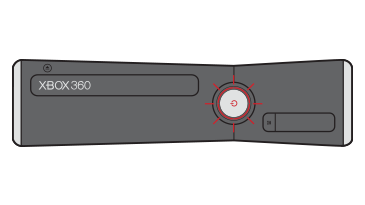
Credit: support.xbox.com
Frequently Asked Questions
What Is The Red Ring Of Death?
The Red Ring of Death is when three red lights blink on the Xbox 360. It means a general hardware failure, often related to the motherboard. It’s a serious problem and usually needs expert repair.
Can I Fix The Blinking Red Light Myself?
You can fix simple causes like loose cables or overheating. For more complex problems, like internal hardware damage, it’s best to seek professional help.
How Can I Prevent The Blinking Red Light?
Keep your console clean, use original accessories, and place it in a cool, open space. Avoid long gaming sessions in hot environments.
Does Using Third-party Cables Cause The Red Light?
Yes, sometimes third-party cables don’t work well with the Xbox 360. They can cause AV errors or power problems.
Is The Blinking Red Light Always A Sign Of Hardware Failure?
No. Sometimes it’s just a loose cable or overheating. Check all connections and let the console cool before assuming it’s a serious hardware problem.
The Xbox 360 blinking red light can be fixed or avoided with careful use and regular maintenance. By understanding the causes, diagnosing the issue, and following practical tips, you can keep your Xbox 360 running smoothly and enjoy gaming without interruption.