
If you own a Nintendo Wii, you’ve likely seen your Wii controller blinking at some point. For many, this small detail can create big confusion. Is it searching for the console? Is the battery low? Or is something wrong with the device? The truth is, the blinking lights can mean different things depending on the situation. If you want to fix syncing issues, avoid gaming interruptions, or just understand your controller better, this guide will help you. Let’s explore why your Wii controller blinks, what those blinking patterns mean, and how to troubleshoot common problems—using clear, simple language and practical advice.
What Does The Wii Controller Blinking Mean?
The Wii Remote (often called the “Wiimote”) has a row of four blue LED lights near the bottom. When you press buttons or try to connect, these lights might start blinking in different ways. Each blinking pattern tells you something about what the controller is doing.
- Quick blinking: The controller is searching for the Wii console and trying to connect.
- Slow, steady blinking: The controller is in the process of syncing with the console.
- Blink, then steady light: The controller has successfully connected and is assigned a player number (1 to 4).
- Random blinking with no connection: There may be a problem with the controller, console, or batteries.
Understanding these signals is the first step to solving most Wii controller issues. Many users don’t realize that the blinking can also help diagnose problems, not just show the controller’s status.
Why Does The Wii Controller Blink? Main Causes
Wii controller blinking isn’t random—it’s a sign of a specific process or issue. Here are the most common causes:
- Searching for Connection: When you turn on the controller, it tries to find the Wii console it was last paired with. If the console is off or out of range, the lights will blink rapidly.
- Syncing Mode: After pressing the red sync button (on the controller or the console), the controller enters syncing mode, blinking as it tries to pair.
- Low Battery: Sometimes, the lights blink as a warning for low battery. This isn’t always obvious, but if blinking is combined with poor performance, it’s a good clue.
- Interference: Wireless devices, routers, or even thick walls can block the signal. This can cause the controller to lose connection, making the lights blink.
- Hardware Faults: Rarely, a problem inside the controller or console can cause random blinking. This can be a sign of worn-out hardware or water damage.
It’s worth noting that many beginners overlook interference or battery issues and immediately assume the controller is broken. Usually, it’s a simple fix.
Understanding The Wii Controller Lights: What Each Pattern Means
It helps to know exactly what each blinking pattern is telling you. Here’s a breakdown:
| Light Pattern | Meaning | What to Do |
|---|---|---|
| All 4 LEDs blink rapidly | Searching for Wii console | Turn on console, try resyncing |
| 1-4 LEDs blink, then 1 stays lit | Connected as Player 1 | Ready to play |
| 1-4 LEDs blink, then 2 stays lit | Connected as Player 2 | Ready to play |
| Lights blink, then all turn off | Failed connection or dead battery | Replace batteries or resync |
| Single LED blinks slowly | Low battery warning | Replace batteries |
Sometimes, more than one light will stay on—this shows which player number the controller is. If all four lights blink and then go dark, it usually means no connection was made.
How To Sync The Wii Controller Correctly
Many blinking issues are caused by improper syncing. Syncing is how the controller and console “find” each other and connect. There are two main types of syncing: Standard Sync and One-Time Sync.
Standard Sync (permanent Pairing)
This method pairs the controller with your Wii console permanently, until you sync it with a different Wii.
Steps:
- Turn on your Wii console.
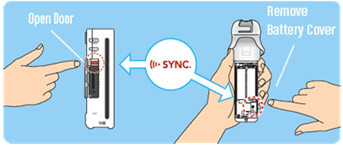
- Open the SD card slot on the front of the Wii to find the red SYNC button.
- Open the battery cover on the back of the Wii Remote to find its red SYNC button.
- Press and release the Wii console SYNC button.
- Within 20 seconds, press and release the Wii Remote SYNC button.
- The LEDs will blink, then one will stay lit—showing player number.
One-time Sync (temporary Pairing)
Useful if friends bring their controller to play at your house.
Steps:
- Turn on the Wii console.
- Go to the Wii Menu.
- On the “Health and Safety” screen, press the 1 and 2 buttons together on the controller.
- The LEDs will blink as it temporarily pairs.
Tip: Many users forget to use the correct sync method for their situation. For home use, always use Standard Sync for stable connections.

Credit: www.reddit.com
Troubleshooting: Fixing Wii Controller Blinking Issues
If your Wii controller keeps blinking and won’t connect, try these steps:
- Check Batteries: Weak or old batteries cause most problems. Always use fresh, high-quality AA batteries or a well-charged rechargeable pack.
- Resync the Controller: Use the Standard Sync process above.
- Reduce Interference: Move away from Wi-Fi routers, microwaves, or thick walls. The Wii uses Bluetooth, which can be blocked.
- Reset the Controller: Remove the batteries, wait 60 seconds, then put them back and resync.
- Power Cycle the Console: Turn off the Wii, unplug it for 5 minutes, then restart.
- Try Another Controller: If possible, see if a different Wii Remote works with your console. This helps identify if the issue is with the controller or the console.
Non-obvious insight: Many users don’t realize that old or leaking batteries can damage the controller contacts. Always check for corrosion when changing batteries.
Common Mistakes When Dealing With Wii Controller Blinking
Mistakes can make a simple problem worse. Here are errors to avoid:
- Syncing with the wrong method: Using One-Time Sync when you need Standard Sync leads to repeated blinking every time you turn on the Wii.
- Ignoring battery quality: Cheap or mismatched batteries may fit but don’t provide enough power for stable Bluetooth communication.
- Not checking for interference: Devices like cordless phones can disrupt the Wii’s Bluetooth signal. Moving the console or controller even a few feet can solve the issue.
- Forgetting to remove old syncs: If you’ve paired the controller with another Wii, you may need to re-sync it to your current console.
How Many Controllers Can You Use At Once?
The Wii console supports up to four controllers at the same time. The LED lights at the bottom of the remote show which player number you are.
Here’s a quick reference:
| Number of Controllers | LED Lights On | Player Number |
|---|---|---|
| 1 | 1st LED | Player 1 |
| 2 | 2nd LED | Player 2 |
| 3 | 3rd LED | Player 3 |
| 4 | 4th LED | Player 4 |
If you try to sync a fifth controller, it won’t connect, and the LEDs will keep blinking. Always check the number of connected controllers if syncing fails.
When To Replace Your Wii Controller
Sometimes, blinking problems mean your controller is at the end of its life. But how do you know when to replace it?
Signs of a worn-out controller:
- Won’t sync even after trying all troubleshooting steps
- Buttons or pointer do not respond
- Frequent disconnects despite fresh batteries and no interference
- Visible corrosion or damage inside battery compartment
If your controller is more than 10 years old or has been dropped in water, replacement is usually the best option. New and used Wii Remotes are still available online and work with original Wii consoles.
Credit: www.reddit.com
Wii Controller Blinking Vs. Other Console Controllers
How does the Wii Remote compare to other popular controllers when it comes to blinking lights and connection issues?
| Controller | Blinking Light Meaning | Common Issue |
|---|---|---|
| Wii Remote | Syncing, player number, battery warning | Batteries, interference, sync errors |
| Xbox 360 Controller | Player number, searching for console | Battery pack issues, wireless adapter needed |
| PS3 Controller | Charging, player number | USB sync problems, battery wear |
| Switch Joy-Con | Syncing, battery status | Low battery, firmware mismatch |
Many of the troubleshooting steps are similar, but the Wii Remote is more sensitive to battery quality and physical interference.
Advanced Troubleshooting: When Basic Steps Don’t Work
If you’ve tried all the basic steps and your controller still blinks, there are a few advanced things to try.
- Try Syncing on Another Wii: Borrow a friend’s Wii. If your controller connects easily, the problem may be with your console.
- Update Your Wii’s Firmware: Outdated console software can cause syncing issues. Go to Wii Settings and check for updates (if your console is connected to the internet).
- Inspect the Sync Button: Sometimes, the red sync button sticks or is damaged. Use a cotton swab to clean around it gently.
- Test the Controller on PC: With a Bluetooth dongle and special software, you can test if the controller is broadcasting. This helps rule out hardware failure.
- Check for Bluetooth Interference: Other devices, like Bluetooth headphones, can block the signal. Turn off unnecessary devices during troubleshooting.
Practical tip: Many users don’t realize that rechargeable battery packs wear out after a few years. If your controller only works with disposable AA batteries, your rechargeable pack may need replacement.
Credit: www.nintendo.com
How To Extend Your Wii Controller’s Life
Proper care can prevent many blinking and connection issues.
- Store controllers away from heat and moisture
- Remove batteries if not used for months
- Use only high-quality, matching batteries
- Avoid dropping or hitting the controller
- Clean the battery compartment regularly
Many problems come from battery leaks, physical drops, or long-term storage with batteries inside. Simple habits can add years to your controller’s life.
When The Wii Controller Still Blinks: Repair Or Replace?
If your controller continues to blink with no connection after all troubleshooting:
- Try a different set of batteries
- Sync the controller on a different Wii console
- Inspect for physical damage or battery corrosion
- Consider professional repair if the controller is valuable or special edition
For most users, replacing the controller is faster and more cost-effective. New Wii Remotes are still manufactured by third parties, and used ones are common on eBay and local shops.
Non-obvious Insights For Wii Controller Users
- Controller memory: Each Wii Remote “remembers” the last console it was synced with. If you take your controller to a friend’s house, you must re-sync it when you return.
- LEDs as diagnostic tool: The exact blinking pattern can tell you if the issue is battery, interference, or hardware-related. For example, rapid blinking followed by all lights off almost always means battery or sync issues.
- Battery door and contacts: If the battery door isn’t fully closed, the controller may work intermittently, causing blinking and disconnects. Many users miss this small detail.
Resources For Further Help
If you’re still having problems, the official Nintendo support site is a reliable source. Visit Nintendo Support for step-by-step guides and contact options.
Frequently Asked Questions
Why Does My Wii Controller Keep Blinking And Not Connecting?
The most common reasons are low batteries, the controller not being synced, or interference from other wireless devices. Try changing the batteries, following the correct syncing method, and moving closer to the console.
How Do I Know If My Wii Controller Is Synced?
If the LED light corresponding to your player number (1 to 4) stays on and does not blink, your controller is synced. Blinking means it is still searching or trying to connect.
Can A Wii Controller Blink If It Is Broken?
Yes, a controller with internal damage or corroded battery contacts may blink but not connect. If you’ve tried all troubleshooting steps and it still blinks, the controller may need repair or replacement.
Is It Normal For A Wii Controller To Blink When I Press Buttons?
A quick blink when you press a button is normal if the controller is waking from sleep or searching for the console. Continuous or repeated blinking usually means a problem with connection or power.
Do Rechargeable Batteries Cause More Blinking Issues Than Regular Batteries?
Rechargeable batteries can cause more issues if they are old or don’t hold a charge. Use only high-quality rechargeables and replace them after a few years. Regular AA batteries are usually more reliable for the Wii Remote.
Conclusion
Wii controller blinking is a common issue, but it’s usually easy to fix with the right steps. By understanding the meaning of the blinking lights, using good batteries, and syncing correctly, you can enjoy smooth gaming sessions. If problems continue, checking for interference, hardware faults, or upgrading your controller may be the best solution.
With a little attention to detail, your Wii gaming experience can stay fun and frustration-free.