
When you see the Sense and Done lights blinking on your Whirlpool washer, it can feel confusing or even stressful. You might wonder if your machine is broken or if you need an expensive repair. But these lights are actually trying to tell you something important about your washer’s cycle, sensors, or even an error. Understanding what this signal means—and what to do next—can save you time, money, and hassle.
Let’s break down everything you need to know about the Whirlpool washer Sense and Done blinking issue. You’ll learn what this signal means, why it happens, and how to troubleshoot it step by step. We’ll also look at how the sensing technology works, what mistakes to avoid, and when to call for professional help. By the end, you’ll be confident in handling this common Whirlpool washer alert.
What Does “sense And Done” Blinking Mean?
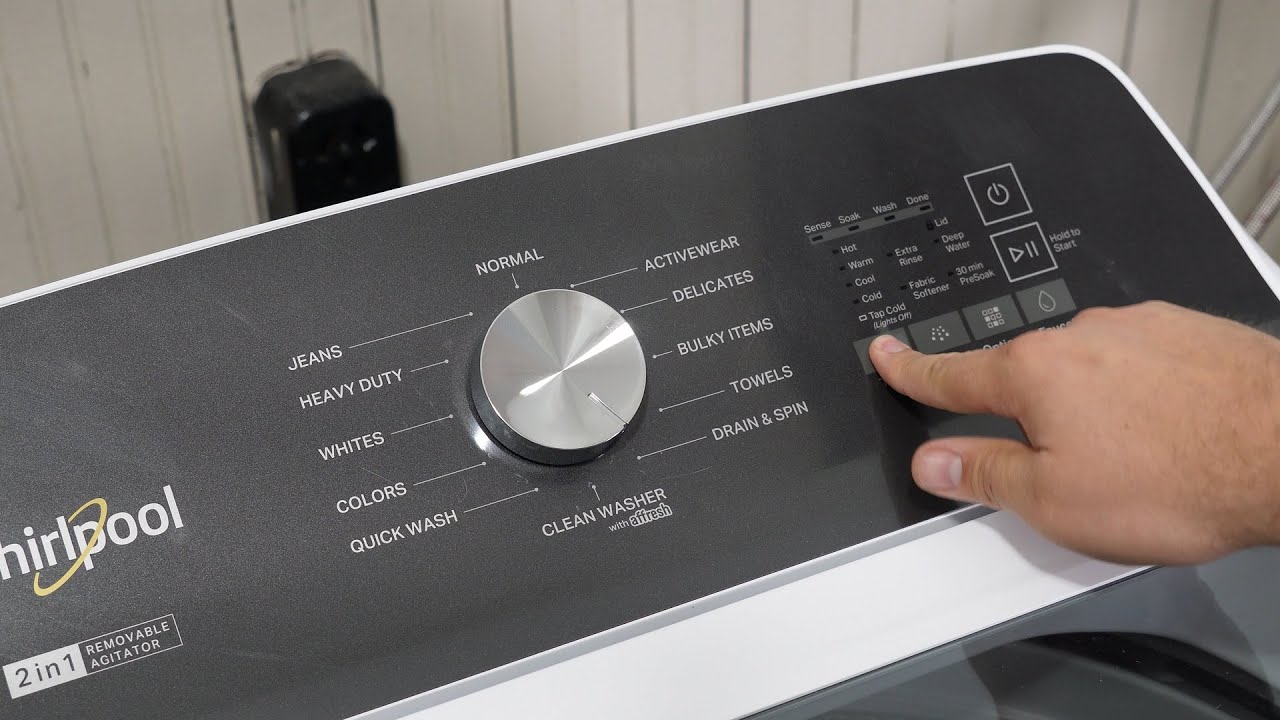
The Sense and Done lights are part of the user interface on many modern Whirlpool washers. They work together with other indicators to show the washer’s status or alert you to problems. But when both lights blink at the same time, it usually means one of three things:
- The machine detected an error during the sensing part of the cycle.
- The wash cycle ended too early, often because of a problem.
- There’s a communication issue between the washer’s control board and one or more internal sensors.
Normally, the Sense light comes on at the start of a cycle. This is when the washer checks the load size, water level, and other factors to adjust the wash. The Done light comes on at the end, showing that the cycle finished. When both blink together, the washer is trying to tell you something is wrong—often before a wash even starts.
Common Causes For Blinking Sense And Done
These are the most frequent reasons you’ll see both lights blinking:
- Unbalanced load: If clothes are unevenly spread, the washer may stop before washing.
- Sensor failure: The load, water, or lid sensor may not be working.
- Water supply problem: Not enough water entering the drum.
- Control board glitch: The washer’s “brain” may have a temporary problem.
- Power interruption: If power is lost during sensing, the cycle can fail.
- Lid lock issue: If the lid isn’t locked or detected as locked, the washer won’t start.
Understanding these causes is the first step to solving the problem.
How Whirlpool Washer Sensing Technology Works
Whirlpool washers use automatic sensing to make laundry easier. This technology checks your laundry load and sets the water level, cycle time, and agitation to match. Here’s how it works:
- Load detection: The washer senses the weight and size of your laundry.
- Water level adjustment: It adds just the right amount of water for the load.
- Cycle optimization: The washer adjusts wash time and spin speed.
- Continuous monitoring: Sensors keep checking for errors or imbalances.
The Sense light shows when the washer is measuring the load and making decisions. If a sensor can’t get a reading—maybe because of a faulty wire or too little water—the cycle can’t continue.
Types Of Sensors In Whirlpool Washers
Whirlpool washers often use several sensors, including:
- Load sensor: Measures the weight of clothes.
- Water level sensor: Checks how much water is in the drum.
- Lid lock sensor: Confirms that the lid is closed and locked.
- Temperature sensor: Monitors water temperature.
- Motor sensor: Detects if the motor is running correctly.
If any of these fail or send confusing signals, the washer might flash the Sense and Done lights.
Credit: www.youtube.com
Step-by-step Troubleshooting For Sense And Done Blinking
When you see the blinking lights, don’t panic. Many causes are simple to fix at home. Follow these steps for a systematic approach:
1. Reset The Washer
A simple reset can fix many glitches.
- Unplug the washer from the wall for at least 1 minute.
- Plug it back in.
- Try starting a new cycle.
This clears temporary errors from the control board.
2. Check The Load
Open the lid and look inside.
- Are clothes bunched up? Even out heavy items so the load is balanced.
- Is the drum overloaded? Remove some items if it’s too full.
- Is the load too small? Add a few more pieces if you’re washing just one or two items.
3. Inspect The Lid Lock
The lid must be closed and locked for the washer to work.
- Listen for a click when you close the lid.
- Check for broken or loose parts on the lid lock.
- Wipe away any lint or debris around the lock.
If the lid doesn’t lock, the washer will stop and blink the lights.
4. Verify Water Supply
No water or low pressure can trigger an error.
- Turn on both hot and cold water faucets.
- Check hoses for kinks or blockages.
- Clean the hose filters if water flows slowly.
If water doesn’t enter, the cycle can’t start.
5. Examine Sensors And Hoses
Sometimes, sensors get dirty or disconnected.
- Look for loose wires around the load and water level sensors.
- Clean any visible buildup or dirt near sensors.
- Check hoses for leaks or pinches.
6. Run A Diagnostic Cycle
Many Whirlpool washers have a built-in diagnostic mode. This helps you find specific errors.
- Usually, you turn the cycle knob back and forth in a special pattern (see your user manual).
- The washer will flash different lights to show error codes.
Write down any codes you see—they can help with repairs.
7. Clear Error Codes
After fixing any obvious problems, you might need to clear error codes.
- Reset the washer again by unplugging it.
- Sometimes, pressing and holding certain buttons (like “Start” or “Cancel”) for 5 seconds will clear codes.
8. Check Power Source
Make sure your washer is plugged in securely.
- Try a different outlet if possible.
- Avoid using extension cords.
A weak or unstable power supply can cause blinking lights.
9. Inspect The Control Board
If none of the above helps, the control board may be faulty.
- Look for signs of burning or corrosion inside the control panel (only if you feel safe doing so).
- If you see damage, you may need a technician to replace the board.
10. When To Call A Professional
If the lights keep blinking after all these steps, or if you see complex error codes, it’s time for expert help. Modern washers are complicated, and certain repairs (like replacing sensors or boards) require special tools and knowledge.
Whirlpool Washer Models With Sense And Done Feature
Not every Whirlpool washer uses the Sense and Done light system. Here are some popular models that do:
| Model | Type | Sensing Feature |
|---|---|---|
| WTW5000DW | Top Load | Yes |
| WTW4816FW | Top Load | Yes |
| WTW4955HW | Top Load | Yes |
| WTW7000DW | Top Load (Cabrio) | Yes |
| WFW6620HC | Front Load | Advanced |
If your model isn’t listed, check your user manual to see if it uses this kind of indicator.

Credit: www.reddit.com
Comparing Error Signals: Sense And Done Vs Other Washer Alerts
Understanding different alert signals can help you troubleshoot faster. Here’s a comparison of the most common light signals on Whirlpool washers:
| Light(s) Blinking | Meaning | Common Causes |
|---|---|---|
| Sense + Done | Sensing error or early cycle end | Unbalanced load, sensor fault, water supply issue |
| Wash | Cycle is running normally | — |
| Spin | Spin cycle has started | — |
| Lid Lock | Lid is not locked | Lid open, lock failure |
| Rinse + Spin | Error in rinse or spin cycle | Drain pump problem, unbalanced load |
Learning to read these signals will help you spot problems before they get worse.
Common Mistakes To Avoid With Whirlpool Washers
Many people make simple mistakes that can trigger the Sense and Done blinking lights. Avoid these to keep your washer running smoothly:
- Overloading or underloading: Too many or too few clothes confuse the sensors.
- Ignoring water supply: Make sure both hot and cold water valves are open.
- Forgetting lid closure: Always shut the lid firmly before starting a cycle.
- Skipping regular cleaning: Buildup in sensors or hoses can cause errors.
- Not leveling the machine: An uneven washer leads to unbalanced loads and cycles stopping early.
Being aware of these mistakes can prevent many common problems.
Practical Tips For Preventing Sense And Done Errors
To avoid running into blinking light issues in the future, try these practical tips:
- Balance every load: Spread clothes evenly in the drum. Mix heavy and light items if possible.
- Don’t pack the washer: Leave enough space for clothes to move.
- Check water pressure: If you notice slow filling, clean the inlet screens or call a plumber.
- Clean regularly: Wipe down the lid lock, drum, and detergent drawer.
- Use the right detergent: Too much or the wrong kind can cause excess suds and errors.
- Level your washer: Adjust the feet so the machine doesn’t rock.
- Run self-clean cycles: Many models have a cleaning cycle—use it monthly.
- Inspect hoses every 6 months: Replace if worn or cracked.
These habits help your washer’s sensors work accurately, reducing the chance of error signals.
Real-world Examples: What Users Experience
Many Whirlpool washer owners have run into the Sense and Done blinking problem. Here are a few real stories:
- Sarah from Ohio noticed the lights blinked every time she washed bedding. She realized her sheets were tangling, causing an unbalanced load. After she started spreading items out and mixing towels, the issue stopped.
- Mike in Texas found the lights blinking after a power outage. A quick unplug and reset fixed the problem.
- Priya in California struggled with blinking lights after moving her washer. She discovered the machine wasn’t level, and fixing the feet solved her issue.
These examples show that small changes can make a big difference.
When Should You Replace Parts?
Sometimes, a part inside your washer may be faulty. Here’s when you should consider a replacement:
- Lid lock not clicking: If cleaning doesn’t help, the lock mechanism may be broken.
- Washer doesn’t fill: Water inlet valve or sensor may need replacing.
- Repeated sensor errors: If you keep seeing the same error after resets, the sensor itself may be bad.
- Control board problems: Signs like burning smells or visible damage mean it’s time for a new board.
Most of these parts are available online or from appliance stores. If you aren’t comfortable with repairs, hire a professional.
Cost Of Repairs For Sense And Done Blinking
Repair costs vary depending on the issue:
| Part/Service | Estimated Cost | DIY or Professional? |
|---|---|---|
| Lid lock replacement | $40–$90 | DIY or Pro |
| Water inlet valve | $25–$60 | DIY or Pro |
| Sensor replacement | $30–$120 | Pro recommended |
| Control board | $150–$350 | Pro only |
| Service call fee | $80–$150 | Pro only |
Always compare repair costs with the price of a new washer—especially if your machine is more than 8–10 years old.

Credit: www.youtube.com
Whirlpool Washer Support And Resources
If you need more help, Whirlpool offers several ways to get support:
- Official support site: Visit the Whirlpool Contact Us page for manuals, troubleshooting, and live chat.
- User manual: Your washer’s manual has a troubleshooting section with model-specific advice.
- YouTube tutorials: Many repair experts share step-by-step videos for common Whirlpool issues.
- Local appliance repair services: Search for certified Whirlpool technicians in your area.
Don’t hesitate to reach out if you feel stuck.
Frequently Asked Questions
Why Do The Sense And Done Lights Blink At The Same Time?
Both lights blinking usually mean the washer detected a problem during the sensing phase, such as an unbalanced load, sensor issue, or a water supply problem. It’s an alert to check the washer before trying another cycle.
How Do I Reset My Whirlpool Washer?
Unplug the washer from the wall for at least 1 minute, then plug it back in. For some models, you can also press and hold the “Start” or “Cancel” button for 5 seconds to reset. Check your manual for model-specific instructions.
Can I Fix A Blinking Sense And Done Error Myself?
Yes, many causes (like unbalanced loads or a stuck lid lock) are easy to fix at home. Follow the troubleshooting steps above. If the problem keeps coming back or you see error codes, consider calling a professional.
Is It Safe To Keep Using The Washer If The Lights Keep Blinking?
No, it’s best to stop using the washer until you find and fix the problem. Ignoring the alert can cause more damage or even a water leak.
Where Can I Find Replacement Parts For My Whirlpool Washer?
You can buy genuine Whirlpool parts from the official website, appliance stores, or trusted online sellers. Always use your washer’s model number to find the right part.
If you see the Sense and Done blinking on your Whirlpool washer, don’t worry—most problems are easy to diagnose and fix. By understanding what these lights mean, using the troubleshooting steps, and following good laundry habits, you can keep your washer running smoothly for years. And if you ever feel unsure, professional help is always available. Take care of your appliance, and it will take care of your clothes.