
Most people buy a Waterpik because they want better oral hygiene. It’s easy to use, effective, and feels like a professional cleaning at home. But sometimes, technology doesn’t work as expected. If your Waterpik isn’t charging and the charging light keeps blinking, you’re not alone. This problem can be confusing and frustrating. You want to fix it quickly, but you may not know where to start.
This article will guide you through the causes, fixes, and steps to solve the Waterpik not charging light blinking issue. You’ll learn what the blinking light means, how to troubleshoot, and what to do if simple fixes don’t work. We’ll share tips that most beginners miss, compare Waterpik models, and explain what to do if your device needs a deeper repair. By the end, you’ll have a clear plan to get your Waterpik working again.
What The Blinking Charging Light Means
When the charging light blinks on your Waterpik, it usually signals a charging problem. For most models, a solid light means charging is successful, while a blinking light can mean:
- Poor connection to the charger
- Battery issue
- Charger malfunction
- Internal fault
Different Waterpik models use the blinking light in different ways. For example, the Waterpik Cordless Advanced (WP-560) flashes blue during charging, but turns solid when fully charged. If it blinks continuously and never turns solid, it means something is wrong.
Some models use red or orange lights to show low battery or charging errors. It’s important to check your user manual to understand your specific model’s signals.
Common Reasons For Waterpik Not Charging (light Blinking)
Several issues can cause the charging light to blink instead of showing a full charge. Here are the most common reasons:
- Dirty charging contacts – Dust or residue can block the electrical connection.
- Charger cable damage – Bent or broken wires prevent power flow.
- Faulty power adapter – The plug or adapter may not supply enough power.
- Battery degradation – Old batteries lose their ability to charge.
- Internal circuit failure – Water damage or manufacturing faults disrupt charging.
- Using wrong charger – Not all chargers are compatible, even if they fit.
- Temperature extremes – Charging in cold or hot conditions may fail.
Many users overlook simple issues like dirt or wrong chargers. Before assuming your Waterpik is broken, check these basic points.

Credit: www.reddit.com
Quick Troubleshooting Steps
Before you panic or contact support, try these easy steps. They solve most blinking light problems.
1. Check The Charger And Cable
- Use the original Waterpik charger. Avoid third-party cables.
- Inspect for frayed wires or bent pins.
- Plug into a different outlet to rule out socket issues.
2. Clean Charging Contacts
- Wipe the charging contacts on both the Waterpik and charger with a dry cloth.
- Use a cotton swab for difficult spots.
- Avoid water or cleaning fluids—moisture can cause damage.
3. Restart The Device
- Unplug the charger and wait 5 minutes.
- Plug in again and check if the blinking stops.
4. Try A Different Charger
- If you have a friend with the same model, borrow their charger.
- See if your Waterpik charges with their cable.
5. Check For Software Reset (cordless Models)
- Some Waterpik models have a reset function.
- Press and hold the power button for 10 seconds.
- Release and try charging again.
6. Move To A Room Temperature Environment
- Charging in very hot or cold places can affect battery performance.
- Place your Waterpik in a normal room (65–75°F) for one hour, then try charging.
These steps solve most issues. If your device still doesn’t charge, the problem may be deeper.
Waterpik Model Comparison: Charging Indicators
Different Waterpik models use various charging indicators. Understanding these can help you diagnose your issue faster. Here’s a comparison of popular models:
| Model | Charging Light Color | Blinking Meaning | Fully Charged Signal |
|---|---|---|---|
| WP-560 Cordless Advanced | Blue | Blinks during charging, solid when complete | Solid blue |
| WP-360 Cordless | Green | Blinks during charging, turns off when charged | No light |
| WP-450 Cordless Plus | Red | Blinks for low battery, solid for charging | Solid red, then turns off |
| WP-100 Ultra | No indicator | N/A | N/A |
Not all Waterpiks have a charging indicator. If your model doesn’t, check the manual or official website.
Battery Life And Charging Statistics
Battery issues are a common cause of blinking lights. Most Waterpik models use rechargeable batteries that last for:
- Cordless Advanced: Up to 4 weeks per charge
- Cordless Plus: Up to 2 weeks per charge
- Cordless Express: Up to 1 week per charge
Battery life drops after 1–2 years. Charging may become slower, and the blinking light may appear more often. Most batteries are lithium-ion or NiMH, both of which degrade over time.
According to Waterpik, over 80% of charging issues are solved by using the original charger and cleaning the contacts. Less than 10% require battery replacement.
Advanced Troubleshooting: When Simple Fixes Fail
If basic steps don’t work, try these advanced methods:
1. Inspect For Water Damage
Waterpik devices are water-resistant, but not waterproof. If water enters the charging port or battery compartment, it can cause short circuits.
- Look for moisture near the charging contacts.
- Check for rust or corrosion.
- If you find water, dry the device thoroughly before charging.
2. Test The Charger With A Multimeter
If you have a multimeter, measure the voltage output of the charger.
- Standard Waterpik chargers output between 5V and 12V.
- If your charger delivers less, it may need replacement.
3. Replace The Battery
Some models allow battery replacement. If your Waterpik is out of warranty and you’re comfortable with electronics:
- Search for replacement batteries compatible with your model.
- Follow online guides for safe installation.
Warning: Opening the device may void your warranty.
4. Contact Waterpik Support
If your device is less than two years old, contact Waterpik for warranty service. They may offer a replacement if the device is faulty.
You can reach Waterpik support through their website or phone. Have your model number and purchase date ready.
Waterpik Vs. Other Oral Irrigators: Reliability Data
How does Waterpik compare to other brands for charging reliability? Here’s a look at recent consumer data:
| Brand | Charging Failure Rate | Average Battery Life | Warranty |
|---|---|---|---|
| Waterpik | 6% | 2 years | 2 years |
| Philips Sonicare | 8% | 1.5 years | 2 years |
| H2Ofloss | 10% | 1 year | 1 year |
| Panasonic | 12% | 1 year | 1 year |
Waterpik is known for low failure rates and longer battery life compared to other brands. If you see the blinking charging light often, it’s likely a fixable issue.
Preventing Charging Problems: Practical Tips
To avoid future charging issues with your Waterpik:
- Use only the original charger supplied with your device.
- Clean charging contacts monthly with a dry cloth.
- Store in a dry place to prevent moisture damage.
- Charge at room temperature—avoid cold or hot environments.
- Do not overcharge. Unplug after the light turns solid or off.
- Replace batteries if your device is over two years old and charging slows.
Most users don’t realize that charging with third-party cables can damage the battery. Also, storing your Waterpik in the bathroom, where humidity is high, increases the risk of corrosion.
Signs Your Waterpik Needs Professional Repair
Some blinking light problems are signs of a deeper issue. Consider professional repair or replacement if you notice:
- Charging light always blinks and never turns solid, even after trying all fixes.
- Device won’t turn on even after charging.
- Charging contacts are corroded or rusted.
- Battery heats up during charging.
- Device makes unusual noises during charging.
These are signs of battery failure or circuit damage. Continuing to use the device may cause further problems.
Waterpik Warranty And Replacement Options
Waterpik offers a two-year warranty on most models. If your device is within warranty, contact Waterpik for repair or replacement. They will guide you through the process.
To file a claim:
- Visit the Waterpik support page.
- Submit your model number and purchase proof.
- Describe the charging issue.
If your warranty is expired, you can:
- Order replacement parts (charger, battery) from Waterpik.
- Visit a local repair center.
- Consider upgrading to a newer model.
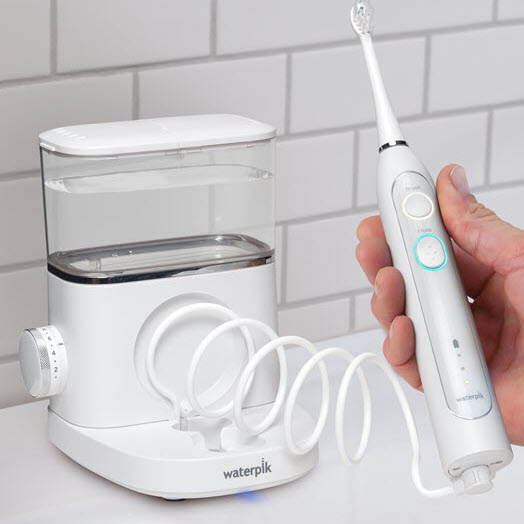
For more details on Waterpik’s warranty policy, visit their official site or read their support documents.
Credit: www.waterpik.com
Real User Experiences: Blinking Light Issues
Many Waterpik users have shared their experiences with the charging light blinking problem. Here are a few examples:
- Maria, WP-560 owner: “My Waterpik wouldn’t charge, the blue light just blinked. I cleaned the contacts and tried a new charger—it worked!”
- James, WP-450 owner: “After two years, my device started blinking red. The battery was worn out. I replaced it and now it charges fine.”
- Lina, WP-360 owner: “I used a phone charger by mistake. The blinking light appeared. Switched back to the original charger and the issue was gone.”
These stories show that most issues are solved with simple steps. Only a small number require battery replacement or warranty service.
How To Safely Dispose Of Old Waterpik Batteries
If you replace your battery, it’s important to dispose of the old one safely. Batteries contain chemicals that harm the environment.
- Take the battery to a local recycling center.
- Do not throw it in the trash.
- Many electronics stores accept old batteries.
Disposing batteries properly protects the environment and follows US safety laws.

Credit: www.youtube.com
Waterpik Charging Light: Myths And Facts
There are many myths about Waterpik charging lights. Let’s clear up a few:
- Myth: Blinking light means the device is charging.
- Fact: Blinking often signals a problem. Check your manual.
- Myth: Any USB charger will work.
- Fact: Only the original charger is safe.
- Myth: Leaving the device plugged in won’t hurt.
- Fact: Overcharging can damage the battery.
Understanding the real signals and facts will help you avoid mistakes.
Expert Tips For Waterpik Owners
Here are two insights beginners often miss:
- Regularly update your Waterpik firmware (for smart models). Some models allow firmware updates that fix charging bugs.
- Avoid charging after every use. Wait until the battery is low. Frequent charging shortens battery life.
Many users charge their Waterpik daily, even when it’s not needed. This causes faster battery wear. Instead, charge once the light signals low battery.
When To Replace Your Waterpik
If your Waterpik is over two years old and charging issues are frequent, it may be time to upgrade. Newer models offer:
- Longer battery life
- Better water resistance
- Improved charging technology
- Warranty coverage
Compare features and prices before buying. For reliable information, see the Waterpik official site.
Frequently Asked Questions
What Does A Blinking Charging Light Mean On My Waterpik?
A blinking charging light usually means there’s a charging issue. This could be a dirty contact, wrong charger, battery problem, or internal fault. Check your manual for signals specific to your model.
Can I Use A Phone Charger To Charge My Waterpik?
It’s not recommended. Using a third-party charger may damage the battery or cause charging errors. Always use the original charger supplied with your Waterpik.
How Long Should My Waterpik Battery Last?
Most Waterpik batteries last 1–2 years with normal use. Cordless Advanced models can last up to 4 weeks per charge. If battery life drops quickly, it may be time to replace the battery.
What Should I Do If Cleaning The Contacts Doesn’t Help?
If basic cleaning and troubleshooting don’t fix the blinking light, try a different charger, check for water damage, or contact Waterpik support. Battery replacement or warranty service may be needed.
Is It Safe To Open My Waterpik To Replace The Battery?
Opening your Waterpik can void the warranty and risk damaging the device. Only attempt battery replacement if you’re comfortable with electronics and your warranty has expired. Otherwise, contact Waterpik for professional service.
Solving the Waterpik not charging light blinking problem can be simple or complex, depending on the cause. By following the steps above, you’ll fix most issues and keep your Waterpik running smoothly. If the problem persists, don’t hesitate to reach out for help or consider a replacement. For more detailed guidance and support, visit the official Waterpik website.