
Many homes have a Vicks thermometer in their medicine cabinet. It’s a trusted tool for checking fevers in children and adults. But sometimes, users see a blinking arrow on their Vicks thermometer’s screen and feel confused or concerned. What does this symbol mean? Is it a warning, an error, or just a reminder? Understanding this simple sign can make your thermometer more useful and help you get more accurate temperature readings.
In this article, you’ll learn exactly why the Vicks thermometer blinking arrow appears, what actions to take, and how to avoid common mistakes. We’ll also cover how the thermometer works, compare different models, give troubleshooting tips, and answer popular questions. This information is clear, direct, and designed for non-native English speakers or anyone who wants easy instructions.
What Does The Vicks Thermometer Blinking Arrow Mean?
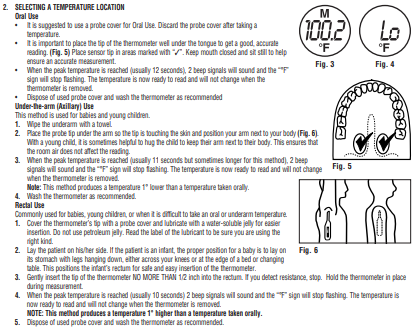
When you see a blinking arrow on your Vicks thermometer, it’s not just a random symbol. The arrow is a message from the device. Its main purpose is to guide you toward the correct way to use the thermometer. Most of the time, the blinking arrow means the thermometer is ready and waiting for you to begin the temperature measurement.
Here are the most common reasons for the blinking arrow:
- Ready to Measure: The thermometer is at the correct temperature and is signaling that you should place it in the mouth, under the arm, or in the rectum (depending on the model).
- Position Reminder: It reminds you to make sure the sensor is touching the correct body area. If you do not place it properly, you might get a false reading.
- Start Prompt: On some models, the blinking arrow asks you to press a button or perform an action to start the measurement.
- Battery or Error Notification: Rarely, a blinking arrow can signal a battery issue or a malfunction, but this is less common.
It’s important to consult your Vicks thermometer manual to check exactly what the blinking arrow means on your model. Most issues are simple to solve and don’t require technical skill.
How Vicks Thermometers Work
Understanding how your thermometer works will help you use it correctly and avoid confusion. Most Vicks thermometers are digital thermometers that use a tiny sensor to detect body heat.
Key Features Of Vicks Digital Thermometers
- Fast and Accurate: They give a reading in about 10-30 seconds.
- Multiple Modes: Some models can measure temperature orally, rectally, or under the arm.
- Memory Recall: Certain models remember your last reading.
- Fever Signal: Many Vicks thermometers beep or show a color/arrow if a fever is detected.
How The Sensor Detects Temperature
Inside the tip of the thermometer is a thermal sensor. When you place the sensor in the correct spot, it senses your body heat and converts it to a number that displays on the screen. The arrow blinks to tell you when to start or continue measuring.
Why Placement Is Important
If the sensor is not in the right location or not making good contact with the skin or tissue, the reading will be incorrect. The blinking arrow helps you avoid this mistake.

Credit: device.report
Common Vicks Thermometer Models And Their Blinking Arrow Meanings
Not every Vicks thermometer uses the arrow symbol in exactly the same way. Here’s how the blinking arrow works on some popular models:
| Model Name | Blinking Arrow Meaning | Special Features |
|---|---|---|
| Vicks V901F-EE | Ready for use; place sensor correctly | Memory recall, waterproof |
| Vicks V912US | Indicates to start measurement | Color fever alert, 8-second reading |
| Vicks V977 Forehead | Positioning guidance | Forehead scan, fever insight |
| Vicks V966F | Sensor not in contact | Flexible tip, backlight display |
If your model is not in this list, check the instruction manual or the manufacturer’s website.
Step-by-step: What To Do When You See The Blinking Arrow
When your Vicks thermometer shows a blinking arrow, follow these steps:
1. Check The Placement
Make sure the sensor is in the correct position. For oral use, place it under the tongue. For underarm use, put the tip deep in the center of the armpit, with the arm pressed tightly against the body. For rectal use (usually for babies), insert the tip gently as recommended by the manufacturer.
2. Wait For Steady Arrow Or Signal
Keep the thermometer steady. The blinking arrow will usually stop, or a beep will sound, when the device has finished measuring. If you move the thermometer too soon, you might get a low or inaccurate reading.
3. Read The Result
Once the measurement is complete, the thermometer will beep and show the temperature. Some models change the arrow to a steady icon or turn off the symbol.
4. Clean The Thermometer
After use, clean the sensor tip with alcohol or as recommended to prevent germs.
5. Store Properly
Put the thermometer back in its case, away from heat or direct sunlight.
Troubleshooting: When The Blinking Arrow Won’t Stop
Sometimes, the arrow keeps blinking even after you follow all the steps. Here are common reasons and what to do:
The Sensor Is Not Touching The Body Properly
Make sure the thermometer is in full contact with the skin or tissue. For oral use, the mouth should stay closed. For underarm, the arm must press tightly.
Low Battery
A weak battery can cause the thermometer to act strangely, including a constantly blinking arrow. Replace the battery if the device is slow, the screen is dim, or if you see a battery symbol.
Faulty Sensor
If the thermometer has been dropped or exposed to water (and is not waterproof), the sensor may be damaged. Try using a different thermometer to confirm.
Extreme Room Temperature
If you try to use the thermometer in a very cold or very hot room, it may not work properly. Wait for the device to reach room temperature before use.
Outdated Thermometer
Digital thermometers have a lifespan—usually 2-5 years. If your device is old, it may be time to replace it.
Not Following The Manual
Each model is a bit different. Always check your manual for specific instructions.
How To Change The Battery In A Vicks Thermometer
If you suspect a battery problem, here’s how to change it:
1. Find The Battery Cover
Usually on the back or the end of the thermometer.
2. Open The Cover
Use a small screwdriver if needed.
3. Remove The Old Battery
Take note of the battery’s orientation.
4. Insert The New Battery
Use the same type (often LR41 or CR1225).
5. Close The Cover
Make sure it snaps or screws back tightly.
6. Test The Thermometer
Turn it on and check if the blinking arrow works as expected.
Tip: Dispose of the old battery safely, as it can be harmful to the environment.
Comparing Vicks Thermometers: Which Model Is Right For You?
Choosing the right thermometer can make a big difference in convenience and accuracy. Here’s a quick comparison of popular Vicks models:
| Model | Measurement Method | Time to Read | Display Features | Suitable For |
|---|---|---|---|---|
| V912US | Oral, rectal, underarm | 8-15 seconds | Color fever alert | All ages |
| V977 Forehead | Forehead | 2 seconds | Backlit, fever insight | Babies, young children |
| V965F | Oral, rectal, underarm | 10 seconds | Flexible tip, memory recall | All ages |
| V901F-EE | Oral, rectal, underarm | 10-30 seconds | Waterproof, simple display | Adults, older children |
Non-obvious insight: If you need to take the temperature of a sleeping child, a forehead thermometer (like the V977) is less disturbing, but oral/rectal models are usually more accurate for babies under 3 months.
Mistakes To Avoid When Using A Vicks Thermometer
Many people make small mistakes that lead to wrong readings or confusion with the blinking arrow. Here’s how to avoid common problems:
1. Not Waiting For The Arrow Or Beep
Moving the thermometer too soon will give you a false reading. Always wait for the device to signal that it’s finished.
2. Placing The Sensor Incorrectly
For oral readings, the tip must stay under the tongue. For underarm, the skin should be dry, and the arm pressed closely.
3. Using The Wrong Method For Age
Rectal thermometers are best for infants, while oral or forehead thermometers are better for older kids and adults.
4. Ignoring Room Temperature
Taking a reading right after coming indoors from cold weather can affect the result. Wait a few minutes before measuring.
5. Not Cleaning The Thermometer
Dirty sensors can cause inaccurate readings and spread germs.
6. Using An Expired Thermometer
If your device is more than five years old, it may not be reliable.
Non-obvious tip: Don’t use the thermometer right after eating or drinking hot or cold foods—wait at least 15 minutes for an accurate oral reading.
Caring For Your Vicks Thermometer
To keep your thermometer working well and to avoid issues like a malfunctioning blinking arrow, regular care is essential.
- Clean After Every Use: Wipe the tip with isopropyl alcohol or a soft cloth.
- Store in a Case: Protect it from dust and moisture.
- Check the Battery Annually: Even if you don’t use it often, a weak battery can cause problems.
- Avoid Dropping the Device: Even small falls can damage the sensor.
- Don’t Boil the Thermometer: High heat can destroy electronic parts. Use recommended cleaning methods.
When To Replace Your Vicks Thermometer
Digital thermometers do not last forever. Here are signs it’s time for a new one:
- Repeated Errors: If the blinking arrow or error message appears often.
- Slow Response: If it takes longer than usual to get a reading.
- Physical Damage: Cracks, water inside the display, or a loose sensor.
- Cannot Change Battery: Some models have sealed batteries.
Most digital thermometers last around 2-5 years with regular use and proper care.

Credit: www.youtube.com
How Accurate Are Vicks Thermometers?
Vicks thermometers are known for good accuracy, usually within ±0.2°F (±0.1°C) when used correctly. But accuracy depends on:
- Proper Placement
- Device Condition
- Following Instructions
For medical decisions, always consult a doctor if you are unsure about a reading.
Vicks Thermometer Vs. Other Brands
How does a Vicks thermometer compare to other popular brands like Braun, Omron, or Kinsa?
| Feature | Vicks | Braun | Kinsa | Omron |
|---|---|---|---|---|
| Common Symbol (Arrow) | Yes | No | No | Yes |
| Fever Alert | Color & beep | Color & beep | App-based | Beep |
| Reading Speed | 8-15s | 2-8s | 8s | 10-20s |
| Mobile App | No | No | Yes | Some models |
| Price Range | $8-$30 | $15-$50 | $20-$35 | $10-$40 |
Insight: While Vicks is reliable and simple, other brands may offer features like app connection or faster readings. But for most homes, Vicks provides a good balance of price and performance.
Practical Tips For Accurate Temperature Measurement
Getting the most from your thermometer means more than just reading the screen. Here are a few practical tips:
- Wait Before Measuring: If the person has just bathed, exercised, or eaten, wait 15-30 minutes.
- Take Multiple Readings: If you get a surprising result, repeat the measurement to confirm.
- Record Your Results: Some thermometers store previous readings, but writing them down can help track a fever over time.
- Use the Right Method: Oral and rectal readings are more accurate than underarm.
Non-obvious tip: For babies, always use a thermometer designed for their age group and method (rectal for infants is best).
Safety And Health Information
Digital thermometers are safe, but a few precautions are wise:
- Never Share: Use one thermometer per person for rectal readings, or clean carefully between uses.
- Supervise Children: Do not allow children to use the thermometer alone.
- Follow Age Guidelines: Use rectal for infants under 3 months, and oral/forehead for older children.
If you have concerns about a fever or other symptoms, always consult a healthcare provider.
Where To Find More Help
If you lose your instruction manual or need more information, the Vicks official site and customer support are good resources. You can also check trusted health sites like Centers for Disease Control and Prevention (CDC) for advice on fever and thermometer use.
Frequently Asked Questions
Why Does My Vicks Thermometer Keep Blinking The Arrow?
Usually, the blinking arrow means the device is ready to measure or that you need to position the sensor correctly. If the arrow won’t stop blinking, check the battery, placement, and ensure you’re following the instructions for your specific model.
What Should I Do If The Thermometer Gives A Low Reading?
A low reading often means the sensor was not in full contact with the body or was removed too soon. Try again, making sure the thermometer stays in place until it beeps or the arrow stops blinking.
Can I Use The Same Thermometer For Oral, Rectal, And Underarm Readings?
Many Vicks thermometers are designed for all three methods, but you must clean the device well between uses. For hygiene, it’s best to have separate thermometers or use disposable probe covers for rectal readings.
How Do I Know If My Vicks Thermometer Is Broken?
Signs of a broken thermometer include repeated error messages, a display that does not turn on, or a blinking arrow that never stops even after troubleshooting. Try changing the battery. If problems continue, replace the device.
Is A Vicks Thermometer Accurate Enough For Medical Use?
Yes, Vicks thermometers are suitable for home health monitoring and provide accuracy within ±0. 2°F (±0. 1°C) when used correctly. For medical concerns or if you are unsure about a reading, consult a healthcare professional.
Conclusion
Digital thermometers like those from Vicks make it easy to check for fever at home, but understanding what the symbols mean—especially the blinking arrow—can save you time and worry. If you follow the guidance in this article, you’ll get more reliable results and keep your family safer.
Credit: www.vickshumidifiers.com