
If you’re driving a Toyota Camry and suddenly see the maintenance light blinking on your dashboard, you might feel a mix of worry and confusion. Is your car about to break down? Did you miss a big problem? Or is it just a reminder for basic maintenance? Many Camry owners face these questions each year. Understanding what the blinking maintenance light means—and how to respond—can save you stress, money, and help keep your car running smoothly for years.
In this guide, you’ll find clear explanations, real examples, and practical advice for handling the Toyota Camry maintenance light blinking issue. Whether you drive an older Camry or a newer model, you’ll learn why this light comes on, what steps to take, and how to prevent bigger problems in the future.
What Is The Toyota Camry Maintenance Light?
The maintenance required light is a small indicator on your dashboard. It often appears as “MAINT REQD” or a wrench symbol, depending on your Camry’s model year. Unlike the check engine light, which warns about engine or emission issues, the maintenance light is mainly a reminder for routine service—like oil changes, fluid checks, and other scheduled tasks.
But when this light blinks instead of staying solid, it can mean something different. A blinking maintenance light usually signals that maintenance is overdue, or there might be a more urgent issue with the system that tracks your vehicle’s service needs.
Solid Vs. Blinking Light
- Solid Maintenance Light: Standard reminder. Usually comes on after a set number of miles (often 5,000).
- Blinking Maintenance Light: Can indicate overdue maintenance or a system malfunction. Needs more attention.
Many drivers think both lights mean the same thing. But a blinking light requires quicker action.
Why Does The Maintenance Light Blink?
The blinking maintenance light on a Toyota Camry doesn’t mean your engine is about to fail, but it’s not something to ignore. Here are the most common reasons this happens:
1. Overdue Service
If you haven’t performed the scheduled maintenance (like an oil change) after the solid light came on, the system may start blinking.
2. Maintenance Data Reset Error
After an oil change or service, the maintenance light should be reset. If the reset wasn’t done correctly, the light can start blinking to signal a system error.
3. Dashboard System Malfunction
Sometimes, electrical or sensor issues cause the light to blink. This can happen if the dashboard’s computer has a software or wiring problem.
4. Incorrect Oil Or Fluids
Using the wrong oil type or running low on fluids can sometimes trigger dashboard warnings, including blinking lights.
5. Unusual Driving Patterns
Extreme stop-and-go driving, very short trips, or long idling can confuse the car’s maintenance system, causing it to blink.
Key Insight: Many Camry owners miss that a blinking maintenance light is often just a stronger reminder—not always a sign of mechanical failure. But it’s important to check, as ignoring it can mask real problems.
What Should You Do First?
When you see the maintenance light blinking, don’t panic. Most of the time, you can handle it without a trip to the mechanic. Here are the first steps:
1. Check Your Maintenance Records
When was your last oil change or service? If it’s been more than 5,000 miles or six months, it’s probably time for routine maintenance.
2. Turn Off The Engine Safely
Stop in a safe place and turn off the engine. Wait a moment, then restart. Sometimes, a quick restart resets the system if it glitched.
3. Inspect Fluid Levels
Open the hood and check oil, coolant, and brake fluid levels. Top up if any are low.
4. Look For Other Warnings
Is the check engine light or any other warning also on? If yes, get professional help soon.
5. Consult Your Owner’s Manual
The manual will explain what the blinking light means for your specific Camry year and model. It may list reset steps or special instructions.
Pro Tip: If you recently had an oil change but the light started blinking afterward, the shop may have forgotten to reset the light. Try resetting it yourself (instructions below).
How To Reset The Maintenance Light On A Toyota Camry
Resetting the maintenance required light is simple on most Camry models. Here’s how to do it yourself:
For 2007–2021 Toyota Camry
- Turn the ignition switch to ON (do not start the engine).
- Make sure the odometer displays ODO (not TRIP A or B).
- Turn the ignition OFF.
- Press and hold the ODO/TRIP button.
- While holding the button, turn the ignition back to ON (do not start the engine).
- Keep holding until the odometer displays “000000” or the light turns off.
- Release the button.
For 2022 And Newer Camry
Newer models may use digital dashboards:
- Turn the car on (engine OFF, but power ON).
- Use the arrow buttons on the steering wheel to open the Settings menu.
- Scroll to Vehicle Settings > Scheduled Maintenance.
- Press and hold OK to reset.
Caution: Only reset the light after completing the maintenance—never just turn it off to ignore the issue.
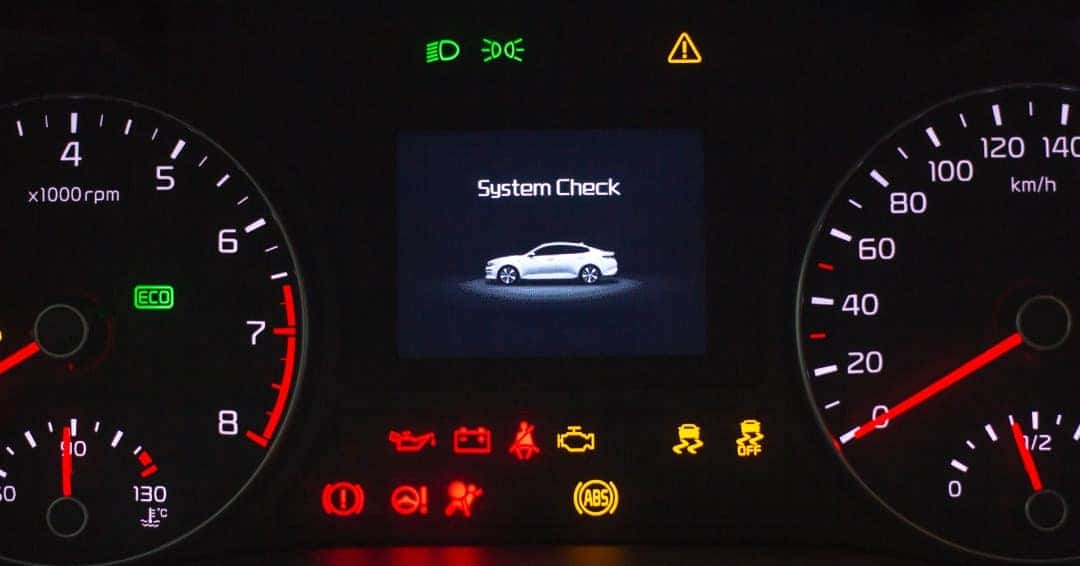
Credit: www.serratoyota.com
What If The Light Keeps Blinking?
If you’ve performed maintenance, checked fluids, and reset the light but it still blinks, there may be a deeper issue. Here’s what to check next:
1. Battery Issues
A weak or failing battery can cause dashboard lights to act strangely. Test your battery if it’s more than three years old.
2. Faulty Sensors
The maintenance reminder relies on sensors. If a sensor is dirty or broken, it may send bad signals to the dashboard.
3. Wiring Problems
Loose or corroded wires behind the dashboard can cause warning lights to blink randomly.
4. Software Glitches
Rarely, a computer update from Toyota may be needed to fix dashboard bugs.
Uncommon Insight: Sometimes, aftermarket accessories (like remote starters or dash cams) can interfere with the dashboard system, especially if installed incorrectly.
If you suspect any of these, visit a Toyota dealer or a trusted mechanic for a diagnostic scan.
Common Maintenance Needs For The Toyota Camry
The maintenance light is mainly a reminder for regular service. Here are the most common tasks it’s tracking:
| Service Type | Typical Interval | Importance |
|---|---|---|
| Oil and Filter Change | Every 5,000 miles or 6 months | Prevents engine wear |
| Tire Rotation | Every 5,000–7,500 miles | Extends tire life |
| Air Filter Replacement | Every 15,000–30,000 miles | Improves engine efficiency |
| Cabin Filter Replacement | Every 15,000–25,000 miles | Better air quality |
| Brake Inspection | Every 10,000 miles | Ensures safe stopping |
| Fluid Checks | Every service visit | Prevents overheating |
Missing these can lead to more serious issues—and more expensive repairs.
How The Maintenance Reminder System Works
Toyota uses a maintenance reminder system based on mileage or time since the last reset. Here’s how it functions:
- Mileage-Based Reminders: The system counts miles since the last reset (usually at your last oil change).
- Time-Based Reminders: If you drive very little, the light will come on after six months, even if you haven’t reached the mileage.
- Dashboard Signals: The light starts solid, then blinks if the reminder is ignored for too long.
Some owners confuse this with the check engine light, but they serve different purposes.
Camry Maintenance Light Vs. Check Engine Light
Understanding the difference is critical:
| Light | Color | Meaning | Urgency |
|---|---|---|---|
| Maintenance Light | Yellow/Orange | Routine service needed | Low to Medium |
| Check Engine Light | Yellow/Orange | Engine/emissions issue | Medium to High |
| Check Engine (Blinking) | Yellow/Orange (flashing) | Severe engine problem | High—stop vehicle! |
Important: A blinking check engine light is far more serious than a blinking maintenance light. Don’t confuse them.
Can You Drive With The Maintenance Light Blinking?
Short trips are usually safe if the maintenance light is blinking. But you shouldn’t ignore it for long. Here’s why:
- If it’s just a reminder, you still need to schedule maintenance soon.
- If it’s blinking due to a sensor or system problem, you may miss other warnings.
- Ignoring the light can void your warranty if major issues develop.
Practical Tip: Never cover the light with tape or ignore it for weeks. Fix the cause or confirm it’s just overdue service.
Cost Of Ignoring The Maintenance Light
Many drivers delay routine maintenance, hoping to save money or time. But ignoring the blinking maintenance light can cost you much more later.
- Engine Damage: Skipping oil changes leads to worn parts and possible engine failure.
- Reduced Resale Value: Poor maintenance records lower your car’s value.
- Higher Repair Bills: Small problems become expensive when left unfixed.
- Warranty Issues: Toyota may refuse warranty work if regular maintenance is not done.
A 2023 study showed that ignoring basic oil changes could reduce engine life by up to 30%.
How Mechanics Diagnose A Blinking Maintenance Light
If you bring your Camry to a mechanic, here’s what they’ll typically do:
1. Scan The Computer
Mechanics use an OBD-II scanner to read the car’s computer for error codes.
2. Check Service History
They’ll ask about your last oil change and any recent repairs.
3. Test Sensors And Battery
They’ll check key sensors and the battery for faults.
4. Inspect Dashboard Wiring
If no errors are found, they’ll look for wiring issues.
5. Reset The Light
After fixing or confirming the issue, they’ll reset the light.
Most shops will charge $80–$150 for a full diagnostic if the problem isn’t obvious.
Credit: carspecmn.com
Preventing Maintenance Light Problems
You can reduce the chances of seeing a blinking maintenance light with simple habits:
- Follow the Schedule: Do oil changes and other services on time.
- Keep Records: Write down service dates and mileage.
- Use Quality Parts: Cheap oil filters or the wrong oil confuse sensors.
- Check Fluids Regularly: Low fluids can trigger warnings.
- Reset the Light After Service: Ask your mechanic, or do it yourself.
Uncommon Insight: When changing your own oil, always use a new crush washer on the drain plug. Small leaks or air pockets can sometimes trigger false dashboard warnings.
How Toyota Camry Maintenance Light Differs By Model Year
Not all Camrys use the same reminder system. Here’s a summary:
| Model Year | Light Type | Reset Method | Common Issues |
|---|---|---|---|
| 2007–2011 | MAINT REQD (solid/blinking) | Odometer button | Missed reset after oil change |
| 2012–2017 | Wrench symbol or text | Steering wheel buttons | Sensor glitches |
| 2018–2021 | Digital display | Settings menu | Software issues |
| 2022+ | Advanced digital | Touchscreen/settings | Accessory interference |
Always check your owner’s manual for the correct reset steps.

Credit: www.beavertoyotacumming.com
When To See A Professional
If you’ve checked everything and the light still blinks, or if you notice other symptoms (rough running, strange noises, other warnings), it’s time for a professional diagnosis. Signs you shouldn’t ignore:
- The maintenance light blinks and the check engine light is also on.
- You hear engine knocking or tapping.
- You smell burning oil or see smoke.
- The car runs differently (loss of power, hesitation).
Toyota dealerships and certified mechanics have the right tools to fix these problems.
The Most Common Myths About The Blinking Maintenance Light
Many Camry owners fall for these myths:
1. “it’s Just A Suggestion, Not Important.”
Fact: Ignoring the light leads to real problems.
2. “resetting The Light Solves The Problem.”
Fact: Only reset after doing the required maintenance.
3. “all Dashboard Lights Mean The Same Thing.”
Fact: Each light has a different purpose and urgency.
4. “you Must Go To The Dealer.”
Fact: Most maintenance can be done at trusted independent shops.
5. “the Light Will Go Off On Its Own.”
Fact: It usually stays on (or blinks) until reset.
Knowing these can help you avoid costly mistakes.
Real-world Example
Jorge, a 2015 Camry owner, ignored his blinking maintenance light for eight months. He thought it was just a minor reminder. But over time, his engine started running rough. When he finally went to a mechanic, he learned that his oil was dangerously low and sludge was building up.
A $50 oil change turned into a $2,000 repair.
Lesson: Don’t wait when your maintenance light blinks.
Useful Resources For Toyota Camry Owners
If you’re looking for more details, schedules, or troubleshooting help, check the official Toyota Maintenance Schedule at the Toyota Owners site.
Frequently Asked Questions
Why Is My Toyota Camry Maintenance Light Blinking After An Oil Change?
If the maintenance light blinks after an oil change, it probably wasn’t reset correctly. Follow the reset steps for your model year, or ask the mechanic who did the oil change to do it. If it continues to blink, check for sensor or wiring issues.
Is A Blinking Maintenance Light Dangerous?
A blinking maintenance light isn’t usually dangerous, but it means your car needs attention soon. If you also see other warning lights or notice driving problems, stop and get your car checked by a professional.
Can I Reset The Maintenance Light Myself?
Yes, you can reset the maintenance light on most Camry models using the odometer or settings menu. Only do this after you’ve completed the required maintenance. Instructions are in your owner’s manual and in this article above.
Does The Maintenance Light Mean I Need An Oil Change?
Most of the time, yes. The maintenance required light is mainly a reminder for oil changes and basic service. But sometimes it can signal other needs, like tire rotation or air filter replacement.
What’s The Difference Between A Maintenance Light And A Check Engine Light?
The maintenance light reminds you about routine service, while the check engine light warns about engine or emissions problems. A blinking check engine light is urgent—stop driving and get help right away.
Taking care of your Toyota Camry doesn’t have to be stressful. By understanding what the maintenance light blinking means and responding quickly, you’ll protect your car, your wallet, and your peace of mind. Stay proactive, keep good records, and your Camry will reward you with years of reliable driving.