
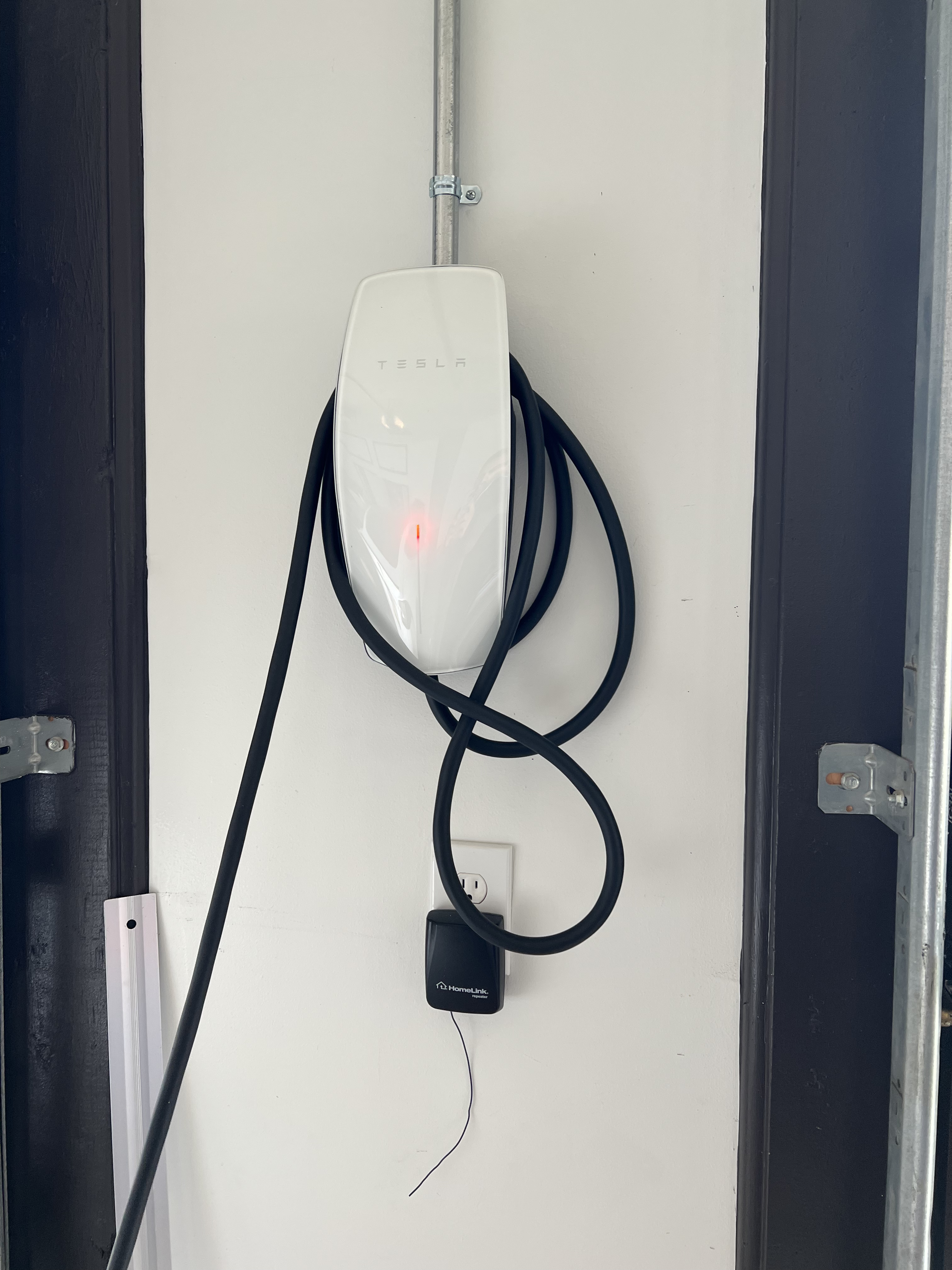
If you own a Tesla and use a home charger, seeing a blinking red light can be alarming. You expect a simple, smooth charging experience—so when something goes wrong, it disrupts your routine and raises questions. Is your car safe? Is your charger broken? Will you need to call an electrician or can you fix it yourself? Many Tesla owners face this situation at some point, and the good news is: most red blinking issues can be solved with some basic steps. Understanding what causes a Tesla home charger blinking red can save you time, money, and unnecessary worry.
This article explains why your Tesla charger blinks red, what each pattern means, how to troubleshoot, and when you should call for help. Whether you’re a new Tesla owner or you’ve been charging at home for years, you’ll find clear answers and expert tips below.
What Does A Blinking Red Light Mean On A Tesla Home Charger?
A Tesla home charger, officially called a Wall Connector, uses lights to communicate its status. A blinking red light is the charger’s way of telling you there’s a problem. Unlike green (charging normally) or blue (car detected but not charging), red always signals an error.
There are several types of red blinking:
- Solid red (not blinking): Serious internal error. Charging stops completely.
- Blinking red (one or more blinks, then pause): Error code. The number of blinks tells you what’s wrong.
Tesla designed these patterns to help you and service technicians quickly spot and diagnose problems. Think of the red blinks as “Morse code” for your charger.
Common Causes Of Tesla Home Charger Blinking Red
The most common reasons for a red blinking light are:
- Power supply issues – Problems with your home’s wiring, breaker, or the outlet.
- Ground connection error – The charger can’t detect a proper ground.
- Overheating – The charger or cable is too hot to charge safely.
- Overcurrent – Too much power is being drawn.
- Internal fault – Hardware problem inside the charger.
- Network or configuration error – The charger can’t connect or is misconfigured.
Each error type has its own blink pattern. Understanding these helps you pinpoint the cause.
Tesla Charger Blink Codes: What Each Pattern Means
Tesla chargers show error codes with specific numbers of red blinks. After the last blink, there’s a pause, and the pattern repeats. Here’s a quick reference:
| Blink Pattern | Meaning | Typical Solution |
|---|---|---|
| 1 blink | Ground fault | Check wiring, ground connection |
| 2 blinks | High temperature | Let charger cool, check installation |
| 3 blinks | Lost ground | Inspect ground wiring, consult electrician |
| 4 blinks | High current detected | Reduce amperage, check circuit breaker |
| 5 blinks | Power supply issue | Check voltage, wiring, or utility power |
| 6 blinks | Unexpected voltage | Check for wiring errors |
| Solid red | Internal error | Contact Tesla support |
Non-obvious tip: Sometimes, the blink pattern can change after a reset or power cycle. Always check the pattern again after any troubleshooting step.
How To Troubleshoot A Tesla Home Charger Blinking Red
You don’t always need an electrician right away. Many issues are simple to fix if you follow a careful process. Here’s what to do:
1. Identify The Blink Pattern
Count the number of red blinks between pauses. This tells you the type of error.
Example: If you see two red blinks, then a pause, repeating, that’s a high temperature warning.
2. Basic Reset
Unplug the charger from your car. Flip the breaker (the switch that controls power to the charger) OFF, wait 10 seconds, then ON again. Wait for the charger to reboot—this clears temporary errors.
3. Check Connections
Make sure the charger is plugged in securely. Check the cable for visible damage, frayed wires, or overheating marks. If you see or smell anything burnt, stop immediately.
4. Inspect The Outlet And Circuit Breaker
For mobile connectors (not wall-mounted), make sure your wall outlet is in good shape. For hardwired wall connectors, check your main electrical panel for tripped breakers.
Pro tip: If the breaker keeps tripping, the problem is likely with your wiring or the charger’s internal components.
5. Review Installation
If your charger was recently installed, confirm that a licensed electrician did the work. Bad ground connections or loose wiring are a common cause of red blink errors, especially in older homes.
6. Check For Overheating
Feel the charger and plug. If either is hot, let them cool down for 30 minutes before trying again. High temperatures can cause a 2-blink error.
Unexpected insight: Overheating can be caused by poor ventilation around the charger—make sure nothing is blocking airflow.
7. Try A Different Car Or Charger
If possible, plug another Tesla into your charger, or try your car at a different Tesla home charger. This helps you figure out whether the problem is with the charger or your car.
8. Update Firmware
Some issues are fixed by software updates. Check your Tesla app for charger firmware updates. This step is often missed by new owners.
9. Contact Tesla Support
If you see a solid red light, or if troubleshooting doesn’t fix the blinking red, reach out to Tesla’s support team. Document the blink pattern and any steps you’ve taken.
When Should You Call A Professional?
While many red blinking errors are simple, some are serious. Call a licensed electrician or Tesla service if:
- You see a solid red light (not blinking)
- The charger smells burnt or shows signs of melting
- Breakers keep tripping after resetting
- You’re unsure about your home wiring
- You’ve tried all troubleshooting steps and the red blinking remains
Important reminder: Never open the charger’s case yourself. There are high-voltage parts inside that can cause injury.
Real-world Examples: Tesla Owners’ Experiences
Hearing what other Tesla owners have faced can help you understand your own situation.
Case 1: 2 Red Blinks, High Temperature
A Tesla Model 3 owner in Texas noticed their Wall Connector showed two red blinks on hot afternoons. The charger was installed in a garage with poor airflow. After moving a storage box that blocked the vent, the problem disappeared.
Case 2: 3 Red Blinks, Lost Ground
A Model S owner in California found their charger blinking three times after a heavy rainstorm. An electrician found a loose ground wire in the panel. Tightening the connection fixed the error, and charging resumed normally.
Case 3: 5 Red Blinks, Power Supply Issue
A Model Y owner in a rural area saw five red blinks during a thunderstorm. Their home’s voltage dropped below the charger’s minimum. When the storm passed, the charger worked fine.
Insight: Environmental factors like heat, storms, or even pests in the wiring can trigger red blink errors.

Credit: www.reddit.com
Comparing Tesla Chargers: Wall Connector Vs. Mobile Connector
There are two main ways to charge a Tesla at home: the Wall Connector (hardwired) and the Mobile Connector (plugs into a wall outlet). Each handles errors a bit differently.
| Feature | Wall Connector | Mobile Connector |
|---|---|---|
| Installation | Hardwired by electrician | Plug and play |
| Max Power Output | Up to 48 amps | Up to 32 amps |
| Error Indication | Red blink codes, app alerts | Red light, fewer codes |
| Common Issues | Wiring, ground faults, overheating | Outlet wear, adapter issues |
| Best For | Daily home charging | Travel, backup charging |
Key takeaway: Wall Connectors give more detailed error codes, but both types can show a blinking red if there’s a problem.
Safety And Prevention: Avoiding Future Red Blinks
You can prevent many red blink errors with a few simple habits:
- Have your charger installed by a licensed electrician—never cut corners on wiring.
- Check the charger and cable regularly for wear, heat, or damage.
- Keep the area around your charger clear to allow ventilation.
- Avoid using extension cords with your Mobile Connector.
- Test your outlet every few months for tightness and heat.
- Keep firmware up to date through the Tesla app.
Unexpected tip: Some homeowners install a small surge protector at the breaker panel to reduce risk from power surges.
Credit: uber.energy
Cost Of Fixing Tesla Home Charger Blinking Red
How much will it cost to fix a red blinking error? The answer depends on the cause.
| Problem Type | DIY Fix? | Typical Cost |
|---|---|---|
| Overheating (ventilation) | Yes | Free |
| Loose plug/outlet | Yes | Free |
| Tripped breaker | Yes | Free |
| Wiring/ground issue | No | $150–$400 (electrician) |
| Charger hardware fault | No | $500–$700 (replacement, if not under warranty) |
Insight for new owners: Tesla’s charger warranty is usually 4 years for the Wall Connector. Always check if you’re covered before paying out of pocket.
How The Tesla App Helps Diagnose Charger Problems
The Tesla mobile app does more than just show your charging status. With newer Wall Connectors, the app will send you alerts if there’s a charging problem, often with a description of the error.
How to use the app:
- Open the Tesla app and select your vehicle.
- Tap “Charging.”
- Look for error messages or warnings—these often match the blink pattern.
- Some errors have links to more info or suggested fixes.
Pro tip: Take a screenshot of the error and blink pattern before contacting Tesla support. This speeds up the troubleshooting process.
Are Blinking Red Errors Covered By Tesla Warranty?
Most new Wall Connectors come with a 4-year limited warranty in the US. If your charger fails due to a manufacturing defect (not installation or home wiring), Tesla will repair or replace it.
What’s NOT covered:
- Problems caused by incorrect installation
- Damage from power surges or lightning (unless you have extra surge protection)
- Water or pest damage
If your charger is out of warranty, you’ll need to pay for repairs or replacement. Always check your purchase date and keep your receipt.
For official warranty details, visit the Tesla warranty page.
Should You Replace Or Repair A Blinking Red Tesla Charger?
If you’ve tried all troubleshooting and the charger still blinks red, you have two options:
- Repair: If the problem is in your wiring, a licensed electrician can usually fix it. This is often cheaper than replacement.
- Replace: If the charger’s internal hardware is bad and it’s out of warranty, replacement is sometimes the only option.
Pro insight: Tesla’s Wall Connector is not usually user-serviceable. Attempting DIY repairs can void your warranty and risk injury.
How To Prevent False Alarms And Unnecessary Service Calls
Many Tesla owners call for help when the problem is minor or temporary. Here’s how to avoid unnecessary stress:
- Always count the blinks carefully—don’t confuse a temporary power loss with a real error.
- Wait at least 5 minutes after a reset before deciding the error is permanent.
- Double-check your car’s charging port for debris or moisture.
- Try charging at a different time of day; voltage drops at peak hours can cause errors.
Non-obvious tip: If you live in a new development, power quality can be unstable. Small voltage changes sometimes cause false red blink errors.
Frequently Asked Questions
Why Is My Tesla Home Charger Blinking Red After A Storm?
A storm can cause power supply issues or voltage drops, which trigger a red blink. Wait for power to stabilize, then reset the charger. If the problem continues, have an electrician check your wiring for storm damage.
Can A Blinking Red Light Mean My Tesla Charger Is Dangerous?
A blinking red light is a warning, not always a sign of danger. However, if you smell burning, see melted parts, or the light stays solid red, stop using the charger and call a professional.
How Do I Fix A Ground Fault Error On My Tesla Home Charger?
A ground fault (1 or 3 blinks) usually means there’s a problem with your home’s electrical ground. Check for loose wires in your outlet or breaker panel. Most people need an electrician to fix this safely.
Will A Firmware Update Fix A Tesla Charger Blinking Red?
Sometimes, yes. If Tesla releases a firmware update for your Wall Connector, installing it can solve software-related errors. Always update before calling for service.
Is The Charger Or My Tesla At Fault When I See A Blinking Red Light?
Usually, the charger or home wiring is the cause—not the car. Try charging a different Tesla, or use your Mobile Connector at another location. If errors only happen at home, the issue is with your home setup.
A blinking red light on your Tesla home charger can be frustrating, but it’s not a reason to panic. Most issues are easy to diagnose if you understand the blink codes and follow a careful troubleshooting process. Remember: safety comes first. If you’re unsure about wiring or see signs of damage, always call a professional. By keeping your charger and wiring in good shape, you’ll enjoy reliable charging for years to come. And if you ever get stuck, Tesla’s support and a community of fellow owners are just a call or click away.

Credit: www.reddit.com