
When your Sonicare toothbrush starts blinking rapidly, it can feel confusing or even worrying. Many people see the flashing lights and wonder if the device is broken or if it needs a quick fix. This article will explain what these rapid blinking lights mean, why they happen, and how you can solve the problem. Whether you use a Sonicare daily or are new to electric toothbrushes, you’ll learn how to handle blinking issues and keep your brush running smoothly. We’ll also share some little-known tips, compare common Sonicare models, and answer key questions so you can feel confident about your oral care routine.
Understanding Sonicare Toothbrush Light Signals
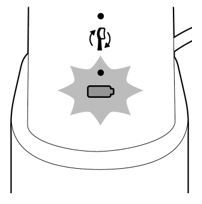
Toothbrushes are getting smarter every year. With Sonicare, lights on the handle are used to share important information. The most common signals are:
- Battery status
- Charging progress
- Brush head replacement reminders
- Error warnings
A single light or slow blinking usually means something simple, like charging or low battery. But rapid blinking is different. It’s often a sign that the brush needs attention right away.
What Does Rapid Blinking Mean?
Rapid blinking can happen for several reasons. It’s not always an error—sometimes it’s just a reminder or a safety feature. Most Sonicare models use a quick, repeated flash to warn you about things like:
- Low battery (but not always; sometimes it’s just a slow blink)
- Charging issues (power not reaching the brush)
- Brush head problems (improper fit or needs replacement)
- Device malfunction (internal error or water damage)
Common Light Colors And Their Meaning
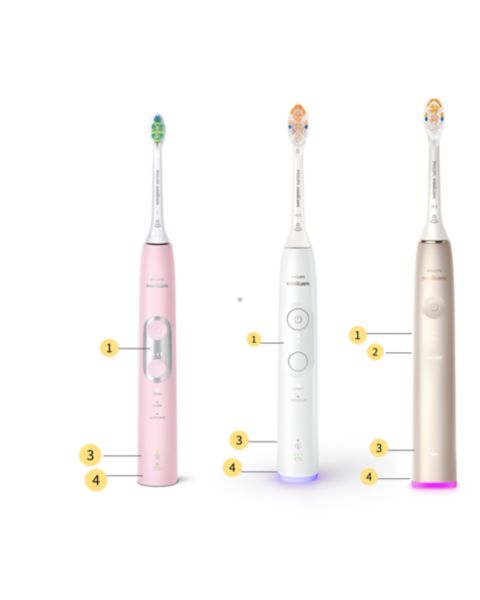
Sonicare toothbrushes use different colors for their signals. Here are the main ones:
- Green light: Battery is charging or fully charged
- Orange/amber light: Battery is low
- White light: Normal operation or timer
- Red light: Error or critical battery level
Rapid blinking of any color means you should check your brush.
Why Is My Sonicare Toothbrush Light Blinking Rapidly?
If your toothbrush is blinking quickly, start by checking the following:
- Charging issues: Is the charger plugged in? Is the brush sitting correctly on the base?
- Brush head problems: Is the head attached properly? Is it too old?
- Internal errors: Has the brush been dropped or exposed to water?
- Software updates: Some newer models update themselves and blink during this process.
Let’s look deeper at each cause.
Charging Problems
The most common reason for rapid blinking is a charging issue. The brush may not be getting power. Try these steps:
- Make sure the charger is plugged in and the outlet works.
- Check if the brush sits correctly on the charging base.
- Look for dirt or water on the charging contacts.
- Try another outlet or charger.
If the light keeps blinking, the battery may be failing or the charger is broken.
Brush Head Issues
Sonicare brushes have sensors to check the brush head. If the head is:
- Not clicked in fully
- Damaged or worn out
- Not a genuine Sonicare head
…the brush may blink rapidly. Replace the head with a new, official Sonicare head and see if the blinking stops.
Internal Malfunction
Sometimes, rapid blinking means an internal error. This can happen after:
- Dropping the brush
- Water leaking inside
- Using third-party chargers
If the brush won’t stop blinking after checking the charger and brush head, it may need repair or replacement.
Software And Connectivity
Some smart Sonicare models blink rapidly during Bluetooth pairing or firmware updates. If you have a connected brush, check the app for messages.
Credit: www.philips.sa
Sonicare Model Comparison: Light Signals
Different Sonicare models use lights in slightly different ways. Here’s a quick comparison:
| Model | Light Signal Types | Rapid Blinking Meaning |
|---|---|---|
| DiamondClean | Green, White, Red | Charging error or battery issue |
| ProtectiveClean | Green, Amber | Brush head error or low battery |
| ExpertClean | Green, White, Red | Internal malfunction or charging problem |
| FlexCare | Green, Red | Battery problem |
Most models use green for charging, red or amber for errors. Always check your manual for the exact meaning.
How To Fix Sonicare Toothbrush Light Blinking Rapidly
If your Sonicare is blinking fast, follow these steps:
- Remove the brush head and reattach it firmly.
- Place the brush on the charger, making sure it sits correctly.
- Clean the contacts with a dry cloth.
- Try a different charger or outlet if possible.
- Check the app (for smart models) for error messages.
- Reset the brush: Hold the power button for 10 seconds (if your model allows).
- Replace the brush head with a new, original Sonicare head.
Step-by-step Troubleshooting Guide
Let’s break down the troubleshooting steps:
1. Check The Charger
Plug the charger into a working outlet. Place the brush on the charger. Wait for the light to change. If it blinks rapidly, try another charger or outlet.
2. Inspect The Brush Head
Remove the brush head. Check for cracks, wear, or dirt. Clean the metal shaft and reattach the head firmly. If the blinking continues, try a new brush head.
3. Clean The Contacts
Dirt or moisture can block the charging contacts. Use a dry, soft cloth to clean both the charger and the base of the brush handle.
4. Reset The Brush
Some models allow a manual reset. Hold the power button for 10 seconds. This can clear minor errors. If your brush has no reset function, skip this step.
5. Use The App
For smart models like DiamondClean Smart, open the Sonicare app. Look for error messages or update prompts.
6. Replace Components
If none of the above works, try replacing the brush head or charger. Sometimes, the battery inside the brush is failing—this needs professional repair.

Credit: www.reddit.com
When To Seek Professional Help
Not every blinking problem can be solved at home. If you notice any of these signs, contact Philips support or visit an authorized repair center:
- Persistent blinking after all troubleshooting steps
- Brush won’t turn on at all
- Visible damage (cracks, water inside)
- Burning smell or overheating
Many Sonicare brushes have a two-year warranty. If your brush is under warranty, repairs or replacements are often free.
Sonicare Toothbrush Battery Life And Charging
Understanding battery life can help prevent blinking issues. Most Sonicare brushes use lithium-ion batteries. A full charge lasts about two weeks with normal use (twice daily).
Battery Statistics
- Charging time: 24 hours for full charge
- Daily use: 2 minutes, 2 times per day
- Battery lifespan: 2–3 years
If you notice the battery draining faster, blinking lights may warn you of a failing battery.
Charging Tips
- Always use the original charger.
- Avoid charging in wet areas.
- Don’t leave the brush on the charger for weeks—charge when needed.
- If the brush is not used for a long time, charge it fully before use.
Battery Comparison Table
Here’s a quick look at battery stats for popular Sonicare models:
| Model | Battery Type | Battery Life (Days) | Charge Time (Hours) |
|---|---|---|---|
| DiamondClean | Lithium-ion | 21 | 24 |
| ProtectiveClean | Lithium-ion | 14 | 24 |
| ExpertClean | Lithium-ion | 14 | 24 |
| FlexCare | NiMH | 7 | 24 |
DiamondClean offers the longest battery life, but all models require proper charging to avoid blinking issues.
Brush Head Replacement And Smart Sensors
Sonicare uses smart sensors to track brush head wear. Many models have a BrushSync feature. When the head is old or not clicked in fully, the brush blinks rapidly.
Brush Head Stats
- Recommended replacement: Every 3 months
- BrushSync feature: Tracks head usage and signals replacement
- Non-original heads: May cause blinking
Always use genuine heads for best performance. If you use third-party heads, the brush may not work properly.
Brushsync Comparison Table
| Model | BrushSync Feature | Head Replacement Reminder |
|---|---|---|
| DiamondClean Smart | Yes | Blinks rapidly when head is old |
| ProtectiveClean | Yes | Blinks rapidly when head is old |
| FlexCare | No | No reminder |
BrushSync models make it easier to know when to replace the head, but non-BrushSync brushes rely on manual checking.
Common Mistakes And How To Avoid Them
Many Sonicare users make simple mistakes that lead to blinking problems. Here are some to watch out for:
- Using third-party chargers or heads: Only use official Sonicare products.
- Ignoring blinking lights: Rapid blinking is a warning; don’t wait.
- Charging in wet areas: Water can damage the brush.
- Not cleaning the contacts: Dirt or toothpaste residue can block charging.
- Leaving brush unused for months: Batteries degrade if not used.
Practical Tips
- Check your manual for light codes specific to your model.
- Clean your brush every week, including the charging contacts.
- Replace the brush head every three months.
- Store your charger in a dry area.
- If traveling, bring the original charger.
Credit: www.usa.philips.com
Non-obvious Insights For Sonicare Users
Most guides focus on basic troubleshooting. Here are two insights many beginners miss:
- Firmware Updates Can Cause Blinking: Newer Sonicare models update automatically when connected to the app. During updates, rapid blinking is normal. Wait until the update finishes before worrying.
- BrushSync and Non-BrushSync Heads: Using a BrushSync head on a non-BrushSync model, or vice versa, can cause rapid blinking. Always match the head type to your brush.
These tips can save you time and prevent unnecessary repairs.
Keeping Your Sonicare In Top Shape
Regular care is key to avoiding problems. Here’s how to keep your brush working well:
- Charge only when needed, not constantly.
- Clean the handle and charger contacts weekly.
- Replace the brush head every three months.
- Use the app for reminders if your model supports it.
- Store the brush upright in a dry area.
If you’re unsure about a blinking light, check your manual or visit the Philips support page for guidance. You can find more details at the official Philips Support site.
Frequently Asked Questions
Why Does My Sonicare Toothbrush Blink Rapidly After Charging?
Rapid blinking after charging usually means the brush head is not attached correctly or is worn out. Remove the head, clean the shaft, and reattach. If blinking continues, try a new head or check the charger.
Can Rapid Blinking Mean My Toothbrush Is Broken?
Sometimes, yes. If blinking does not stop after checking the charger and head, your brush may have an internal error or battery failure. Contact Philips support for repair or replacement.
How Do I Reset My Sonicare Toothbrush?
Most models can be reset by holding the power button for 10 seconds. This clears minor errors. If your model has no reset function, check the manual or use the app for troubleshooting.
Does Using Non-original Brush Heads Cause Blinking?
Yes. Non-original heads may not fit properly or be detected by smart sensors, causing rapid blinking. Always use genuine Sonicare brush heads.
What Should I Do If Rapid Blinking Continues After Trying All Fixes?
If you’ve tried all troubleshooting steps and the brush still blinks rapidly, contact Philips customer service. The device may need repair or replacement, especially if it’s under warranty.
Final Thoughts
A rapidly blinking light on your Sonicare toothbrush isn’t just a minor annoyance—it’s a sign your brush needs attention. From charging problems to brush head issues or internal errors, the blinking light is your brush’s way of asking for help. By following the steps above, you can often fix the problem quickly and keep your brush working for years. Remember to use genuine parts, clean your brush regularly, and pay attention to blinking lights. If you ever feel unsure, check your manual or reach out to Philips support. Your oral health depends on a reliable toothbrush, so don’t ignore the signals—it’s always better to act early.