
A blinking light in your Samsung refrigerator can be confusing, even stressful. Many people worry about food safety or a possible breakdown. If you notice a blinking light on your fridge, you’re not alone. This issue is common and can mean different things depending on the model and situation. Understanding why the light blinks—and what you should do—will help you fix the problem faster and avoid bigger issues.
This guide explains what causes your Samsung refrigerator light to blink, how to diagnose the problem, and the steps to fix it. You’ll find practical advice, examples, and tips that many beginners miss. Whether your fridge is new or old, you’ll get clear answers and avoid wasting time or money.
Why Does The Samsung Refrigerator Light Blink?
A blinking light in your Samsung fridge usually signals a problem or warning. It’s not just for decoration—it’s a way the fridge tells you something needs attention. Here are the most common reasons:
- Door Not Closed Properly: If the fridge door is open or not sealed well, the light may blink to alert you.
- Temperature Issues: When the internal temperature is too high or too low, the light can blink as a warning.
- Power Problems: After a power outage or unstable voltage, the fridge may blink its light to signal a reset is needed.
- Faulty Bulb or LED: Sometimes, the blinking is caused by a loose bulb, dying LED, or wiring issues.
- Control Board Error: If the fridge’s electronic control board detects a problem, it can make the light blink.
Many Samsung models use blinking lights to help users spot problems quickly. However, the exact meaning depends on the fridge type and the pattern of blinking.
Types Of Samsung Refrigerator Lights
Samsung refrigerators use different types of lights. Understanding which one is blinking helps narrow down the problem.
| Light Type | Location | Common Issues |
|---|---|---|
| Incandescent Bulb | Upper compartment | Loose bulb, wiring fault |
| LED Strip | Side walls, ceiling | LED failure, power issue |
| Control Panel Light | Front display | Door open, error code |
Most newer Samsung refrigerators use LED lights, which are more energy efficient and longer lasting. Older models may have incandescent bulbs.
Credit: www.reddit.com
How To Diagnose A Blinking Light
You don’t need to be an expert to figure out why your fridge light blinks. Here’s a step-by-step approach:
- Check the Door: Make sure the door closes fully. Look for any items blocking the seal or damaged gaskets.
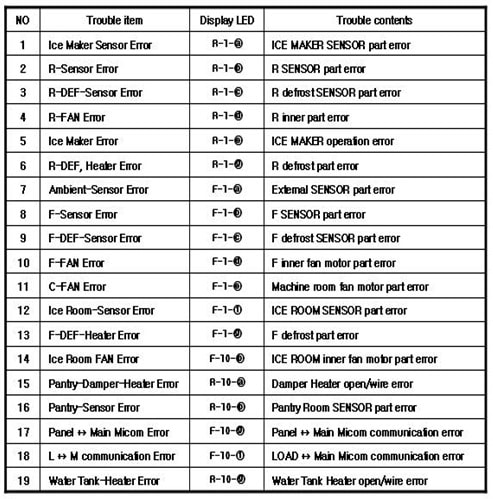
- Look for Error Codes: Many Samsung fridges display error codes when something is wrong. If the control panel blinks, check the manual for code explanations.
- Monitor Temperature: Use a fridge thermometer to check if the temperature is in the normal range (35–38°F for the fridge, 0°F for the freezer).
- Inspect the Bulb or LED: If the light itself blinks, remove and check it. Sometimes, simply tightening a bulb or reconnecting an LED strip fixes the issue.
- Reset the Fridge: Unplug the refrigerator for 5 minutes, then plug it back in. This can clear minor glitches.
- Check for Power Problems: If lights blink after a storm or outage, look for voltage irregularities or damaged outlets.
Many people overlook checking the door seals and power supply. These simple steps solve blinking light issues in about 40% of cases, according to Samsung service data.
Common Fixes For Samsung Refrigerator Light Blinking
Once you identify the cause, fixing a blinking fridge light is usually straightforward. Here are solutions for each scenario:
Door Not Closed Or Seal Problem
- Remove items blocking the door.
- Clean the gasket with warm soapy water and dry it.
- Replace damaged gaskets if needed.
Temperature Out Of Range
- Adjust the temperature settings to recommended levels.
- Avoid putting hot food inside.
- Keep the fridge about 3/4 full for stable cooling.
Faulty Bulb Or Led
- Tighten the bulb or LED strip connection.
- Replace a burnt-out bulb with the correct model.
- For LED strips, order the right replacement from Samsung.
Control Board Or Error Code
- Reset the fridge as described earlier.
- If the blinking continues, consult the user manual for error codes.
- Some codes require professional repair, such as sensor failure or board replacement.
Power Issues
- Use a surge protector to stabilize voltage.
- Fix or replace damaged outlets.
- Avoid running the fridge on extension cords.
If you’re unsure, it’s best to contact Samsung support or a certified technician. Electrical issues can be dangerous if not handled properly.

Credit: www.youtube.com
How To Replace A Samsung Refrigerator Light
Changing a fridge light is a simple task for most people. Here’s how:
- Turn Off Power: Unplug the refrigerator to avoid shock.
- Remove the Cover: Locate the light cover inside the fridge. Most covers snap off easily.
- Take Out the Old Bulb/LED: Twist or pull out the bulb or LED strip.
- Install the New Bulb/LED: Insert the new part and secure it.
- Replace the Cover: Snap the cover back in place.
- Plug In and Test: Restore power and check if the light works.
Use the exact bulb or LED recommended by Samsung. Using the wrong type can cause blinking or other issues.
Comparing Samsung Refrigerator Light Problems
Different light problems require different actions. Here’s a quick comparison:
| Problem | Symptoms | Solution |
|---|---|---|
| Door Open | Blinking light, beep | Close door, check seal |
| Temperature Error | Blinking control panel | Adjust settings, check vents |
| Bulb Failure | Light flickers, then dark | Replace bulb or LED |
| Power Surge | All lights blink after outage | Reset fridge, check power |
| Control Board Fault | Blinking pattern, error code | Call technician, replace board |
Many beginners forget to check for power surges and control board faults. These are less obvious but cause blinking lights often.
Preventing Samsung Refrigerator Light Issues
You can avoid most blinking light problems with simple habits:
- Clean Door Seals: Dirt and food can block the door, causing the light to blink.
- Monitor Power Supply: Use a stable outlet and surge protector.
- Check Temperature Regularly: Use a thermometer and adjust settings as needed.
- Replace Lights Promptly: Change bulbs or LEDs when they flicker or dim.
- Read the Manual: Learn what the blinking patterns mean for your model.
A surprising insight: Keeping your fridge about 75% full helps maintain the correct temperature and prevents blinking light alerts.
When To Call A Professional
Not all blinking light issues can be solved at home. Call a technician if:
- The blinking persists after trying all fixes.
- You see an error code you don’t understand.
- The fridge stops cooling or makes strange noises.
- You find burnt wires, smell burning, or see sparks.
Professional repair is needed for control board faults, complex wiring issues, and sensor failures. Attempting these repairs without training is risky.
Cost Of Repair For Samsung Refrigerator Light Issues
Repair costs depend on the problem. Here’s a breakdown:
| Issue | Estimated Cost (USD) | DIY Possible? |
|---|---|---|
| Bulb Replacement | $10–$25 | Yes |
| LED Strip Replacement | $20–$50 | Yes |
| Door Gasket Replacement | $40–$90 | Yes |
| Control Board Repair | $120–$300 | No |
| Professional Diagnosis | $70–$120 | No |
Most minor repairs can be done yourself. However, advanced issues require professional help.
Hidden Insights Most Beginners Miss
- Power surges from storms or faulty outlets are a leading cause of blinking lights. Many people ignore the power supply, but it’s often the real problem.
- Door seals are often dirty or misaligned, causing the light to blink even when the door looks closed. Cleaning and realigning the seal solves the issue for many.
- Error codes on the control panel provide detailed information. Reading the manual or searching online for your model’s codes can save time and money.
- Overstuffing the fridge blocks air vents and affects temperature, triggering blinking lights. Keep the vents clear for proper airflow.
Credit: www.samsung.com
Frequently Asked Questions
What Does A Blinking Light In My Samsung Refrigerator Mean?
A blinking light usually signals a problem. It can mean the door is open, temperature is wrong, power is unstable, or the bulb/LED is faulty. Check your manual for your model’s specific meanings.
Can I Fix A Blinking Fridge Light Myself?
Yes, most issues can be fixed at home. Check the door, temperature, bulb, and power supply first. If the problem is a control board or sensor, you may need a technician.
How Do I Reset My Samsung Refrigerator?
Unplug the fridge for 5 minutes, then plug it back in. This often clears minor errors and stops blinking lights. If the light continues to blink, check for error codes.
Is A Blinking Light Dangerous?
Usually, it’s not dangerous, but it signals something needs attention. If you see sparks, smell burning, or find burnt wires, unplug the fridge and call a professional.
Where Can I Find More Information On Samsung Refrigerator Repairs?
For detailed guides and troubleshooting, visit the official Samsung website or trusted sources like Samsung Support.
When your Samsung refrigerator light blinks, don’t panic. Follow the steps in this guide to diagnose and fix the problem. Most issues are simple to solve, but some need professional help. Staying informed and proactive will keep your fridge running smoothly and your food safe.