
Many people choose the Roku Stick for easy, affordable streaming. It’s small, simple to use, and brings thousands of channels to your TV. But sometimes, you see a blinking white light on your Roku Stick, and nothing seems to work. This light can be confusing—especially if you don’t know what it means or how to fix it. Don’t worry. This guide explains why the white light blinks, what it signals, and how to solve the problem step by step.
What Does The Blinking White Light Mean?
When your Roku Stick shows a blinking white light, it’s not just a random signal. It’s the device’s way of telling you something is wrong. Usually, the white light means your Roku is having trouble connecting or booting up. Sometimes, it’s a simple problem, like a loose cable. Other times, it points to deeper issues with the device or your network.
The blinking pattern can give extra clues. For example:
- Fast blinking often means a connection problem.
- Slow, steady blinking can mean a software issue or failed update.
- Random blinking might signal a hardware problem.
Understanding these patterns helps you quickly find the right fix.
Common Causes Of The Roku Stick Blinking White Light
Let’s look at the most frequent reasons behind the blinking white light. Knowing these can save you time and frustration.
1. Power Issues
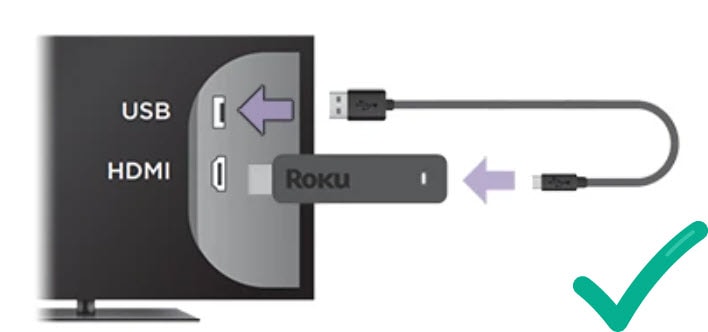
Your Roku Stick needs stable power. If the USB port or adapter isn’t giving enough energy, the device may blink white and not start correctly.
- Using a TV’s USB port can sometimes provide less power than needed.
- Faulty power adapters or cables often cause problems.
2. Hdmi Problems
A loose or damaged HDMI connection can also trigger the blinking light. If the TV doesn’t read the Roku Stick, it tries to reconnect, showing the white flash.
3. Internet Or Network Errors
Roku devices depend on a strong Wi-Fi signal. If the network is down, the Roku Stick can’t reach its servers and may blink white.
- Changing Wi-Fi passwords or routers can cause this.
- Slow or unstable internet also leads to connection loops.
4. Software Glitches Or Failed Updates
Sometimes, a failed software update or a corrupted system file keeps the Roku from starting normally. You might see the white light if the system is stuck during a reboot.
5. Hardware Failure
Though less common, internal hardware problems—like a damaged board—can cause the white light to blink and the device not to work.
Credit: mspoweruser.com
How To Fix A Roku Stick Blinking White Light
Now, let’s get practical. Here’s how you can solve most blinking white light problems. Start with the simplest fixes, and go step by step. Most users can fix the problem at home.
Step 1: Check The Power Source
- Use the original Roku power adapter and cable.
- Plug the adapter directly into a wall outlet—not the TV’s USB port.
- If possible, try a different adapter and cable to see if the light stops blinking.
Why this matters: Many TVs’ USB ports don’t give enough power, causing the Roku Stick to act up.
Step 2: Inspect The Hdmi Connection
- Unplug the Roku Stick from the TV and plug it back in firmly.
- Try a different HDMI port, if your TV has more than one.
- If you have an HDMI extender, use it to improve the fit and signal.
Step 3: Test Your Internet Connection
- On another device (like your phone or laptop), check if your Wi-Fi is working.
- Restart your router and modem.
- Move the Roku Stick closer to your router if possible.
- If you’ve changed your Wi-Fi password, reconnect the Roku Stick to the network.
Step 4: Restart The Roku Stick
- Unplug the Roku Stick from power and the TV for at least 60 seconds.
- Plug everything back in and turn on your TV.
- Wait for a few minutes to see if the device boots up normally.
Pro tip: A longer unplug time (over 1 minute) can help clear up deeper glitches.
Step 5: Factory Reset (last Resort)
If nothing else works, try a factory reset. This erases all settings and starts fresh.
- Find the small reset button on your Roku Stick (usually near the HDMI connector).
- Hold the button for at least 10 seconds while the device is powered.
- Wait for the Roku logo to appear and go through setup again.
Warning: You’ll lose all your apps and settings, so only do this if other steps fail.
Roku Stick Models And Blinking White Light Differences
Not all Roku Sticks are the same. Some models have different indicator lights or reset methods. Here’s a quick comparison to help you identify your device and its signals.
| Model | Indicator Light Location | Common Blinking Causes |
|---|---|---|
| Roku Streaming Stick (3600/3800) | Side of device | Power, Wi-Fi, HDMI |
| Roku Streaming Stick+ | Side of device | Power, software update |
| Roku Express/Express+ | Top/front of device | Power, internet |
Non-obvious insight: Some newer Roku models may hide the indicator light inside the HDMI plug, making it harder to see. Always check your manual if you can’t find the light.
When You Should Replace Your Roku Stick
Most blinking white light issues can be fixed at home. However, there are times when the device is beyond repair.
Signs You Need A New Device
- The light blinks even after a factory reset.
- The device gets unusually hot or smells burnt.
- Physical damage, like cracks or bent connectors.
Example: If your Roku Stick was working fine before a power outage but now won’t start even after resets, the internal hardware might be damaged.
Comparing Repair Vs. Replacement Costs
Buying a new Roku Stick is usually less expensive than trying to repair it. Here’s a quick cost comparison:
| Solution | Average Cost (USD) | Time to Fix |
|---|---|---|
| New Roku Stick | $30–$50 | Immediate (after purchase) |
| Professional Repair | $50–$100 | 1–2 weeks |
| DIY Cable/Adapter Replacement | $5–$15 | Minutes |
Advice: If your device is over three years old or shows hardware failure, replacing is usually smarter.
Preventing Future Blinking White Light Problems
Once you solve the problem, you don’t want it to come back. Here’s how you can avoid future issues.
- Use only official power adapters for your Roku Stick.
- Avoid plugging into TV USB ports—they often provide unstable power.
- Keep your Wi-Fi router updated and placed close to your streaming devices.
- Do not block the Roku Stick with objects that can cause it to overheat.
- Regularly check for software updates in the Roku settings menu.
Non-obvious tip: If you travel with your Roku Stick, always pack the original power adapter, not just the USB cable. Hotel TVs often have weak USB power.

Credit: www.youtube.com
Extra Troubleshooting Tips
Sometimes, the usual fixes don’t work, or the problem is less obvious. Here are some advanced steps and checks:
- Try a different TV: Plug your Roku Stick into another TV. If it works, the original TV’s HDMI port may be faulty.
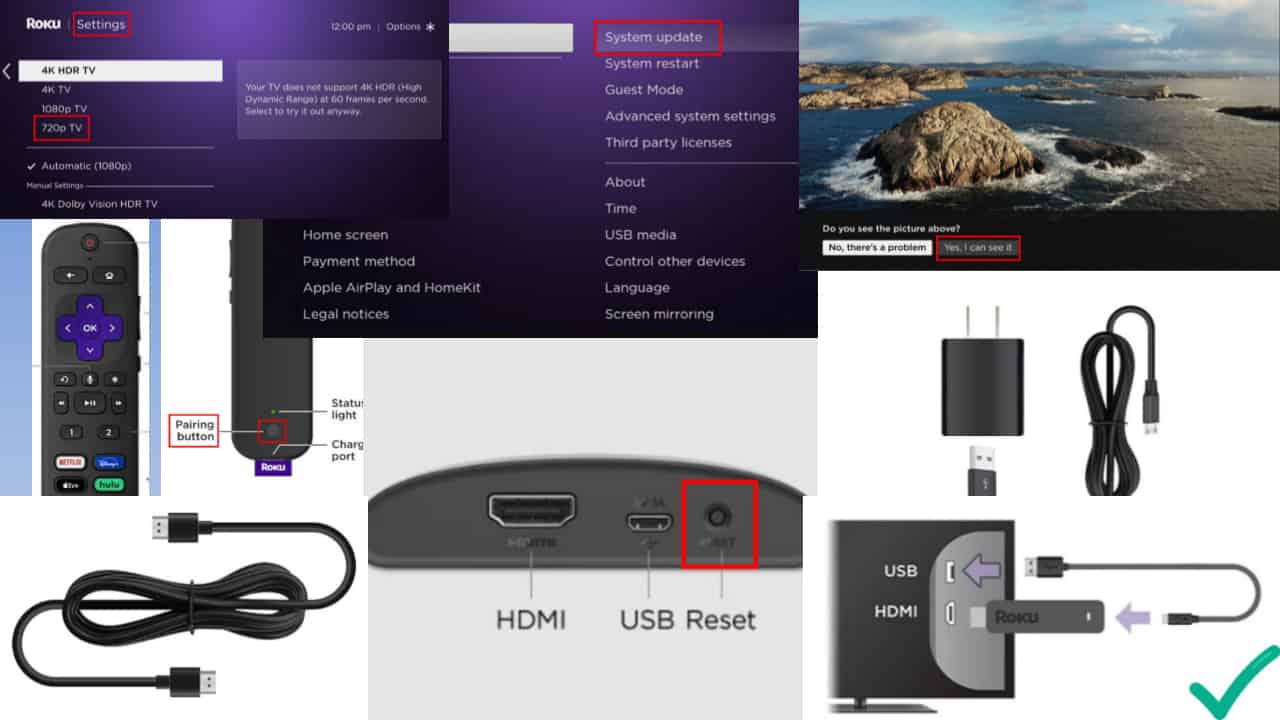
- Check for software updates: If you get the device working, go to Settings > System > System update to make sure you have the latest software.
- Contact Roku support: If you see error codes or if none of these steps help, reach out to Roku’s official support for further guidance.
Example: One user found that their Roku Stick blinked white only when their Wi-Fi router was set to a crowded channel. Changing the router’s channel fixed the problem.
When To Seek Professional Help
Some issues can’t be fixed at home. If you’ve tried all steps and the white light keeps blinking, it’s time for expert help.
- Contact Roku support: They may offer a replacement if your device is under warranty.
- Visit the official website: Find troubleshooting guides and contact forms at Roku Support.
Remember: DIY repairs on the device itself can void your warranty. Stick to cable and power troubleshooting unless you’re confident.
Credit: mspoweruser.com
Frequently Asked Questions
Why Does My Roku Stick Blink White But Not Turn On?
A blinking white light usually means a power or connection problem. Check your power adapter, cable, and HDMI connection first. Try using the original adapter plugged into a wall outlet, not the TV’s USB port.
Can A Weak Wi-fi Signal Cause The Blinking White Light?
Yes, an unstable Wi-Fi signal can sometimes trigger the white blinking light, especially during setup or system updates. Move your router closer or use a Wi-Fi extender to improve the signal.
Will A Factory Reset Delete My Channels And Settings?
A factory reset will erase all personal settings, installed apps, and accounts from your Roku Stick. You’ll need to set up everything again from scratch.
How Long Should The Roku Stick Light Blink Before I Worry?
If the white light blinks for more than 3–5 minutes during startup or after a reset, it’s a sign of a problem. Follow the troubleshooting steps above. Quick blinking for a few seconds is normal during boot.
Is It Safe To Use Third-party Power Adapters With Roku Stick?
It’s best to use the official Roku adapter. Third-party adapters can deliver the wrong voltage, causing power problems and the blinking white light. If you must use another adapter, make sure it matches the original’s specifications.
A blinking white light on your Roku Stick is annoying, but it usually signals a fixable problem. Check your power source, HDMI connection, and Wi-Fi first. Most issues can be solved at home with simple steps. If your device is old or damaged, consider a replacement for better performance and peace of mind. For more information on troubleshooting smart devices, visit Roku Support—and enjoy smooth streaming again.