
When you see your LG subwoofer blinking green, it can be confusing and even a little worrying. Many people expect their home theater systems to work smoothly, but a blinking green light often means something needs attention. Understanding why your LG subwoofer shows this signal can save you time, money, and frustration. In this guide, you’ll learn what the blinking green light means, how to fix it, and how to keep your sound system working at its best.
What Does The Blinking Green Light Mean?
A blinking green light on your LG subwoofer is a form of communication. The light is not just a random color; it has a purpose. Generally, for LG soundbars and subwoofers, a steady green light means a good connection, while a blinking one usually indicates a problem.
The most common causes are:
- The subwoofer is trying to connect to the soundbar.
- The connection between devices is weak or lost.
- The subwoofer is in pairing mode but not paired yet.
- There could be interference from other devices.
This light helps you know what’s happening inside the device, even if you don’t hear any sound or error message.
How Lg Subwoofer Wireless Connection Works
Your LG subwoofer connects wirelessly to the soundbar. This wireless link uses a 2.4GHz radio frequency, similar to Wi-Fi or Bluetooth, but it is dedicated and not visible to your phone or computer. The subwoofer and soundbar are paired at the factory, but sometimes they lose this pairing.
Here’s a simple view of how it works:
- When you turn on both the soundbar and subwoofer, they search for each other.
- If they find each other, the green light on the subwoofer becomes steady.
- If they do not connect within a few seconds, the green light starts to blink.
Many users do not realize that other wireless devices in your home, thick walls, or even microwaves can interfere with this connection. This is one non-obvious reason why your LG subwoofer might start blinking green, even if it worked fine before.
Common Reasons For Lg Subwoofer Blinking Green
To fix the problem, you need to know what causes it. Here are the most frequent reasons:
1. Power Supply Issues
If your subwoofer is not getting enough power, it may not work correctly. Check if the power cord is loose or if there is a problem with the power outlet. Try plugging the subwoofer into another socket to see if the light changes.
2. Pairing Problems
Sometimes, the subwoofer loses its connection to the soundbar. This can happen after a power outage, moving the device, or pressing the wrong button on the remote.
3. Wireless Interference
Devices like Wi-Fi routers, cordless phones, and microwave ovens can interfere with the wireless signal. This interference can make the green light blink, even if nothing else has changed.
4. Faulty Hardware
While less common, sometimes the subwoofer or soundbar may have a hardware issue. For example, a broken wireless module or damaged circuit can prevent connection.
5. Outdated Firmware
LG sometimes releases updates that fix bugs and improve performance. If your sound system has old firmware, it may not pair correctly.
6. Distance And Obstacles
If your subwoofer is too far from the soundbar or there are thick walls or furniture between them, the connection may fail.
Understanding these reasons helps you know where to start troubleshooting.
Step-by-step Troubleshooting Guide
If your LG subwoofer is blinking green, follow these steps to solve the problem. Start with the simplest step and move to the next if the issue is not fixed.
Step 1: Check Power Connections
Make sure both the soundbar and subwoofer are plugged in and turned on. Unplug both devices, wait 30 seconds, then plug them back in. This “power cycle” can reset the connection.
Step 2: Check Device Placement
Move the subwoofer closer to the soundbar, especially if they are in different rooms or separated by thick walls. Remove objects that may block the signal.
Step 3: Reduce Wireless Interference
Turn off or move other wireless devices (like routers or cordless phones) away from the subwoofer and soundbar. This is a practical step that many people overlook.
Step 4: Re-pair The Subwoofer And Soundbar
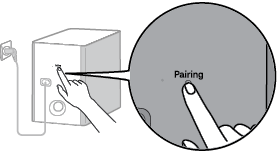
Most LG subwoofers have a “PAIRING” button on the back. Here’s how you can re-pair them:
- Turn off both devices.
- Press and hold the PAIRING button on the subwoofer until the green light blinks quickly.
- Turn on the soundbar. The devices should find each other and connect. The green light should become steady.
- If there’s no PAIRING button, check the manual for your model’s specific instructions.
Step 5: Update Firmware
Check if there is a firmware update for your LG soundbar system. Visit the LG support website, enter your model number, and follow the update instructions. Updated firmware can solve hidden bugs.
Step 6: Test With Another Outlet
Try plugging your subwoofer into a different power outlet. Sometimes, the problem is with the outlet, not the device.
Step 7: Factory Reset
If nothing else works, perform a factory reset. This will clear all custom settings and return the system to its original state. This process is different for each model, so check your user manual.
Step 8: Contact Lg Support
If your subwoofer still blinks green after all these steps, you may have a hardware issue. Contact LG customer support or visit their official website for repair options.

Credit: www.antillespr.edu
Comparing Lg Subwoofer Light Signals
It helps to know what different light signals mean. Here’s a quick reference.
| Light Color | Pattern | Meaning |
|---|---|---|
| Green | Solid | Connected/Paired |
| Green | Blinking | Pairing Mode/Not Connected |
| Red | Solid | Standby/No Power |
| Red | Blinking | Error/Hardware Issue |
If you see a different color or blinking pattern, check your model’s manual, as some LG systems may use unique indicators.
Preventing Future Blinking Green Issues
Solving the problem is good, but preventing it is even better. Here are some practical tips to avoid future blinking green issues:
- Keep devices close: Place your subwoofer and soundbar in the same room with a clear line of sight.
- Avoid wireless congestion: Don’t put your soundbar or subwoofer next to Wi-Fi routers or other wireless devices.
- Use surge protectors: Power surges can cause pairing loss or damage components.
- Update regularly: Check for firmware updates every few months.
- Label your cables: If you need to move the system, label power and speaker cables to avoid confusion.
A non-obvious tip: If you often move your subwoofer, consider marking the best spot for wireless signal with a small sticker. This way, you can return it to the same location each time.

Credit: www.afvt.org
When To Worry: Signs Of Hardware Failure
Most blinking green problems are simple to fix. However, some signs mean you might need professional help:
- The subwoofer never connects, even after re-pairing.
- The light blinks in a strange or fast pattern not shown in the manual.
- You hear crackling or no sound, even when the light is steady green.
- The subwoofer feels hot to the touch.
If you see these signs, it’s best to stop using the device and contact LG or a certified technician.
How Lg Subwoofers Compare To Other Brands
Many people wonder if LG subwoofers have more connection issues than other brands. The truth is that most wireless subwoofers, no matter the brand, can have blinking light problems, especially in busy wireless environments. However, LG’s pairing process is generally simple, and most users can fix issues themselves.
Here’s a comparison between LG and two other major brands:
| Brand | Pairing Process | Common Light Signals | Unique Features |
|---|---|---|---|
| LG | Automatic/Manual Pairing | Green/Red Blinking or Solid | Simple Pair Button |
| Samsung | Automatic/Manual Pairing | Blue/Red Indicators | Separate Wireless ID |
| Sony | Manual Pairing | Amber/Green Indicators | NFC Pairing Option |
LG’s system is known for its reliability if you follow the instructions, but interference and placement are common problems for all brands.
Real-world Examples And Common Mistakes
Many users have shared their experiences with blinking green lights on forums and support sites. Here are a few examples:
- One user placed the subwoofer behind a thick entertainment center, which blocked the signal. Moving it just a few feet solved the problem.
- Another user had their Wi-Fi router next to the subwoofer. After moving the router to another room, the green light became steady.
- A family had frequent power outages. Each time, the subwoofer needed to be re-paired manually.
A common mistake is forgetting to check for firmware updates. Many people only look at hardware problems, but software can be the hidden cause.
Extra Tips For Better Sound And Fewer Problems
Getting rid of the blinking green light is important, but you can also improve your overall experience. Here are some extra tips:
- Calibrate your soundbar: Many LG soundbars have a setup mode to balance the sound between the bar and subwoofer.
- Use high-quality power cables: Cheap or damaged cables can cause subtle problems.
- Ventilation matters: Place your subwoofer where air can flow around it. Heat can cause both performance and connection problems.
- Update your remote batteries: Weak remote signals can make it harder to pair devices.
A non-obvious insight: If you have smart home devices, sometimes their updates can interfere with wireless signals. Try updating all your wireless devices at the same time, or check if a smart device was updated just before your subwoofer started blinking green.
Credit: gscs-manual.lge.com
When To Upgrade Your System
If your LG subwoofer is old and keeps having problems, it might be time to consider an upgrade. Newer models often have better wireless technology, stronger signals, and less interference. Signs that it’s time to upgrade include:
- The subwoofer is more than 5-7 years old.
- You need to re-pair the system often.
- The sound quality is much lower than before.
- You want features like Bluetooth music streaming or voice control.
Before buying a new system, compare models carefully and check for deals. For more information about wireless sound systems and how they work, you can visit this Wikipedia page on wireless speakers.
Troubleshooting At A Glance
For quick reference, here is a troubleshooting summary:
| Problem | Possible Cause | Solution |
|---|---|---|
| Blinking Green Light | Pairing lost, interference, distance | Re-pair, move closer, reduce interference |
| No Sound | Not connected, volume low, hardware fault | Check pairing, raise volume, test hardware |
| Solid Red Light | Standby mode, power issue | Check power, restart device |
| Fast Blinking Red | Error, hardware problem | Contact support |
This table can help you quickly identify what to do next when you see a light signal.
Frequently Asked Questions
Why Does My Lg Subwoofer Keep Blinking Green Even After Re-pairing?
If your subwoofer keeps blinking green, even after following the pairing steps, check for wireless interference or distance issues. Move the subwoofer closer to the soundbar and away from other wireless devices. If the problem remains, it could be a hardware fault.
Can Thick Walls Or Furniture Cause My Lg Subwoofer To Lose Connection?
Yes, thick walls, metal cabinets, or large pieces of furniture can block the wireless signal between your subwoofer and soundbar. Try placing both devices in the same room with no large objects in between.
Is It Safe To Use My Subwoofer If The Green Light Keeps Blinking?
A blinking green light means the subwoofer is not connected. While it’s not dangerous, you won’t get bass sound until the connection is restored. If the light blinks in a pattern not shown in the manual, stop using the device and check for problems.
How Often Should I Update My Lg Soundbar’s Firmware?
Check for updates every three to six months, or whenever you notice connection problems. New firmware can fix bugs and improve wireless performance.
Where Can I Find The Pairing Instructions For My Specific Lg Model?
Pairing instructions are usually in your user manual. You can also download manuals and guides from the official LG website by entering your model number.
Conclusion
A blinking green light on your LG subwoofer can be frustrating, but with the right steps, you can fix it and enjoy your home theater again. Stay patient, try these solutions, and your system will likely be back to normal soon.
If problems continue, LG support is there to help.