
Keurig Coffee Maker Blinking Lights: Causes, Fixes, And Expert Tips
Few things are more frustrating than waking up, craving a hot cup of coffee, and seeing your Keurig coffee maker blinking mysterious lights instead of brewing your favorite drink. These blinking lights can mean many things, from simple reminders to serious errors. Sometimes, the fix is easy. Other times, you may need to dig deeper or even call for help. This guide will help you understand why your Keurig’s lights are blinking, what each pattern means, and how to solve the most common issues—so you can get back to enjoying your coffee.
Understanding Keurig Blinking Lights
Keurig coffee makers use blinking lights to communicate problems or alerts. Each model might have slightly different patterns, but most blinking lights fall into a few main categories. Knowing what these signals mean is the first step toward a solution.
Why Do Keurig Machines Blink?
Keurig machines have built-in sensors and software to monitor things like water level, temperature, and clogging. When something is wrong, the machine cannot always display a detailed message. Instead, it uses blinking lights to get your attention. These lights are usually on the power, brew, add water, or descale buttons.
Common Blinking Patterns
- All lights blinking at once: Usually a sign of a major error or a reset needed.
- Add water light blinking: Water reservoir is empty, not seated properly, or sensor issue.
- Descale light blinking: Time to descale the machine.
- Power or brew light blinking: Often points to a mechanical or electrical fault.
- Heating light blinking: The machine is trying to heat water, or there’s a heating problem.
While these are the most common patterns, your model may have unique signals. Always check your user manual for model-specific information.
What Each Blinking Light Means
Let’s break down what the most frequent blinking lights mean and what you should do when you see them.
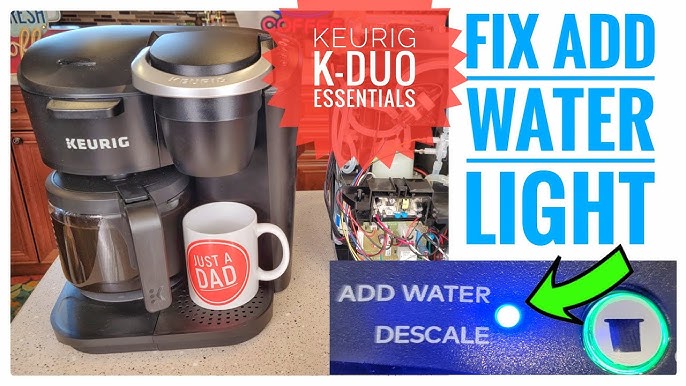
Add Water Light Blinking
If the add water light blinks, check:
- Is the reservoir empty or low?
- Is the water reservoir seated correctly?
- Is there something blocking the water sensor?
Sometimes, even if the tank is full, the sensor may fail to detect it because of mineral buildup or misalignment.
Descale Light Blinking
A blinking descale light is your Keurig’s way of telling you it’s time for a cleaning. Minerals from water can build up inside the machine. Over time, this can block the water flow and damage the heating element. Ignoring this warning can cause poor performance or even permanent damage.
Power Or Brew Light Blinking
A blinking power or brew light often points to:
- A jammed or clogged needle
- An electrical reset needed
- The lid not being fully closed
If you’ve just used the machine and nothing happens except a blinking light, it’s likely a mechanical error.
All Lights Blinking
When all lights blink at once, this usually signals a critical fault. It might happen if:
- The machine overheats
- There’s a hardware problem
- You need to perform a hard reset
Heating Light Blinking
If the heating light blinks for a long time, your Keurig may not be reaching the correct temperature. This could be due to scale buildup, a faulty heating element, or electronic issues.

Credit: www.reddit.com
Step-by-step Solutions For Blinking Lights
Now let’s get practical. Here are step-by-step solutions for each blinking light pattern.
1. Fixing The Add Water Light
- Remove the reservoir and fill it with fresh, cold water.
- Check for any debris at the bottom of the tank or where it connects to the machine.
- Reseat the reservoir firmly. Sometimes, it clicks into place.
- Clean the reservoir and its contacts with a soft cloth.
- If the light still blinks, try unplugging the machine for 30 seconds and plugging it back in.
A less obvious tip: Some Keurig models have a small float inside the water tank. If it gets stuck, the sensor thinks the tank is empty. Gently shake the tank or tap it to free the float.
2. Solving The Descale Light Issue
- Empty any remaining water from the reservoir.
- Fill the tank with a mix of descaling solution and water (follow the instructions on the solution bottle).
- Run a brew cycle without a K-cup, using a large mug to catch the liquid.
- Repeat until the tank is empty.
- Fill the tank with fresh water and run several rinse cycles.
Pro tip: Even if you use filtered water, minerals can still build up over time. Descaling every 3-6 months keeps your Keurig running smoothly.
3. Resetting Power Or Brew Light
- Unplug the machine for at least 60 seconds.
- Open and close the lid securely.
- Remove and reinsert the K-cup.
- Plug the machine back in and try brewing again.
If the problem continues, check the needle for clogs. Use a paperclip to gently clean out any coffee grounds or debris.
4. Dealing With All Lights Blinking
- Turn off and unplug the coffee maker.
- Wait at least 10 minutes. This helps reset the internal electronics.
- Reconnect and try turning it on.
- If the problem persists, contact Keurig support. This could signal a hardware failure.
5. Handling Heating Light Problems
- Descale the machine, even if the descale light is not on.
- Check for power issues (try a different outlet).
- If the machine still does not heat, the heating element might be faulty, which usually needs professional repair.
Keurig Model Differences: Blinking Lights
Not every Keurig is the same. Some have simple, single lights; others use more complex displays. Here’s a quick comparison of how blinking lights work across popular models:
| Keurig Model | Blinking Light Alerts | Special Features |
|---|---|---|
| K-Classic | Add water, descale, heating | Simple control panel |
| K-Select | All lights blink for reset, descale | Strong brew option |
| K-Elite | Descale, add water, temp control lights | Iced coffee, hot water on demand |
| K-Slim | All lights blink for errors | Compact size |
| K-Supreme Plus | Descale, add water, multi-stream brew lights | Custom brew strength |
Always check your specific model’s manual for unique signals or troubleshooting steps.
Preventing Blinking Light Problems
Prevention is easier than fixing problems. A few simple habits can help your Keurig run smoothly and avoid blinking light issues.
Regular Cleaning
- Clean the water reservoir weekly with warm, soapy water.
- Wipe down the machine’s exterior.
- Use a paperclip to clear out the needles every month.
Descale On Schedule
Most experts recommend descaling your Keurig every 3-6 months. If you have hard water, do it more often. Some users set a calendar reminder so they don’t forget.
Use Filtered Water
Filtered water reduces mineral buildup. It helps prevent both descale warnings and heating problems. Some Keurig models have built-in water filters—replace these as recommended.
Don’t Overfill Or Underfill
Follow the max and min lines on the water reservoir. Overfilling can cause leaks, while underfilling can trigger the add water light.
Let The Machine Cool Down
If you brew several cups back-to-back, give your Keurig a few minutes to rest. Overheating can cause all lights to blink or even damage the machine.
Real-world Examples: What Users Experience
To make these problems more relatable, here are real-life situations and solutions:
- Sarah’s K-Classic: The add water light kept blinking even with a full tank. She found a sticky film on the water sensor inside the tank. Cleaning it fixed the problem.
- Mike’s K-Elite: After months of ignoring the descale light, his coffee tasted off and the machine ran slowly. Descaling twice solved both issues.
- Lina’s K-Supreme Plus: All lights blinked after a power outage. Unplugging for 10 minutes reset the system.
A surprising fact: Many users think their Keurig is broken when it only needs a thorough cleaning or simple reset.
Credit: www.youtube.com
When To Call For Help
Sometimes, blinking lights won’t go away, even after all the steps above. Here’s when you should contact Keurig customer support:
- The machine won’t turn on at all.
- Lights blink in a pattern not covered in the manual.
- You see leaks or smell burning plastic.
- The heating element fails repeatedly after resets.
Most Keurig machines have a one-year warranty. If your machine is still under warranty, repairs or replacements may be free.
Comparing Keurig Blinking Lights To Other Brands
How do Keurig’s blinking lights and alerts compare to other popular coffee makers? Here’s a simple look:
| Brand | Alert Style | Common Issues |
|---|---|---|
| Keurig | Blinking lights on buttons | Scale buildup, sensor misreads |
| Nespresso | Blinking and steady lights | Capsule jams, pump errors |
| Hamilton Beach | Simple indicator lights | Clogs, overflows |
| Cuisinart | Text display + lights | Water filter issues, descale |
Keurig’s system is simple and easy to understand, but sometimes doesn’t give detailed error codes like other brands.
Non-obvious Insights For Keurig Users
Most guides focus on basic troubleshooting, but here are a few deeper tips:
- Hidden Reset Sequences: Some Keurig models have a secret reset sequence. For example, opening and closing the lid five times in a row can sometimes clear persistent errors.
- Sensor Sensitivity: The sensors that trigger blinking lights are often very sensitive. Even a small speck of dust or a light film of mineral deposits can cause false alerts. Regular, gentle cleaning of contact points makes a big difference.
Many people miss these points, assuming they need to replace the whole machine when a minor fix is possible.
Key Mistakes To Avoid
- Ignoring descale alerts: This can shorten the machine’s life.
- Using tap water in hard water areas: This speeds up mineral buildup.
- Forcing the reservoir: Pushing too hard can damage the water sensor.
- Skipping needle cleaning: Clogs are a top cause of blinking lights.
If you fix these habits, you’ll reduce most Keurig problems before they even start.
Quick Reference: What To Do When Lights Blink
Here’s a summary for fast action:
- Add water light: Fill tank, check alignment, clean contacts.
- Descale light: Run descaling cycle as soon as possible.
- Power/brew light: Reset, check needle, ensure lid is closed.
- All lights: Unplug, wait, and try again.
- Heating light: Descale, check power, consider professional repair if it continues.
For more details, visit the official Keurig Support page.
Frequently Asked Questions
Why Does My Keurig Keep Blinking After I Add Water?
If your Keurig keeps blinking after you fill the reservoir, it could be due to a misaligned tank, stuck float, or dirty water sensor. Try reseating the tank and cleaning the contacts. If that doesn’t help, check for debris in the water tank area.
How Often Should I Descale My Keurig?
Most experts recommend descaling every 3-6 months. If you have hard water, descale even more often. Descaling helps remove mineral buildup that can trigger blinking lights and reduce machine performance.
Can I Use Vinegar Instead Of Descaling Solution?
Yes, you can use a mix of white vinegar and water to descale your Keurig. Use about 1 part vinegar to 1 part water. After running the cycle, flush the machine with several tanks of clean water to remove any vinegar taste.
What Should I Do If All Lights Are Blinking And Nothing Works?
If all lights are blinking and none of the standard resets help, unplug the machine for 10 minutes. If the problem continues, the machine may need professional repair or replacement.
Is It Safe To Use My Keurig If Lights Are Blinking?
It’s best not to use your Keurig until you solve the blinking lights. The machine may not brew correctly, and you could cause more damage by forcing it. Always troubleshoot first before brewing.
Keurig blinking lights are a helpful warning system—if you know what they mean and how to fix them. With regular care and a little knowledge, you can avoid most problems and keep your coffee flowing every morning.

Credit: www.reddit.com