
Honeywell Thermostat Return Blinking: Causes, Fixes, And Key Insights
Smart thermostats have made controlling home temperature easier and more efficient. Among the best-known brands, Honeywell thermostats are popular for their reliability and features. But what happens when you see the Return blinking message on your Honeywell thermostat? Many users feel confused, worried, or even annoyed when this small light or symbol starts to flash. If you’re searching for answers, you’re not alone.
Understanding what the “Return blinking” means, why it appears, and how to respond is essential for keeping your home comfortable and energy bills under control. In this article, you’ll learn everything you need about this issue—whether you’re a DIY enthusiast, a first-time thermostat owner, or just want to avoid a costly service call.
We’ll cover causes, solutions, common mistakes, and tips that most people miss. Let’s get started on solving your Honeywell thermostat mystery.
What Does “return Blinking” Mean On A Honeywell Thermostat?
When you see Return blinking on your Honeywell thermostat, it doesn’t always mean something is broken. In fact, “Return” refers to the Return Air system in your HVAC setup. The blinking is a signal or notification, not an error by itself.
The Purpose Of The Return Indicator
The Return air is the air being pulled from your home into the HVAC system to be cooled or heated. The thermostat monitors this airflow to make sure your system is working correctly. When the “Return” indicator blinks, it usually means the thermostat is:
- Waiting for the system to reach a certain temperature
- Indicating a delay in the heating or cooling cycle
- Notifying you about a filter check or airflow issue
Common Models With Return Blinking
Not all Honeywell thermostats have a “Return” light. The feature is mostly found in programmable or smart models, such as:
- Honeywell VisionPRO 8000
- Honeywell Prestige IAQ
- Honeywell T Series (T6, T9)
- Some advanced Wi-Fi models
If your model doesn’t have this feature, the blinking may mean something else. Always check your user manual for the most accurate guidance.
Main Reasons For Return Blinking
Many people jump to conclusions when they see a blinking light. It’s important to understand the real causes before making changes or calling for help. Here are the most common reasons:
- System Delay: After turning on your HVAC system, the thermostat might delay the cycle to protect the equipment. During this delay, the “Return” symbol may blink.
- Filter Reminder: Some Honeywell models remind you to change or check the air filter by blinking the “Return” light.
- Airflow Obstruction: If something is blocking the airflow in your return vents, the thermostat may blink to warn you.
- Wiring or Installation Issue: Loose or incorrect wiring can cause communication problems, leading to blinking indicators.
- Sensor Problem: Thermostats with advanced sensors may blink if a sensor is dirty, misplaced, or malfunctioning.
- Software Updates or Errors: Rarely, a firmware update or internal error can cause the blinking.
Let’s look closer at each reason and how to handle them.
Credit: www.reddit.com
System Delay: What It Is And Why It Matters
Many Honeywell thermostats are designed to protect your HVAC system from short cycling (turning on and off too quickly). When you change the temperature or switch between heating and cooling, the thermostat may activate a short delay—usually between 3 to 5 minutes—before starting the system.
During this delay, the Return blinking indicator acts as a visual cue. It tells you that the thermostat received your command but is waiting to protect your equipment.
How To Handle System Delay
- Wait for a few minutes. The blinking should stop once the delay is over.
- Avoid pressing buttons repeatedly. This won’t speed up the process and may confuse the system.
- If the blinking lasts more than 10 minutes, there could be another problem.
Filter Reminder And Airflow Issues
A blocked or dirty air filter is one of the most common HVAC problems. Some Honeywell thermostats are smart enough to track filter usage. When the time comes to check or replace the filter, the “Return” light may blink.
Steps To Check And Replace The Filter
- Locate your return air vent—usually found near the floor or ceiling.
- Open the vent cover and remove the old filter.
- Check the filter for dust or dirt. If it looks clogged, replace it.
- Install a new filter (make sure the airflow arrow points toward the HVAC unit).
- Reset the filter reminder on the thermostat, if needed.
A clean filter keeps your system running well and may stop the blinking.
Airflow Obstruction
Other airflow issues can also trigger the blinking. For example:
- Furniture or rugs blocking the return vent
- Debris inside the vent
- Closed or blocked interior doors
Make sure air can move freely in your home, especially near return vents.
Wiring And Installation Problems
If your Honeywell thermostat was recently installed, or if you’ve had electrical work done, a wiring problem could be the cause.
Signs Of Wiring Issues
- Thermostat screen flashes or goes blank
- System does not turn on or respond
- Blinking does not stop after filter checks or delays
What To Do
- Turn off power to the thermostat at the breaker box.
- Gently remove the thermostat from the wall plate.
- Check that all wires are secure and connected to the right terminals (refer to your manual).
- If you’re unsure, call a licensed HVAC technician for help.
Caution: Working with wiring can be dangerous. If you’re not experienced, ask for professional help.
Sensor And Software Problems
Advanced Honeywell thermostats use temperature and humidity sensors to control your system. If these sensors get dirty, knocked out of place, or fail, the thermostat may blink to alert you.
How To Fix Sensor Issues
- Check for dust or debris around the thermostat and clean gently.
- Make sure the thermostat is mounted straight and on an inside wall.
- Avoid placing lamps, electronics, or other heat sources near the thermostat.
- If the problem continues, consult the manual or contact Honeywell support.
Software Glitches And Updates
Occasionally, a software update or internal error can cause blinking. Try these steps:
- Power cycle the thermostat (turn off, wait 30 seconds, turn on).
- Check for firmware updates using the Honeywell app or website.
- If all else fails, a factory reset may help. Note: This will erase your settings.
Comparing Honeywell Thermostat Models And Their Return Indicators
Different Honeywell thermostats handle the “Return blinking” in different ways. The table below compares some popular models and how they use the Return indicator.
| Model | Return Indicator Present? | Common Blinking Reasons |
|---|---|---|
| VisionPRO 8000 | Yes | System delay, filter reminder, airflow |
| Prestige IAQ | Yes | System delay, sensor issue |
| T6 Pro Smart | Yes | System delay, wiring issue |
| Round Wi-Fi | No | N/A |
| Lyric T5 | Sometimes | Filter reminder, delay |
How To Troubleshoot A Blinking Return Indicator
If you see “Return blinking” and want to solve it yourself, follow these steps in order:
- Wait five minutes: Most blinking is due to a system delay.
- Check your filter: Replace or clean if dirty.
- Inspect vents: Remove anything blocking airflow.
- Check for wiring problems: Especially if the thermostat was moved or recently installed.
- Restart the thermostat: Power cycle to clear glitches.
- Consult your manual: Each model is slightly different.
- Contact support: If none of these steps work, call Honeywell or a professional.
Typical Troubleshooting Mistakes
Many people make these errors when trying to fix a blinking return light:
- Repeatedly pressing thermostat buttons (may cause lockout)
- Ignoring regular filter changes
- Covering or decorating the thermostat (blocking sensors)
- Forgetting to reset the filter timer after changing the filter
How The Return Air System Works
To really understand the blinking light, it helps to know how return air works in your HVAC system. The return air vents pull air from your rooms back to the furnace or air handler. This air is then reconditioned and sent back out as warm or cool air.
If this cycle is blocked or interrupted, your thermostat may blink to warn you. A well-designed return air system:
- Keeps indoor air clean and fresh
- Reduces energy use
- Extends the life of your HVAC system
Real-world Example: Sarah’s Story
Sarah, a homeowner in Texas, noticed her Honeywell thermostat’s return indicator started blinking. She tried adjusting the temperature, but nothing happened. After waiting a few minutes, the light kept flashing.
Sarah checked her air filter and found it was covered in dust. She replaced it, reset the filter reminder, and within minutes, the blinking stopped. Her home cooled down, and she avoided a costly service call.
Insight: Most people forget to check the filter first. It’s the simplest fix, but also the most missed.

Credit: www.youtube.com
Common Myths About Honeywell Thermostat Return Blinking
Many homeowners believe a blinking thermostat means something is broken. Here are a few myths to avoid:
- Myth: Blinking always means a system failure.
- Truth: It’s usually a normal delay or a filter reminder.
- Myth: You must call a repair technician immediately.
- Truth: Most causes are simple and can be fixed at home.
- Myth: Any blinking means the thermostat is faulty.
- Truth: Sensors and airflow issues are more common causes.
Knowing these facts can save you time and money.
How Often Should You Check Your Thermostat And Filter?
Maintaining your thermostat and HVAC system is key to preventing issues like “Return blinking.” Here’s a simple schedule:
- Check your filter: Every 1-3 months, depending on use and air quality.
- Inspect vents: Every month for blockages.
- Review thermostat settings: Each season.
- Schedule professional maintenance: Once a year.
Sticking to this plan reduces the chance of unwanted blinking lights and keeps your system running smoothly.
What To Do If The Blinking Won’t Stop
If you’ve tried all basic steps and the blinking doesn’t go away, it may be time for expert help. Persistent blinking could signal:
- A failing thermostat
- A more serious wiring or control board problem
- A sensor that needs replacement
Call a qualified HVAC technician, especially if:
- Your home isn’t heating or cooling
- Other warning lights appear
- You hear unusual noises from the system
Cost Comparison: Diy Fixes Vs. Professional Service
Is it cheaper to fix a blinking return indicator yourself or call a pro? Here’s a quick comparison.
| Action | DIY Cost | Professional Cost |
|---|---|---|
| Replace air filter | $5 – $25 | $50 – $150 (service call + filter) |
| Check vents/airflow | $0 | $50 – $100 |
| Wiring check | $0 – $20 (for tools) | $100 – $300 |
| Sensor replacement | $15 – $50 | $120 – $250 |
As you can see, simple fixes are much cheaper if you do them yourself.
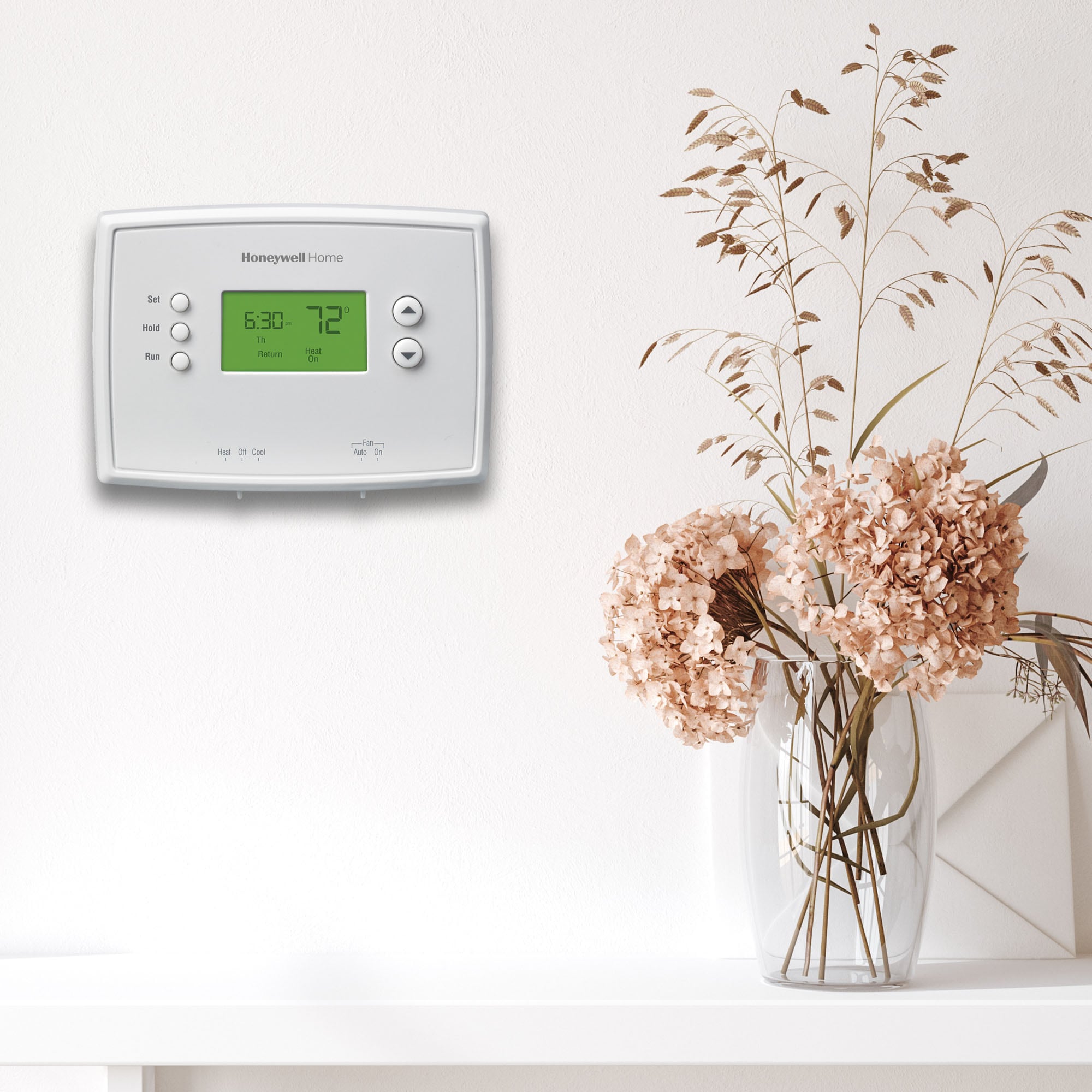
Credit: www.lowes.com
When Should You Replace Your Thermostat?
If your Honeywell thermostat keeps having problems, it might be time for a new one. Signs you need a replacement:
- Blinking lights that won’t stop, even after troubleshooting
- The thermostat is more than 10 years old
- Buttons or screen don’t work
- Your energy bills are rising
Newer thermostats have better features, such as Wi-Fi, energy tracking, and improved sensors. Upgrading can save money in the long run.
Tips For Preventing Return Blinking
Here are some expert tips to avoid seeing the return blinking message in the future:
- Change your air filter regularly. Don’t wait for a reminder.
- Keep return vents clear. Don’t block them with furniture, curtains, or decorations.
- Use the right thermostat settings. Avoid setting extreme temperatures.
- Keep the thermostat clean. Dust and dirt can affect sensors.
- Schedule annual maintenance. A professional checkup catches small problems early.
Frequently Asked Questions
Why Does My Honeywell Thermostat Keep Blinking “return” Even After Changing The Filter?
If the blinking continues after you’ve changed the filter and reset the reminder, there may be another airflow issue or a sensor problem. Double-check all return vents are clear and that the thermostat is clean and properly installed. If the problem persists, a wiring or internal sensor issue may require professional help.
How Long Should The System Delay (return Blinking) Last On My Thermostat?
The system delay usually lasts between 3 and 5 minutes. This pause protects your HVAC equipment from short cycling. If the blinking continues for more than 10 minutes, check your filter, airflow, and wiring.
Can I Reset The Honeywell Thermostat To Stop The Return Blinking?
Yes, you can perform a soft reset by turning off the thermostat for 30 seconds, then turning it back on. On some models, you may need to press a reset button or follow instructions in the manual. Be aware that a factory reset will erase all custom settings.
Is A Blinking Return Indicator Dangerous For My Hvac System?
No, the blinking indicator itself is not dangerous. It’s a warning or reminder. However, ignoring it—especially if it’s due to airflow or filter issues—can eventually damage your system and reduce efficiency.
Where Can I Find More Information About My Specific Honeywell Thermostat Model?
The best source is your user manual or the official Honeywell support website. They offer guides, FAQs, and troubleshooting help for every model.
Your Honeywell thermostat is a key part of your home comfort system. When the “Return blinking” message appears, it’s usually a sign to check your filter, airflow, or wait for a system delay. Most fixes are simple and can be done without calling a technician.
By understanding what the indicator means and following the tips in this guide, you can keep your home comfortable and your HVAC system running smoothly—without stress or unnecessary costs.