
When you see the Cool On blinking message on your Honeywell AC thermostat, it’s easy to feel confused or even worried. Maybe your air conditioner is not cooling, or it’s cycling on and off. This blinking light isn’t just a random signal—it’s your thermostat’s way of telling you that something needs attention. Whether you’re a homeowner, a renter, or someone managing a commercial space, understanding what this message means can help you fix the problem faster and avoid costly mistakes.
Honeywell thermostats are known for being reliable and user-friendly, but when the Cool On indicator starts blinking, many people don’t know what to do next. Is it a sign of a bigger issue? Should you call a professional, or can you solve it yourself? This article will guide you through every aspect of the Honeywell AC thermostat Cool On blinking issue. You’ll learn what causes it, how to troubleshoot step by step, and when you really need expert help. Along the way, you’ll get practical advice, clear explanations, and real examples. By the end, you’ll feel confident handling this problem and keeping your indoor comfort steady.
What Does “cool On Blinking” Mean?
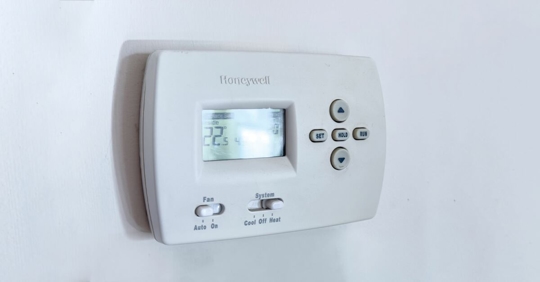
The Cool On blinking signal is a built-in safety feature in most Honeywell digital thermostats. When you set your thermostat to cool, it usually shows “Cool On” to confirm that the cooling mode is active. If this message is blinking instead of solid, it means the thermostat is trying to start cooling, but the system isn’t running yet.
This blinking is not just a warning; it’s a delay mode that protects your air conditioning system. For example, after you turn your AC off and on quickly, the thermostat delays restarting to protect the compressor from damage. The delay usually lasts for 5 minutes, but sometimes it can be longer if there are other issues.
Safety And Delay Function
The delay is important for the health of your AC. If the compressor starts and stops too quickly, it can wear out or even break. Honeywell thermostats use this blinking signal to show that the system is waiting before it starts cooling again.
It’s normal for “Cool On” to blink for a few minutes after you change settings or power cycle your thermostat.
Non-obvious insight: Many people think the blinking means something is broken, but often it’s just the delay protecting your equipment.
Is It Always Normal?
While the blinking is often normal, if it stays on for more than 5–10 minutes, it usually signals a problem. The system may not be cooling, and you may need to troubleshoot. Sometimes, the blinking never stops until you fix the issue.
Common Reasons For Cool On Blinking
Several factors can cause the Cool On blinking message to stay on. Understanding these helps you diagnose the problem faster.
- Compressor Delay: The most common reason. After a power interruption or setting change, the thermostat waits to start the compressor.
- Power Issues: If there’s not enough power to your thermostat or AC unit, the blinking may continue.
- Dirty Air Filter: A clogged filter can cause the system to overheat or fail to start.
- Thermostat Wiring Problems: Loose or damaged wires inside the thermostat can prevent proper cooling.
- Low Refrigerant: If your AC is low on refrigerant, it may not cool properly, causing the thermostat to blink.
- Frozen Evaporator Coil: Ice buildup can stop cooling and lead to blinking signals.
- Faulty Thermostat: Sometimes, the thermostat itself is broken and needs replacement.
- Incorrect Settings: Wrong mode or temperature settings can confuse the system.
- Sensor Issues: If the temperature sensor inside the thermostat is faulty, it may not read the room temperature correctly.
- System Lockout: Some Honeywell models have a lockout function for safety, leading to blinking.
Non-obvious insight: If you recently replaced your thermostat or had electrical work done, incorrect wiring is a surprisingly common cause.
Step-by-step Troubleshooting Guide
Fixing the Cool On blinking issue requires a systematic approach. Here’s how you can do it safely and efficiently.
Step 1: Wait For The Delay
First, give the system time. The delay can last up to 5 minutes. If the blinking stops and the cooling starts, the problem is solved.
Step 2: Check Power Supply
If the blinking does not stop, check if your thermostat and AC unit are getting power.
- Look for a blank screen or other error messages.
- Check circuit breakers and fuses.
- Inspect batteries if your thermostat uses them.
Step 3: Inspect Thermostat Settings
Make sure the thermostat is set to Cool mode and the temperature is lower than the current room temperature.
- Sometimes, the system is set to “Heat” or “Off” by mistake.
- Double-check schedule settings.
Step 4: Examine Air Filter
A dirty air filter can block airflow and prevent cooling.
- Remove the filter and check for dirt or debris.
- Replace it if needed.
Step 5: Check Wiring
If you’re comfortable, remove the thermostat cover and check for loose or disconnected wires.
- Only do this if you know about electrical safety.
- Look for corrosion or damage.
Step 6: Look For Frozen Coil
Go to your indoor unit and check if the evaporator coil is covered in ice.
- If yes, turn off the AC and let it thaw for a few hours.
- Change the filter and restart.
Step 7: Test System Response
Change the temperature setting to see if the system responds.
- If nothing changes, the thermostat or AC may need repair.
Step 8: Inspect Sensors
Some Honeywell thermostats have replaceable temperature sensors. If the sensor is faulty, the system may not cool.
Step 9: Check For Low Refrigerant
If the AC runs but doesn’t cool, you may have a refrigerant leak. Only a professional can fix this.
Step 10: Reset Thermostat
Try resetting your thermostat:
- Remove batteries for 30 seconds and re-insert.
- Or, turn off circuit breaker for 1 minute and turn back on.
Practical example: If you notice the blinking after a storm or power outage, it’s often a delay or power issue. If it happens after changing the filter, it may be a wiring or sensor problem.
How To Prevent Cool On Blinking Problems
Prevention is easier than repair. Here are steps to keep your Honeywell thermostat and AC running smoothly.
- Change air filters every 1–3 months.
- Check thermostat batteries every 6–12 months.
- Schedule professional AC maintenance yearly.
- Avoid frequent on/off switching of your AC.
- Keep thermostat firmware updated if applicable.
- Check wiring after any home renovation.
- Set realistic cooling temperatures (72–76°F for most homes).
- Keep vents and registers open and unobstructed.
- Use surge protectors during storms or power fluctuations.
- Clean thermostat and AC units regularly.
Non-obvious insight: Many homeowners forget to check vents and registers. Blocked vents can cause cooling delays and blinking signals.
Honeywell Thermostat Models: Comparison
Different Honeywell thermostat models have unique features. Here’s a quick comparison of popular models and their Cool On behavior.
| Model | Delay Feature | Blinking Behavior | Reset Method |
|---|---|---|---|
| Honeywell T5 | Yes (5 min) | Cool On blinks during delay | Batteries or breaker |
| Honeywell RTH9580WF | Yes (up to 10 min) | Blinks & displays error codes | Touchscreen reset |
| Honeywell 6000 Series | Yes (5 min) | Blinks, no error codes | Batteries or breaker |
| Honeywell VisionPRO | Yes (variable) | Blinks, lockout possible | Touchscreen or breaker |
Tip: Always check your user manual for delay times and reset methods specific to your model.
When To Call A Professional
Sometimes, DIY troubleshooting isn’t enough. Here are signs you should call an HVAC technician:
- Blinking persists for more than 10 minutes after reset
- AC unit doesn’t turn on at all
- Thermostat screen is blank or shows error codes
- You find damaged wiring, corrosion, or water leaks
- AC runs but does not cool the room
Data point: According to the US Department of Energy, 40% of AC failures are caused by electrical or refrigerant issues that require professional repair.
Example: If you reset your thermostat and the blinking continues, the problem is likely inside the AC unit or wiring. Professionals have tools to check refrigerant levels, compressor health, and electrical circuits safely.

Credit: www.sevgastro.com
Common Mistakes To Avoid
Fixing thermostat issues can be tricky. Avoid these mistakes:
- Ignoring the delay: Don’t panic if “Cool On” blinks for 5 minutes—it’s normal.
- Changing settings repeatedly: This can extend the delay and confuse the system.
- Failing to check power: Many people overlook tripped breakers or dead batteries.
- Touching wires without turning off power: Always ensure safety before handling electronics.
- Skipping filter changes: Dirty filters cause more problems than you expect.
- Blocking vents: Closed or blocked vents lead to poor airflow and blinking signals.
- Overcooling: Setting the temperature too low strains the AC and increases delay time.
- Ignoring maintenance: Annual service helps prevent most cooling problems.
Practical tip: Write down any changes you make and note how the system responds. This helps technicians diagnose faster if you need help.
Honeywell Thermostat Vs Other Brands
Honeywell is a leading brand, but how does its delay and blinking features compare to others?
| Brand | Delay Feature | Blinking Indicator | User Reset Options |
|---|---|---|---|
| Honeywell | 5–10 min delay | Cool On blinks | Batteries, breaker, touchscreen |
| Nest | Variable delay | Leaf or blinking light | App or manual reset |
| Ecobee | Short delay | Cool On message | App or panel reset |
| Emerson | 5 min delay | Blinking snowflake | Batteries or breaker |
Non-obvious insight: Honeywell’s delay feature is more explicit—users see “Cool On blinking,” while other brands use symbols or codes that are less clear.
Real-life Examples And Solutions
Let’s look at common real scenarios:
Example 1: After Power Outage
A homeowner notices “Cool On” blinking after a blackout. Waiting 5 minutes solves the problem—the delay is protecting the compressor.
Example 2: After Filter Change
After replacing the air filter, “Cool On” blinks and the AC doesn’t start. Checking wiring reveals a loose wire, which is reconnected. The system starts cooling.
Example 3: Persistent Blinking
A renter finds “Cool On” blinking for hours. Resetting the thermostat doesn’t help. Technician finds low refrigerant and fixes the leak. Blinking stops, cooling resumes.
Example 4: Faulty Sensor
The thermostat reads the wrong room temperature, causing “Cool On” to blink. Replacing the sensor solves the issue.
Tip: Keep a log of when the blinking starts and stops—this helps identify patterns and speeds up troubleshooting.
Honeywell Thermostat Maintenance Checklist
A well-maintained thermostat and AC system reduce blinking and other issues.
- Replace air filters regularly
- Check thermostat batteries
- Inspect wiring and connections
- Clean thermostat display
- Schedule annual AC service
- Keep vents clear
- Update thermostat firmware
- Test system response monthly
Practical tip: Set reminders on your phone or calendar for filter changes and battery checks.

Credit: lekk.nl
Understanding Delay Times: Data And Statistics
Delay times vary based on model and situation.
- Most Honeywell thermostats: 5–10 minutes delay
- After quick power cycle: Up to 10 minutes
- After setting change: 3–5 minutes
- After scheduled program change: 1–2 minutes
Data: According to Honeywell, over 70% of “Cool On blinking” cases resolve within 5 minutes without any intervention.
Non-obvious insight: If your delay lasts more than 10 minutes, it’s almost always a wiring, sensor, or refrigerant issue.
Honeywell Thermostat User Resources
Honeywell provides user manuals, troubleshooting videos, and support forums. You can find model-specific guides and solutions on their official site.
For more details, visit the official Honeywell support page: Honeywell Home Support.
Credit: www.premierwellbeing.ie
Frequently Asked Questions
What Does “cool On Blinking” Mean On My Honeywell Thermostat?
It means your thermostat is delaying the start of cooling. This protects your AC’s compressor from damage. If the blinking stops after 5–10 minutes, it’s normal. If it continues, there may be a problem with power, wiring, or the AC unit.
How Long Should The Cool On Blinking Last?
Usually, 5 minutes. Sometimes up to 10 minutes after a power change or setting adjustment. If it’s longer, check for issues like power loss or dirty filters.
What Can I Do If Cool On Keeps Blinking And The Ac Won’t Start?
Try resetting the thermostat, checking power supply, replacing the air filter, and inspecting wiring. If these steps don’t help, call a professional.
Is It Safe To Fix Thermostat Wiring Myself?
Only if you know about electrical safety. Always turn off power before touching wires. If you’re unsure, call an expert to avoid injury or damage.
Does Cool On Blinking Mean My Ac Is Broken?
Not always. It’s often a delay or minor issue. But if blinking lasts more than 10 minutes or cooling never starts, there may be a mechanical or electrical problem needing professional repair.
Conclusion
Feeling confident with your Honeywell thermostat is possible when you understand its signals. The Cool On blinking feature is designed to keep your AC safe, but it’s also a useful indicator for troubleshooting. With the steps and insights in this guide, you can solve most issues yourself and know when to get expert help. If you keep up with maintenance and avoid common mistakes, your AC will run smoothly and efficiently for years.