
If you’ve ever used Hart battery-powered tools and seen your battery blinking red, you know how frustrating it can be. You’re ready to work, but your device isn’t. This blinking red light is not just a random signal; it’s the battery’s way of telling you something is wrong. Most people simply swap the battery or charger, but there’s more to understand. Whether you’re a new user or someone who’s experienced this problem many times, this guide will help you decode the Hart battery blinking red issue and get your tools running again.
What Does A Blinking Red Light Mean?
Hart batteries use an LED indicator to show their status. The blinking red light is not a normal charging signal. If you see it, the battery is warning you about a specific problem. Sometimes it’s a quick flash, other times a slow blink, but in most cases, it means there’s an issue stopping the battery from charging or working properly.
Most Hart batteries blink red for these reasons:
- Overheating: The battery is too hot.
- Low voltage: The battery is deeply discharged.
- Faulty cell: One or more cells inside the battery are damaged.
- Charger error: The charger isn’t working correctly.
- Connection issue: The battery isn’t seated properly.
Understanding this signal is important because ignoring it can make the issue worse. For example, continuing to try charging an overheated battery can damage it further or even cause safety risks.
Common Causes Of Hart Battery Blinking Red
Let’s look at what usually triggers the blinking red light and how each cause affects the battery.
1. Overheating
Batteries heat up during use and charging. If a battery gets too hot, the internal protection circuit stops charging and shows a red blinking light. This is common if you use the tool for a long time or charge immediately after heavy use.
Signs of overheating:
- Battery feels warm or hot to touch
- Red light blinks during charging
- Charger may also feel warm
2. Low Voltage
When a battery is used until it’s completely empty, it can drop below its safe voltage range. The charger detects this and the red light blinks to warn you. Deeply discharged batteries are harder to recover and sometimes need special handling.
3. Faulty Battery Cells
Lithium-ion batteries have several cells inside. If one cell fails or loses capacity, the battery protection system detects it and shows the blinking red light. This usually means the battery is damaged and may not be safe to use.
4. Charger Problems
Sometimes the charger itself is the issue. If the charger isn’t supplying the correct voltage or current, or has a broken connector, the battery will blink red. This can be tested by using another charger.
5. Connection Issues
If the battery isn’t fully inserted or the terminals are dirty, the charger can’t recognize the battery. The blinking red light often appears in these cases. Cleaning the terminals and reinserting the battery can solve this.
How To Troubleshoot Hart Battery Blinking Red
Troubleshooting is more than just swapping parts. Here’s a step-by-step approach to finding the real cause and fixing it.
Step 1: Check Battery Temperature
Remove the battery from the charger and let it sit for 30–60 minutes. Place it in a cool, dry area away from sunlight. Once it feels cool, try charging again. If the red light stops blinking, overheating was likely the cause.
Step 2: Inspect Charger
Try charging another Hart battery with your charger. If the second battery works fine, your charger is probably OK. If both batteries blink red, you may need a new charger.
Step 3: Examine Battery Terminals
Look at the metal contacts on the battery and charger. If you see dust, corrosion, or moisture, clean them gently with a dry cloth or cotton swab. Avoid using water or cleaning products.
Step 4: Try A Different Outlet
Plug the charger into another wall outlet. Sometimes, power supply issues cause errors. If the blinking continues, move to the next step.
Step 5: Test Battery Voltage
If you have a voltmeter or multimeter, measure the voltage at the battery terminals. Compare your reading to the nominal voltage printed on the battery.
| Battery Type | Nominal Voltage | Safe Range |
|---|---|---|
| Hart 20V Lithium-Ion | 20V | 15V–20V |
| Hart 40V Lithium-Ion | 40V | 32V–40V |
If your voltage is below the safe range, the battery may be deeply discharged or damaged.
Step 6: Try A “jump Start” (advanced)
Some users try to “jump start” a battery by briefly connecting it to a working charger or battery. This is risky and should only be tried if you know what you’re doing. If you’re unsure, skip this step and contact Hart support.
What To Do If Troubleshooting Fails
Sometimes the battery cannot be fixed. Here’s what you should do next.
Warranty And Replacement
Hart batteries typically come with a 3-year limited warranty. If your battery is still under warranty and troubleshooting didn’t fix the blinking red issue, contact Hart customer service. They may offer a free replacement.
Recycling Old Batteries
If your battery is out of warranty or damaged beyond repair, don’t throw it in the trash. Lithium-ion batteries should be recycled. Many hardware stores and recycling centers accept them.
Buying A New Battery
When buying a new Hart battery, check compatibility with your tools and charger. Look for genuine Hart batteries—counterfeit or third-party batteries can cause more problems.
Preventing Hart Battery Blinking Red
Prevention is always better than repair. Here’s how to keep your batteries healthy and avoid the blinking red light.
Store Batteries Properly
- Keep batteries in a cool, dry place.
- Avoid leaving them in a hot car or direct sunlight.
- Store at room temperature when not in use.
Avoid Deep Discharge
Don’t run your tool until the battery is completely empty. Charge it when you notice power dropping.
Use The Right Charger
Always use Hart-approved chargers. Third-party chargers may not deliver the correct voltage or current.
Clean Terminals Regularly
Dust and corrosion build up over time. Clean battery and charger contacts every few months.
Let Batteries Cool Down
After heavy use, let the battery cool before charging. This prevents overheating and extends battery life.
How Hart Batteries Compare To Other Brands
Hart batteries are known for their reliability, but how do they stack up against competitors like DeWalt, Ryobi, and Milwaukee? Here’s a quick comparison.
| Brand | Voltage Options | Typical Warranty | Common Issues |
|---|---|---|---|
| Hart | 20V, 40V | 3 Years | Blinking red light, overheating |
| DeWalt | 20V, 60V | 3 Years | Red flashing, charger errors |
| Ryobi | 18V, 40V | 3 Years | Battery not recognized |
| Milwaukee | 18V, 12V | 5 Years | Overheating, cell imbalance |
Hart’s blinking red issue is similar to what other brands experience. The main difference is in how quickly the battery protection circuit triggers and how easy it is to troubleshoot.

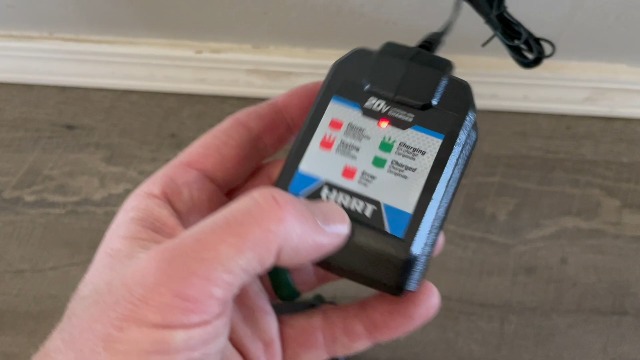
Credit: www.youtube.com
Real-life Examples And User Experiences
Let’s look at some real-world stories to help you understand the blinking red issue better.
Example 1: Overheated Battery After Yard Work
Sarah was using her Hart 40V leaf blower for over an hour. When she tried to recharge, the battery blinked red. After letting it cool for 40 minutes, it charged normally. The overheating protection had triggered.
Example 2: Deep Discharge From Power Tool
Miguel used his Hart drill until it stopped running. The battery blinked red when placed on the charger. He learned that deeply discharged batteries need time and sometimes several attempts to recharge. After a few tries, the battery recovered.
Example 3: Charger Failure
Tom noticed his Hart batteries all blinked red on one charger but worked fine on another. He replaced the faulty charger and the problem disappeared.
Example 4: Damaged Cell From Drop
Nina dropped her battery from a ladder. It blinked red and never charged again. Inspection showed a cracked case and damaged cell. She recycled the battery and bought a new one.
Advanced Tips: Extending Hart Battery Life
Beyond basic care, there are ways to get more life from your Hart batteries.
Use Partial Charges
Lithium-ion batteries last longer if you don’t always charge them to 100%. Try charging to 80–90% and avoid letting them drop below 20%.
Monitor Battery Health
Some smart chargers show battery health or cycle count. Keep an eye on these numbers to spot early signs of trouble.
Avoid Extreme Temperatures
Both high and low temperatures damage batteries. Don’t use or charge your battery in freezing conditions or during heat waves.
Replace Old Batteries
Batteries lose capacity over time. If your battery is more than 3 years old and blinking red often, it’s probably time for a replacement.
Credit: www.amazon.com
Hart Battery Technology: Key Features
Hart batteries use several advanced features to protect and improve performance.
- Protection circuit: Stops charging if overheating or cell failure is detected.
- Smart charging: Adjusts charging speed based on battery temperature and health.
- LED indicator: Shows charge level and error status.
- Durable casing: Designed to withstand drops and impacts.
These features help Hart batteries last longer and reduce safety risks. However, protection circuits can also cause blinking red lights if they detect any problem.
When To Seek Professional Help
Some battery issues are too complex or risky to fix at home. Here’s when you should contact a professional:
- Battery feels swollen or emits odor
- Charger sparks or makes noise
- Blinking red persists after all troubleshooting steps
- Battery was exposed to water or physical damage
Professional technicians have tools to test battery cells and replace damaged parts. DIY fixes are not recommended for these cases.
Credit: apacheelectricvehicles.com
Comparing Hart Battery Error Signals
Hart batteries use different blink patterns to signal errors. Here’s a quick guide:
| Blink Pattern | Meaning | Recommended Action |
|---|---|---|
| Slow red blink | Overheating | Let battery cool |
| Fast red blink | Charger error | Test charger |
| Red/green alternating | Cell failure | Replace battery |
| Solid red | Charging | No action needed |
Knowing these signals helps you react quickly and avoid damage.
Hart Battery Safety Tips
Safety is important when dealing with batteries. Here’s how to stay safe:
- Never try to open or repair a battery cell yourself.
- Keep batteries away from water and chemicals.
- Don’t charge batteries overnight or unattended.
- If a battery leaks, handle it with gloves and recycle it.
Following these tips reduces risk and keeps your tools working longer.
Frequently Asked Questions
Why Does My Hart Battery Blink Red Even When It’s New?
A new battery can blink red if it’s overheated, not fully inserted, or has a manufacturing defect. Try cooling the battery and reinserting it. If the problem continues, contact Hart for a warranty replacement.
Can I Fix A Deeply Discharged Hart Battery Myself?
Sometimes you can recover a deeply discharged battery by charging it for short periods, letting it rest, and then charging again. However, if the battery keeps blinking red, it may be damaged beyond repair.
Is It Safe To Use Third-party Chargers With Hart Batteries?
Using third-party chargers is risky. They may not supply the correct voltage or current, leading to errors or safety hazards. Always use Hart-approved chargers for best performance and safety.
How Long Does A Hart Battery Last Before Needing Replacement?
Most Hart batteries last about 500–700 charge cycles or 3–5 years, depending on use and care. If your battery blinks red often and doesn’t recover, it’s likely time for a replacement.
Where Can I Recycle My Old Hart Battery?
You can recycle old Hart batteries at hardware stores, recycling centers, or through community programs. For more information, visit EPA Battery Recycling Guide.
When your Hart battery blinks red, don’t panic. Most issues can be fixed with careful troubleshooting and proper care. Knowing the causes, solutions, and prevention tips will help you keep your tools running and avoid downtime. If you’re ever in doubt, seek professional help or contact Hart support.
With the right knowledge, you’ll get the most from your Hart batteries—and spend more time working, less time worrying.