
If you own a Genie garage door opener and notice a blinking red light, it can feel frustrating or even worrying. Many homeowners are unsure what the red light means, and what they should do next. Is your garage door opener broken? Is it a simple fix or a sign of a bigger problem? The good news is, a blinking red light on a Genie garage door opener is a common issue, and most of the time, it can be fixed without calling a professional. Understanding what this red light means, why it happens, and how to respond will save you time, money, and stress. This guide will walk you through everything you need to know, from interpreting the blinking pattern to troubleshooting and fixing the issue. With clear steps and expert tips, you’ll feel confident about handling your Genie garage door opener’s red light—whether you’re a first-time owner or have had your system for years.
What Does A Blinking Red Light On A Genie Garage Door Opener Mean?
The blinking red light on your Genie garage door opener isn’t just a warning; it’s a message. Genie openers use light codes to show the system’s status or signal a problem. The number of blinks, the speed, and whether the light is steady or flashing all have different meanings.
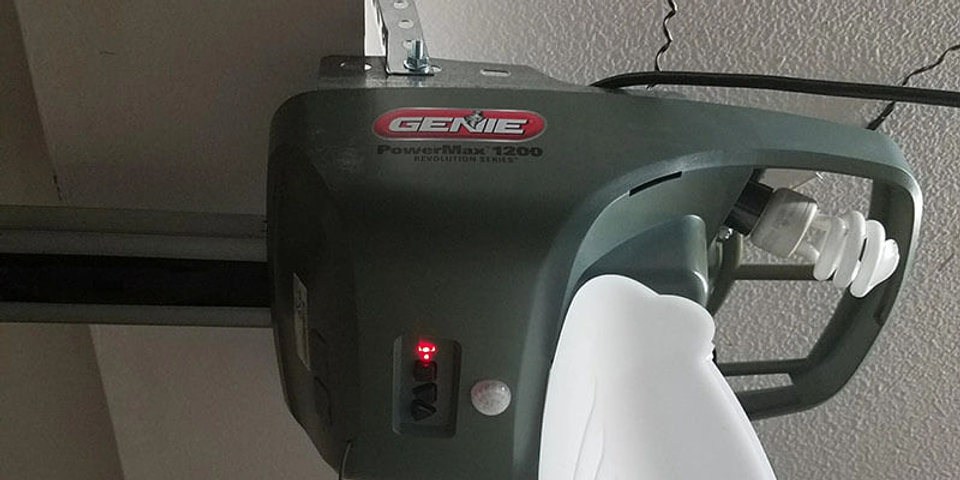
Usually, the red light is found on the powerhead (the main opener unit) or on the safety sensors near the bottom of the door tracks. Here’s what each location usually means:
- Powerhead blinking red light: Often signals a problem with the opener’s internal system, such as a circuit error or a programming issue.
- Sensor blinking red light: Usually means there’s a problem with the safety sensors—the small boxes at the bottom of the door tracks that keep the door from closing on people or objects.
Knowing which light is blinking and how it’s blinking is the first step to fixing the problem.
Genie Blinking Red Light Patterns And Their Meanings
Genie openers use different blink codes to show different problems. Here are the most common patterns and what they mean:
| Blinking Pattern | Location | Possible Meaning |
|---|---|---|
| Steady red (not blinking) | Sensor | Sensor is powered and working |
| 1 slow blink | Sensor | Sensor is misaligned or blocked |
| Flashing rapidly | Sensor | Wiring issue or sensor failure |
| Flashing 2 times, pause, repeat | Powerhead | Limit switch or travel error |
| Flashing 5 times, pause, repeat | Powerhead | Circuit board or programming error |
It’s important to count the blinks and note their speed. This helps identify the exact problem and find the right solution.

Credit: www.youtube.com
Why Does The Genie Garage Door Opener Blink Red?
Several things can cause a Genie opener to flash a red light. Some of the most common reasons include:
- Safety sensor alignment: If the sensors at the bottom of the door are not facing each other, the opener will blink red and refuse to close.
- Dirty or blocked sensors: Dust, spider webs, or objects in front of the sensors break the beam, triggering the red light.
- Wiring problems: Loose, frayed, or broken wires between the sensors and opener can interrupt signals.
- Power surges or outages: Sometimes, electrical issues reset or confuse the opener’s system.
- Component failure: Faulty sensors, bad circuit boards, or worn-out parts can also cause blinking red lights.
Sometimes, the issue is simple and easy to fix. Other times, it may need a part replacement or professional help.
Step-by-step Troubleshooting: Genie Garage Door Opener Blinking Red Light
Before you call a technician, try these steps to diagnose and solve the blinking red light problem.
1. Check The Safety Sensors
The most common cause of a blinking red light is a sensor problem. Here’s what to do:
- Find the two sensors near the floor, on either side of the garage door tracks.
- Each sensor should have a small LED light. One is usually green (sending sensor) and the other red (receiving sensor).
- Make sure nothing blocks the sensors—look for trash, tools, or bikes.
- Clean the sensor lenses with a soft cloth. Even a little dust or cobweb can break the beam.
If the red light is still blinking, move to the next step.
2. Realign The Sensors
If the sensors are misaligned, the system won’t work. To realign:
- Gently move the sensors so they face each other directly.
- The red light on the receiving sensor should turn steady when aligned.
- Use a level or string to make alignment easier.
If the light stops blinking, you’ve fixed the problem.
3. Inspect Sensor Wiring
Loose or damaged wires can cause communication errors.
- Check the wires leading into each sensor. Look for cuts, loose connections, or broken insulation.
- Make sure the wires are firmly connected to both the sensors and the opener’s terminal screws.
- If you see damage, repair or replace the wires.
4. Check For Power Issues
If your garage has had a recent power outage or surge, the opener may need to be reset.
- Unplug the opener for 30 seconds, then plug it back in.
- Try using the remote to see if the problem is fixed.
5. Examine The Opener’s Control Board
If the problem isn’t with the sensors or wiring, the opener’s internal circuit board may be the culprit.
- Look at the red light pattern on the powerhead.
- Refer to your Genie manual for blink codes (or use the table above).
- If you see a code for “circuit board error,” the board may need replacement.
6. Test The Door’s Operation
Try opening and closing the door with both the wall control and the remote. If the door only works in one direction or not at all, this gives clues about where the fault is.
7. Reprogram The Opener
Sometimes, the opener loses its memory or gets confused.
- Follow your model’s instructions to clear and reprogram the remote controls.
- This often fixes strange light patterns caused by memory errors.
How To Fix Specific Genie Red Light Blink Codes
Different blink codes mean different fixes. Here are the most common:
1. Sensor Blinks Once Every Few Seconds
This usually means misalignment. Adjust the sensors until both LEDs are solid. If that fails, try swapping the sensors to see if one is faulty.
2. Rapid Blinking On The Sensor
Rapid blinking often signals a wiring issue. Check for pinched, cut, or disconnected wires between the sensor and opener. Replace or repair as needed.
3. Red Light On The Powerhead Blinks 2 Or 5 Times
Multiple blinks on the opener’s main unit mean an internal error. You may need to:
- Reset the opener by unplugging it
- Check for obstructions in the door tracks
- Re-set the open/close limits, following your manual
- If all else fails, consider replacing the logic board
4. Both Sensor Lights Are Off
No lights at all usually mean a power problem to the sensors. Check the opener’s plug and circuit breaker. Inspect the wiring to the sensors.
When To Call A Professional
Most blinking red light issues can be fixed by homeowners, but sometimes you’ll need expert help. Consider calling a professional if:
- The sensors are aligned and clean, but the red light still blinks
- You see damaged circuit boards or burnt wires
- The opener makes strange noises or smells burnt
- You’re uncomfortable working with electrical parts
A professional can diagnose and fix complex problems safely.
Credit: cltgaragedoorrepai.wixsite.com
Genie Garage Door Opener Models And Red Light Issues
Different Genie models have slight differences in how they show errors. Here’s a quick comparison of popular models and their red light behaviors:
| Model | Red Light Location | Common Blinking Pattern | Typical Cause |
|---|---|---|---|
| Genie SilentMax 1200 | Powerhead & Sensors | 1 blink/second | Sensor misalignment |
| Genie ChainMax 1000 | Powerhead & Sensors | 5 rapid blinks | Logic board error |
| Genie StealthDrive 750 | Sensors | Fast flashing | Wiring or power issue |
| Genie Excelerator II | Powerhead | 2 blinks, pause | Limit switch error |
Always check your owner’s manual or the Genie website for codes specific to your model.
Preventing Future Red Light Problems
Once you’ve fixed the blinking red light, a few simple habits will help prevent it from coming back:
- Keep sensors clean: Wipe lenses monthly to prevent dust buildup.
- Check alignment regularly: Even slight bumps can knock sensors out of line.
- Inspect wiring yearly: Look for wear, pests, or moisture damage.
- Protect the opener from surges: Use a surge protector to avoid electrical damage.
- Don’t ignore small problems: Fixing minor issues early avoids bigger, costlier repairs.
These steps keep your Genie garage door opener working smoothly.
Common Mistakes When Fixing A Blinking Red Light
Some homeowners accidentally make things worse when trying to fix their opener. Here are mistakes to avoid:
- Forcing the sensors: Pushing sensors too hard can break them.
- Using harsh cleaners: Chemicals can scratch or fog sensor lenses—use only a dry or slightly damp cloth.
- Skipping safety checks: Always unplug the opener before working with wires.
- Ignoring the blink pattern: Don’t guess—count the blinks and check the meaning.
- Replacing parts too soon: Many problems are simple fixes; don’t buy new sensors or boards until you’ve checked alignment and wiring.
How To Reset A Genie Garage Door Opener
A reset can often clear error codes and stop the red light from blinking. Here’s a quick guide:
- Unplug the opener: Wait 30-60 seconds.
- Plug it back in: The system will reboot.
- Press the “Learn” button (if available): Hold for 10 seconds to clear remote codes.
- Reprogram remotes and keypads: Follow the instructions in your manual.
Resets are safe and often solve odd or random blinking problems.
Upgrading Your Genie Garage Door Opener For Fewer Problems
If your opener is old or often has problems, consider upgrading to a newer Genie model. Newer models have:
- Improved sensors that are less sensitive to dust and bumps
- Stronger surge protection
- Better diagnostics for easier troubleshooting
- Quieter operation and longer lifespans
While the upfront cost is higher, it can save money and frustration in the long run.
Real-world Example: A Homeowner’s Story
Sarah, a homeowner in Ohio, noticed her Genie StealthDrive 750 was showing a blinking red light. At first, she thought it was a serious failure. But after cleaning the sensors and gently adjusting them, the red light turned solid and her door worked perfectly again.
She learned that even a small spider web had blocked the sensor beam. Now, she cleans her sensors every month and hasn’t had a red light problem since.

Credit: cltgaragedoorrepai.wixsite.com
The Importance Of Genie’s Safety Sensors
Genie’s safety sensors are not just a convenience—they’re a key safety feature. The sensors prevent the heavy garage door from closing on people, pets, or objects. A blinking red light is the system’s way of saying, “Something might be in the way!” Never bypass or ignore the sensors just to get the door working.
Always fix the real problem.
Where To Find More Help
If you need more information, check the Genie company’s support pages or your product manual. For official help and parts, visit the Genie Company Support page.
Frequently Asked Questions
What Does A Solid Red Light On My Genie Garage Door Sensor Mean?
A solid red light usually means the receiving sensor is powered and aligned correctly. If the light is solid and your door works, everything is fine. If the door still won’t close, check the sending sensor (usually green) and make sure both have solid lights.
Why Does My Genie Garage Door Opener Blink Red But The Door Still Works?
Sometimes, the system detects a minor sensor misalignment or dust, but it’s not enough to stop the door. While it may still work for now, a blinking red light signals you should clean or adjust the sensors soon to avoid future problems.
Can I Bypass The Safety Sensors To Stop The Red Light?
It’s possible, but not recommended. Safety sensors protect people and property from accidents. Bypassing them puts your family and pets at risk and may even be illegal in some areas. Always fix the problem properly.
How Do I Know If My Sensor Is Broken Or Just Dirty?
If cleaning and realigning the sensor doesn’t stop the blinking red light, and you see no light at all on the sensor, it may be broken. Try swapping the sensors (if your model allows) to see if the problem follows the sensor.
If it does, replace the faulty sensor.
How Often Should I Check My Genie Garage Door Opener’s Sensors?
Check the sensors at least once a month. Wipe the lenses, check for alignment, and inspect the wires. Doing this regularly prevents most blinking red light problems.
Final Thoughts
A blinking red light on your Genie garage door opener can be annoying, but it’s rarely a disaster. With a little patience and careful troubleshooting, most homeowners can fix the issue themselves. By understanding what the red light means and knowing how to respond, you’ll keep your garage door running safely and smoothly for years to come.