
A blinking blue light on your Dyson vacuum battery can be puzzling, especially if your machine suddenly stops working or won’t charge. Many Dyson owners see this flashing blue light but aren’t sure what it means or what to do next.
If you’re facing this issue, you’re not alone. This guide will help you understand the possible reasons for the blue blinking battery, what steps to take, and how to avoid common mistakes. Let’s dive into the world of Dyson battery troubleshooting and make sense of that mysterious blue light.
What Does The Dyson Battery Blinking Blue Mean?
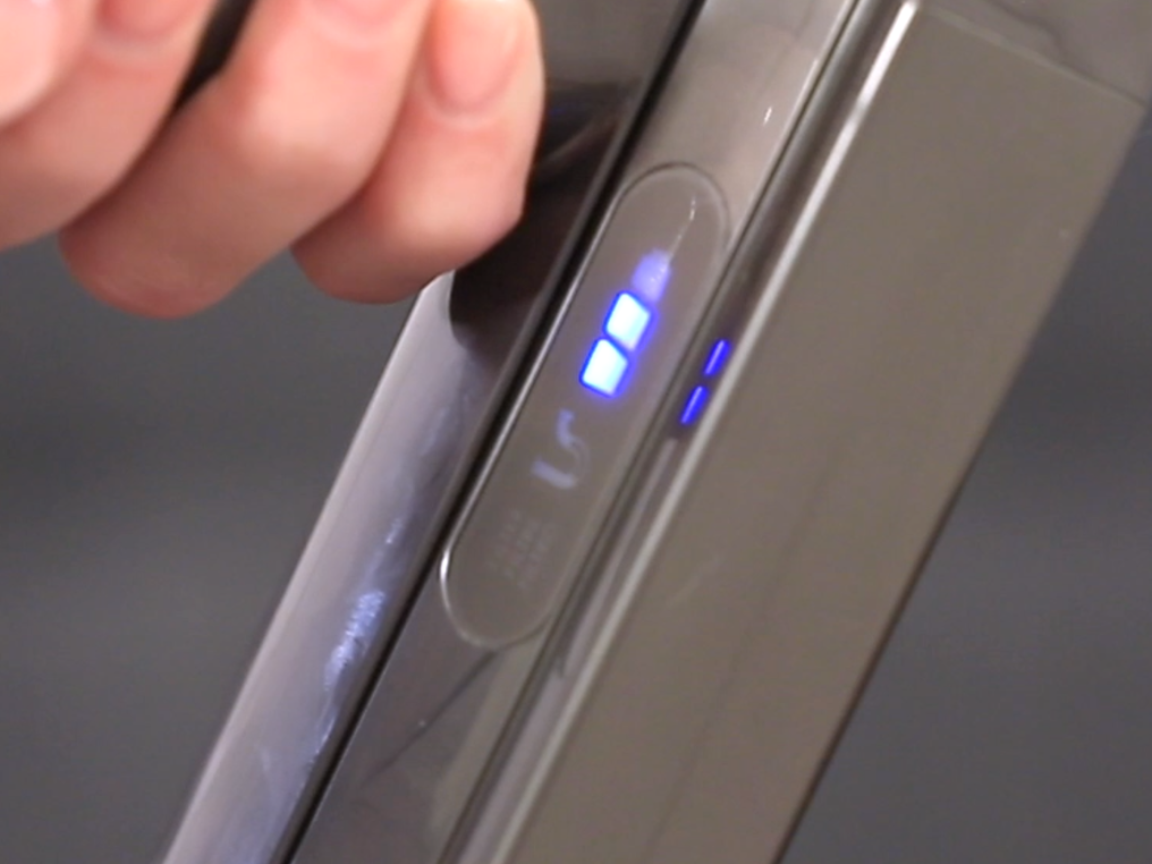
When you see a blinking blue light on your Dyson vacuum’s battery, it’s your machine’s way of saying something needs your attention. Unlike steady lights, a flashing blue often signals a problem with charging, power delivery, or internal safety mechanisms.
There are a few main reasons for this signal:
- Charging Issue: The battery is not charging correctly, often due to a loose connection, faulty charger, or power supply problems.
- Blockage or Overheating: The vacuum has detected a blockage, or the battery/motor is overheating and has shut down as a precaution.
- Battery Fault: The battery might be failing or has reached the end of its useful life.
- Connection Problem: The battery is not making good contact with the vacuum or charger.
It’s important to pay attention to the blinking pattern. Sometimes, the number of flashes indicates a specific issue (for example, two flashes vs. ten flashes). Refer to your model’s manual for details, but the guidance below covers the most common scenarios.
Understanding Dyson Battery Lights: Quick Reference
Dyson vacuums use colored lights to communicate. Here’s a quick summary for easy reference:
| Light Color | Behavior | Possible Meaning |
|---|---|---|
| Blue | Blinking | Battery not charging, blockage, overheating, or connection issue |
| Blue | Solid | Battery charging normally |
| Amber | Blinking | Battery temperature issue, not charging |
| Red | Blinking | Battery fault, needs replacement |
| No Light | — | Battery fully charged or not connected |
Knowing these signals helps you quickly identify what your vacuum is trying to tell you.
Main Causes Of Dyson Battery Blinking Blue
Let’s explore the most common reasons for a blinking blue light on Dyson vacuum batteries.
1. Battery Not Charging
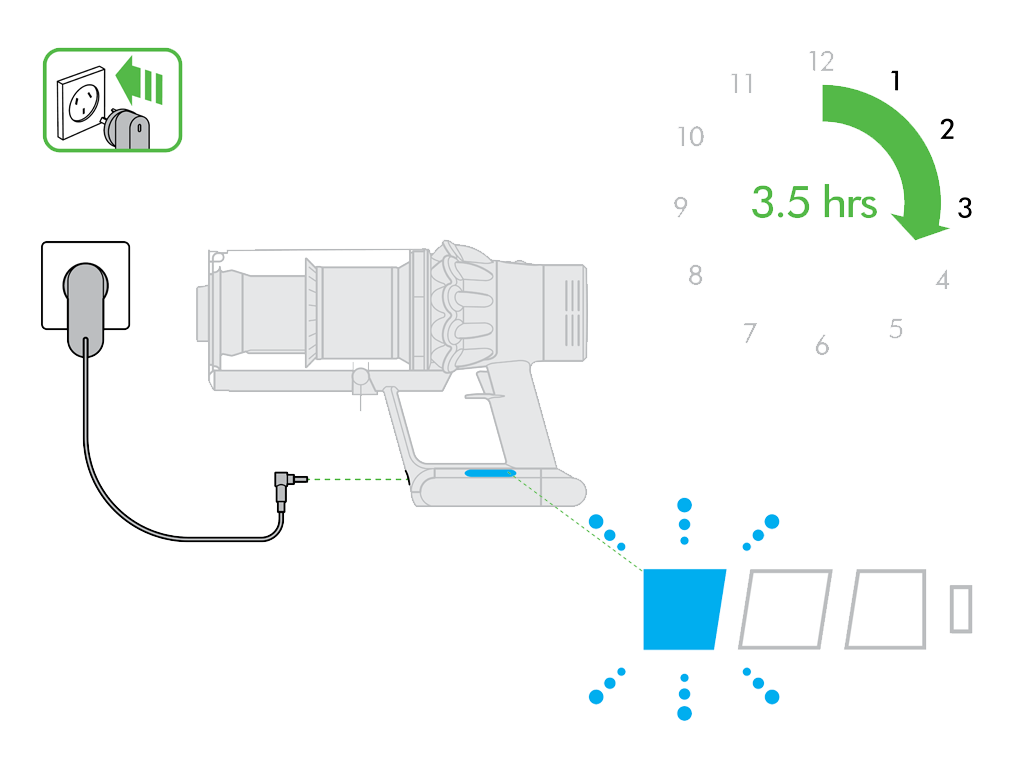
If the battery isn’t charging, the blue light will blink as a warning. Common reasons include:
- Loose charger connection
- Damaged charging cable
- Faulty charging dock or adapter
- Power outlet issues
A simple way to check is to plug another device into the same outlet or try charging your Dyson in a different location.
2. Battery Connection Problems
Sometimes, the battery isn’t fully clicked into place. This poor connection stops the battery from charging or powering the vacuum.
- Make sure the battery is firmly attached to the vacuum or charging cradle.
- Remove and reinsert the battery, listening for a click.
3. Overheating Or Blockage
Dyson vacuums have sensors to detect overheating or blockages. If something is blocking airflow (like a jammed filter, clogged hose, or full dust bin), the blue light may blink and the vacuum will shut down to prevent damage.
- Check for blockages in the wand, hose, filters, and bin.
- Let the vacuum cool down for 30–60 minutes before trying again.
4. Battery Near End Of Life
Rechargeable batteries lose capacity over time. A blinking blue light can sometimes mean the battery is worn out and needs replacement.
- Dyson batteries typically last 2–5 years, depending on use.
- If you notice shorter run times, this is a strong hint.
5. Charger Or Dock Malfunction
A faulty charger or dock can stop the battery from charging, causing the blue light to blink.
- Test the charger with another compatible Dyson vacuum, if possible.
- Inspect the dock and cable for damage.
How To Fix A Dyson Battery Blinking Blue
Solving this issue often requires a step-by-step approach. Here’s what you can do:
Step 1: Check Power Source
- Plug your charger into a different wall socket.
- Avoid extension cords or power strips, as they can sometimes cause problems.
- Make sure the wall socket is switched on (in some countries).
Step 2: Inspect The Charger And Dock
- Look for visible damage on the cable or dock.
- Clean the charging contacts with a dry cloth.
- If you have another Dyson charger, try swapping it.
Step 3: Reseat The Battery
- Remove the battery from the vacuum (or the charger).
- Wait 10 seconds, then reinsert it with a firm push.
- Listen for a click to ensure it’s secure.
Step 4: Clear Any Blockages
- Remove and empty the dust bin.
- Check the wand, hose, and all air pathways for clogs.
- Wash or tap out the filter (follow your model’s manual for cleaning).
Step 5: Cool Down The Vacuum
- If you’ve been vacuuming for a long time or using “Max” mode, the vacuum may overheat.
- Let it cool down in a cool, dry place for at least 30 minutes.
Step 6: Try A Full Reset
- Disconnect the vacuum from all power sources.
- Remove the battery (if possible).
- Hold the power button for 10 seconds.
- Reattach the battery and try charging again.
Step 7: Test With A New Battery
- If all else fails, your battery might be at the end of its life.
- Try a new, genuine Dyson battery (avoid cheap third-party versions).
Credit: support.dyson.ee
When To Replace Your Dyson Battery
Knowing when to replace your Dyson battery can save you time and hassle. Here’s how to decide:
- Short Run Time: If your vacuum runs for much less time than before, even after charging fully, the battery is probably worn out.
- Frequent Blue Blinking: If the blue light keeps blinking after you’ve tried all troubleshooting steps, replacement is likely.
- Battery Age: Most Dyson batteries last around 2–5 years. If yours is older, replacement is a good idea.
- Red Blinking Light: If you see a red light blinking (instead of blue), this often means a serious battery fault.
How To Choose The Right Replacement Battery
Not all batteries are created equal. Dyson recommends using genuine replacement batteries for safety and best performance.
Here’s a quick comparison of battery types for Dyson vacuums:
| Battery Type | Average Lifespan | Warranty | Compatibility |
|---|---|---|---|
| Genuine Dyson | 2–5 years | 12 months | Guaranteed |
| Third-Party (High Quality) | 1–3 years | 6–12 months | May vary |
| Cheap Third-Party | Less than 1 year | None/Unknown | Not always safe |
Tip: Always check the part number and your model before buying a replacement battery.
Common Mistakes When Dealing With Blinking Blue Lights
Many Dyson owners make similar mistakes when troubleshooting a blinking blue battery light. Avoid these to save time and prevent damage:
- Ignoring Cleaning and Maintenance: Blocked filters or hoses are easy to miss but can cause the vacuum to shut down.
- Using Non-Genuine Batteries: Cheap batteries may fit, but they often cause more problems, including safety risks.
- Forgetting to Check the Charger: Sometimes the problem is with the charger, not the battery.
- Overusing Max/Boost Mode: Running on high power drains the battery faster and heats it up, which can trigger safety shutoffs.
- Not Letting the Vacuum Cool Down: After heavy use, give your machine time to rest before trying again.
- Neglecting Firmware Updates: Some newer Dyson models can receive firmware updates that improve battery management. Always check if updates are available.
Credit: support.dyson.co.nz
Practical Tips To Extend Dyson Battery Life
Taking care of your Dyson battery can help prevent blinking blue lights and keep your vacuum running longer.
- Charge After Every Use: Don’t let the battery fully drain regularly; lithium-ion batteries prefer partial discharges.
- Store at Moderate Temperatures: Avoid leaving your Dyson in hot or cold environments.
- Clean Filters Regularly: Clogged filters make the vacuum work harder, using more battery power.
- Don’t Leave Fully Charged for Months: If storing your Dyson for a long time, leave the battery at around 40–60% charge.
- Use Official Accessories: Chargers and batteries from Dyson are designed to work together safely.
- Avoid Extreme Power Modes: Use Max/Boost only when needed.
Real-world Example: Troubleshooting A Dyson V8 Blinking Blue
Let’s look at a common scenario:
Maria notices her Dyson V8 flashes blue when she tries to vacuum. It stops running after a few seconds. She tries charging it, but the blue light keeps blinking.
She follows these steps:
- Checks the Charger: No visible damage, but she tries another power outlet. No change.
- Reseats the Battery: Removes and reinserts the battery. Clicks in place, but problem continues.
- Cleans the Filter: She finds the filter is dirty. After cleaning and letting it dry completely, she reinserts it.
- Removes Blockages: She checks the wand and bin. Finds a small toy blocking the tube. Removes it.
- Lets Vacuum Cool Down: Waits 30 minutes before trying again.
After these steps, her Dyson works normally. In Maria’s case, the blue blinking light was caused by a blockage and dirty filter, not a failed battery.
Insight: Many blinking blue light issues are simple fixes, not always a failed battery. Start with the easiest solutions.
Dyson Vacuum Models And Battery Light Patterns
Different Dyson vacuums may use slightly different light patterns. Here’s a quick comparison of popular models:
| Model | Blue Light Pattern | Common Causes |
|---|---|---|
| Dyson V6/V7/V8 | Blinking rapidly or steadily | Blockage, low battery, charging issue |
| Dyson V10/V11 | Blinking with error code (display screen) | Blockage, overheating, battery issue |
| Dyson V15 | Blinking with digital message | Blockage, battery error, software fault |
| Older DC Models | Blue or amber lights, no screen | Mostly battery or charger faults |
Always check your model’s manual for specific light codes and troubleshooting advice.
How Safe Are Blinking Dyson Batteries?
A blinking blue light is usually a protective feature, not a danger sign. Dyson uses sensors to prevent overheating, short-circuiting, or deep battery discharge. This helps avoid damage to the vacuum and keeps you safe.
However, if you notice:
- A burning smell
- The battery gets extremely hot
- The vacuum sparks or makes strange noises
Stop using the vacuum immediately. In rare cases, damaged batteries can be a fire risk. Always use genuine replacements and contact Dyson support if you’re unsure.

Credit: www.youtube.com
When To Contact Dyson Support
If you’ve tried all troubleshooting steps and the blue light keeps blinking, it’s time to reach out for help. Dyson’s customer service can offer model-specific guidance and arrange repairs or replacements if needed.
- Have your vacuum’s serial number and purchase details ready.
- Explain the steps you’ve already tried.
- If your vacuum is under warranty, repairs or battery replacements may be free.
For official support and warranty information, visit the Dyson Support website.
Frequently Asked Questions
Why Does My Dyson Battery Keep Blinking Blue Even After Charging?
A blue blinking light after charging often means the battery isn’t making good contact, or there’s a blockage/overheating issue. Check the battery connection, clean any filters, and remove clogs. If the problem continues, your battery may need replacement.
Can I Use A Third-party Battery If My Dyson Battery Is Blinking Blue?
You can use third-party batteries, but it’s risky. Many cheap batteries don’t match Dyson’s safety standards and can cause more blinking lights or even damage. Always use high-quality, compatible replacements, and consider genuine Dyson batteries for best results.
How Long Do Dyson Batteries Typically Last?
Most Dyson batteries last between 2 and 5 years, depending on use and care. Heavy use of high-power modes or poor maintenance can shorten battery life. If your vacuum’s run time drops or the blue light blinks frequently, it’s likely time to replace the battery.
Is It Safe To Keep Using My Dyson If The Battery Blinks Blue?
If the blue light blinks occasionally and the vacuum works after a reset or cleaning, it’s usually safe. But if the blinking is constant and the vacuum won’t run, stop using it until you fix the issue. Persistent blinking could signal a battery fault.
What Should I Do If None Of The Troubleshooting Steps Work?
If all troubleshooting fails, your battery may be at the end of its life or there’s a deeper electrical fault. Contact Dyson support for advice, especially if your vacuum is under warranty. They may recommend a replacement battery or a repair.
A blinking blue light on your Dyson vacuum battery can be frustrating, but it’s often a sign of a simple issue like a loose connection or blockage. By following the steps above, you can solve most problems yourself and keep your vacuum running well.
Remember, proper care and using genuine parts are the keys to a long-lasting Dyson. If you ever feel stuck, reach out to Dyson’s expert support—they’re there to help.