
A Bosch laser level is a favorite tool for builders, DIYers, and professionals. Its clean, accurate lines make jobs faster and easier. But what happens when your Bosch laser level starts blinking? Many users get confused, worrying their tool is broken or unsafe. In reality, a blinking Bosch laser level is a helpful signal. It tells you something important needs attention.
If you’ve seen your Bosch laser level blinking and felt unsure what to do, you’re not alone. This article explains why it happens, what each type of blinking means, and how to solve common problems. You’ll also learn tips to prevent future issues and get the most from your tool.
Whether you’re new to laser levels or an experienced pro, understanding these signals saves you time, money, and frustration.
What Is A Bosch Laser Level?
A Bosch laser level is a modern leveling tool that uses lasers to project straight lines or points onto walls, floors, or ceilings. These tools help with tasks like:
- Hanging pictures or shelves
- Installing tiles
- Framing walls
- Setting up drop ceilings
Bosch makes several types of laser levels. The most common are:
- Line Laser Levels – Project one or more straight lines.
- Dot Laser Levels – Show points for layout tasks.
- Rotary Laser Levels – Spin to make a 360° level line, good for large jobs.
Each model has different features, but all Bosch laser levels use blinking lights as signals.
Why Do Bosch Laser Levels Blink?
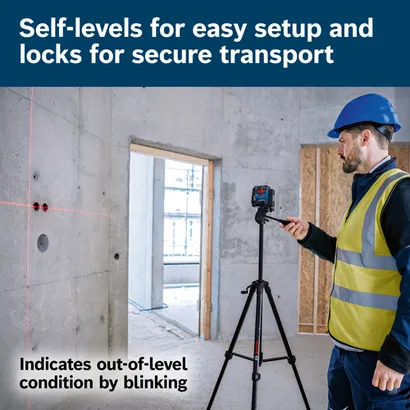
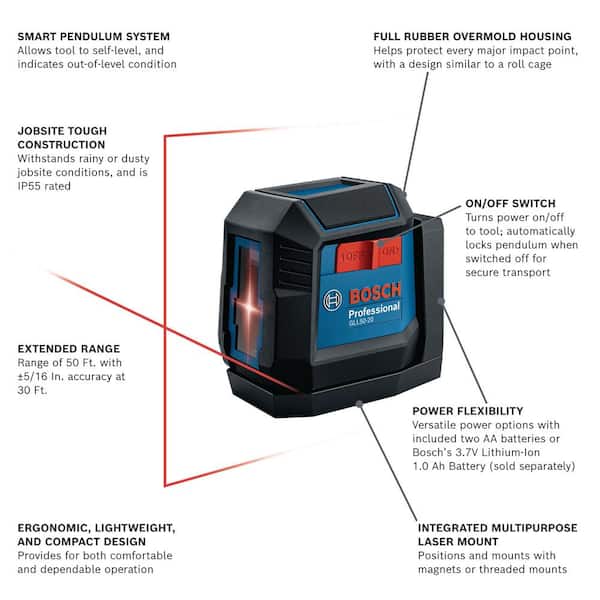
The blinking on a Bosch laser level is not just for show. It’s a warning system that tells you when something is wrong or needs attention. Unlike old bubble levels, modern laser levels have sensors and electronics inside. When these detect a problem, the laser line or the indicator light blinks.
Some reasons for blinking are:
- The device is not level.
- The tilt angle is too great.
- Batteries are low.
- The unit is in pulse mode.
- There’s a calibration issue.
- There’s a hardware fault.
Understanding what kind of blinking you see—slow, fast, or pattern—helps you know what to fix.
Credit: www.boschtools.com
Common Causes Of Blinking In Bosch Laser Levels
1. Out Of Level (tilt Error)
Most Bosch laser levels have a self-leveling system. If you place the device on a surface that’s too uneven, it can’t level itself. When this happens, the laser line blinks to warn you.
Example:
You set your Bosch GLL 55 on a pile of lumber. The device tilts more than 4°. The laser starts blinking quickly. This is a sign to move the tool to a flatter spot.
2. Low Battery Power
When the batteries are weak, the laser may not shine as brightly or may blink. Some models blink the power light, while others blink the laser itself.
Why this matters:
A blinking light warns you before the unit shuts down. Change or recharge batteries if you see this.
3. Pulse Mode Activated
Many Bosch laser levels have a pulse mode for working with laser detectors. When you turn on pulse mode, the laser may blink slowly to show it’s in this mode. This is normal and not a fault.
Pro tip:
Always check if you’ve accidentally pressed the pulse button. If you don’t need a detector, turn off pulse mode to save battery.
4. Calibration Problems
After years of use or a hard drop, the self-leveling system may lose accuracy. Some Bosch models blink the laser or show an error code if they detect calibration issues.
What to do:
Check the manual. If recalibration is possible, follow the steps. If not, contact Bosch service.
5. Hardware Or Internal Fault
Rarely, a blinking laser means a hardware problem. This can be a broken pendulum, a loose wire, or damaged electronics. If you’ve checked other causes and the blinking continues, the tool may need repair.
6. Temperature Extremes
Using the laser in very hot or cold places can affect its function. Some models blink if the temperature is outside the safe range.
Example:
Left in a hot car, the laser blinks when turned on. Let it cool before using.
How To Identify The Type Of Blinking
Not all blinks are the same. Bosch uses different patterns to show different problems. Here’s a quick guide:
| Blinking Pattern | Possible Meaning | Action to Take |
|---|---|---|
| Fast, continuous blinking | Out of level / tilt error | Place on a flat surface |
| Slow, regular blinking | Pulse mode active | Turn off pulse mode if not needed |
| Short, repeating blinks | Low battery | Replace or recharge batteries |
| Irregular or random blinking | Hardware or calibration fault | Service or recalibrate device |
Non-obvious insight:
Some Bosch models may blink both the laser and power light at the same time for certain faults. Always check your model’s manual for exact patterns.
Credit: loneralj.com
Step-by-step Troubleshooting For Bosch Laser Level Blinking
If your Bosch laser level is blinking, follow these steps to fix it:
1. Check The Surface
- Place the tool on a known flat, stable surface.
- Wait a few seconds for self-leveling.
- If blinking stops, the problem was uneven placement.
2. Inspect The Batteries
- Open the battery cover.
- Replace with new, high-quality batteries.
- Recharge if using a rechargeable model.
- Check for corrosion or dirt in the battery compartment.
Tip:
Avoid mixing old and new batteries. This causes weak performance and may trigger false warnings.
3. Review Mode Settings
- Look for a pulse mode button or switch.
- Turn off pulse mode if you’re not using a detector.
- Some models have a “lock” switch; make sure it’s in the correct position.
4. Let The Tool Adjust To Room Temperature
If the laser was stored in a hot or cold place:
- Bring it inside.
- Let it rest for 15–30 minutes.
- Try again once at normal room temperature.
5. Check For Physical Damage
- Inspect for cracks, dents, or loose parts.
- Gently shake—if you hear rattling, a part may be loose inside.
- If dropped recently, calibration may be off.
6. Attempt Recalibration
Some Bosch models allow user calibration. Steps usually include:
- Place the device on a flat, level surface.
- Follow on-screen or manual instructions to adjust the self-leveling system.
- If not user-calibratable, contact Bosch support.
7. Consult The Manual
Every Bosch model has specific signals. Look up your exact model number in the manual for more detailed blink codes.
8. Seek Professional Repair
If all else fails, Bosch offers repair services. Do not try to open the unit yourself—this voids the warranty.
Non-obvious insight:
Sometimes, a slight tilt (less than 4°) won’t cause blinking, but will still affect accuracy. Always use the tool’s bubble vial as a first check before relying on the laser.
Preventing Future Blinking Issues
A little care goes a long way in avoiding laser level problems.
- Store in a dry, moderate place: Avoid extreme heat/cold and humidity.
- Use quality batteries: Cheap or old batteries cause more issues.
- Handle gently: Dropping the tool is the #1 cause of calibration faults.
- Clean the lens: Dust or dirt can block the laser, causing false warnings.
- Check settings before use: Make sure you’re not in pulse mode by accident.

Credit: www.laserlevelreview.com
Bosch Laser Level Models: Blinking Patterns Compared
Bosch makes many laser levels. Each model may have its own blinking style. Here’s a comparison of popular Bosch models and how they signal errors:
| Model | Blinking Signal | Most Common Reason | User Fixable? |
|---|---|---|---|
| GLL 55 | Fast laser blinking | Out of level | Yes |
| GCL 2-160 | Laser + power light blink | Low battery | Yes |
| GLL3-330CG | Slow blink in pulse mode | Pulse mode on | Yes |
| GRL400HCK | Irregular blinking | Calibration error | Service needed |
Pro tip:
Write down your model’s signals or keep the manual nearby so you can quickly check what each blink means.
When To Replace Your Bosch Laser Level
Most blinking problems can be fixed. But sometimes, it’s better to replace the tool:
- The device is out of warranty and repair is expensive.
- Repeated calibration faults after repair.
- Major physical damage (cracked housing, water inside).
- Laser is dim even with new batteries.
A good Bosch laser level can last many years with proper care. But after heavy use or serious damage, replacement is the safest option.
Professional Vs. Diy Bosch Laser Level Repair
Should you try fixing a blinking Bosch laser level yourself? Here’s a quick comparison:
| Repair Type | What You Can Do | What Needs a Pro |
|---|---|---|
| Batteries | Replace, clean contacts | None |
| Settings | Check/adjust modes | Firmware update |
| Calibration | User calibration (if allowed) | Internal calibration, parts replacement |
| Physical damage | Basic inspection | Open unit, replace parts |
Pro advice:
Never open the laser yourself unless the manual says it’s safe. Most internal parts are delicate and can be made worse by DIY fixes.
Bosch Laser Level Blinking In Different Work Environments
Where you use the laser level affects how often you might see blinking warnings.
- Dusty construction sites: Dust on the lens or inside the device can cause false signals. Clean regularly.
- Outdoor work: Bright sunlight can make the laser hard to see and may cause users to think the tool is off or faulty. Use laser detectors for outdoor work.
- Vibration-heavy areas: Using the tool on shaky surfaces (like scaffolding) can keep it from leveling, causing constant blinking.
Non-obvious insight:
Mounting your Bosch laser level on a heavy, stable tripod reduces false tilt errors, especially on uneven job sites.
Choosing The Right Bosch Laser Level To Minimize Blinking
Some Bosch models are more “forgiving” than others. If you want fewer false warnings, look for these features:
- Wider self-leveling range: Some models can self-level even if tilted up to 5°.
- Auto shut-off: Turns off the laser if the device stays out of level too long.
- Clear indicator icons: Some have digital screens showing exactly what’s wrong.
- IP54 or higher rating: Better protection against dust and water.
Example:
The Bosch GLL3-330CG has a 4° self-leveling range and a durable design for tough job sites.
Real-world Stories: How Users Solved Blinking Issues
Case 1: The Mystery Of The Fast Blinking Laser
Jack, a home renovator, noticed his Bosch GLL 2-50 started blinking rapidly during a wall framing project. He tried new batteries, but the problem continued. After checking the surface, he realized the floor had a hidden slope. Placing the laser on a tripod solved the issue instantly.
Case 2: Cold Weather Trouble
Maria used her Bosch laser level for outdoor patio work in winter. The tool blinked on startup and would not project a steady line. After reading the manual, she let the tool warm up inside her truck for 20 minutes.
The blinking stopped, and she finished her project without further problems.
Case 3: Pulse Mode Confusion
A contractor accidentally turned on pulse mode, causing the laser to blink slowly. Thinking it was broken, he almost sent it for repair. A coworker pointed out the pulse mode light. Turning it off returned the laser to normal.
Lesson:
Always check the mode indicators before assuming there’s a fault.
The Importance Of Regular Maintenance
Taking a few minutes to care for your Bosch laser level saves hours of troubleshooting. Here are key habits:
- Wipe the lens with a soft cloth after each use.
- Store the tool in its case.
- Check batteries before starting important jobs.
- Inspect for cracks or loose parts monthly.
- Review the manual’s troubleshooting guide.
These simple steps prevent most blinking issues and help your laser level last longer.
Where To Find More Help
If you’re stuck, several resources can help:
- Bosch website support: Manuals, FAQs, and contact forms.
- Authorized Bosch service centers: For repairs and recalibration.
- Online forums: Other users may have faced the same blinking pattern.
- YouTube: Many pros share video solutions for common Bosch laser level problems.
For more technical details about how laser levels work, see the Wikipedia Laser Level page.
Frequently Asked Questions
Why Is My Bosch Laser Level Blinking Even On A Flat Surface?
This usually means one of three things: batteries are low, the tool is still out of level (even if the surface looks flat), or there’s a calibration issue. Try new batteries and double-check with a bubble level. If blinking continues, the device may need recalibration.
How Do I Know If The Blinking Is Because Of Pulse Mode?
Pulse mode blinking is usually slow and regular. Look for a pulse mode light or icon on your Bosch laser level. Check your manual for your model’s exact indicator. If you don’t need a detector, turn off pulse mode.
What Should I Do If My Bosch Laser Level Blinks After Being Dropped?
First, inspect for visible damage. Try recalibrating if your model allows it. If blinking continues, contact Bosch service. Dropping often causes internal misalignment, which can’t be fixed at home.
Can I Use My Bosch Laser Level Outside If It’s Blinking?
If the blinking is due to pulse mode (for use with a detector), it’s safe. If it’s blinking because it’s out of level or for another error, fix the problem first. Outdoor sunlight can make it hard to see the laser and may cause confusion about its status.
How Often Should I Calibrate My Bosch Laser Level?
For professional use, check calibration every 6–12 months. If you drop the tool or see blinking without an obvious cause, check it sooner. Regular calibration keeps your lines accurate and prevents costly mistakes.
Conclusion
Bosch laser levels are reliable, but blinking signals should never be ignored. With the right knowledge, you can quickly solve most issues and keep your projects moving forward.