
When you see your BlendJet blinking red and purple, it can be confusing and frustrating. This portable blender promises quick smoothies and shakes anywhere. But what do these lights mean? Are they warnings, errors, or something else? Many BlendJet owners run into this issue and wonder if their blender is broken or if there’s an easy fix. Understanding these blinking lights is the first step to getting your BlendJet working again. In this article, you’ll find clear answers, real solutions, and practical tips to keep your blender running smoothly.
What Do Blendjet Blinking Red And Purple Lights Mean?
BlendJet uses colored lights to communicate different statuses and problems. The red and purple blinking lights are not random—they have specific meanings. If you see these colors, your BlendJet is trying to tell you something important about its condition.
The red light often signals an error or urgent issue. The purple light can mean a less critical problem or a warning. When these two colors blink together or alternate, it usually means:
- The jar is not attached correctly
- The blades are blocked
- The battery is low or not charging
- There’s a safety lock triggered
It’s easy to overlook these signals, but ignoring them may stop your BlendJet from working or even cause damage. The good news: most problems can be fixed at home with simple steps.
Common Reasons For Blendjet Blinking Red And Purple
Understanding the possible causes helps you troubleshoot faster. Here are the most common reasons why your BlendJet blinks red and purple:
1. Incorrect Jar Attachment
If the jar isn’t properly aligned with the base, the blender won’t start. This is a built-in safety feature to prevent spills and accidents.
2. Blade Obstruction Or Jammed Blades
Sometimes, ingredients can get stuck under the blades, blocking their movement. Even a small piece of fruit or ice can cause this.
3. Low Or Dead Battery
A low battery is one of the most common reasons for blinking lights. BlendJet needs enough charge to run the motor safely.
4. Charging Issues
Problems with the charging cable, port, or adapter may prevent the battery from charging, even if the blender is plugged in.
5. Overheating
If you run the BlendJet for too long or blend thick ingredients, it can overheat. The lights warn you to let it cool down.
6. Activated Safety Lock
The BlendJet has a safety lock that activates if you assemble it wrong or open the jar while blending. This triggers warning lights.
7. Water Or Moisture In The Base
Liquid inside the base can cause electrical issues and trigger the lights.
8. Faulty Sensors
Sometimes, a sensor inside the blender may malfunction and send incorrect signals.
These issues are not uncommon, especially for new users. Most can be solved without professional help, but knowing the exact cause saves time and effort.
How To Fix Blendjet Blinking Red And Purple
You don’t need to be a tech expert to fix your BlendJet. Follow these clear steps to troubleshoot and solve the problem.
1. Check And Reattach The Jar
Start with the most common issue—jar alignment.
- Remove the jar from the base by twisting it counterclockwise.
- Inspect the connection points for food debris or residue.
- Clean both the jar and base with a dry cloth.
- Reattach the jar by aligning the arrows or markers. Twist until you hear a click or feel it lock in place.
This simple step solves the problem for many users. If the lights stop blinking, you’ve found the issue.
2. Clear Blade Obstructions
If ingredients are stuck, the blades can’t spin.
- Unplug the BlendJet or make sure it’s off.
- Turn the blender upside down and gently shake it.
- Use a spatula or brush to remove stuck pieces. Never use fingers or sharp objects.
- Try blending with a small amount of water to clear out remaining debris.
Avoid overfilling the jar or blending very hard ingredients, as these increase the risk of jams.
3. Recharge The Battery
A low battery can trigger warning lights.
- Connect your BlendJet to a USB charger using the original cable.
- Look for a solid blue light (charging) or green (fully charged).
- Charge for at least 1-2 hours, especially if the battery was completely dead.
If the battery doesn’t charge, try a different cable or USB port. Avoid cheap or low-quality chargers—they may not deliver enough power.
4. Inspect The Charging Cable And Port
Faulty charging hardware is a hidden cause of blinking lights.
- Check the cable for damage like fraying or bent connectors.
- Clean the charging port on the blender with a dry cotton swab.
- Try a different USB adapter or charging block if available.
If the battery still won’t charge, the internal battery might need replacement. This is less common but possible after long-term use.
5. Let The Blender Cool Down
Overheating usually happens if you blend for more than 30-60 seconds at a time.
- Turn off the BlendJet and unplug it if possible.
- Let it sit for at least 15-30 minutes before trying again.
- Avoid blending thick mixtures or large amounts in one go.
Regular short blending cycles keep your device safe and extend its life.
6. Look For Signs Of Water Damage
Moisture inside the base can cause short circuits and light errors.
- Check for drops of water inside the charging port or base.
- Dry thoroughly with a towel and let it air dry for several hours.
- Never submerge the base in water. Only wash the jar and blades.
If you see corrosion or persistent blinking, contact BlendJet support for advice.
7. Reset The Blendjet
If none of the above works, try resetting your device.
- Disconnect the blender from any power source.
- Detach the jar and leave both parts separate for a few minutes.
- Reattach the jar and try blending again.
This can clear minor software glitches or sensor errors.
8. Contact Customer Support
If your BlendJet still blinks red and purple after these steps, the problem may be internal or related to the electronics. Reach out to BlendJet’s customer support with your device details and a description of the issue. Most units come with a warranty, so repairs or replacements might be covered.
Blendjet Blinking Patterns And Their Meanings
Understanding light codes helps you react quickly. Here’s a guide to what the most common BlendJet light patterns mean:
| Light Pattern | Meaning | Action Needed |
|---|---|---|
| Solid Blue | Normal operation | Ready to blend |
| Blinking Red | Error or blockage | Check jar, blades, and charge |
| Blinking Purple | Jar not attached or safety lock | Reattach jar, check alignment |
| Red & Purple Blinking | Multiple errors (jar, battery, blockage) | Troubleshoot step by step |
| Blinking Green | Charging complete | Unplug and use |
Many users make the mistake of ignoring these lights or misreading their meaning. It’s important to match the light pattern to the correct fix.

Credit: www.youtube.com
Preventing Blendjet Red And Purple Blinking Issues
You can avoid most blinking light problems by using and caring for your BlendJet properly. Here are some simple tips to keep your blender running smoothly:
- Always align the jar carefully before blending.
- Don’t overfill—leave space for ingredients to move.
- Charge with the original cable and avoid third-party chargers.
- Clean the jar and blades after every use to prevent food build-up.
- Never run the blender for more than 60 seconds at a time.
- Keep the base dry and never wash it under running water.
- Store your BlendJet in a cool, dry place when not in use.
A little preventive care saves time and avoids the stress of troubleshooting blinking lights.
Advanced Troubleshooting: When Basic Fixes Don’t Work
If your BlendJet continues to blink red and purple after basic troubleshooting, it may be time for deeper checks.
Check For Internal Battery Failure
After many charge cycles, the built-in battery can lose capacity or fail. Signs include:
- The blender only works when plugged in
- Battery drains very quickly
- Won’t hold a charge at all
In this case, battery replacement may be necessary. This is not a DIY job for most people. If your BlendJet is under warranty, contact support for repair or replacement.
Inspect For Faulty Sensors
Sometimes the internal sensors that detect jar alignment or blade motion fail. You may see blinking lights even if everything is assembled correctly. Unfortunately, this requires professional servicing.
Software/firmware Glitches
Rarely, the BlendJet’s internal software can crash. This may cause strange blinking patterns or unresponsive controls. Resetting the device (disconnecting and leaving it unpowered for several minutes) can sometimes clear the problem.
Comparing Blendjet Models: Are All Affected?
Not all BlendJet models use the same light codes. Here’s a quick comparison:
| Model | Light Codes | Common Issues |
|---|---|---|
| BlendJet One | Blue, Red | Battery, Jar alignment |
| BlendJet 2 | Blue, Red, Purple, Green | Jar, Battery, Overheat |
| BlendJet Pro | Blue, Red, Purple, Green | Advanced safety, Sensor errors |
If your model is not listed, check the official manual or the BlendJet website for your specific light codes.
Real User Experiences: What Works And What Doesn’t
Many new BlendJet owners worry that a blinking red and purple light means the blender is broken. In reality, most issues are minor and can be fixed at home. For example, a user on a popular kitchen forum described how their BlendJet stopped working after making a thick smoothie.
The lights blinked red and purple, but after clearing the blades and recharging, it worked perfectly again.
Another user made the mistake of washing the entire base under the faucet. Water got inside, causing permanent light errors. This highlights the importance of following cleaning instructions—never submerge the base.
A non-obvious insight: Sometimes, the jar appears attached but isn’t fully locked. Even a small misalignment can trigger the safety lock and blinking lights. Always twist the jar until you feel or hear it “click.”
Another tip: If your BlendJet blinks red and purple only when blending thick mixtures, try adding more liquid. This reduces strain on the motor and prevents overheating.
When To Seek Professional Help
BlendJet blenders are designed for easy troubleshooting, but not every problem can be fixed at home. Seek professional help if:
- The blinking lights persist after all troubleshooting steps
- The blender smells like burning plastic or shows signs of electrical damage
- The charging port is loose, corroded, or broken
- The battery is swollen or leaking
In these cases, stop using the blender and contact BlendJet support or a qualified repair center.

Credit: www.reddit.com
Blendjet Maintenance Tips For Longevity
A well-maintained BlendJet lasts longer and avoids most light errors. Here are some maintenance practices:
- Clean the jar and blades after every use
- Wipe the base with a dry or slightly damp cloth only
- Store with the jar detached to prevent seal wear
- Charge the battery regularly, even if not in use
- Check for updates or recalls on the BlendJet website
Following these habits prevents both common and rare issues.
Blendjet Vs. Other Portable Blenders: Reliability Comparison
How does BlendJet stack up against similar products when it comes to light errors and reliability? Here’s a quick look:
| Blender Brand | Common Light Errors | User-Reported Reliability |
|---|---|---|
| BlendJet | Red, Purple, Green | High, with good troubleshooting |
| PopBabies | Red, Blue | Moderate, more battery issues |
| Oster MyBlend | Blue, Red | Moderate, less safety locking |
| NutriBullet Go | Blue, Red | High, fewer light codes |
BlendJet’s advanced light codes help prevent accidents but can confuse new users. Once you learn what the lights mean, troubleshooting becomes much easier.
Useful Resources For Blendjet Owners
For more detailed help, you can visit the official BlendJet Help Center. Here you’ll find official guides, FAQs, and warranty information.
Frequently Asked Questions
Why Does My Blendjet Only Blink Red And Purple When I Try To Blend Thick Smoothies?
When blending thick mixtures, the motor can get overloaded or the blades can jam. This triggers the safety system, causing the red and purple lights to blink. Try adding more liquid to reduce thickness and blend in short bursts.
Can I Reset My Blendjet If The Lights Keep Blinking?
Yes, you can reset the BlendJet by detaching the jar, disconnecting from power, and leaving both parts separate for a few minutes. Reattach and try again. This clears minor software and sensor errors.
Is It Safe To Keep Using My Blendjet When The Red And Purple Lights Are Blinking?
No, it’s not safe. The blinking lights are a warning that something is wrong—such as a blockage, misalignment, or battery problem. Continuing to use it can damage the blender or cause safety risks.
My Blendjet Blinks Red And Purple Even After Charging. What Should I Do?
Check for jar misalignment, blade jams, or moisture in the base. If everything is clean and assembled correctly, and the battery is fully charged, the problem may be a faulty sensor or battery. Contact BlendJet support if the issue remains.
Does Blendjet Warranty Cover Blinking Light Issues?
In most cases, yes. BlendJet’s warranty covers defects in materials and workmanship, including persistent light errors not caused by misuse or water damage. Save your receipt and contact support for warranty claims.
Conclusion
If you understand the meaning behind the red and purple blinking lights, BlendJet troubleshooting becomes much less stressful. With a little care and attention, your portable blender can serve you well for years—no more mystery lights, just smooth blending wherever you go.
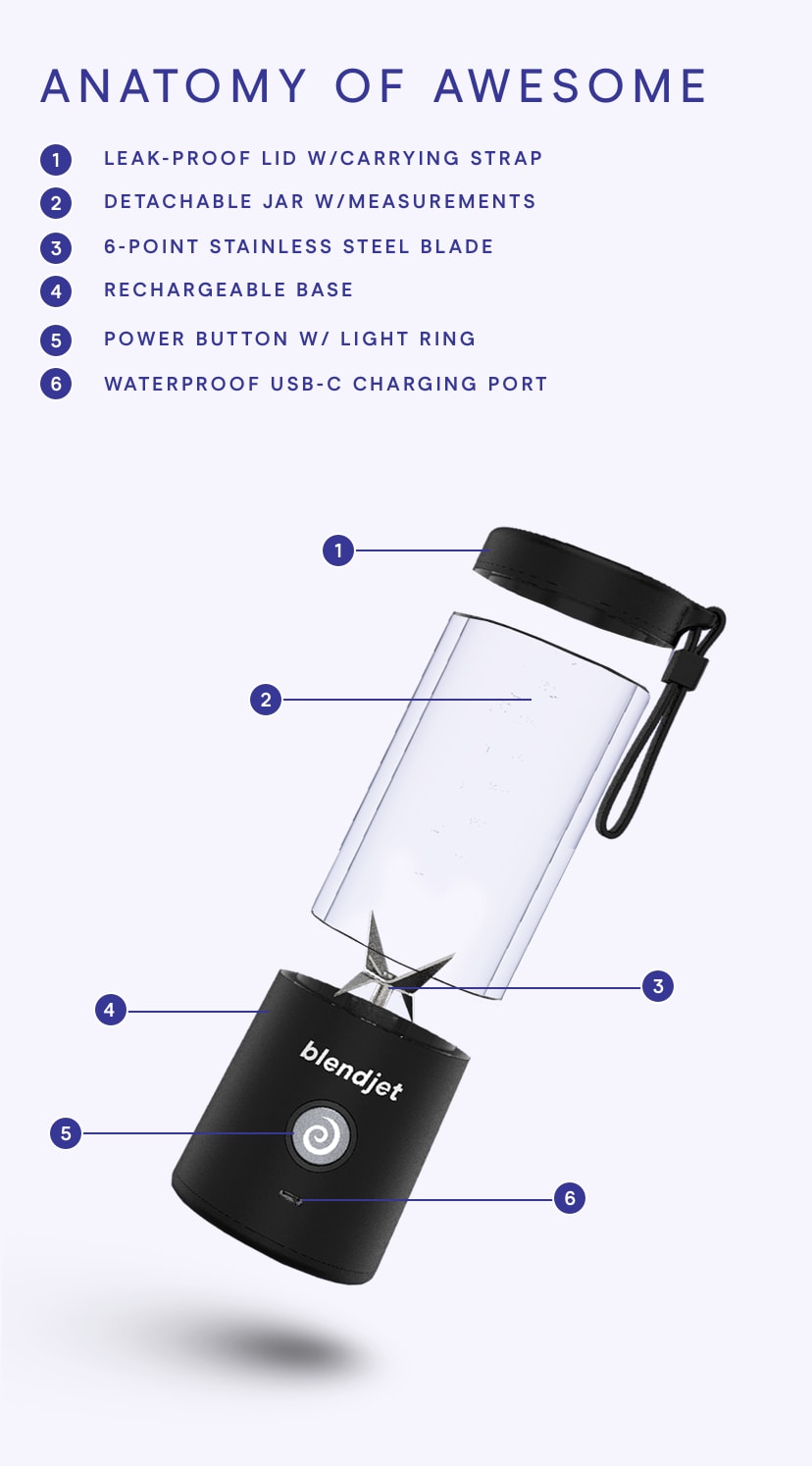
Credit: blendjet.com