
A blinking orange light on your Philips Sonicare toothbrush can be confusing—especially if you depend on it for your daily oral care. Many users see this light and worry their toothbrush is broken or not charging. But there’s good news: in most cases, the orange light is a sign that something needs your attention, not a sign of permanent failure. Understanding what it means, how to fix it, and when to seek help can save you time, money, and frustration.
In this article, you’ll discover what the orange light means on different Sonicare models, learn the most common causes, and get step-by-step solutions. You’ll also find practical advice on battery care, cleaning, and troubleshooting. If you want to keep your Sonicare toothbrush working well (and avoid unnecessary replacements), this guide will help you feel confident and in control.
What Does The Orange Light Mean?
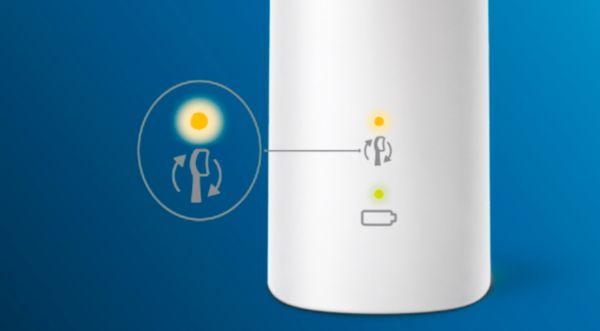
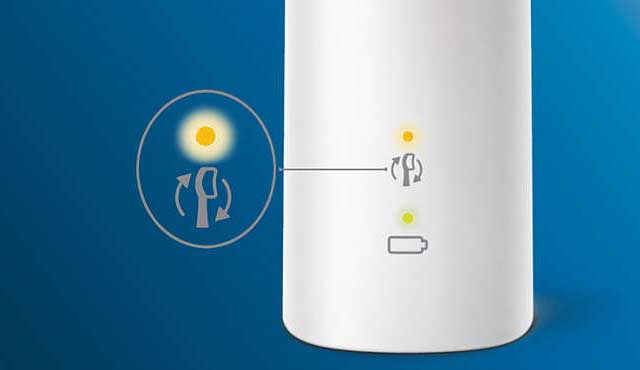
The orange light on a Philips Sonicare toothbrush is a warning or notification. It can mean several things depending on your model, but it usually signals one of these:
- Low battery: The toothbrush needs to be charged soon.
- Charging problem: The toothbrush is not charging correctly.
- Brush head alert: Time to replace your brush head.
- Error or malfunction: Sometimes, it can mean something is wrong.
Model Differences
Not all Sonicare toothbrushes use the orange light the same way. Here’s a quick look at how the meaning changes by model:
| Model | Orange Light Location | Main Meaning |
|---|---|---|
| ProtectiveClean | Base or handle | Brush head replacement or low battery |
| DiamondClean | Near power button | Low battery or charging error |
| HealthyWhite+ | Base | Low battery |
| EasyClean | Handle | Low battery |
| ExpertClean | Handle | Brush head alert, battery, or connectivity issue |
Tip: Always check your user manual for model-specific signals. Some models even have two different orange lights!
Common Causes Of Orange Light Blinking
Let’s break down the most frequent reasons you’ll see a blinking orange light.
1. Low Battery
The most common reason is low battery. The orange light starts blinking when the battery level drops below a certain point—usually around 20%. If you keep brushing without charging, the toothbrush will eventually stop working.
2. Charging Problems
If you place your toothbrush on the charger and the orange light keeps blinking, it might not be charging at all. This can be due to:
- Faulty charger or cable
- Dirty charging contacts
- Incorrect charger for the model
- Power outlet issues
3. Brush Head Replacement Reminder
Some Sonicare models have a brush head reminder. The orange light flashes when it’s time to replace the brush head (usually every 3 months or after a set number of uses).
4. Error Or Malfunction
Rarely, a blinking orange light can mean a fault inside the toothbrush. For example, water damage, a stuck button, or an internal error.
5. Connectivity Issue (bluetooth Models)
Newer models with Bluetooth (like the ExpertClean) can show an orange light if the toothbrush cannot sync with the app or loses connection.
How To Fix A Blinking Orange Light
Troubleshooting depends on the specific cause. Here’s how to approach each situation, step by step.
Charging The Toothbrush
If the orange light means low battery, do this:
- Place the toothbrush on the charger. Make sure the charger is plugged in and the light on the charger is on.
- Wait at least 24 hours for a full charge (especially if the battery was empty).
- Do not use the toothbrush while charging.
If the orange light stays on after charging, try these steps:
- Check for dust or toothpaste on the charging contacts. Clean with a dry cloth.
- Try a different outlet or charger (if available).
- Move the toothbrush slightly on the charger—sometimes alignment matters.
Replacing The Brush Head
If your toothbrush uses an orange light for the brush head reminder:
- Remove the old brush head.
- Attach a new, genuine Philips Sonicare brush head.
- The orange light should turn off automatically.
Some models require a special reset. Hold the power button for 5 seconds after replacing the head to clear the reminder.
Dealing With Errors
If you suspect a malfunction (toothbrush doesn’t turn on, orange light blinks fast, or brush vibrates strangely):
- Reset the toothbrush (hold the power button for 10+ seconds).
- Try charging for 24 hours, then test again.
- If the problem continues, contact Philips support.
Bluetooth Troubleshooting
For Bluetooth-connected models:
- Make sure your phone’s Bluetooth is on.
- Open the Sonicare app and try to reconnect.
- If the orange light still blinks, restart both the toothbrush and your phone.
Pro tip: Always use the official Sonicare app for the best compatibility.
Battery Life And Charging Tips
A common worry is that the orange light means your battery is failing. But most Sonicare batteries last 2-3 years or more with proper care. Here’s how to get the most from your battery and avoid problems:
Best Practices
- Charge regularly: Don’t let the battery drain to zero every time. Top up every few days.
- Avoid overcharging: Remove from the charger after a full charge. Continuous charging can slowly reduce battery life.
- Room temperature: Charge at normal room temperature (60°F–75°F / 16°C–24°C). Extreme cold or heat can damage batteries.
- Use the original charger: Third-party chargers may not work correctly.
Battery Performance Comparison
How Does Sonicare Battery Life Compare To Other Brands?
| Brand & Model | Battery Type | Average Run Time (Days) | Full Charge Time (Hours) |
|---|---|---|---|
| Philips Sonicare DiamondClean | Li-ion | 14-21 | 24 |
| Oral-B Genius X | Li-ion | 12-14 | 12 |
| Fairywill FW-507 | Li-ion | 30 | 4 |
| Philips Sonicare ProtectiveClean | NiMH | 10-14 | 24 |
As you can see, most Sonicare models have competitive battery life, but run time can drop as batteries age.
When To Replace The Battery
Most Sonicare toothbrushes have a sealed battery. Replacing it usually means buying a new toothbrush. If the orange light stays on even after charging, and the toothbrush can’t hold a charge for more than a few days, it’s probably time for a replacement.
Some users try to replace batteries themselves, but it’s difficult and may void your warranty.
Cleaning And Maintenance
Proper maintenance helps prevent orange light issues—especially those caused by poor charging or brush head detection.
Cleaning The Charging Contacts
Every week, check the bottom of the toothbrush and the charger base:
- Wipe away any toothpaste, water, or debris.
- Use a dry cloth only—never use water or cleaners on the contacts.
Brush Head And Handle Care
- Replace brush heads every 3 months or when bristles are frayed.
- Rinse the brush head after every use and let it air dry.
- Once a month, remove the brush head and clean the area where it connects to the handle.
Storage
- Store the toothbrush upright, not on its side.
- Avoid humid or wet storage areas. Moisture can cause internal problems.
When To Contact Philips Support
If you’ve tried all the troubleshooting steps and the orange light still blinks, it might be time to get help from Philips support.
When Support Is Needed
- Orange light blinks after full charge and new brush head
- Toothbrush does not turn on or stops quickly
- Handle is hot, smells, or makes strange noises
- Charger does not power on
Warranty And Repairs
Most Sonicare toothbrushes come with a 2-year warranty. If your brush is still under warranty, contact Philips for a repair or replacement.
You’ll need:
- The model number (on the bottom of the handle)
- The purchase date and receipt
- A description of the problem
You can start a warranty claim at the official Philips Support page.
Credit: www.usa.philips.com
Common Mistakes That Cause Orange Light Issues
Many orange light problems are avoidable. Here are mistakes people often make (and how to avoid them):
- Using non-original chargers: Only use the charger that came with your Sonicare.
- Ignoring brush head reminders: Old brush heads can stop working or trigger alerts.
- Letting the battery die completely: Try to keep the battery above 10-20%.
- Storing in wet conditions: Water can damage the electronics inside.
- Not cleaning contacts: Dirty contacts stop charging.
- Trying to force brush heads: Use only genuine Sonicare heads for proper fit.
Differences Between Orange And Other Light Colors
It’s easy to mix up the meanings of different indicator lights on your Sonicare toothbrush. Here’s a quick guide:
| Light Color | Common Meaning | Action Needed |
|---|---|---|
| Orange/Blinking | Low battery, brush head alert, or error | Charge, replace head, or troubleshoot |
| Green (Solid/Blinking) | Charging or fully charged | None |
| Blue | Bluetooth pairing | Connect with app |
| Red | Error, overheating, or battery failure | Stop use, cool down, or contact support |
| White | Power on or mode selection | Normal operation |
Non-obvious insight: Some models use the same light for two different alerts (for example, orange for both low battery and brush head). The speed of blinking and when it happens (while charging or brushing) gives you the clue.
How To Know If Your Sonicare Needs Replacing
Even with the best care, toothbrushes don’t last forever. Here are signs it’s time to replace your Sonicare:
- The orange light is always on, and it won’t charge fully.
- Battery lasts less than 2 days, even after long charging.
- Toothbrush vibrates weakly or makes unusual sounds.
- The handle shows cracks, rust, or leaking liquid.
- Frequent connection issues with the app (for Bluetooth models).
Pro tip: Most users get 3-5 years of use from a Sonicare toothbrush. If yours is older and has multiple issues, a new model may be a better investment.
Tips For Getting The Most From Your Philips Sonicare Toothbrush
To avoid problems and keep your Sonicare working well:
- Keep the charger and contacts clean and dry.
- Replace brush heads on schedule.
- Charge the battery before it gets too low.
- Store in a dry spot, upright.
- Use official Philips Sonicare accessories.
- Read your model’s manual for unique features.
Experience-based tip: If you travel, take the charger with you. Using a fully charged Sonicare can last up to 3 weeks, but long trips or cold weather can drain the battery faster.
Credit: www.electricteeth.com
Frequently Asked Questions
What Should I Do If My Sonicare Orange Light Blinks But The Toothbrush Works?
If the toothbrush works normally, the orange light usually means the battery is low or the brush head needs replacing. Charge the toothbrush fully and check the brush head. If the light stays on, replace the brush head with a genuine Philips Sonicare head. If it still blinks, reset the toothbrush by holding the power button for 10 seconds.
Can I Keep Using My Sonicare If The Orange Light Is Blinking?
You can use the toothbrush for a few more sessions, but it may stop working soon if the battery is low. If the orange light is for the brush head, the bristles may be worn and less effective. It’s best to address the warning as soon as possible for the best cleaning and to prevent damage.
How Do I Know If The Orange Light Means Battery Or Brush Head?
Check if the light blinks when brushing or when charging. Battery warnings usually blink during or after brushing, especially if the brush feels weaker. Brush head alerts often blink when you turn on the handle or at the end of a session. Review your model’s manual for exact signals—meanings can differ by model.
Credit: www.electricteeth.com
Is It Safe To Use Third-party Chargers Or Brush Heads?
It’s not recommended. Non-original chargers may not deliver the correct voltage, which can damage the battery or electronics. Third-party brush heads might not fit well and can confuse the brush head reminder system, causing orange light errors. Use genuine Philips Sonicare accessories for the best performance and warranty coverage.
When Should I Contact Philips Support About A Blinking Orange Light?
Contact support if the orange light blinks after you’ve fully charged the brush and replaced the head, or if the toothbrush does not work at all. Also, seek help if the handle gets hot, smells unusual, or shows signs of water inside.
Support can check your warranty and help with repair or replacement options.
A blinking orange light doesn’t have to be a cause for stress. With a little troubleshooting and regular care, your Philips Sonicare toothbrush can keep your teeth clean and healthy for years. Knowing what each light means helps you respond quickly, avoid bigger issues, and get the most from your investment. If you ever need more details, Philips’ official support page is a reliable source for answers and help.