
If your LG dryer shows a Flow Sense blinking light, it can be confusing and even worrying. Many people ask, “Is my dryer broken?” or “Is it safe to use?” The Flow Sense feature is there to help you, not scare you. But to use your dryer safely and efficiently, you need to know what this warning means, why it happens, and how to fix it for good.
Let’s explore how the Flow Sense system works, what causes it to blink, and practical steps you can take to clear the warning. You’ll learn how to keep your LG dryer running well, save energy, and avoid fire risks. Even if you’re not a technical person, you’ll find clear advice here—plus a few tips most guides miss.
What Is Flow Sense On Lg Dryers?
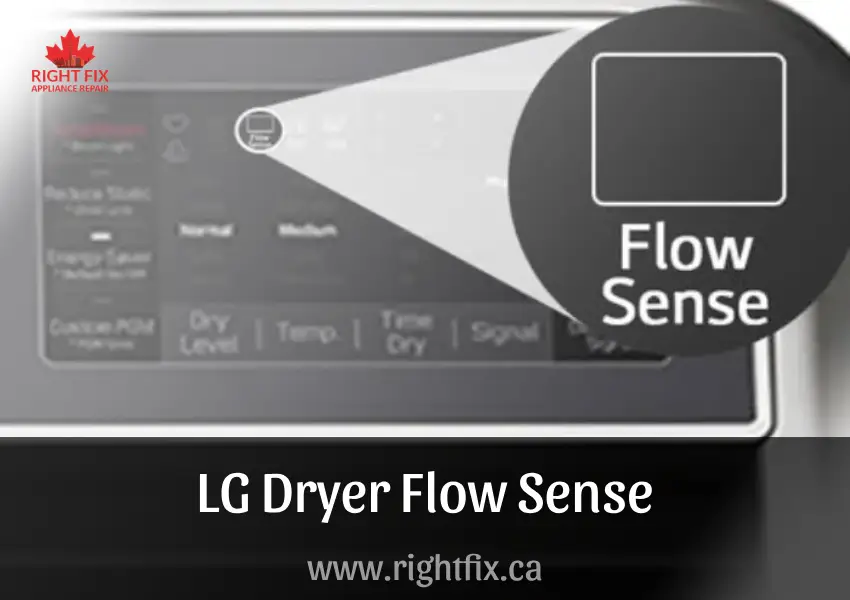
Flow Sense is a smart warning system built into most modern LG dryers. Its main job is to check the airflow through your dryer’s vent system. If it detects poor airflow, it warns you with a blinking icon or code. This helps prevent bigger problems, like overheating or dangerous lint buildup, which can lead to house fires.
The Flow Sense system uses sensors to measure how well air is moving out of your dryer. If something blocks this airflow—like lint, kinks in the duct, or a crushed vent hose—the system will trigger a warning. Most LG models will show a blinking “Flow Sense” light, sometimes along with error codes such as d80, d90, or d95.
Why Airflow Matters
Good airflow does three important things:
- Dries clothes faster – Blocked vents make drying slow.
- Saves energy – Your dryer uses more power if air can’t escape.
- Prevents fires – Lint buildup is a leading cause of dryer fires.
When Flow Sense blinks, it’s telling you something is wrong with the venting. Ignoring the warning can lead to bigger, more expensive problems.
Common Reasons For Flow Sense Blinking
If you see the Flow Sense light blinking, several things could be wrong. Here are the most common causes:
- Lint buildup in the vent pipe
- Crushed or kinked vent hose
- Blocked or dirty lint filter
- Too long or complex vent ducting
- Poor vent cap design or blockage outside
- Using plastic vent hoses instead of metal
- Bird nests or pests in the vent outlet
Let’s look at these in more detail.
Lint Buildup
Even if you clean the lint filter after every load, some lint gets past it. Over time, this lint collects in the vent pipe and slows down airflow. Most dryers need a vent cleaning every 6–12 months.
Crushed Or Kinked Vent Hose
If your dryer is pushed too close to the wall, the vent hose can get squashed. This blocks the air and triggers Flow Sense. Flexible hoses are especially prone to this problem.
Dirty Lint Filter
A clogged lint filter can block air before it even reaches the vent. Wash the filter with water and soap every few weeks, especially if you use dryer sheets.
Long Or Complex Ducting
Long vent runs or many bends make it hard for air to escape. LG recommends vent pipes be as straight and short as possible—ideally less than 35 feet with few bends.
Blocked Vent Cap
Sometimes the vent outside your house gets covered by leaves, snow, or even animal nests. If the flap can’t open, your dryer can’t breathe.
Wrong Vent Hose Material
Plastic or foil hoses can sag, trap lint, and are also a fire risk. LG and safety codes recommend rigid or semi-rigid metal ducts only.
Hidden Pests
Birds, squirrels, or insects sometimes build nests in vents. This is more common than many people realize and can cause sudden, total blockages.
How Flow Sense Works
Understanding how Flow Sense checks airflow helps you troubleshoot better.
Inside your LG dryer, sensors measure the temperature and air pressure during each drying cycle. If the air stays too hot or pressure builds up, the system assumes airflow is poor. When this happens, the Flow Sense icon starts blinking, and you may also see an error code.
Here’s a quick breakdown of common Flow Sense error codes:
| Error Code | Meaning | Action Needed |
|---|---|---|
| d80 | 80% airflow blocked | Clean vent system soon |
| d90 | 90% airflow blocked | Stop using and clean vent now |
| d95 | 95% airflow blocked | Serious danger—clean vent immediately |
A higher number means a more serious problem. D95 means the dryer is close to shutting down to avoid fire risk.
Immediate Steps When Flow Sense Is Blinking
If you see the Flow Sense warning, don’t panic. Most fixes are simple. Here’s what to do:
- Stop using the dryer until you check for blockages.
- Clean the lint filter thoroughly—even wash it if needed.
- Inspect the vent hose behind the dryer. Make sure it’s not crushed or kinked.
- Check the vent cap outside your house. Remove any leaves, snow, or debris.
- Run a test cycle after checking the above. If the warning is gone, you’re safe to continue.
- If the warning remains, call a professional vent cleaning service.
One important tip: Many people clean only the part of the duct they can see. Lint often builds up deep inside the walls or in long runs. Professional tools can reach these spots.

Credit: www.lg.com
How To Clean And Maintain Your Dryer Vent
Regular vent cleaning is the best way to avoid Flow Sense warnings. You can do much of this yourself, but for long or complex ducts, consider hiring a pro. Here’s a step-by-step guide:
Step 1: Unplug The Dryer
Always unplug your dryer before cleaning. If you have a gas dryer, turn off the gas valve too.
Step 2: Pull The Dryer Away From The Wall
Gently move the dryer out so you can access the vent hose. Avoid yanking the hose or pulling too hard.
Step 3: Disconnect The Vent Hose
Loosen the clamp and slide the hose off the back of the dryer. Be ready for lint to fall out.
Step 4: Clean The Hose
Use a vent cleaning brush (available at hardware stores) to remove lint from inside the hose. For best results, attach the brush to a drill.
Step 5: Clean The Wall Duct
Push the brush as far as you can into the duct leading to the outside. Rotate it to collect lint.
Step 6: Check And Clean The Outside Vent
Go outside and remove the vent cover. Pull out any lint, leaves, or nests you find. Make sure the flap opens and closes freely.
Step 7: Reconnect Everything
Attach the hose securely, plug the dryer back in, and slide it gently into place.
Step 8: Run A Test Cycle
Check if the Flow Sense warning is gone. If it is, you’ve solved the problem.
Here’s a quick comparison of cleaning methods:
| Method | Pros | Cons | Cost |
|---|---|---|---|
| DIY Brush Kit | Low cost, easy for short vents | Limited reach, messy | $20-$30 |
| Professional Service | Thorough, safe for long ducts | More expensive, need to schedule | $100-$200 |
How To Prevent Flow Sense Warnings
Prevention is better than repair. Here’s how to keep your dryer’s airflow strong year-round:
- Clean the lint filter after every load, and wash it with soap once a month.
- Check and clean the vent hose at least twice a year.
- Inspect the outside vent cap regularly, especially after storms or heavy winds.
- Replace plastic or foil ducts with rigid metal ducts.
- Keep the vent run short and with as few bends as possible.
- Avoid pushing the dryer too close to the wall.
- Schedule professional vent cleaning every 1–2 years if your duct is long or goes through walls/ceilings.
A common mistake is to forget about the vent cap outside. Even if your dryer is new, an outside blockage can cause Flow Sense to blink.
What If Cleaning Doesn’t Fix The Problem?
Sometimes, you follow all the steps and the warning still blinks. Here are possible reasons:
- Sensors are faulty – Occasionally, the Flow Sense sensor itself fails.
- Control board issue – A rare but possible problem with your dryer’s electronics.
- Hidden duct damage – Sometimes, ducts have collapsed inside walls or have hidden holes.
- Improper installation – Too many bends or wrong materials used by the installer.
If you suspect a technical fault, try unplugging the dryer for 5 minutes to reset the electronics. If the warning comes back, call LG support or a qualified appliance repair service. A skilled technician can test sensors and boards.
Real-life Example: Flow Sense Nightmare
Sarah, a homeowner in Ohio, noticed her LG dryer’s Flow Sense light blinking one winter. She cleaned the lint filter and hose, but the warning stayed. After some frustration, she called a professional. The expert found a bird’s nest jammed deep in the outside vent cap—completely blocking airflow.
After removing the nest, the warning disappeared and her dryer worked like new.
Many people are surprised to learn that even new dryers can have vent problems, especially if you move into a house with old ductwork.
Credit: rightfix.ca
How Flow Sense Compares To Other Dryer Warning Systems
Not all dryers have Flow Sense. Some only have basic high-heat cutoffs, while others have advanced sensor systems.
Here’s how LG’s Flow Sense compares to other brands:
| Brand | Airflow Warning System | Level of Detail | User Action Needed |
|---|---|---|---|
| LG | Flow Sense | Shows blockage percentage and codes | Check vent, clean, or call pro |
| Samsung | Vent Sensor | Basic warning icon | Clean vent |
| Whirlpool | No specific system | Only stops if overheated | Wait to cool, clean if needed |
| GE | Check Vent Light | Simple on/off indicator | Check vent |
LG’s Flow Sense gives you more information and warnings before a problem becomes dangerous.
Non-obvious Insights Most People Miss
- Dryer sheets can coat your lint filter – Even if your filter looks clean, dryer sheets leave a nearly invisible film. Hold the filter under water—if water pools instead of flowing through, wash the filter with soap. A blocked filter can trigger Flow Sense.
- Vent length and bends matter more than you think – Every 90-degree bend in your vent duct adds about 5 feet of “equivalent length.” If your vent is 20 feet with three bends, it’s like 35 feet to the dryer. Too many bends almost guarantee future Flow Sense warnings.
Energy Savings And Fire Safety
A clean vent means more than just no warnings. The US Fire Administration reports that 2,900 home clothes dryer fires are reported each year, causing 5 deaths, 100 injuries, and $35 million in property loss. Most are due to lint buildup.
By keeping your dryer vent clean, you:
- Lower your energy bills (drying times can drop by 30% or more)
- Extend the life of your dryer
- Avoid expensive service calls and repairs
- Protect your family from fire risk
When To Call A Professional
While DIY cleaning is possible, call a pro if:
- The vent is more than 10 feet long or goes through walls
- You can’t reach the outside vent easily
- The warning stays on after cleaning
- There are signs of pests or water in the duct
Professionals use special brushes and vacuums to clean ducts thoroughly.

Credit: www.youtube.com
Resources For More Help
If you want to learn more about dryer safety or vent cleaning, check the official US Fire Administration guide. It has useful tips on fire prevention and dryer maintenance.
Frequently Asked Questions
What Does Flow Sense Blinking Mean On My Lg Dryer?
The Flow Sense blinking light means your dryer’s sensors have detected poor airflow. This usually happens due to a blocked vent, lint buildup, or a crushed hose. It’s a warning to check and clean your dryer vent system before using the dryer again.
Can I Use My Lg Dryer If The Flow Sense Light Is Blinking?
It’s not safe to use your dryer with the Flow Sense warning. Poor airflow can cause overheating and even fires. Always clean the vent and filter first. If the warning stays, get a professional to check your vent system.
How Often Should I Clean My Dryer Vent To Avoid Flow Sense Errors?
Most experts recommend cleaning the vent system at least once a year. If you do many loads, have pets, or use long vent ducts, clean every 6 months. Regular cleaning prevents most Flow Sense warnings.
Is Flow Sense A Sign My Dryer Is Broken?
No, Flow Sense itself does not mean your dryer is broken. It’s a safety feature warning you about a venting problem. Fix the airflow issue, and the warning will usually clear. If the warning stays after cleaning, there could be a sensor or control board problem.
Can I Reset The Flow Sense Warning On My Lg Dryer?
Yes, you can try unplugging your dryer for five minutes to reset the electronics. However, if the real airflow problem is not fixed, the warning will come back. Always fix the cause, not just the symptom.
Keeping your LG dryer’s vent system clean is one of the simplest ways to save energy, avoid costly repairs, and protect your home. The Flow Sense blinking light is your dryer’s way of looking out for you. If you respond quickly and follow the advice above, you’ll keep your dryer working safely and efficiently for years.