
If you use a DirecTV Stream remote and notice a blinking blue light, you probably wonder what it means. For many, this simple signal creates confusion and frustration. Is your remote broken? Is your TV disconnected? Or is it something else?
Understanding the blinking blue light is important for smooth streaming and less stress. This guide explains what causes the blue blinking, how to fix it, and how to prevent it in the future. You’ll learn practical tips, get clear answers, and find out what most people miss when troubleshooting their DirecTV Stream remote.
What Does The Blinking Blue Light Mean?
The blinking blue light on your DirecTV Stream remote is a communication signal. It tells you that the remote is trying to connect to your streaming device. Most people think a blinking light always means a problem, but that’s not true. Sometimes, it’s just part of normal operation.
Here’s what the blue blinking can indicate:
- Pairing Mode: Your remote is searching for the DirecTV Stream device to pair with.
- Low Battery Warning: The remote is alerting you that batteries are weak.
- Lost Connection: The remote can’t find or connect to the streaming box.
- Firmware Update: The device is updating, and the remote signals this process.
Not every blink means trouble. Understanding the context helps you decide what to do next.
Example Scenario
Imagine you press a button and the blue light starts blinking. If your TV responds, the remote is working. If nothing happens and the blinking continues, you need to troubleshoot.
Common Causes Of The Blinking Blue Light
Several issues can trigger the blinking blue light. Let’s break down the most frequent causes:
1. Remote Needs Pairing
When you first use a DirecTV Stream remote or after a reset, it must pair with the streaming box. The blue light blinks as the remote searches for a device.
- Tip: If your remote blinks blue after changing batteries or moving devices, pairing is likely needed.
2. Low Batteries
Weak batteries cause the remote to blink blue to warn you. This is often missed because the remote may still work for some functions but not all.
- Non-obvious insight: Sometimes, the battery contacts inside the remote are dirty. Even with new batteries, the remote blinks blue due to poor contact.
3. Signal Interference
Wireless remotes use Bluetooth or infrared. If there’s interference from other electronics or thick walls, the remote may lose connection and blink blue.
- Example: Wi-Fi routers, microwaves, or cordless phones can disrupt signals.
4. Outdated Firmware
If your DirecTV Stream box or remote needs a software update, the blue light blinks during this process. Occasionally, updates fail and the remote stays in blinking mode.
5. Physical Obstructions
Objects blocking the path between the remote and box can cause connection issues.
- Tip: Keep the streaming box visible and avoid placing it behind TVs or inside cabinets.
Troubleshooting Steps For Directv Stream Remote Blinking Blue
Fixing the blinking blue light is often easy. Follow these steps to solve the problem:
Step 1: Check Battery Health
Remove the batteries and check their condition.
- Replace with fresh, high-quality batteries.
- Clean the battery contacts with a dry cloth.
- Make sure batteries are installed correctly.
Step 2: Re-pair The Remote
If battery replacement doesn’t help, try pairing again.
- Turn on your DirecTV Stream device.
- Hold the Home and Back buttons on the remote for about 10 seconds.
- Wait for the blue light to blink rapidly, showing pairing mode.
- Follow on-screen instructions.
Step 3: Remove Interference
Move other electronics away from the streaming box.
- Place the box in an open space.
- Use the remote closer to the device.
Step 4: Restart Devices
Restart both the remote and the DirecTV Stream box.
- Unplug the streaming box, wait 30 seconds, plug it back in.
- Remove batteries from the remote, wait 10 seconds, reinstall.
Step 5: Update Firmware
Check for available updates.
- Navigate to Settings > System > Software Updates on your DirecTV Stream device.
- Install updates if available.
Step 6: Factory Reset
If all else fails, try a factory reset.
- Press and hold the Home and Fast Forward buttons together for 10 seconds.
- The remote will reset and try to pair again.
Step 7: Contact Support
If blinking continues, contact DirecTV customer support for help.
Comparison Of Directv Stream Remote Issues
Let’s compare common remote issues and their indicators:
| Issue | Blinking Light Color | Behavior | Recommended Action |
|---|---|---|---|
| Pairing Mode | Blue (blinking) | Searching for device | Pair remote |
| Low Battery | Blue (blinking) | Weak response | Replace batteries |
| Signal Interference | Blue (blinking) | No response | Remove interference |
| Firmware Update | Blue (steady or blinking) | Temporary loss of function | Wait for update |
| Factory Reset | Blue (rapid blinking) | Remote resets | Re-pair remote |
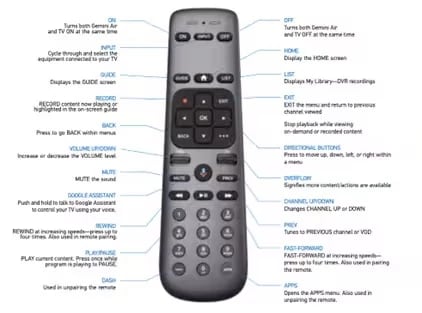
Credit: www.directv.com
How Directv Stream Remotes Work
Understanding how your remote communicates can help you fix blinking issues faster.
Bluetooth Vs Infrared
DirecTV Stream remotes use Bluetooth for most functions. Bluetooth allows you to control the device even if you’re not pointing directly at it. Older remotes use infrared, which requires a direct line of sight.
Automatic Pairing
When you set up your device, the remote tries to pair automatically. If pairing fails or is interrupted, the blue light blinks. Manual pairing is sometimes needed.
Power Management
The remote checks battery health and sends signals to alert you about low power. The blinking blue light is one of these warnings.
Firmware Updates
Both the remote and the streaming box get firmware updates. During updates, the blue light may blink or stay steady. Sometimes, an update can cause temporary connection loss.
Advanced Troubleshooting Tips
If basic fixes don’t work, try these advanced steps:
Resetting Bluetooth Connection
- Unpair the remote from the streaming box.
- Go to Settings > Remote & Devices > Bluetooth Devices.
- Remove the remote from the list.
- Restart the streaming box.
- Pair the remote again.
Checking For Device Compatibility
Some DirecTV Stream remotes only work with certain models. Check your remote’s model number and compare it to your device specifications.
| Remote Model | Compatible Devices | Pairing Method |
|---|---|---|
| RC73 | DirecTV Stream, Genie | Bluetooth |
| RC66 | Older DirecTV boxes | Infrared |
| Voice Remote | DirecTV Stream, Gemini | Bluetooth/Voice |
Using The Directv Remote App
DirecTV offers a smartphone app that can substitute for the physical remote. If your remote fails, download the app and control your device while troubleshooting.
Checking For Physical Damage
Inspect the remote for cracks, water damage, or sticky buttons. Physical issues can cause unpredictable blinking.
- Tip: If the remote has been dropped or exposed to moisture, replace it.

Credit: www.ebay.com
Preventing Future Remote Issues
You can avoid most blinking problems with simple habits:
- Use high-quality batteries. Cheap batteries die faster and cause unreliable signals.
- Keep your streaming box visible. Hide it less and avoid covering the box with objects.
- Update firmware regularly. New updates fix bugs that cause blinking.
- Clean the remote. Dust and dirt inside can block signals.
- Store the remote safely. Don’t leave it in places where it can fall or get wet.
Real-world Example
Sarah, a DirecTV Stream user, noticed her remote blinking blue often. She switched to premium batteries and moved her streaming box to a shelf. The blinking stopped, and her remote became more reliable. Many users overlook battery quality and device placement as simple fixes.
Directv Stream Remote Vs Other Tv Remotes
How does the DirecTV Stream remote compare to other popular remotes for streaming devices?
| Remote | Pairing Method | Blinking Light Signal | Battery Life | Unique Features |
|---|---|---|---|---|
| DirecTV Stream | Bluetooth | Blue blinking | 6-12 months | Voice control, easy pairing |
| Roku | Wi-Fi/IR | Green blinking | 6-9 months | Streaming channel buttons |
| Fire TV | Bluetooth | Amber blinking | 7-10 months | Alexa integration |
| Apple TV | Bluetooth | No blinking indicator | Rechargeable | Touchpad, Siri voice |
DirecTV Stream’s blue blinking signal is unique among major remotes. It gives clear feedback but can confuse users who are not familiar with its meaning.
When To Replace Your Directv Stream Remote
Sometimes, a blinking blue light means the remote is failing. Knowing when to replace helps avoid wasted time.
Signs You Need A New Remote
- The blue light blinks even after battery and pairing fixes.
- Buttons are unresponsive or stuck.
- The remote has visible damage.
- The streaming box cannot detect the remote after multiple resets.
Buying A Replacement
Official DirecTV remotes are available from the company and authorized retailers. Avoid third-party remotes if you want full compatibility.
- Tip: Check your device model before buying. Not all remotes work with every DirecTV Stream box.
Directv Stream Remote Blinking Blue: What Most People Miss
Many users focus only on batteries and pairing. However, two overlooked factors often cause blinking blue:
- Environmental Interference: Nearby electronics, wireless networks, or even thick curtains can block signals.
- Remote Positioning: If the remote is stored in a drawer or behind objects, it loses connection.
By addressing these points, you solve many blinking issues without technical fixes.

Credit: www.youtube.com
Directv Stream Remote Blinking Blue: Expert Insights
As a calm expert, I recommend thinking about the remote as a wireless tool sensitive to its environment. Don’t rush to replace it or call support. Instead:
- Check for hidden obstacles.
- Use fresh batteries from a trusted brand.
- Keep the streaming box in an open area.
- Regularly update device software.
These steps prevent most issues and make troubleshooting easier.
Frequently Asked Questions
Why Does My Directv Stream Remote Blink Blue But Not Work?
The blinking blue light usually means the remote is trying to pair or has lost connection. Check batteries first, then re-pair the remote. If the issue continues, restart your streaming box and look for interference.
Can I Use The Directv Stream Remote With Other Devices?
Most DirecTV Stream remotes are designed for DirecTV Stream boxes. Some models support older DirecTV devices, but compatibility is limited. Check your remote’s model number and your device’s specifications for details.
What Should I Do If My Remote Keeps Blinking Blue After A Factory Reset?
If the blinking continues after a factory reset, try manual pairing. Hold the Home and Back buttons for 10 seconds. If this fails, check for firmware updates or contact DirecTV support.
Does The Blinking Blue Light Mean My Remote Is Broken?
Not always. The blinking blue light is a signal for pairing, battery, or connection issues. Only consider replacement if all troubleshooting steps fail and the remote shows physical damage.
Are There Alternatives To The Directv Stream Remote?
Yes. DirecTV offers a remote app for smartphones that works as a substitute. Other universal remotes may work, but features like voice control may not be supported. Always check compatibility before switching.
Final Thoughts
A blinking blue light on your DirecTV Stream remote can be confusing, but it’s usually easy to fix. Understanding the causes—pairing, batteries, interference, updates, and physical obstacles—helps you solve the problem quickly. Most blinking issues are minor and don’t require a new remote. Use the steps and tips in this guide to get back to smooth streaming. Remember, small changes like better batteries and clear device placement prevent future problems. If all else fails, DirecTV support is ready to help. For more official troubleshooting, visit DirecTV Support.
With these insights, you’ll handle the blinking blue light like a pro and enjoy your DirecTV Stream experience with less hassle.