
When your AT&T Internet box starts blinking red, it can be frustrating and worrying. Most people rely on their home internet for work, entertainment, and communication. A red light usually means something is wrong, but it’s not always clear what the problem is. This article will help you understand why your AT&T Internet box blinks red, what it means, and what you can do to fix it. Whether you’re a beginner or someone who has tried basic troubleshooting, you’ll find practical advice and detailed explanations here.
What Does The At&t Internet Box Blinking Red Mean?
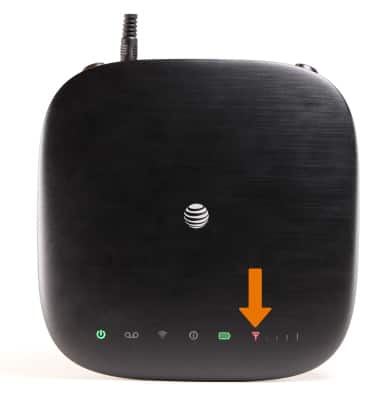
A blinking red light on your AT&T Internet box is a warning. It tells you that the device is having trouble connecting to the internet or there is a technical issue inside the box itself. The red light can appear for several reasons:
- Connection problems with the service provider
- Hardware issues inside the box
- Loose cables or damaged wires
- Firmware errors
- Outages in your area
Understanding the meaning of the red light is the first step. AT&T uses different lights and colors for various signals. A solid green usually means everything is okay. Yellow or orange can mean limited connection. Red is more serious—especially when blinking—because it suggests a disruption that needs attention.
Types Of At&t Internet Box And Light Indicators
AT&T uses several types of internet boxes, including modems, routers, and gateway devices. Each has its own way of showing status using lights. Here’s a quick comparison:
| Device Type | Light Indicators | Common Red Light Causes |
|---|---|---|
| Modem | Power, Broadband, Service, Ethernet | Service outage, cable issue, firmware error |
| Router | Power, Internet, Wi-Fi | Internet loss, configuration problem |
| Gateway | Power, Broadband, Status | Signal loss, hardware failure |
Some models have a single status light, while others have multiple. Always check your model’s manual to understand what each light means.

Credit: www.reddit.com
Common Causes For The Blinking Red Light
The blinking red light is not always caused by the same issue. Here are the most frequent reasons:
- Service Outage: AT&T’s network may be down temporarily in your area. This is often the cause if you suddenly lose internet without warning.
- Loose or Damaged Cables: Wires connecting your box to the wall or other devices may be unplugged or damaged.
- Hardware Failure: Internal components in the box can fail after years of use.
- Incorrect Setup: If you recently moved the box or changed settings, it may not be configured properly.
- Firmware Errors: Software inside the box can become outdated or corrupted.
- Power Issues: The box may not be getting enough power, or there could be a surge.
Here’s a quick comparison of cause frequency:
| Cause | Approximate Frequency (%) | Easy to Fix? |
|---|---|---|
| Service Outage | 35 | No (wait for provider) |
| Loose/Damaged Cables | 20 | Yes |
| Hardware Failure | 15 | No (needs replacement) |
| Incorrect Setup | 15 | Yes |
| Firmware Errors | 10 | Yes |
| Power Issues | 5 | Yes |
Most problems are either outages or simple cable issues. Some are harder to fix and may need professional help.
Step-by-step Troubleshooting Guide
If your AT&T Internet box is blinking red, follow these steps to find and fix the problem. Start with the easiest solutions and move to more advanced ones if needed.
1. Check For Service Outages
Before touching the box, check if AT&T is having network problems in your area. Visit the official AT&T website or use their outage map. You can also call their support line.
Tip: Sometimes, the outage is only in certain neighborhoods. Ask neighbors if they have internet.
2. Inspect All Cables And Connections
Look at every cable connected to your internet box:
- Make sure the power cable is fully plugged in.
- Check the Ethernet cable between the box and your computer or router.
- Inspect the phone line or fiber optic cable.
- Look for visible damage or loose connectors.
If any cable is damaged, replace it. If a cable is loose, push it in firmly.
3. Restart The Internet Box
Restarting is a simple but effective fix. Turn off the box, wait for 30 seconds, then turn it on again. This lets the internal system reset. Many times, the blinking red light disappears after a restart.
Non-obvious insight: Wait at least 30 seconds before turning it back on. A quick restart may not clear the error.
4. Reset To Factory Settings
If restarting does not work, try a factory reset. Find the small reset button on the back of your box. Use a paperclip to hold it for about 10 seconds. This removes custom settings and restores default configuration.
Warning: A factory reset deletes your Wi-Fi name, password, and settings. You’ll have to set them up again.
5. Update Firmware
Outdated firmware can cause blinking red lights. Log in to your device’s admin panel (usually at 192. 168. 1. 254 or similar address). Check for firmware updates in the menu. Follow instructions to update.
Non-obvious insight: Sometimes, updates fix hidden bugs that cause red lights, even if everything else looks fine.
6. Test Power Supply
Plug your internet box into a different outlet. Avoid using extension cords or surge protectors. If the box works in another outlet, your power supply is the problem.
7. Contact At&t Support
If none of these steps work, call AT&T support. They can check your line remotely and guide you through advanced troubleshooting. Sometimes, they may send a technician.
Credit: www.att.com
How To Prevent The Red Light Issue
You can reduce the chances of seeing the blinking red light by following these simple tips:
- Keep cables organized and avoid bending or twisting them.
- Clean the box regularly to prevent dust buildup, which can cause overheating.
- Update firmware every few months.
- Avoid moving the box unless necessary. Physical movement can loosen cables.
- Use surge protectors for power to avoid electrical spikes.
These steps help your device last longer and run more smoothly.
When Should You Replace Your At&t Internet Box?
Sometimes, fixing is not enough. You may need to replace your device if:
- The blinking red light happens often, even after troubleshooting.
- The box is more than 5 years old.
- You see other errors, like slow internet or random disconnects.
- AT&T support tells you the device cannot be fixed.
Newer models are faster, more reliable, and support better Wi-Fi. If you’re unsure, ask AT&T for advice.
Comparing At&t Internet Box Models
If you decide to replace your box, it’s helpful to compare popular models. Here’s a look at three common types:
| Model | Wi-Fi Speed | Max Devices | Typical Lifespan | Red Light Issue Frequency |
|---|---|---|---|---|
| BGW210 | Up to 1000 Mbps | 20 | 5 years | Low |
| Pace 5268AC | Up to 300 Mbps | 10 | 4 years | Medium |
| NVG599 | Up to 400 Mbps | 15 | 4 years | Medium |
BGW210 is a newer model with fewer red light problems. Older models like Pace 5268AC and NVG599 may have more issues as they age.
Real-life Examples Of Blinking Red Light Issues
Understanding the blinking red light is easier with real stories. Here are some examples:
- Case 1: A family in Houston saw the red light after a thunderstorm. The problem was a damaged cable outside their house. Replacing the cable fixed the issue.
- Case 2: An apartment in Chicago had frequent blinking red lights. After checking cables and restarting, the problem continued. AT&T support found a firmware bug and updated the software remotely.
- Case 3: A college student in Dallas noticed the red light after moving their box to a new room. The problem was a loose connection. Tightening the cable fixed it instantly.
- Case 4: A small business in Atlanta had a blinking red light for days. The box was five years old. AT&T replaced it with a new gateway, and the issue disappeared.
These examples show that the blinking red light can have different causes and solutions.

Credit: www.youtube.com
Understanding At&t’s Official Support And Warranty
AT&T offers official support and warranty for their internet devices. Most boxes come with a one-year warranty. If your device is still under warranty and has a blinking red light, AT&T may replace it for free.
To use support:
- Call AT&T’s helpline or use their online chat.
- Have your model number, account information, and details ready.
- Follow their instructions. They may ask you to do some troubleshooting steps first.
- If the problem can’t be fixed, they’ll send a technician or replace the box.
Tip: Keep your purchase receipt and box information handy. It makes warranty claims easier.
For more details about AT&T’s support, visit the official site: AT&T Support.
Advanced Troubleshooting For Persistent Red Light
If the blinking red light won’t go away, even after basic steps, try these advanced solutions:
Check Your Home’s Wiring
Sometimes, the issue is not the box, but the wires inside your walls. Old homes can have faulty phone lines or fiber cables. If you suspect this, ask AT&T for a technician visit.
Network Configuration
Advanced users can log in to the admin panel and:
- Check IP address settings
- Verify DNS configuration
- Look for error logs in the system menu
Misconfigured settings can cause red lights. If you’re not sure, reset to default or contact support.
Test With Another Device
If possible, use a different AT&T internet box. If the new box works, your old one is faulty. If not, the problem is likely in the cables or the service line.
Monitor For Overheating
Internet boxes can overheat if placed in closed spaces or near heat sources. Check for signs of overheating—hot surface, fan noise, or shutdowns. Move the box to a cool, open area.
Firmware Rollback
Rarely, a new firmware update can cause problems. If you updated recently, ask AT&T if rolling back to an older version is possible.
How At&t Internet Box Red Light Affects Your Connection
The blinking red light does more than just warn. It affects your internet in these ways:
- Complete loss of connection: You cannot browse, stream, or use Wi-Fi.
- Slow speeds: Sometimes, the box keeps working but at much slower speeds.
- Frequent disconnects: The red light may blink on and off, causing your internet to drop randomly.
- Limited access: Some devices may connect, but others cannot.
If you notice these issues along with the red light, fix the problem quickly to avoid bigger disruptions.
At&t Internet Box Vs. Other Brands: Reliability
AT&T boxes are widely used, but how do they compare to other brands? Here’s a quick look:
| Brand | Red Light Issue Frequency | Average Lifespan | Support Quality |
|---|---|---|---|
| AT&T | Medium | 4-5 years | Good |
| Comcast/Xfinity | Medium | 4 years | Average |
| Verizon | Low | 5 years | Excellent |
| Charter Spectrum | High | 3 years | Average |
AT&T’s devices are reliable, but red light issues happen with all brands. Regular maintenance and updates are key for any internet box.
What To Avoid When Troubleshooting
Some mistakes can make the problem worse or delay the fix:
- Don’t ignore the blinking red light for days. It’s a sign of a real problem.
- Don’t pull cables out forcefully. This can damage connectors.
- Don’t update firmware from unknown sources. Always use official updates.
- Don’t reset the box without backing up your settings.
- Don’t place the box in a closed cabinet. Heat can build up and cause more issues.
Avoiding these mistakes makes troubleshooting safer and faster.
Frequently Asked Questions
What Should I Do First If My At&t Internet Box Is Blinking Red?
Start by checking for service outages in your area. Next, inspect all cables and restart the box. These are the most common and easiest fixes.
Can I Fix The Blinking Red Light Myself, Or Do I Need Professional Help?
Most blinking red light issues can be fixed at home—especially loose cables, power problems, and simple restarts. If the light stays after all steps, call AT&T support.
How Often Do At&t Internet Boxes Experience Blinking Red Lights?
On average, AT&T boxes show blinking red lights about once every 2–3 years, depending on model and usage. Older devices and poor cable management increase the risk.
Will Replacing The Box Solve The Red Light Issue Permanently?
Replacing the box usually solves hardware-related problems, but not service outages or bad wiring. If your box is old or has frequent issues, a new one is a good idea.
Does The Blinking Red Light Mean My Internet Is Completely Down?
Usually yes, but sometimes it means limited connection or slow speeds. Check your devices—if nothing connects, the red light means a full outage.
A blinking red light on your AT&T Internet box can be stressful, but it’s often fixable with simple steps. By understanding the causes, following the troubleshooting guide, and knowing when to call for help, you can restore your connection and avoid future problems. Reliable internet is important for daily life, and knowing how to handle these issues gives you more control and peace of mind.