
The Litter Robot 4 is a modern automatic cat litter box that makes pet care easier. Many cat owners love its self-cleaning features and smart sensors. But sometimes, you may see a blinking blue light on your Litter Robot 4. This signal can be confusing, especially for new users. Understanding what the blinking blue means and how to fix it can save you stress and keep your cat happy.
In this article, you’ll learn what the blinking blue light is telling you, the four main causes for this alert, how to solve each issue, and why these problems happen. I’ll also share practical tips and real examples so you can get your Litter Robot 4 back to normal quickly.
If you’re struggling with this issue, you’re not alone—many people face it, even experienced pet owners.
What Does The Blinking Blue Light Mean?
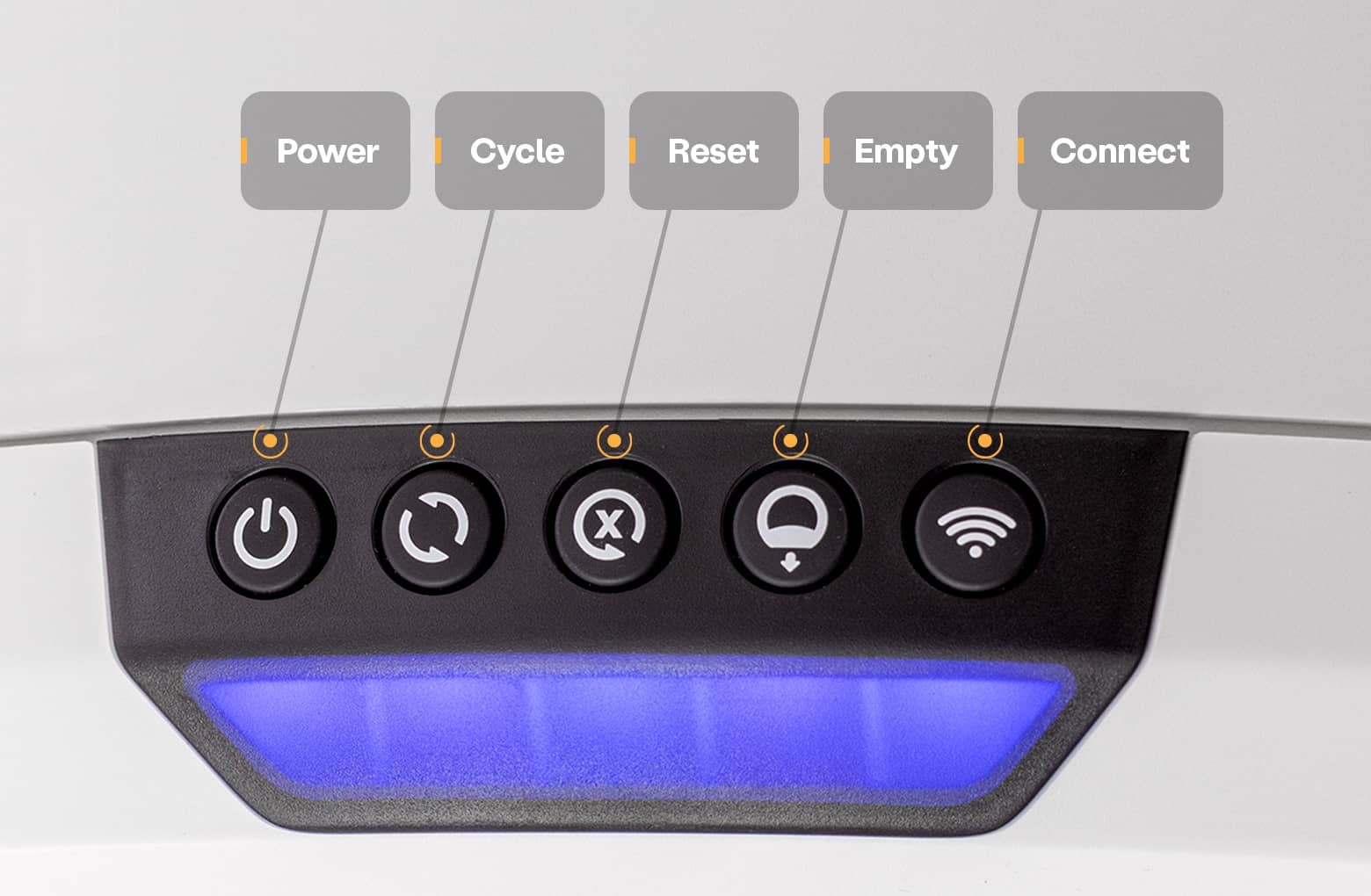
When the Litter Robot 4 shows a blinking blue light, it’s trying to get your attention. This alert usually means the device needs something from you. The blue light is not random—it’s a signal for a specific problem that stops the cleaning cycle. Some users mistake it for a simple notification, but it’s more important than that.
While the blinking blue can mean different things, most often it relates to one of four main issues. The four problems are:
- Drawer Full
- Drawer Not Installed
- Drawer Liner Issue
- Waste Drawer Sensor Error
Each cause requires a different solution. Let’s look at each one carefully.
1. Drawer Full
The most common reason for the blinking blue light is a drawer full warning. The Litter Robot 4 has a waste drawer at the bottom. When this drawer fills up with clumps and waste, the sensors detect it and send a signal.
How It Happens
As your cat uses the litter box, the unit separates waste and drops it into the drawer. When the drawer reaches a certain level, the sensor triggers the blue light to blink.
Signs
- Blinking blue light
- Sometimes, a message on the app saying “Drawer Full”
Solution
- Pull out the waste drawer.
- Remove the used liner and throw away the waste.
- Replace with a new liner.
- Slide the drawer back until it clicks in place.
After you do this, the blinking blue light should turn off. Sometimes, the sensor needs a moment to reset. If the light stays on, pull the drawer out and push it back again.
Practical Tips
- Use strong liners that fit well to avoid leaks.
- Empty the drawer every 2–3 days if you have multiple cats.
Non-obvious insight: Many people ignore the blinking blue for days. This can make the box smelly and uncomfortable for your cat. Regular cleaning keeps your pet healthy.
2. Drawer Not Installed
Another cause is the drawer not installed problem. The Litter Robot 4 is designed to stop working if the drawer is missing or not pushed in correctly. This helps prevent spills and keeps the unit safe.
Why It Happens
Sometimes, during cleaning or liner replacement, you might forget to reinsert the drawer fully. Other times, the drawer may be misaligned, not touching the sensor.
Signs
- Blinking blue light
- No cleaning cycle starts
Solution
- Check if the drawer is in place.
- If missing, locate the drawer and slide it in.
- If already in, pull it out and reinsert firmly.
- Make sure the drawer clicks and sits flat.
The blinking blue light should stop once the drawer is properly installed.
Practical Example
If you’re rushing and don’t push the drawer all the way, the sensor cannot detect it. Always double-check after cleaning.
Non-obvious insight: Some users force the drawer in, which can damage the sensors. Always insert gently but firmly.
3. Drawer Liner Issue
Sometimes, the drawer liner issue triggers the blinking blue light. The liner inside the waste drawer must be installed correctly. If it’s loose, bunched up, or hanging over the edge, the sensor may not work.
How It Happens
When replacing liners, you might leave a corner sticking out. The sensor sees this as a blockage and alerts you.
Signs
- Blinking blue light
- Drawer feels hard to close
Solution
- Remove the drawer and check the liner.
- Smooth out any wrinkles.
- Make sure the liner covers the bottom without blocking the edges.
- Reinsert the drawer.
Sometimes, switching to a liner that fits better can solve the issue.
Data Table: Common Liner Issues And Fixes
| Liner Problem | Impact | Quick Fix |
|---|---|---|
| Bunched up liner | Sensor blocked | Smooth out liner |
| Liner too big | Hard to close drawer | Use smaller liner |
| Liner hanging over edge | Blue light blinks | Tuck liner inside |
Practical Tips
- Use liners made for Litter Robot 4.
- Replace liners regularly to avoid leaks and sensor errors.

4. Waste Drawer Sensor Error
A waste drawer sensor error is less common but can cause the blinking blue light. The Litter Robot 4 uses sensors to check the drawer’s status. If these sensors fail or get dirty, the device cannot work properly.
Why It Happens
Sensors can malfunction due to dust, litter buildup, or humidity. Sometimes, there’s a software glitch.
Signs
- Blinking blue light
- Drawer is empty but still shows full
Solution
- Turn off the unit and unplug it.
- Remove the drawer and clean the sensor area with a dry cloth.
- Plug the unit back in and turn it on.
- If the problem continues, try a soft reset by pressing and holding the reset button.
If none of these steps work, contact customer support. You may need a replacement sensor.
Data Table: Sensor Troubleshooting Steps
| Step | Action | Expected Result |
|---|---|---|
| 1 | Turn off and unplug | Resets electronics |
| 2 | Clean sensor area | Removes dust/blockage |
| 3 | Plug in and restart | Checks if error is gone |
| 4 | Soft reset | Clears software glitch |
Practical Example
In some homes with lots of dust, sensors get dirty quickly. Cleaning once a week can prevent errors.
Non-obvious insight: Some users clean with wet cloths. Moisture can damage electronics. Always use a dry cloth.
Comparing Litter Robot 4 Blinking Blue Causes
To understand the differences, compare the four causes side by side:
| Cause | Frequency | Difficulty to Fix | Needed Tools |
|---|---|---|---|
| Drawer Full | Very common | Easy | New liner, trash bag |
| Drawer Not Installed | Common | Easy | None |
| Drawer Liner Issue | Moderate | Easy | Correct liner |
| Sensor Error | Rare | Medium | Dry cloth, reset button |

Why Does The Blinking Blue Light Matter?
Ignoring the blinking blue light can cause several problems:
- Waste builds up, creating smells.
- Cats may avoid the box, leading to accidents.
- Sensors can break if not fixed quickly.
The blinking blue is not just a minor issue—it keeps the Litter Robot 4 working safely. Fixing it quickly helps your cat stay comfortable.
Preventing Blinking Blue Problems
You can avoid most blinking blue light problems with a few simple habits:
- Empty the drawer often (every 2–3 days for 1 cat, daily for multiple cats).
- Use the right liners and smooth them out.
- Clean the sensor area once a week.
- Always check the drawer after cleaning.
Experience-based guide tip: Set a reminder on your phone to check the drawer. Prevention is easier than fixing problems later.
When To Call Customer Support
If the blinking blue light does not go away after trying all solutions, contact the Litter Robot support team. They can guide you further or send replacement parts. Keep your warranty details ready.
For more details, visit the official Litter Robot website.
Frequently Asked Questions
What Should I Do If The Blinking Blue Light Stays On After Emptying The Drawer?
Double-check the drawer is pushed in all the way and the liner is smooth. Try restarting the unit. If the light stays on, clean the sensor area. If nothing works, contact support.
Can I Use Any Trash Bag As A Liner For The Waste Drawer?
You can use regular trash bags, but bags made for Litter Robot 4 fit better and avoid sensor errors. Too big or small bags can cause issues.
How Often Should I Clean The Waste Drawer Sensor?
Clean the sensor area once a week, especially if you have multiple cats or a dusty home. Use a dry cloth only.
Will The Litter Robot 4 Stop Working If The Blinking Blue Light Is Ignored?
Yes. The unit will pause cleaning cycles until you fix the problem. This can cause waste buildup and make the box unpleasant for your cat.
Is The Blinking Blue Light A Sign Of A Bigger Problem?
Usually, it’s a simple fix like emptying the drawer or adjusting the liner. In rare cases, it means a sensor error. If simple solutions don’t work, contact support.
Conclusion
The blinking blue light on your Litter Robot 4 is more than just a small annoyance—it’s a helpful alert. By understanding the four main causes and how to solve them, you can keep your automatic litter box running smoothly. Regular cleaning, proper liner use, and checking the drawer can prevent most issues.
If problems continue, expert help is available. Your cat will thank you for a clean, comfortable litter box.